

Overview
Market Development Funds (MDF) are crucial for fostering co-marketing efforts between vendors and their partners, enabling them to jointly drive demand generation and market penetration. This module provides a centralized system for managing these funds, from plan creation and approval to tracking associated activities and claims. Administrators can gain a holistic view of each MDF plan, understanding its budget, partner contributions, and the return on investment (ROI) it aims to achieve. This transparency helps ensure that marketing investments are aligned with strategic goals and effectively support partner-driven demand generation.
Viewing the MDF Plans List
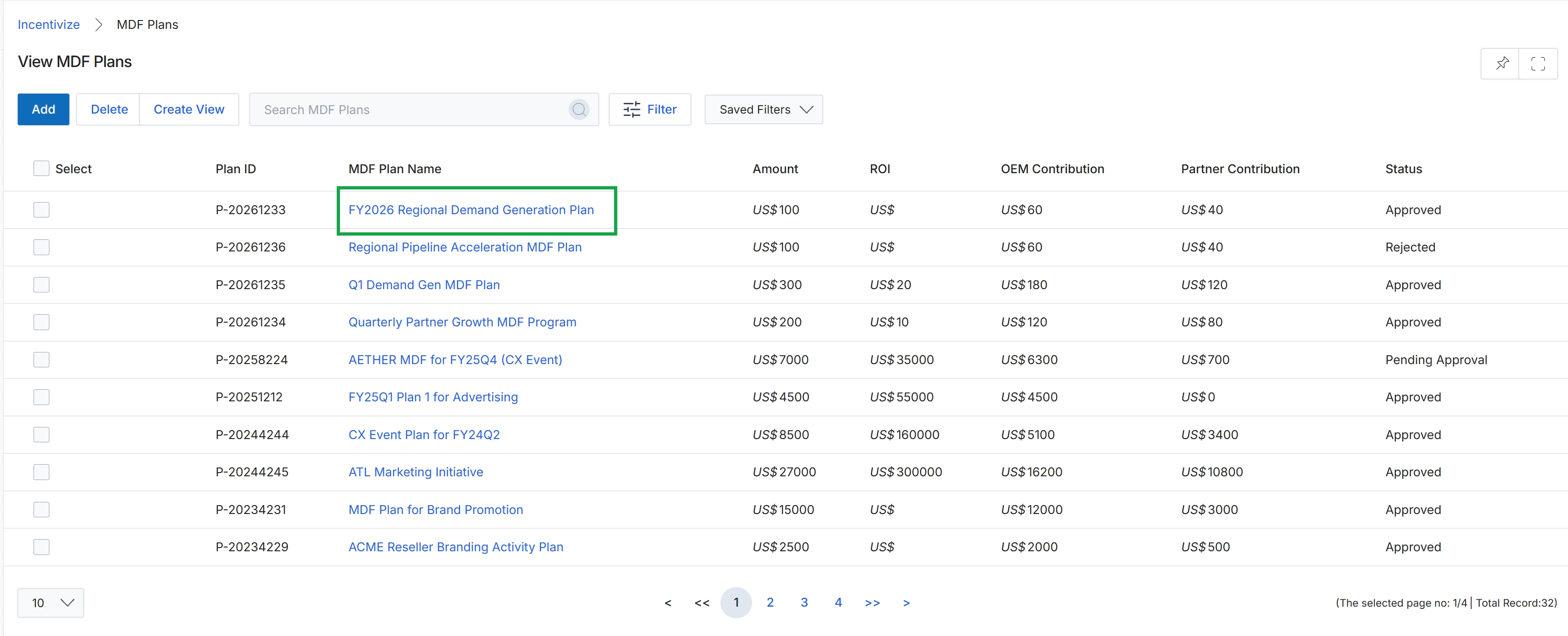
Click FY2026 Regional Demand Generation Plan.
Reviewing a Specific MDF Plan
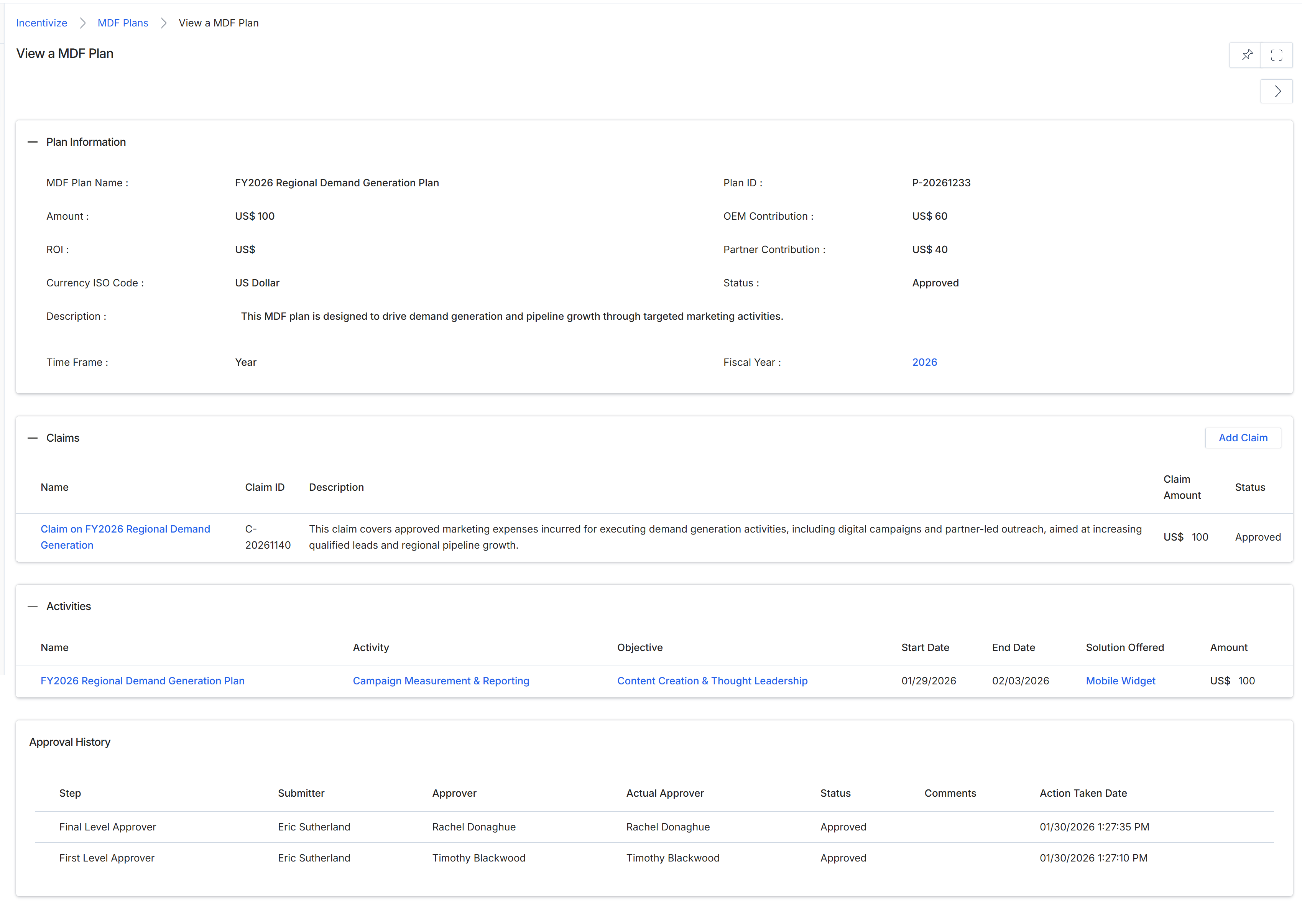
This screen provides a comprehensive view of a specific Market Development Fund (MDF) plan, detailing its core information, associated claims, planned activities, and approval history. MDF plans are established by vendors to co-fund marketing initiatives with partners, supporting demand generation and pipeline growth. The 'Plan Information' section presents key attributes such as the plan's name, allocated amount, contribution breakdown, and current status, offering a quick overview of the plan's financial and operational parameters. The 'Claims' section lists any claims submitted and approved against this particular MDF plan, showing their status and amount, which is crucial for tracking expenditures and reimbursements. The 'Activities' section outlines the marketing initiatives funded by this plan, including their objectives and timelines, providing insight into the strategic execution of the fund. Finally, the 'Approval History' section tracks the workflow of the MDF plan, showing each approval step, the individuals involved, and the action taken, ensuring transparency and accountability in the approval process.
Review the detailed information for the selected MDF plan, including its general information, associated claims, planned activities, and approval history.
Buttons
| Button | Description |
|---|---|
| Add Claim | Initiates the process to add a new claim against this MDF plan. |
Plan Information
| Field | Description |
|---|---|
| MDF Plan Name | The name of the Market Development Fund plan. |
| Amount | The total allocated amount for this MDF plan. |
| Plan ID | A unique identifier for the MDF plan. |
| OEM Contribution | The amount contributed by the vendor (Original Equipment Manufacturer) to the MDF plan. |
| Partner Contribution | The amount contributed by the partner to the MDF plan. |
| Status | The current approval status of the MDF plan, indicating whether it is approved, pending, or rejected. |
| Description | A detailed description of the MDF plan's objectives and scope. |
| Time Frame | The duration or period covered by the MDF plan. |
| Fiscal Year | The fiscal year to which the MDF plan applies. |
Claims
| Column | Description |
|---|---|
| Name | The name of the claim submitted against the MDF plan. |
| Claim ID | A unique identifier for the claim. |
| Description | A brief description of the claim, detailing the marketing expenses incurred. |
| Claim Amount | The financial amount of the claim. |
| Status | The current status of the claim (e.g., Approved, Pending, Rejected). |
Activities
| Column | Description |
|---|---|
| Name | The name of the marketing activity funded by the MDF plan. |
| Activity | A description of the specific marketing activity. |
| Objective | The goal or purpose of the marketing activity. |
| Start Date | The planned start date for the marketing activity. |
| End Date | The planned end date for the marketing activity. |
| Solution Offered | The solution or product promoted by the marketing activity. |
| Amount | The allocated amount for this specific marketing activity. |
Approval History
| Column | Description |
|---|---|
| Step | The name or identifier of the approval step in the workflow. |
| Submitter | The user who submitted the MDF plan for this approval step. |
| Approver | The user designated to approve this step. |
| Actual Approver | The user who actually performed the approval action for this step. |
| Status | The outcome of the approval step (e.g., Approved, Rejected). |
| Action Taken Date | The date and time when the approval action was taken. |