

Admin-Configurable Password Policies
Related Application(s)
Global Settings Management
Feature Description
The Admin-Configurable Password Policies enhancement allows administrators to define password rules for their own portal. Previously, password rules were fixed across the platform, with a length of 8 to 20 characters, no password expiry, and a fixed lockout. With this feature, Admins and Super Admins can align portal authentication with their organization's security standards directly from the platform, without raising a support request. The configured policy applies only to the portal where it is saved.
Log in to the UPM portal as an administrator.
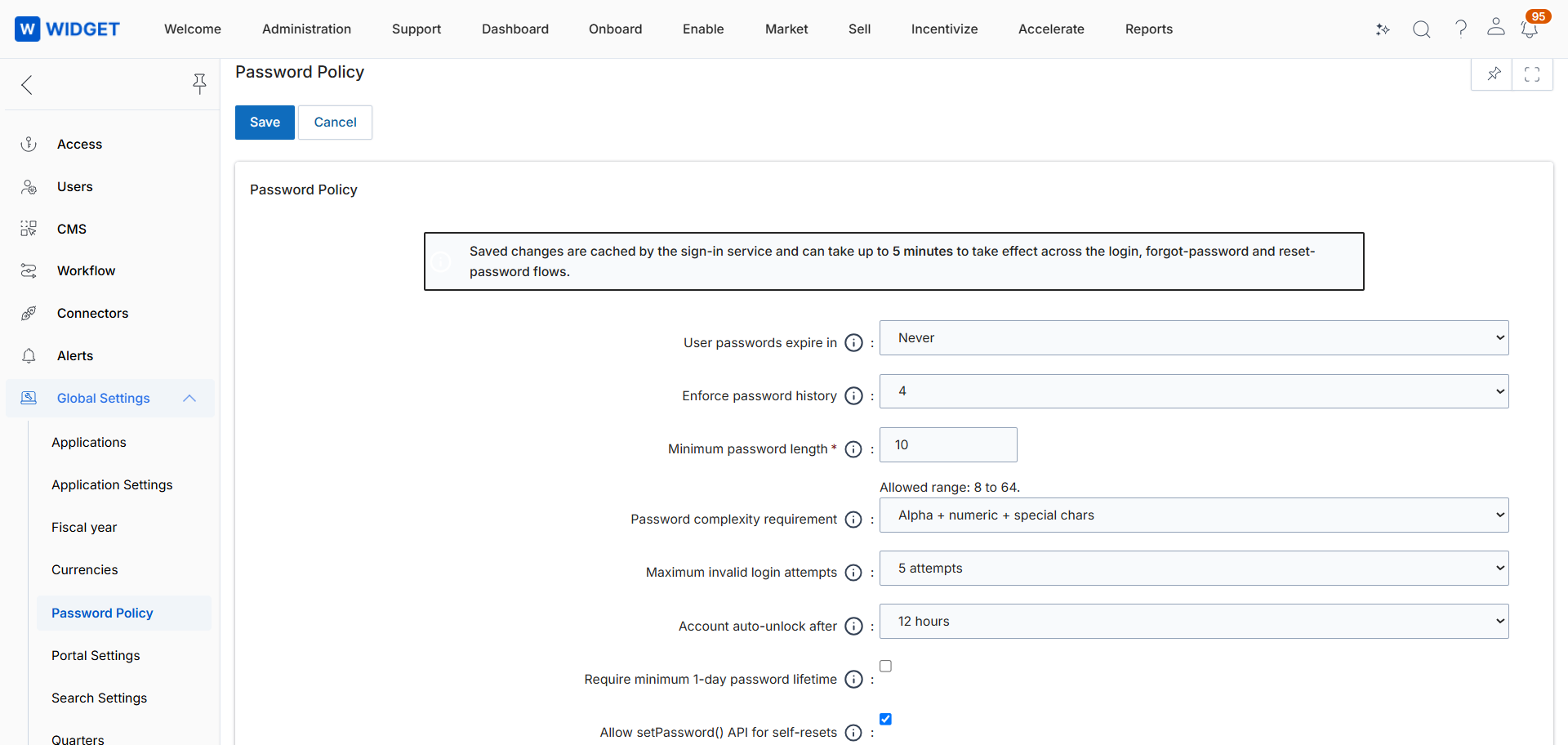
Navigate to Administration > Global Settings > Password Policy.
Set User password expires in. The default value is Never, and it can be set from 1 day up to 365 days.
Set Enforce password history to define how many previous passwords cannot be reused.
Set the minimum and maximum password length. The minimum is 8 characters, and the maximum can be configured up to 64 characters as indicated in the tooltip.
Select the Password complexity requirement: Alphanumeric; Alphanumeric + special characters; or Alphanumeric + special characters + mixed case (default).
Set Maximum invalid login attempts and Account unlock after (12, 24, or 48 hours).
Optionally enable Minimum password age (1 day), which requires users to wait 24 hours before changing their password again.
Set Allow Set Password API for self-resets. When enabled (default), users can reset their own password through the API without supplying the current password.
Click Save. The policy applies to all subsequent password creation, change, and reset events in the portal.
Origin of Feature
Customer request. This feature was introduced to allow organizations with stricter security baselines to self-manage portal password rules.
CX Strategy Relation (6 S’s)
 Security
Portal User-Facing Benefits
This feature allows organizations to match ZINFI password rules to their own security standards without depending on ZINFI support.