

Overview
Sales Orders represent the final stage of a successful sales cycle within the platform, confirming a customer's purchase based on a previously approved quote. This module provides administrators with a comprehensive view of all orders, enabling them to track sales, manage order details, and ensure accurate record-keeping. Each sales order is typically generated from an accepted quote, consolidating all relevant information such as product details, pricing, discounts, and customer billing/shipping addresses.
Effective management of sales orders is crucial for downstream processes like commission payouts (in the Incentivize module) and product fulfillment. Administrators can review individual orders, make necessary edits, and maintain a clear audit trail of all transactions. This ensures that partners receive appropriate credit for their sales and that the overall sales pipeline accurately reflects closed deals.
Accessing and Viewing Sales Orders
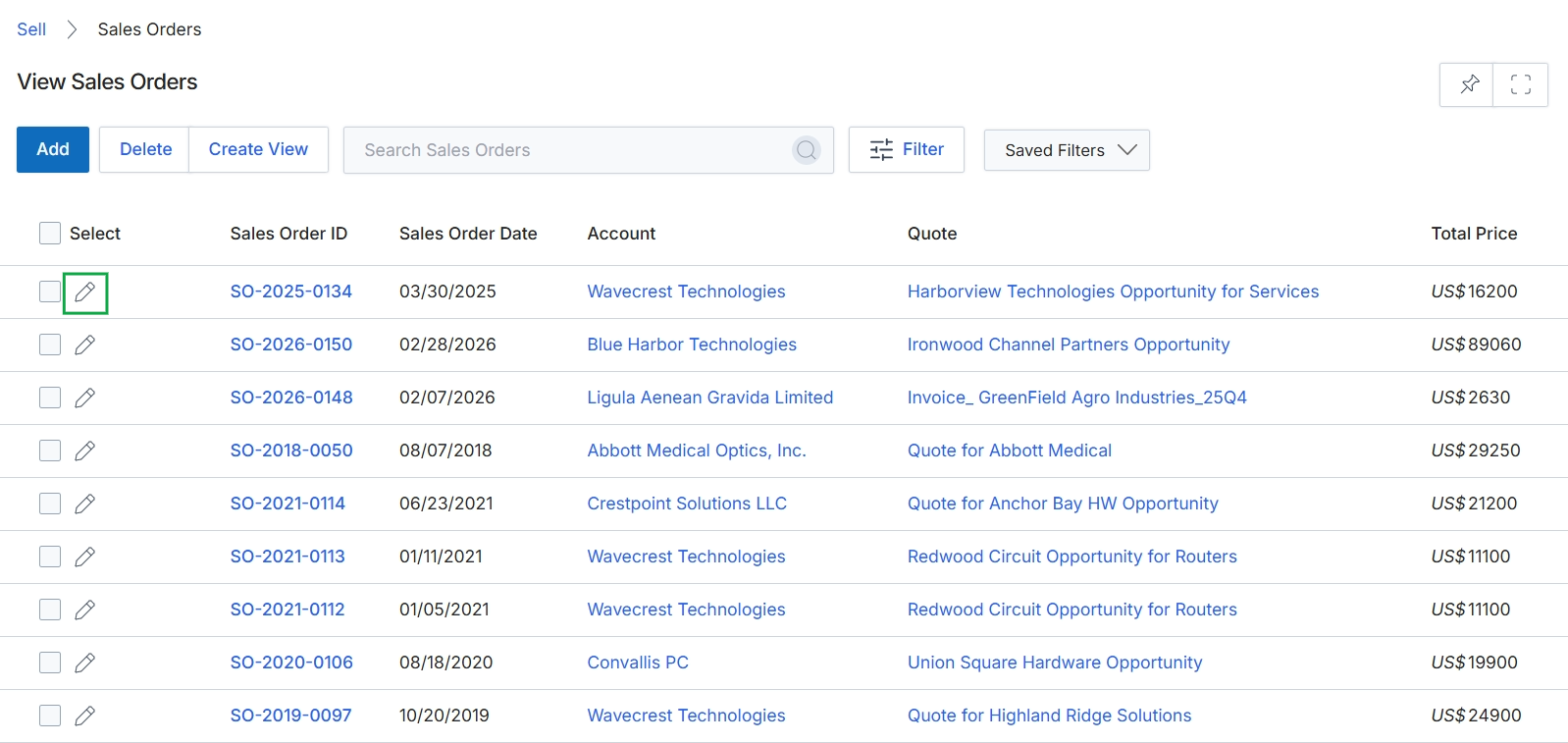
Click the pencil icon next to the Sales Order ID to edit an existing sales order.
Adding or Editing a Sales Order
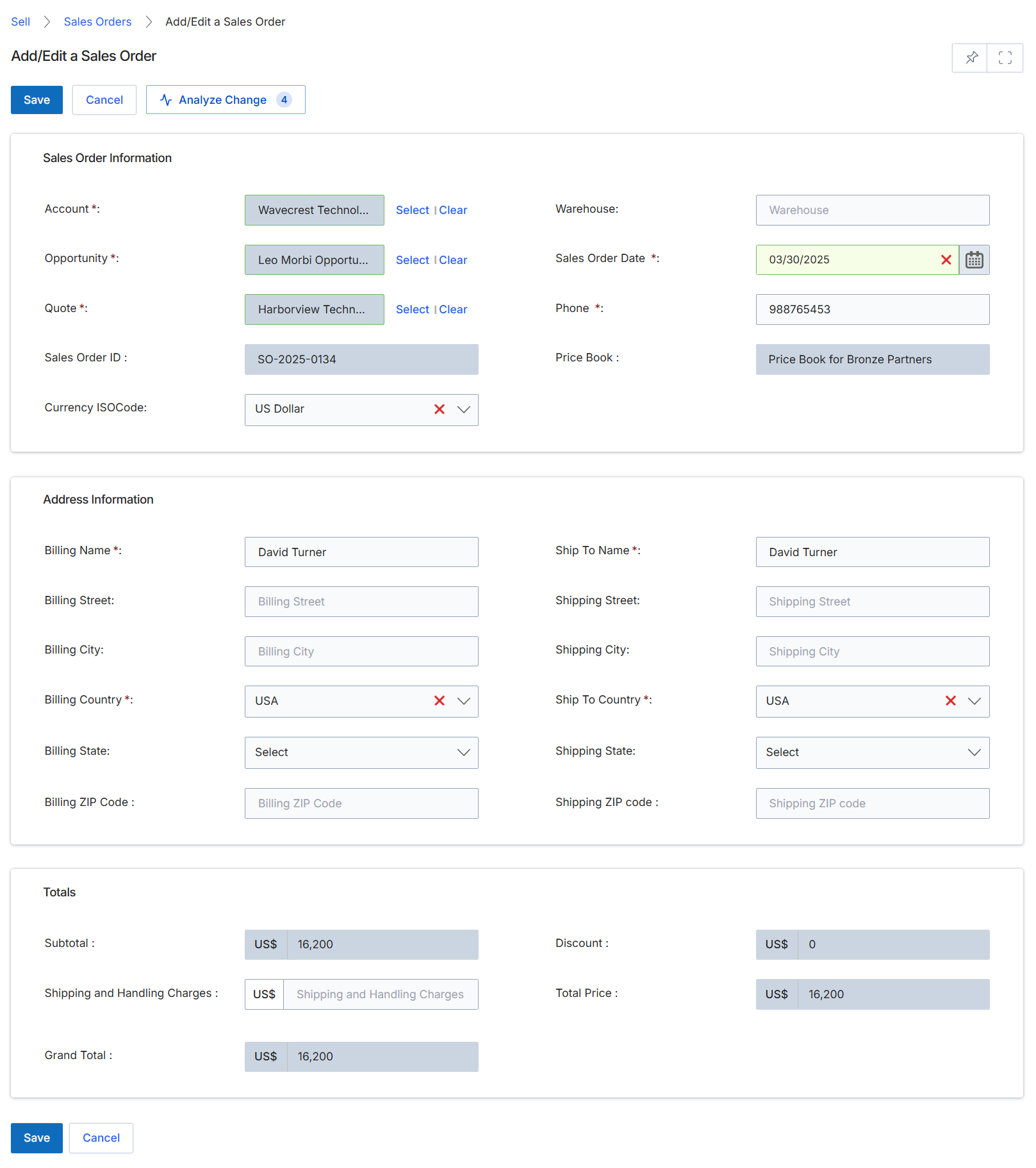
The Add/Edit Sales Order form is used to finalize the details of a sales order, typically after a quote has been approved and accepted by a customer. This screen allows administrators to review and modify critical information such as the associated account, opportunity, and quote, as well as specify billing and shipping addresses. The form also displays the financial summary, including subtotal, discounts, and shipping charges, leading to the grand total. Sales orders in the platform serve as the confirmed purchase record, triggering subsequent processes like fulfillment and commission calculation within the Incentivize module.
Review and update the Sales Order Information, Address Information, and Totals sections as needed.
Buttons
| Button | Description |
|---|---|
| Save | Saves the current sales order details. |
| Cancel | Discards any changes and returns to the previous screen. |
| Analyze Change | Analyzes the impact of changes made to the sales order. |
Sales Order Information
| Field | Description |
|---|---|
| Account * | The customer account associated with this sales order. |
| Opportunity * | The sales opportunity linked to this order. |
| Quote * | The approved quote from which this sales order was generated. |
| Sales Order ID | A system-generated unique identifier for the sales order. |
| Currency ISOCode | The currency used for this sales order, specified by its ISO code. |
| Warehouse | The warehouse from which products for this order will be shipped. |
| Sales Order Date * | The date the sales order was created or confirmed. |
| Phone * | The primary contact phone number for the sales order. |
| Price Book | The price book applied to this sales order, determining product pricing. |
Address Information
| Field | Description |
|---|---|
| Billing Name * | The name of the entity to be billed. |
| Billing Street | The street address for billing. |
| Billing City | The city for billing. |
| Billing Country * | The country for billing. |
| Billing State | The state or province for billing. |
| Billing ZIP Code | The postal code for billing. |
| Ship To Name * | The name of the recipient for shipping. |
| Shipping Street | The street address for shipping. |
| Shipping City | The city for shipping. |
| Ship To Country * | The country for shipping. |
| Shipping State | The state or province for shipping. |
| Shipping ZIP code | The postal code for shipping. |
Totals
| Field | Description |
|---|---|
| Subtotal | The sum of all product prices before discounts and shipping. |
| Shipping and Handling Charges | The cost associated with shipping and handling the order. |
| Grand Total | The final total cost of the sales order, including all charges and discounts. |
| Discount | The total discount applied to the sales order. |