

Overview
In partner-driven sales ecosystems, referral programs allow non-transacting or affiliate partners to submit qualified opportunities directly to the vendor organization. The Sell module captures these submissions as structured referral records, maintaining end-to-end traceability between the submitting partner, the prospect account, and the resulting sales opportunity. This structure ensures accurate partner attribution, timely deal protection, and frictionless handoff to vendor sales reps.
The View a Referral Deal workspace provides complete visibility into individual referral submissions, combining commercial details, associated line items, rep contact information, and governance records into a consolidated overview. Reviewers can verify line-item pricing derived from assigned price books, track review decisions through detailed multi-level approval history tables, and quickly convert accepted referrals into formal registered deals.
Key Features
- Referral Pipeline Tracking
- Line Item Inspection
- Approval History Auditing
- Price Book Association
- Contact & Rep Attribution
- Deal Registration Conversion
Locating Referral Deals in the List View
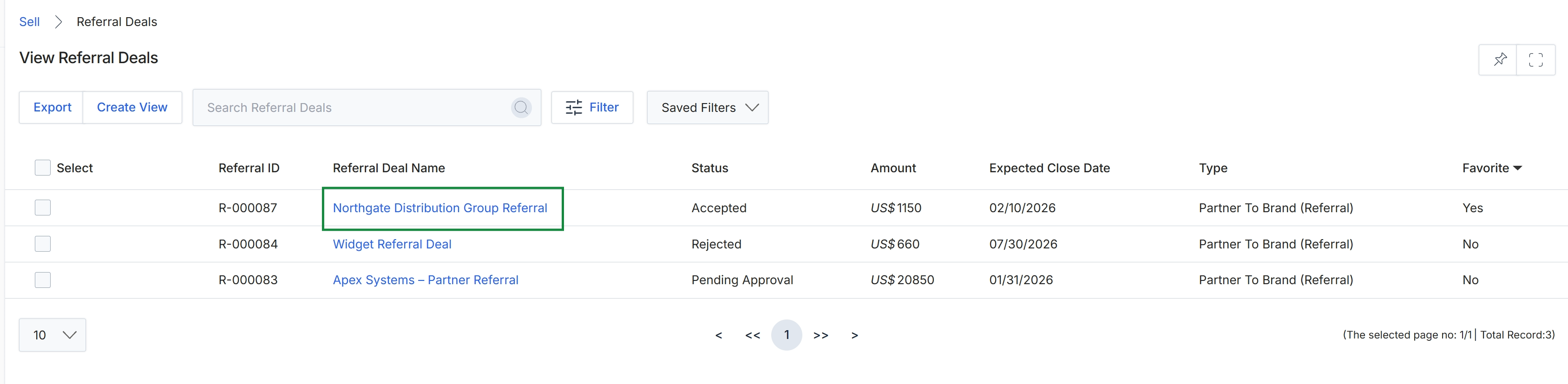
Click Northgate Distribution Group Referral in the Referral Deal Name column to view the deal details.
Reviewing Referral Details, Line Items, and Approval History
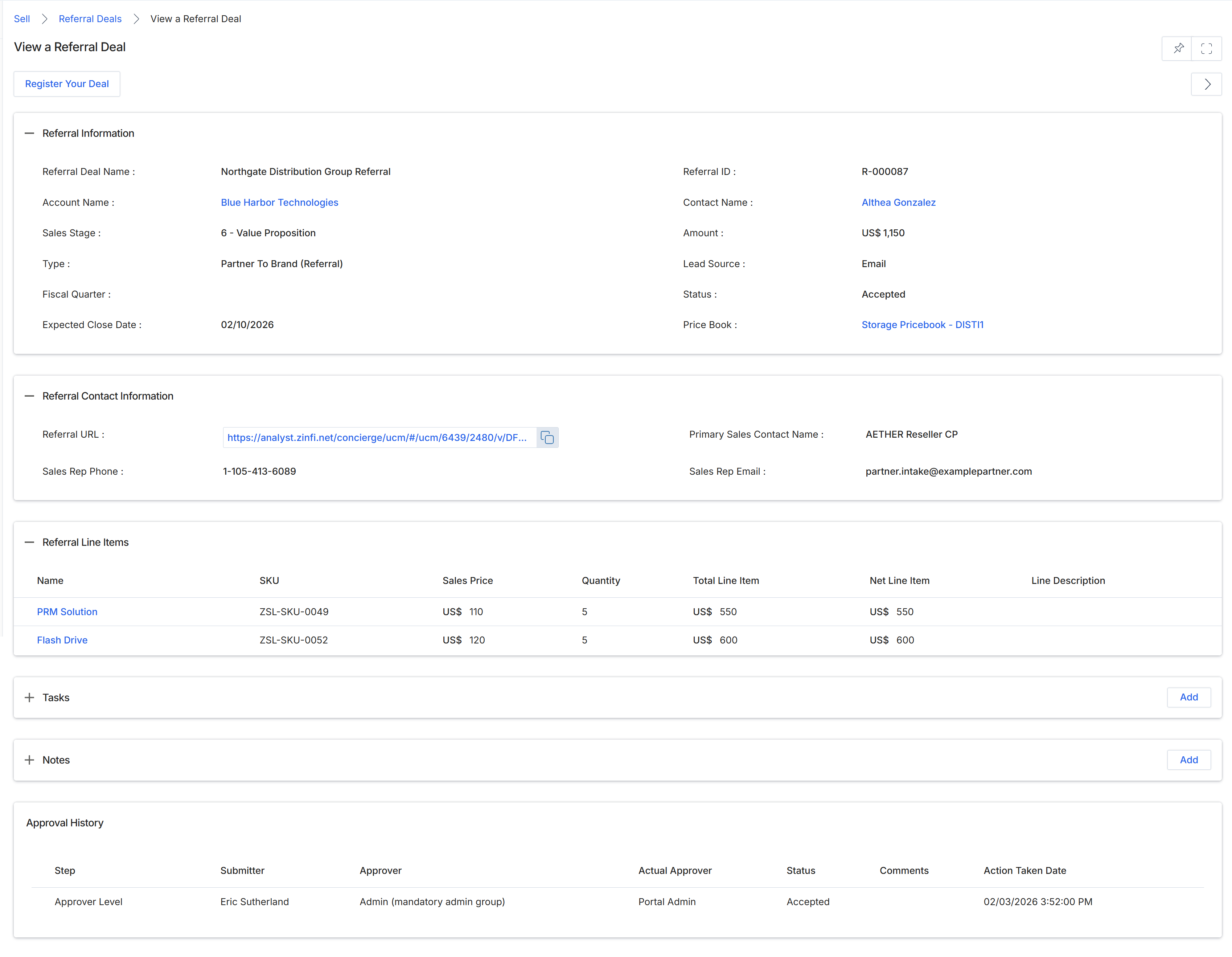
The View a Referral Deal screen provides a comprehensive overview of an accepted referral deal within the Sell module. This record captures core deal parameters, including the pipeline sales stage, target account and contact associations, assigned price book, and financial values. It serves as an audit trail and operational hub for co-selling engagements, allowing channel managers and partner representatives to monitor progress and verify product line item pricing. Data maintained on this record directly impacts downstream commission and reward accruals within the Incentivize module upon deal closure. In addition, the screen provides complete visibility into the governance workflow through an audit log of reviewer assignments and approval milestones.
Review the referral deal details, contact information, associated line items, and approval history.
Buttons
| Button | Description |
|---|---|
| Register Your Deal | Opens the deal registration form to submit a new deal record. |
Referral Information
| Field | Description |
|---|---|
| Referral Deal Name | The designated title of the referral deal. |
| Referral ID | The unique system-generated identifier assigned to the referral record. |
| Account Name | The customer account or company name associated with the referral opportunity. |
| Contact Name | The primary customer contact identified at the target account. |
| Sales Stage | The current sales pipeline phase of the opportunity. |
| Amount | The total currency value associated with the referral deal. |
| Type | The classification of the partnership model, such as Partner To Brand (Referral). |
| Lead Source | The channel or method through which the referral was originated. |
| Fiscal Quarter | The fiscal quarter corresponding to the opportunity timeline. |
| Status | The workflow review status of the referral deal. |
| Expected Close Date | The projected date for finalizing and closing the referral deal. |
| Price Book | The product catalog and tier-based pricing structure applied to the deal. |
Referral Contact Information
| Field | Description |
|---|---|
| Referral URL | The tracking URL generated for this referral deal. |
| Primary Sales Contact Name | The name of the partner sales contact handling the referral. |
| Sales Rep Phone | The telephone number of the primary partner sales representative. |
| Sales Rep Email | The email address of the primary partner sales representative. |
Referral Line Items
| Column | Description |
|---|---|
| Name | The name of the individual product item associated with the deal. |
| SKU | The stock keeping unit identifier for the product line item. |
| Sales Price | The catalog unit price assigned to the product. |
| Quantity | The quantity of units requested for the line item. |
| Total Line Item | The calculated total price before line-level adjustments. |
| Net Line Item | The net price for the line item after applicable discounts. |
| Line Description | Descriptive text or notes specific to the product line item. |
Approval History
| Column | Description |
|---|---|
| Step | The approval hierarchy stage evaluated in the review workflow. |
| Submitter | The user who submitted the referral deal for approval. |
| Approver | The designated group or user assigned to review the referral deal. |
| Actual Approver | The specific administrator who recorded the approval decision. |
| Status | The decision status recorded at this stage of the review workflow. |
| Comments | Explanatory notes entered during the approval review. |
| Action Taken Date | The date and timestamp when the approval decision was executed. |
Frequently asked questions
- What details can administrators and partners review on a referral deal?
Users can inspect target account data, primary contact details, assigned price books, product line items, and audit-level approval history tables.
- How does referral deal data affect downstream partner rewards?
The commercial values and status maintained on the referral record directly determine commission calculations and reward accruals within the Incentivize module upon deal closure.
- What line item fields are available in the referral record?
Line items display product names, SKUs, sales prices, quantities, total line item amounts, net line item values after discounts, and line descriptions.
- How does the system track referral review decisions?
The approval history section logs the workflow step, original submitter, assigned approver, actual decision-maker, review status, comments, and action timestamps.
- Can an accepted referral deal be converted into a deal registration?
Yes, reviewers can use the Register Your Deal option on the referral record to initiate and submit a formal deal registration.