

Overview
The Commissions Management module is a critical component of the Incentivize zone, enabling vendors to track and manage the financial rewards distributed to their partners. This particular section focuses on providing a comprehensive view of individual sales commissions. Administrators can access a list of all generated commissions, filter through them, and then drill down into specific records to understand the underlying transactions that contributed to the commission. This transparency is essential for financial reconciliation, partner relationship management, and ensuring accurate and timely payouts based on predefined commission rules.
Beyond viewing, the platform also supports the addition and editing of various commission types, such as those derived from deals, co-sell activities, referrals, and invoices. This flexibility allows administrators to manually adjust or add commission details as needed, ensuring that all partner contributions are accurately accounted for and compensated.
Viewing Sales Commissions
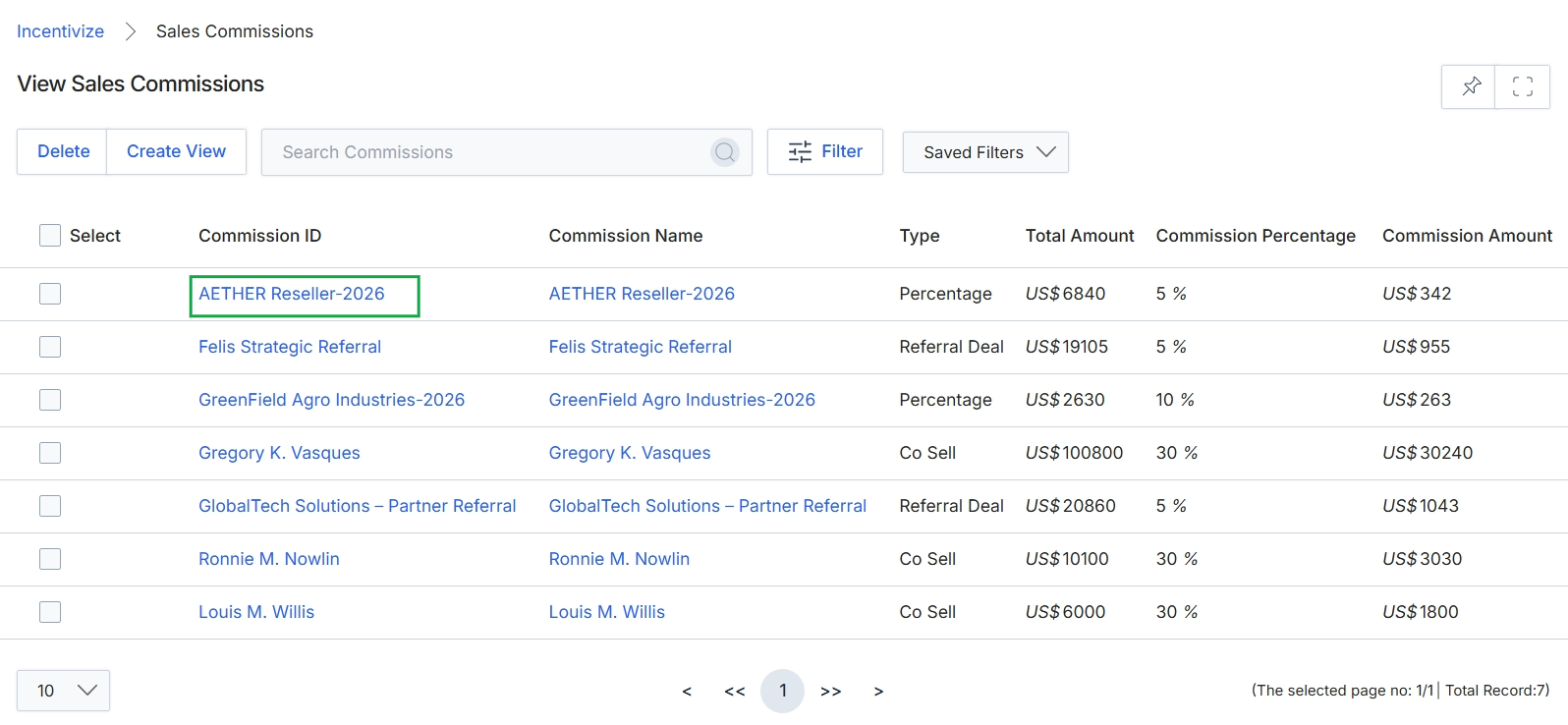
Click the AETHER Reseller-2026 link under the Commission ID column.
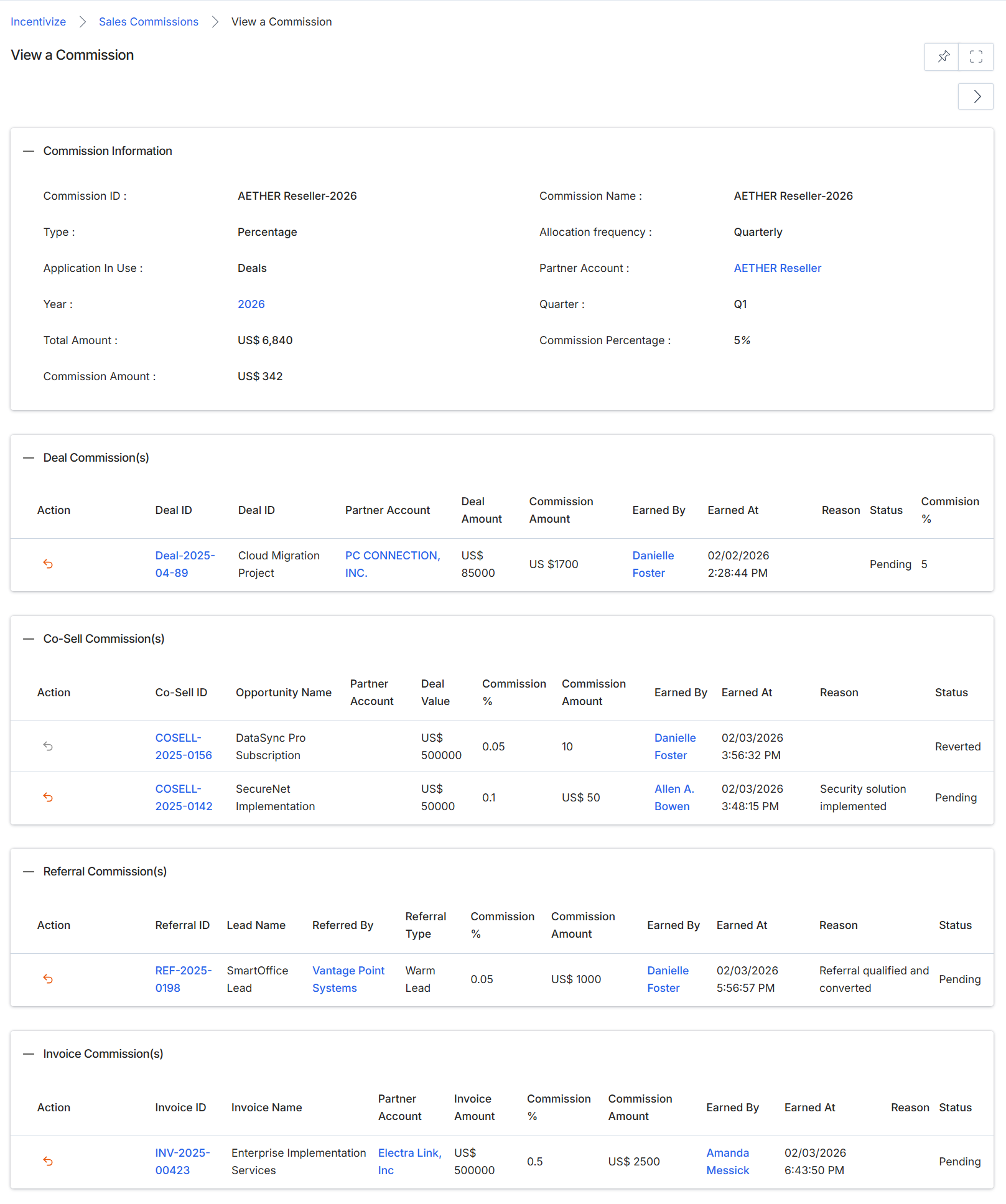
This screen provides a comprehensive view of a specific commission record within the Incentivize module, serving as a detailed audit trail and verification point for administrators. It displays all information related to how a commission was calculated, including general attributes and the individual transactions that contributed to its total. The screen is organized into several sections, each detailing a different aspect of the commission, such as general information, deal-specific commissions, co-sell commissions, referral commissions, and invoice-based commissions. This granular breakdown is crucial for transparent tracking of various reward types, managing partner payouts, and resolving any discrepancies that may arise, ensuring that all accruals are correctly attributed and processed.
Review the detailed information for the selected commission, including its general attributes and the specific transactions that contributed to its total.
Commission Information
| Field | Description |
|---|---|
| Commission ID | A unique identifier for the commission record. |
| Type | The type of commission, such as 'Percentage' or 'Flat Fee'. |
| Application In Use | Indicates the module or context from which the commission originated, such as 'Deals'. |
| Year | The year to which the commission applies. |
| Total Amount | The total amount of the underlying transaction(s) that generated the commission. |
| Commission Amount | The calculated total commission amount for this record. |
| Commission Name | The name assigned to this commission. |
| Allocation frequency | How frequently the commission is allocated, e.g., 'Quarterly'. |
| Partner Account | The partner account associated with this commission. |
| Quarter | The financial quarter to which the commission applies. |
| Commission Percentage | The percentage rate used to calculate the commission. |
Deal Commission(s)
| Column | Description |
|---|---|
| Action | An action icon, typically used to revert or modify the commission entry. |
| Deal ID | The unique identifier for the deal associated with the commission. |
| Deal ID | The name or description of the deal. |
| Partner Account | The partner account involved in the deal. |
| Deal Amount | The total value of the deal. |
| Commission Amount | The commission earned from this specific deal. |
| Earned By | The user who earned the commission. |
| Earned At | The date and time when the commission was earned. |
| Reason | A description or reason for the commission. |
| Status | The current status of the commission (e.g., Pending, Approved, Reverted). |
| Commission % | The percentage rate applied to calculate the commission for this deal. |
Co-Sell Commission(s)
| Column | Description |
|---|---|
| Action | An action icon, typically used to revert or modify the co-sell commission entry. |
| Co-Sell ID | The unique identifier for the co-sell opportunity. |
| Opportunity Name | The name of the co-sell opportunity. |
| Partner Account | The partner account involved in the co-sell opportunity. |
| Deal Value | The total value of the co-sell deal. |
| Commission % | The percentage rate applied to calculate the commission for this co-sell opportunity. |
| Commission Amount | The commission earned from this specific co-sell opportunity. |
| Earned By | The user who earned the co-sell commission. |
| Earned At | The date and time when the co-sell commission was earned. |
| Reason | A description or reason for the co-sell commission. |
| Status | The current status of the co-sell commission (e.g., Pending, Reverted). |
Referral Commission(s)
| Column | Description |
|---|---|
| Action | An action icon, typically used to revert or modify the referral commission entry. |
| Referral ID | The unique identifier for the referral. |
| Lead Name | The name of the lead generated by the referral. |
| Referred By | The partner or entity that made the referral. |
| Referral Type | The type of referral, e.g., 'Warm Lead'. |
| Commission % | The percentage rate applied to calculate the commission for this referral. |
| Commission Amount | The commission earned from this specific referral. |
| Earned By | The user who earned the referral commission. |
| Earned At | The date and time when the referral commission was earned. |
| Reason | A description or reason for the referral commission. |
| Status | The current status of the referral commission (e.g., Pending). |
Invoice Commission(s)
| Column | Description |
|---|---|
| Action | An action icon, typically used to revert or modify the invoice commission entry. |
| Invoice ID | The unique identifier for the invoice. |
| Invoice Name | The name or description of the invoice. |
| Partner Account | The partner account associated with the invoice. |
| Invoice Amount | The total amount of the invoice. |
| Commission % | The percentage rate applied to calculate the commission for this invoice. |
| Commission Amount | The commission earned from this specific invoice. |
| Earned By | The user who earned the invoice commission. |
| Earned At | The date and time when the invoice commission was earned. |
| Reason | A description or reason for the invoice commission. |
| Status | The current status of the invoice commission (e.g., Pending). |
Managing Deal Commissions
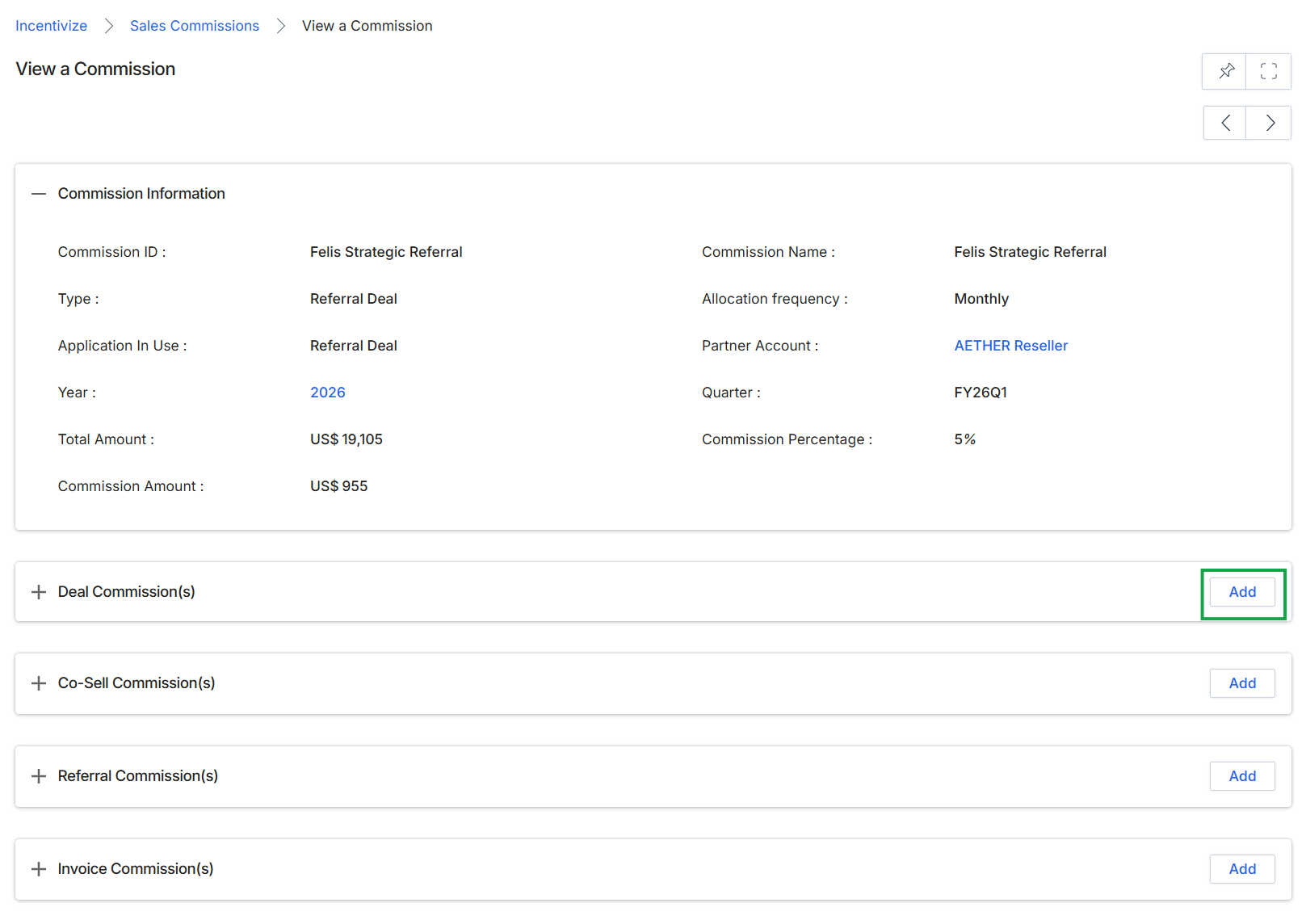
Click the Add button next to "Deal Commission(s)".
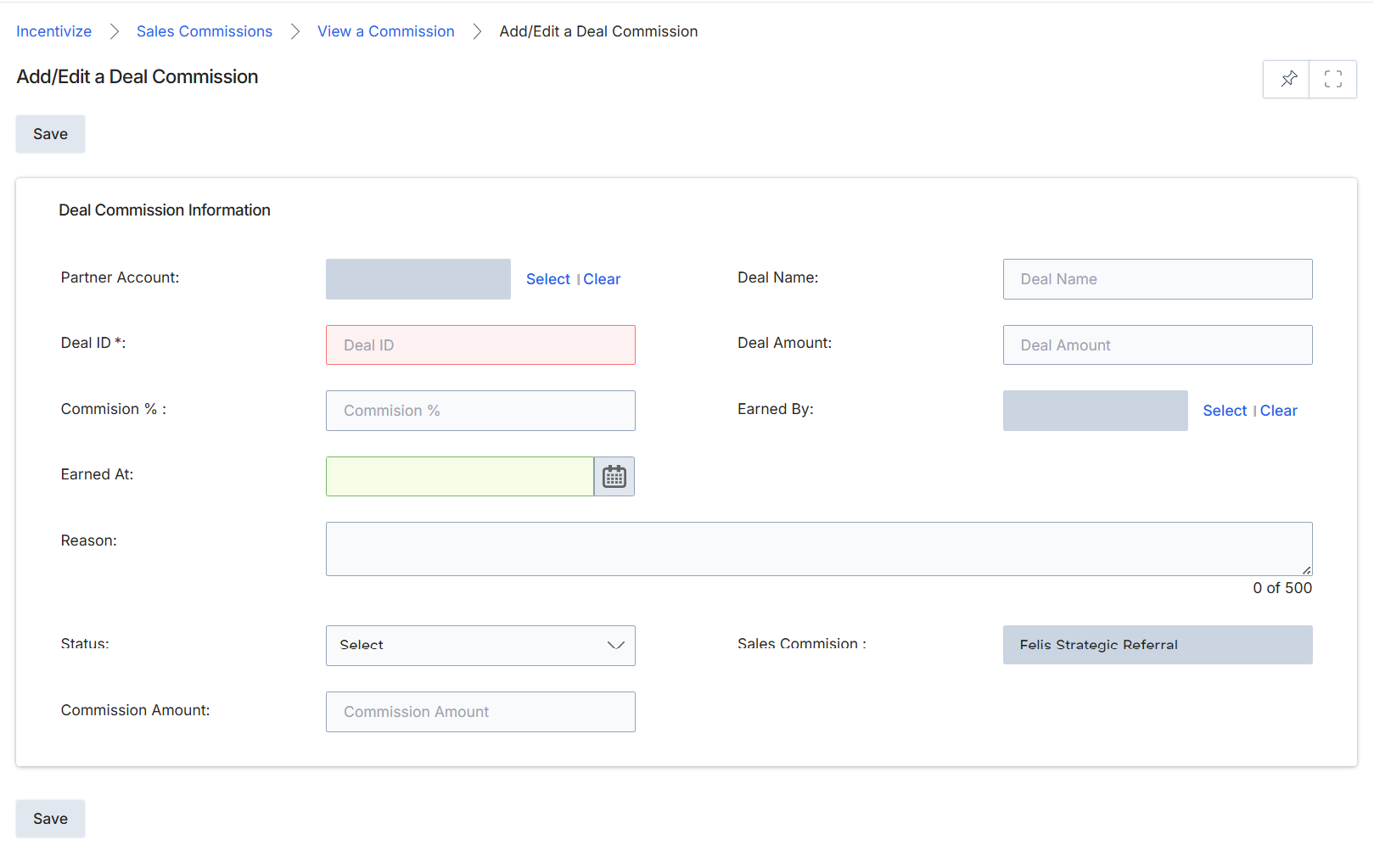
This screen, the Add/Edit a Deal Commission form, allows administrators to manually create or modify records of sales commissions. These commissions represent financial rewards earned by partners for specific closed deals, which are typically triggered by a 'Deal Won' event in the Sell module. While many commission accruals are automatically generated by the platform based on predefined commission rules, this form provides the flexibility to adjust existing commission details or to log commissions that may not have been captured through automated workflows. It is a critical interface for ensuring accurate financial tracking and partner payouts within the Incentivize module, especially for handling exceptions or manual adjustments to commission records.
Fill in the details for the deal commission in the Add/Edit a Deal Commission form.
Buttons
| Button | Description |
|---|---|
| Save | Saves the current deal commission information. |
| Select | Clear | Allows selection or clearing of the Partner Account. |
| Select | Clear | Allows selection or clearing of the 'Earned By' field. |
Deal Commission Information
| Field | Description |
|---|---|
| Partner Account | The partner account associated with this commission. |
| Deal Name | The name of the deal for which the commission is being recorded. |
| Deal ID * | The unique identifier for the deal, a required field. |
| Deal Amount | The total monetary value of the deal. |
| Commission % | The percentage rate at which the commission is calculated. |
| Earned By | The specific individual or entity that earned the commission. |
| Earned At | The date when the commission was earned. |
| Reason | A text field to provide a reason or additional notes for the commission. |
| Status | The current status of the commission, selected from a dropdown list (e.g., Pending, Approved, Paid). |
| Sales Commission | Displays the type of sales commission, which is 'Felis Strategic Referral' in this instance. |
| Commission Amount | The calculated or specified monetary amount of the commission. |
Managing Co-Sell Commissions
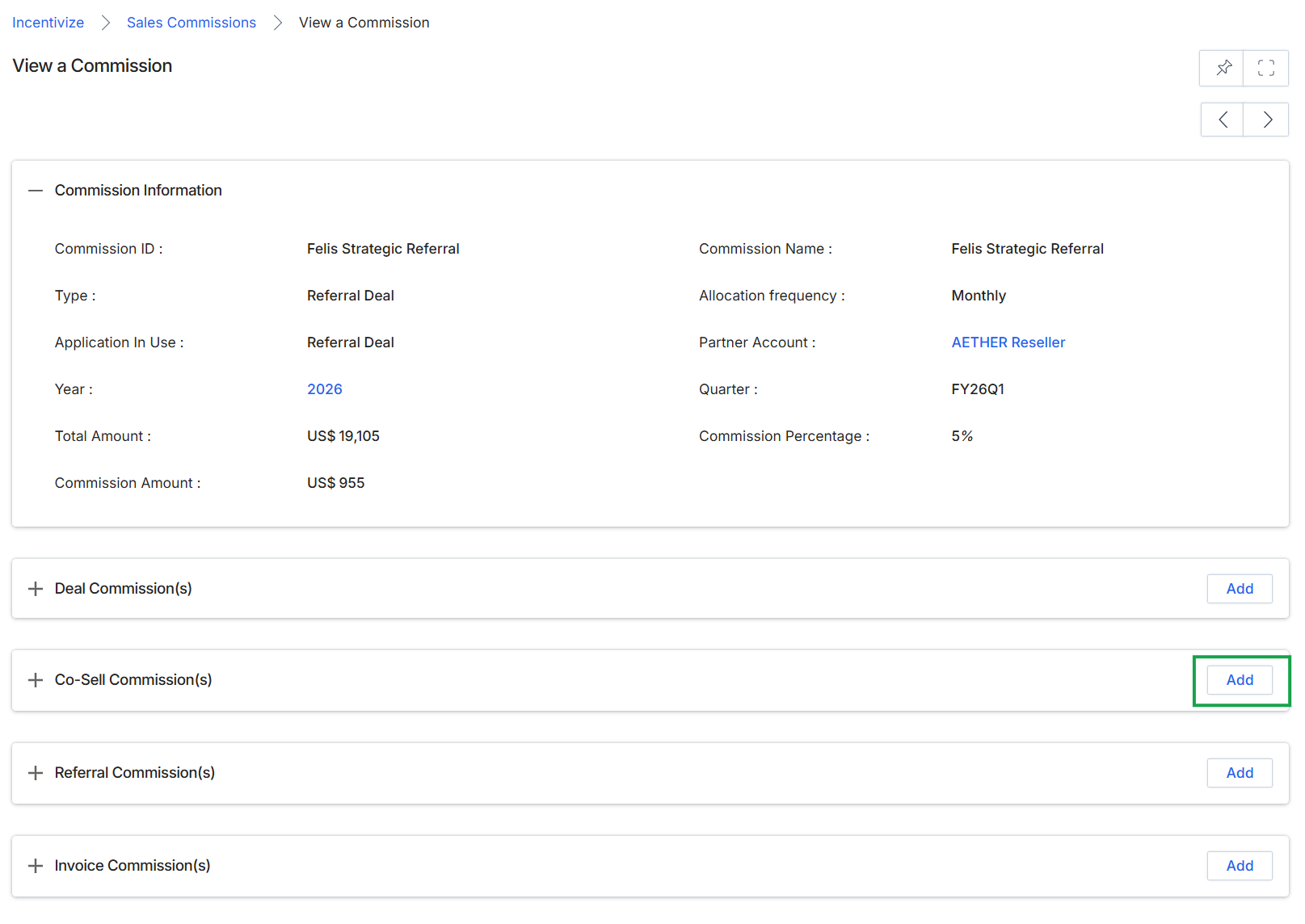
Click the Add button next to "Co-Sell Commission(s)".
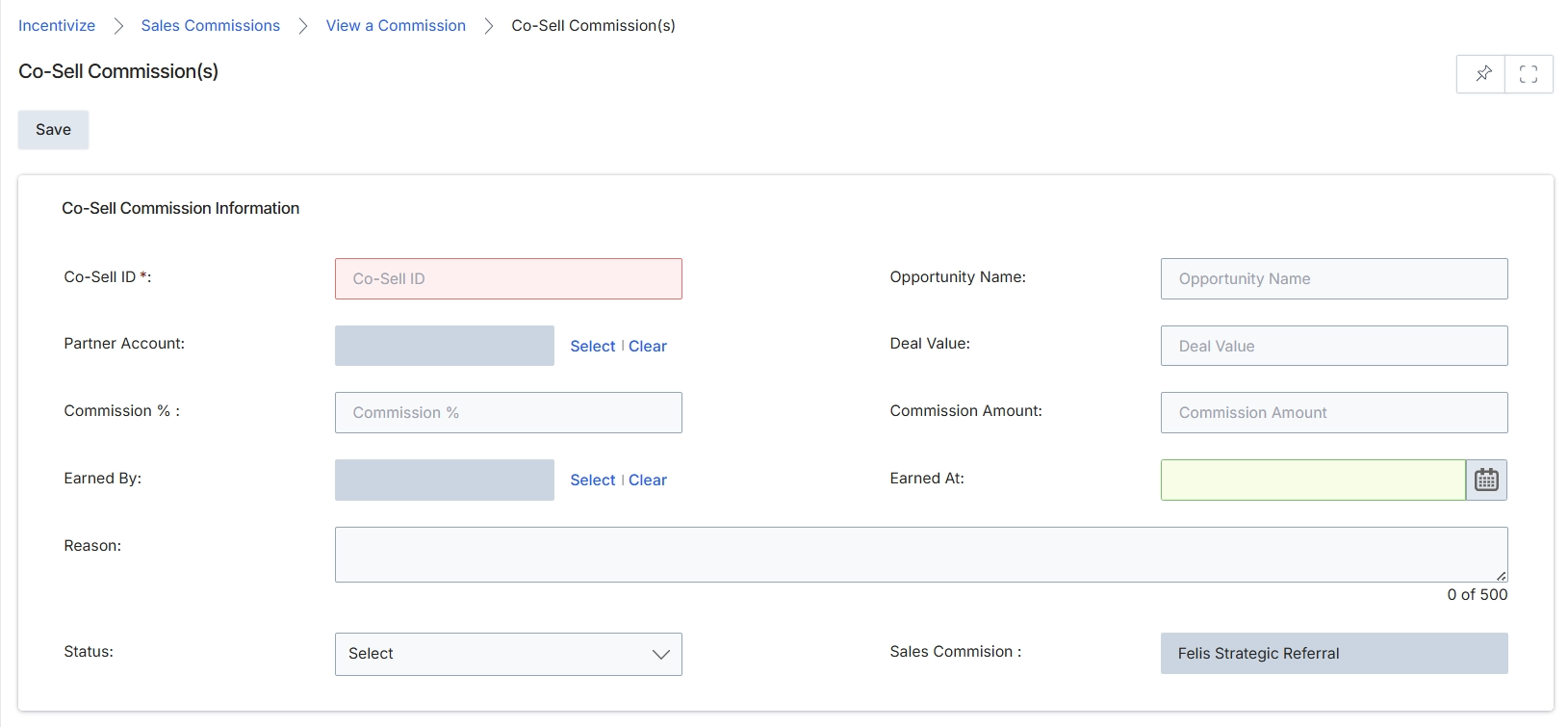
This screen displays the Co-Sell Commission form, which allows administrators to add or edit details for a co-sell commission. Co-sell commissions are financial incentives paid to partners for their involvement in closing deals, often in collaboration with the vendor's sales team. This form captures essential information about the commission, including its unique identifier, the associated partner and opportunity, the commission rate and amount, and the date it was earned. The data entered here contributes to the overall reward accrual process within the Incentivize module, ensuring accurate tracking and eventual payment to partners.
Fill out the Co-Sell Commission form with the relevant details.
Buttons
| Button | Description |
|---|---|
| Save | Saves the entered co-sell commission information. |
| Select | Opens a dialog to select a partner account. |
| Clear | Clears the selected partner account. |
| Select | Opens a dialog to select the individual who earned the commission. |
| Clear | Clears the selected individual who earned the commission. |
Co-Sell Commission Information
| Field | Description |
|---|---|
| Co-Sell ID * | A unique identifier for the co-sell commission. |
| Partner Account | The partner account associated with this co-sell commission. |
| Commission % | The percentage of the deal value awarded as commission. |
| Earned By | The individual who earned the commission. |
| Reason | A descriptive field to provide context or notes regarding the commission. |
| Status | The current status of the co-sell commission, selected from a dropdown list. |
| Opportunity Name | The name of the sales opportunity associated with this co-sell commission. |
| Deal Value | The total monetary value of the deal for which the commission was earned. |
| Commission Amount | The calculated monetary amount of the commission. |
| Earned At | The date when the commission was earned, selected using a calendar picker. |
| Sales Commision | Displays the type of sales commission. |
Managing Referral Commissions
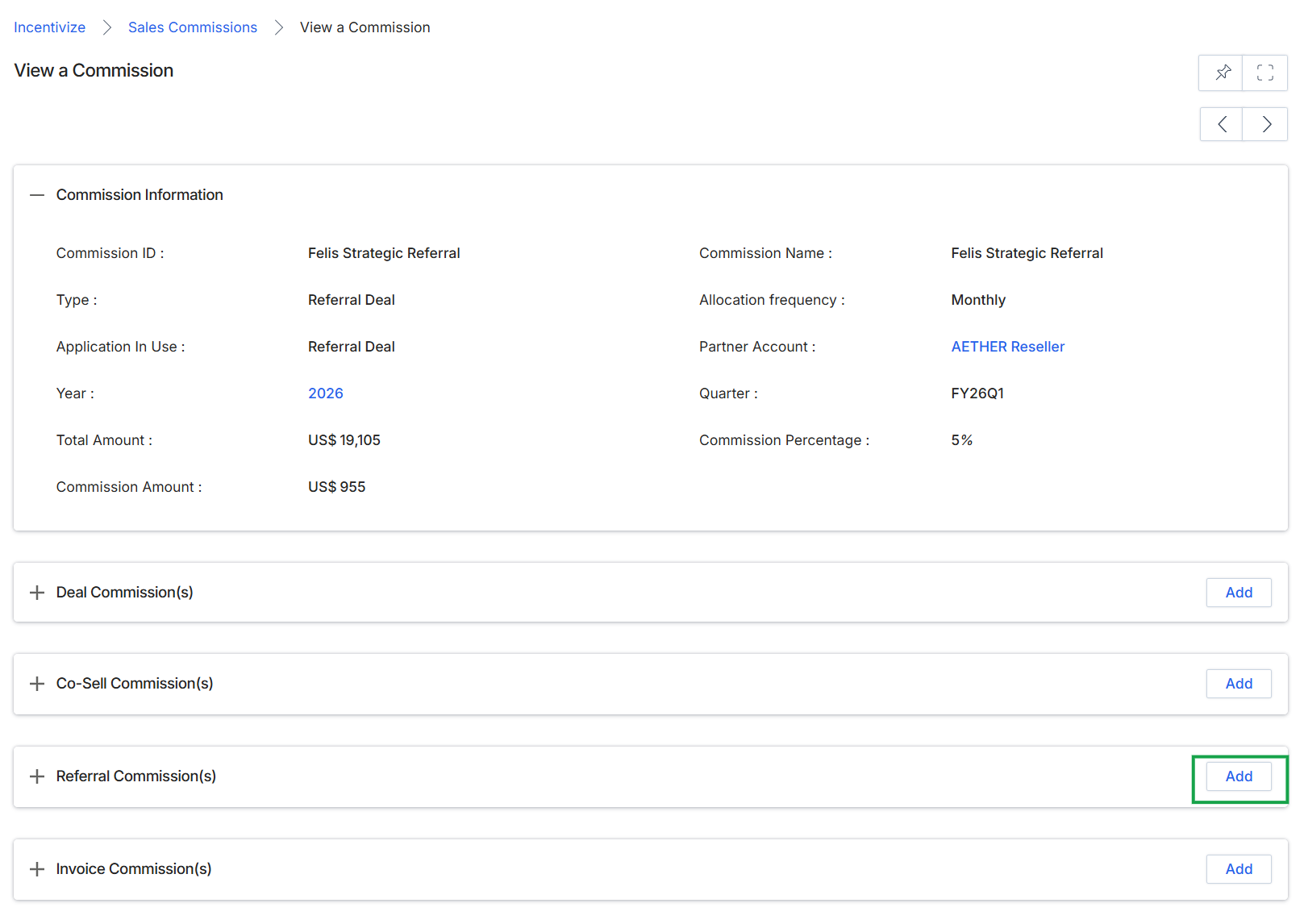
Click Add next to "Referral Commission(s)".
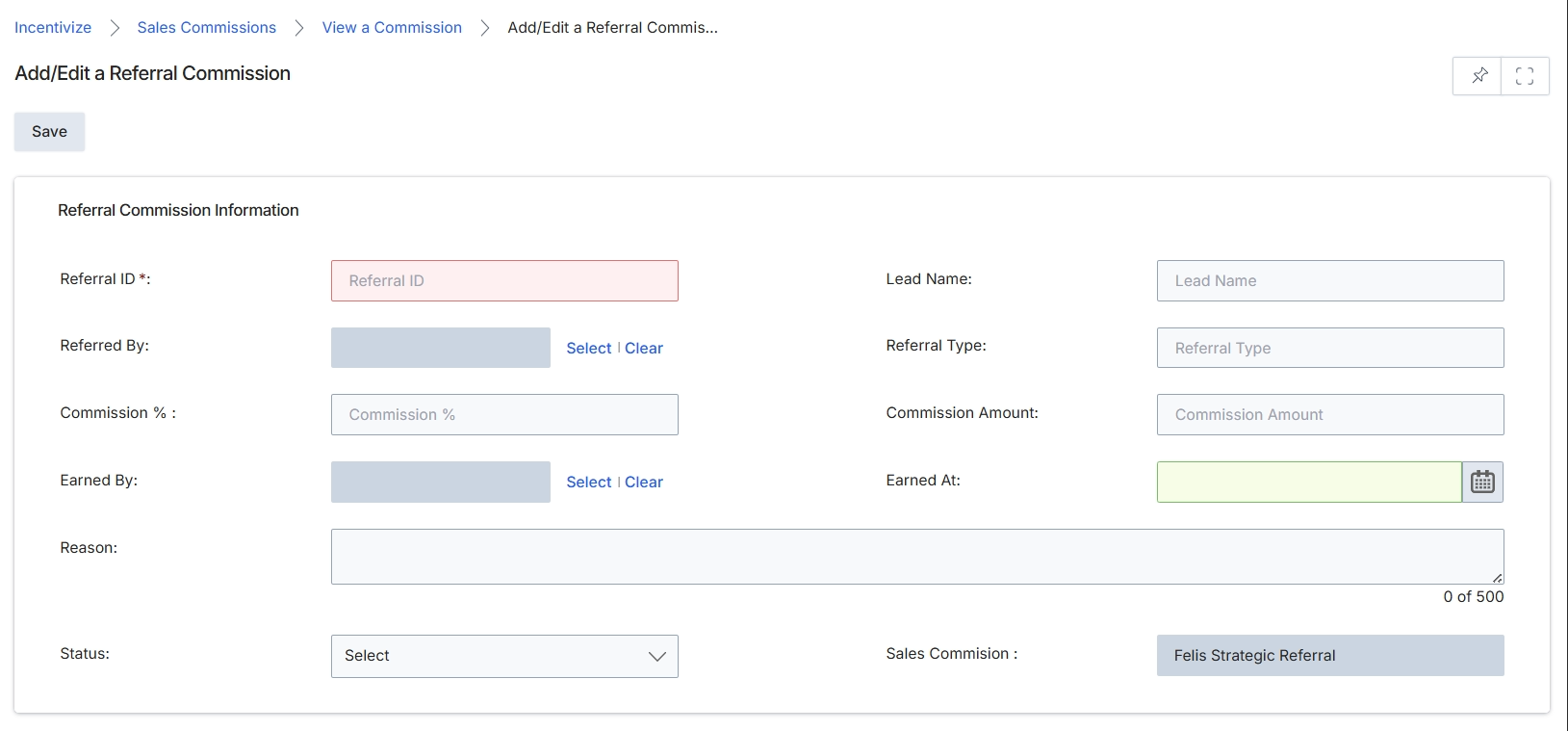
This screen provides the interface for adding new referral commission records or editing existing ones. Referral commissions are a type of sales commission within the Incentivize module, typically generated when a partner refers a lead that converts into a deal. This form allows administrators to manually input or adjust details related to a specific referral, including the referring partner, the lead's name, the commission percentage or amount, and the date the commission was earned. It is crucial for accurately tracking and managing the financial incentives owed to partners for their referral activities, ensuring proper attribution and payment processing within the overall commission workflow.
Enter or update the details for the referral commission in the provided fields.
Buttons
| Button | Description |
|---|---|
| Save | Click to save the referral commission details. |
Referral Commission Information
| Field | Description |
|---|---|
| Referral ID * | A unique identifier for the referral commission. This field is required. |
| Referred By | The partner who made the referral. Use 'Select' to choose a partner from the system. |
| Commission % | The percentage of the deal value awarded as commission for this referral. |
| Earned By | The individual within the partner organization who earned the commission. Use 'Select' to choose a user. |
| Reason | A text field to provide additional context or notes regarding the referral commission, with a limit of 500 characters. |
| Status | The current status of the referral commission, selected from a dropdown list. |
| Lead Name | The name of the lead associated with this referral commission. |
| Referral Type | The category or type of referral. |
| Commission Amount | The monetary value of the commission earned for this referral. |
| Earned At | The date when the referral commission was earned, selected using the calendar icon. |
| Sales Commision | Displays the name of the sales commission rule under which this referral commission falls. |
Managing Invoice Commissions
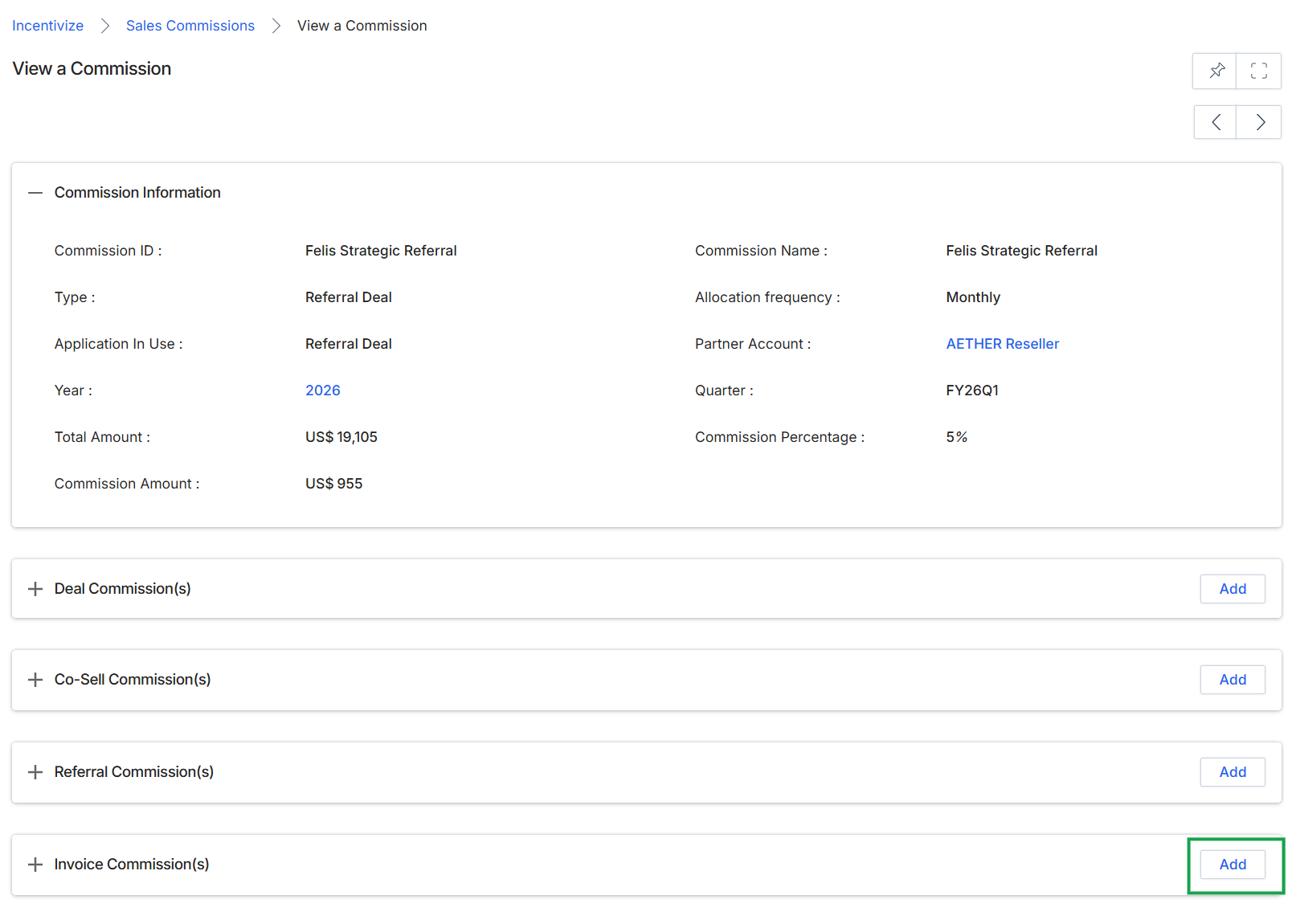
Click the Add button next to "Invoice Commission(s)".
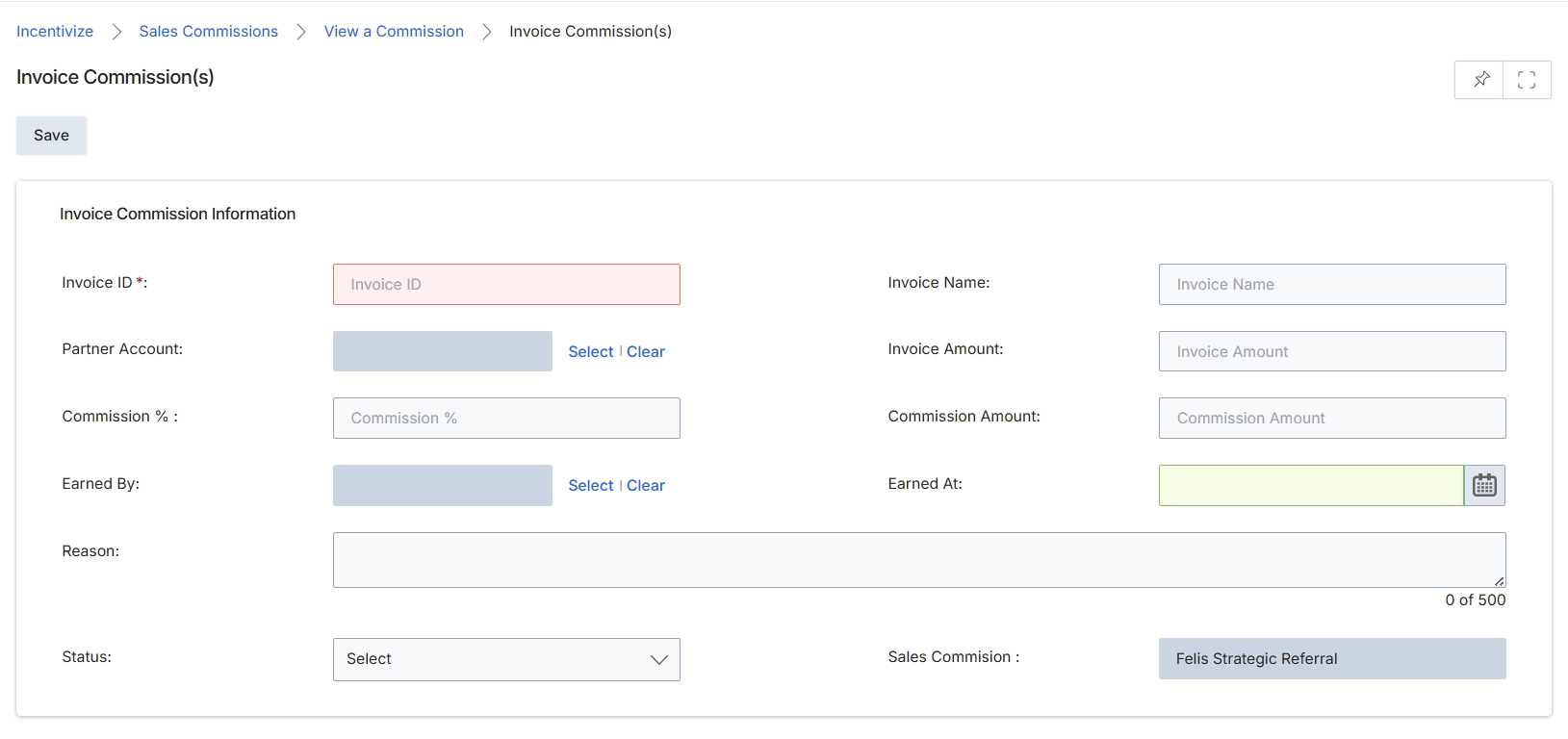
This screen displays the form for adding or editing an Invoice Commission record within the Incentivize module. Invoice Commissions are used to track and manage commissions earned by partners based on specific invoices, often for sales that are not directly tied to a registered deal in the Sell module. This form allows administrators to manually input or adjust the details of an invoice commission, including the associated partner, the invoice specifics, and the calculated commission amounts. This process is critical for ensuring accurate tracking of partner earnings and facilitating timely payouts, especially for commission structures that rely on invoice-level data rather than deal-level data.
Fill in the details on the Invoice Commission(s) form to create a new invoice commission record.
Buttons
| Button | Description |
|---|---|
| Save | Saves the entered invoice commission details. |
Invoice Commission Information
| Field | Description |
|---|---|
| Invoice ID * | The unique identifier for the invoice associated with this commission. This is a mandatory field. |
| Invoice Name | The descriptive name or title of the invoice. |
| Partner Account | The partner account that earned this commission. Use 'Select' to choose an existing partner. |
| Invoice Amount | The total monetary value of the invoice. |
| Commission % | The percentage rate applied to the invoice amount to calculate the commission. |
| Commission Amount | The calculated monetary value of the commission. |
| Earned By | The specific user or contact within the partner account who earned the commission. Use 'Select' to choose a user. |
| Earned At | The date when the commission was earned, typically corresponding to the invoice date or payment date. |
| Reason | A descriptive text field to provide additional context or notes regarding this invoice commission. |
| Status | The current status of the invoice commission, selected from a dropdown list (e.g., Pending, Approved, Paid). |
| Sales Commision | Displays the associated sales commission record, if applicable, linking this invoice commission to a broader sales commission entry. |