

Overview
Deal registration is a critical component of partner programs, enabling partners to formally claim sales opportunities and receive protection against direct vendor sales or other partners. By registering deals, partners ensure their efforts are recognized and that they are eligible for commissions upon successful closure. This process also provides vendors with visibility into the partner pipeline, allowing for better forecasting, resource allocation, and co-selling support.
The 'Add/Edit a Registered Deal' functionality facilitates this process by providing a clear interface for partners to submit new deals or update existing ones. Once submitted, deals typically enter a vendor approval queue, where they are reviewed for conflicts and validity before being approved, declined, or sent back for more information. Approved deals are then tracked through their sales stages until they are won or lost, ultimately triggering commission calculations in the Incentivize module.
Accessing the Deal Registration Form
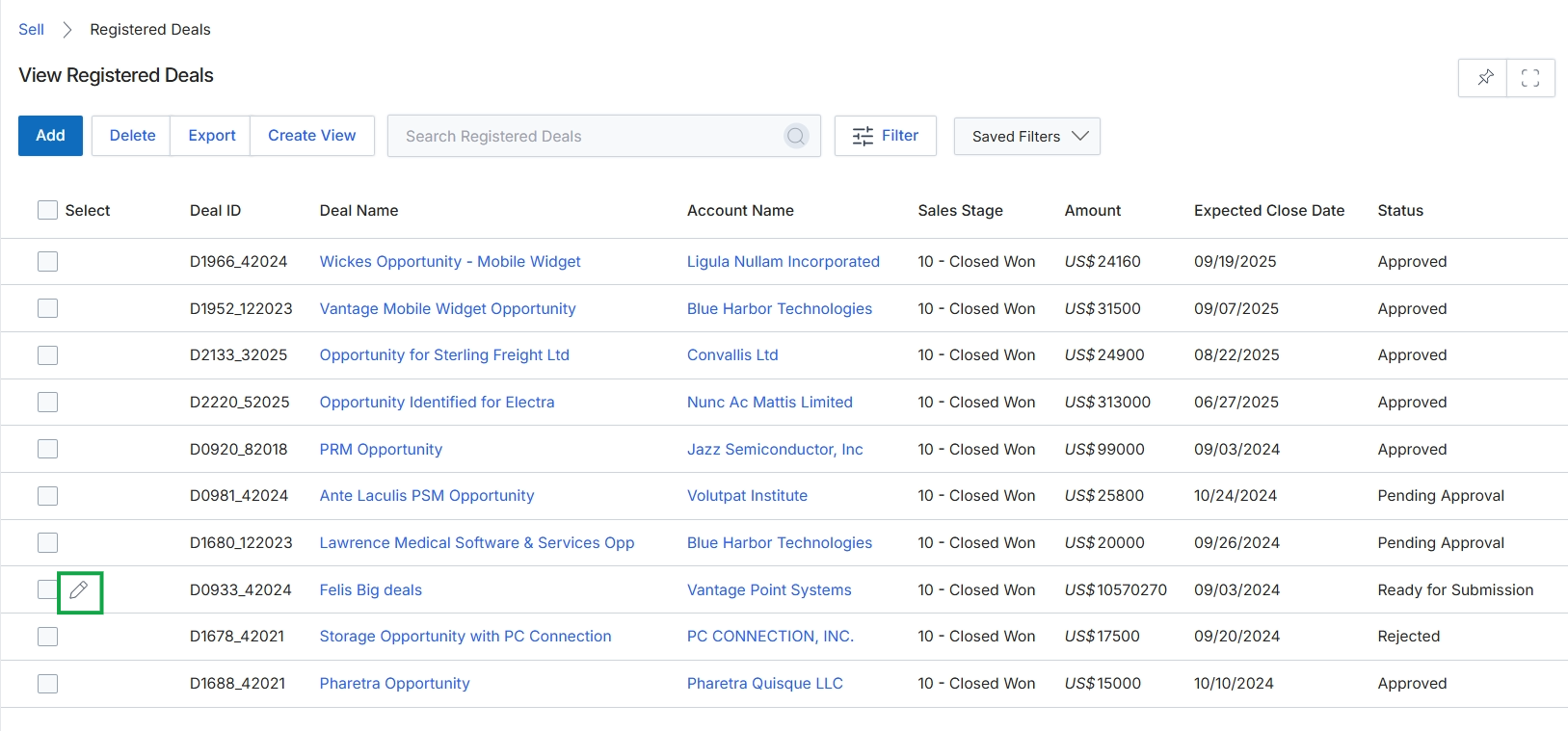
Click the Edit icon next to the registered deal you want to modify.
Entering Deal Details
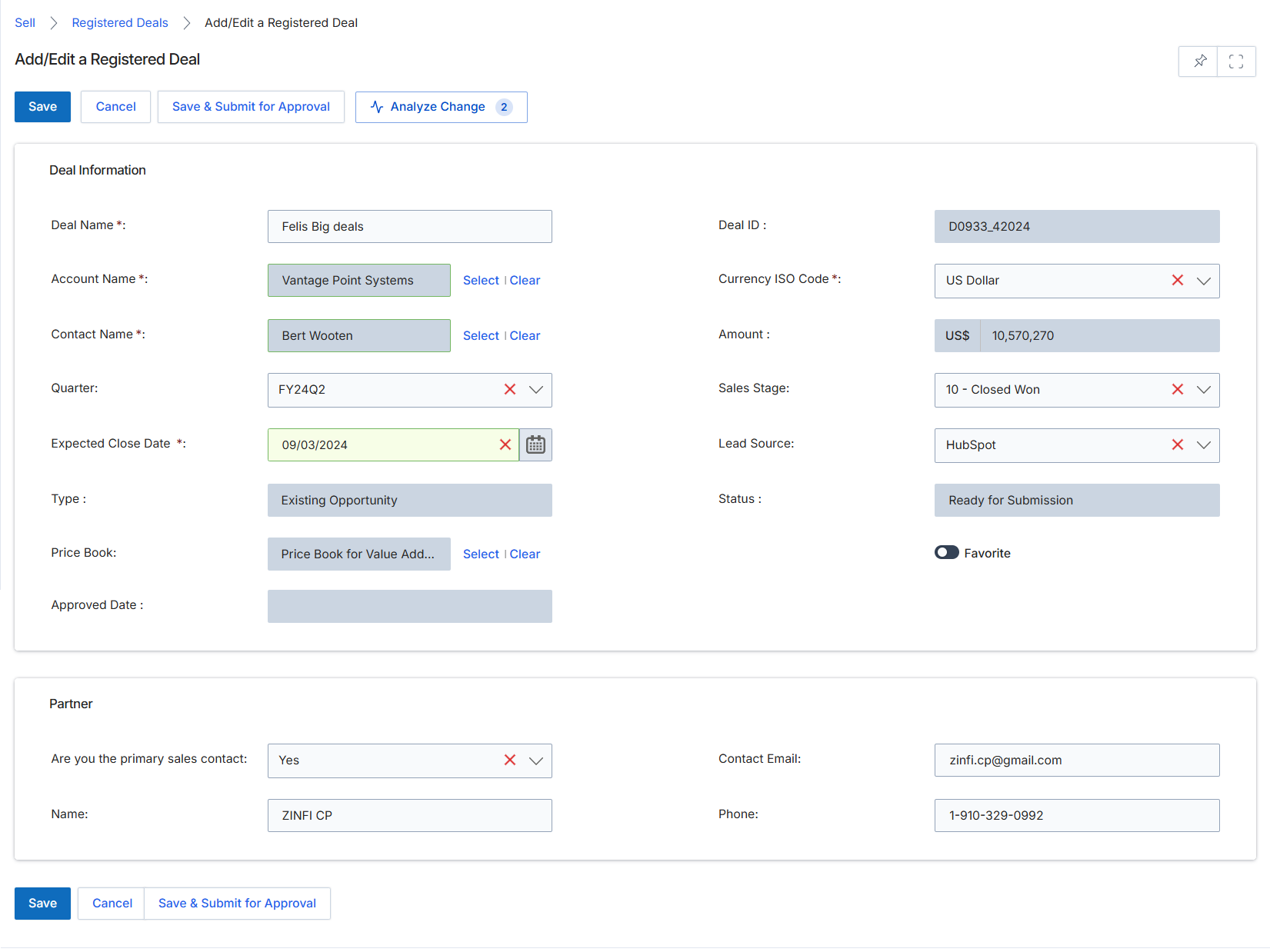
This screen serves as the interface for partners or vendor administrators to add or edit a Registered Deal within the Sell module. Registered Deals are a critical component of the partner program, allowing partners to formally claim and protect sales opportunities they are actively pursuing. The form captures essential information about the deal, including its value, expected close date, associated account, and key contact. This process ensures that the deal is tracked, conflicts are managed, and the partner receives appropriate protection and commission eligibility upon successful closure. The 'Deal Information' section gathers core details about the sales opportunity itself, while the 'Partner' section confirms the primary sales contact within the partner organization for this specific deal.
Fill in or update the details for the Registered Deal, including deal specifics, account information, and partner contact details.
Buttons
| Button | Description |
|---|---|
| Save | Saves the current deal information as a draft without submitting it for approval. |
| Cancel | Discards any changes made and returns to the previous screen. |
| Save & Submit for Approval | Saves the deal and submits it to the vendor for review and approval, initiating the deal registration workflow. |
| Analyze Change | Analyzes the impact of changes made to the deal, potentially showing how they affect commission or other metrics. |
Deal Information
| Field | Description |
|---|---|
| Deal Name * | The name or title of the sales opportunity. |
| Account Name * | The name of the company associated with this deal. Selecting an account may pre-populate other related fields. |
| Contact Name * | The name of the primary contact person at the account for this deal. Selecting a contact may pre-populate other related fields. |
| Quarter | The financial quarter in which the deal is expected to close. |
| Expected Close Date * | The anticipated date by which this deal is expected to be finalized. |
| Type | The classification of the deal, such as 'Existing Opportunity'. |
| Price Book | The price book used for this deal, which determines product pricing and available discounts. |
| Approved Date | The date when the deal registration was approved by the vendor. |
| Deal ID | A system-generated unique identifier for the deal. |
| Currency ISO Code * | The currency in which the deal amount is denominated. |
| Amount | The total estimated monetary value of the deal. |
| Sales Stage | The current stage of the deal in the sales pipeline. |
| Lead Source | The origin or channel through which the lead for this deal was acquired. |
| Status | The current status of the deal registration, indicating its position in the approval workflow. |
| Favorite | A toggle to mark this deal as a favorite for quick access or prioritization. |
Partner
| Field | Description |
|---|---|
| Are you the primary sales contact | Indicates whether the user filling out the form is the primary sales contact for this deal within their partner organization. |
| Name | The name of the primary sales contact within the partner organization for this deal. |
| Contact Email | The email address of the primary sales contact within the partner organization for this deal. |
| Phone | The phone number of the primary sales contact within the partner organization for this deal. |