

Overview
Effective user management is critical for controlling access to the platform and ensuring that each user has the appropriate permissions and information. This module enables administrators to maintain a comprehensive directory of all users, whether they are internal vendor team members or external partner contacts. By accurately configuring user profiles and roles, administrators can streamline workflows, enhance security, and ensure data integrity across the entire partner ecosystem.
Administrators can update essential contact details, assign specific roles that dictate module access and capabilities, and configure security settings like multi-factor authentication. This granular control helps in tailoring the platform experience for each user, aligning with their responsibilities and ensuring compliance with organizational policies.
Accessing User Management
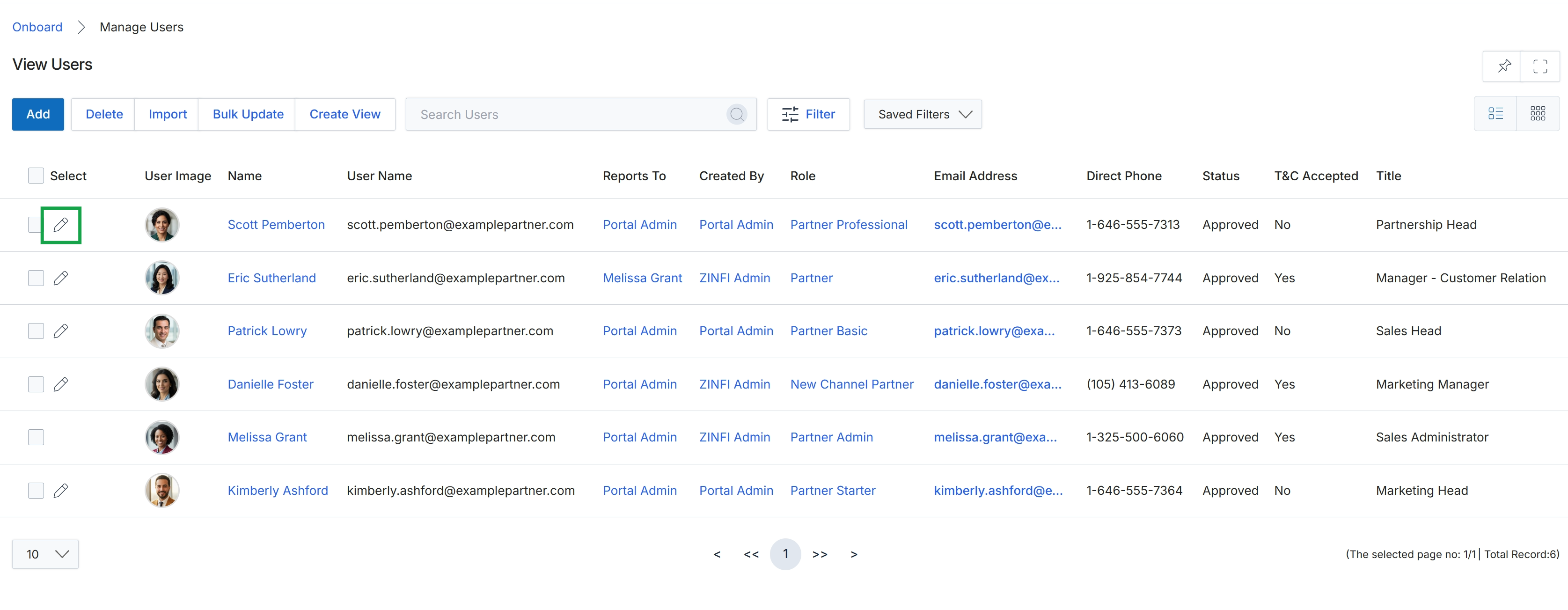
Click the pencil icon next to the user you want to edit.
Editing an Existing User
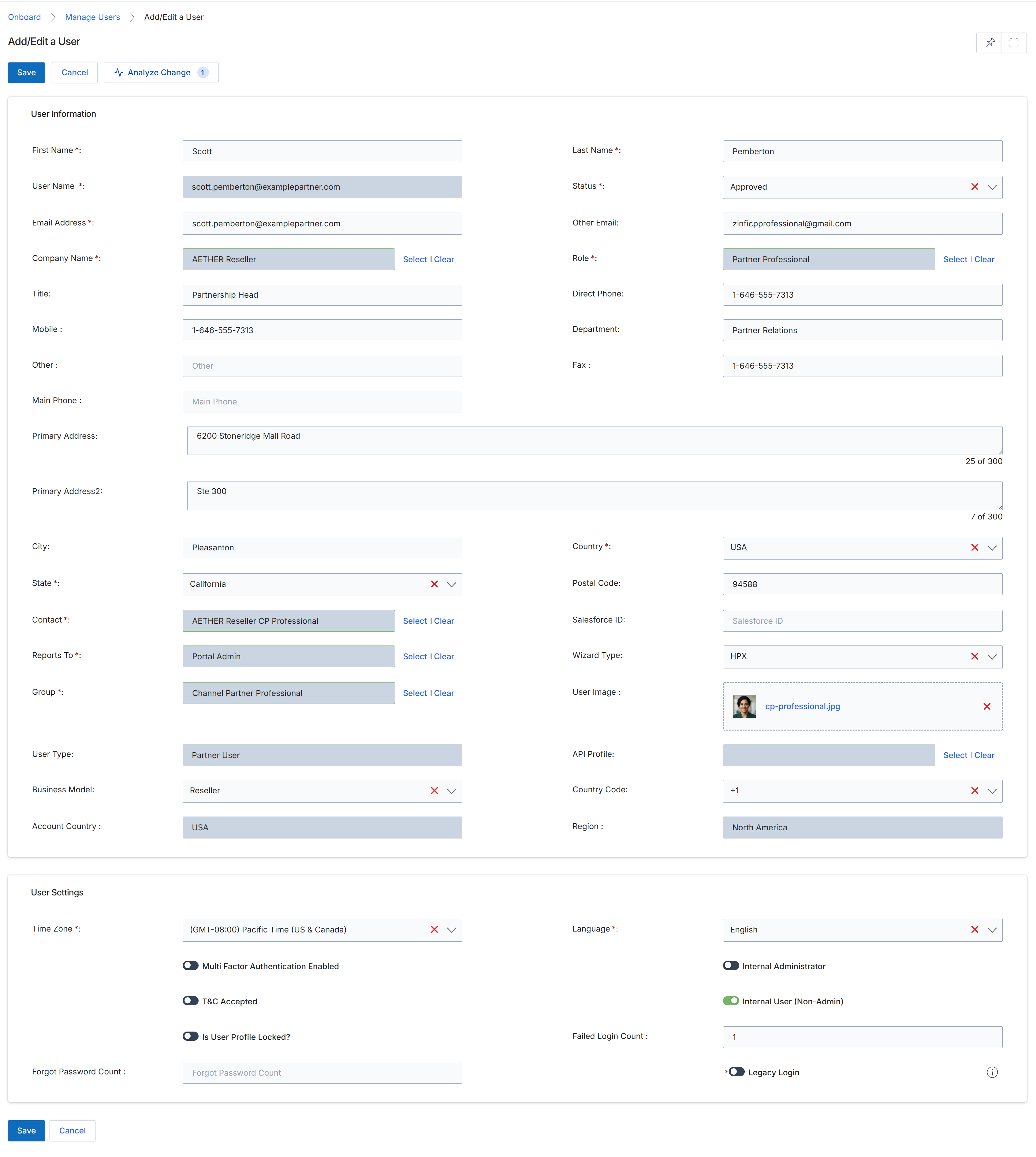
This screen serves as the Add/Edit User form, enabling administrators to create new user accounts or modify existing user profiles within the UPM. It consolidates essential user information, contact details, and system settings into a single interface. Administrators utilize this form to define a user's identity, assign their role and group, link them to a specific partner contact or internal department, and configure their portal access and authentication preferences. This detailed management ensures that each user has appropriate permissions and access to the platform's functionalities, supporting both vendor-side staff and partner-side contacts as defined in the Onboard module's partner profile management capabilities.
Review or update the user's information and settings on this form.
Buttons
| Button | Description |
|---|---|
| Save | Saves the changes made to the user's profile. |
| Cancel | Discards any changes and returns to the previous screen. |
| Analyze Change | Analyzes the impact of proposed changes before saving. |
User Information
| Field | Description |
|---|---|
| First Name * | The user's first name. |
| Last Name * | The user's last name. |
| User Name * | The unique username for the user's login. |
| Status * | The current status of the user account, such as Approved. |
| Email Address * | The primary email address for the user. |
| Other Email | An alternative email address for the user. |
| Company Name * | The name of the company the user is associated with, which can be selected from existing partner accounts. |
| Role * | The role assigned to the user, determining their permissions and access levels. |
| Title | The user's job title within their organization. |
| Direct Phone | The user's direct phone number. |
| Mobile | The user's mobile phone number. |
| Department | The department the user belongs to. |
| Other | An additional contact number for the user. |
| Fax | The user's fax number. |
| Main Phone | The main phone number for the user's organization. |
| Primary Address | The first line of the user's primary address. |
| Primary Address2 | The second line of the user's primary address. |
| City | The city component of the user's address. |
| Country * | The country component of the user's address. |
| State * | The state component of the user's address. |
| Postal Code | The postal code component of the user's address. |
| Contact * | The specific contact record associated with this user. |
| Salesforce ID | The Salesforce ID associated with the user, if integrated. |
| Reports To * | The user or role this user reports to. |
| Wizard Type | The type of wizard associated with the user's profile. |
| Group * | The group the user belongs to, which can influence permissions and content access. |
| User Image | An image representing the user's profile. |
| User Type | The classification of the user, such as Partner User. |
| Country Code | The country calling code associated with the user's phone numbers. |
| Business Model | The business model of the user's associated company, such as Reseller. |
| Region | The geographical region associated with the user. |
| Account Country | The country of the user's associated account. |
User Settings
| Field | Description |
|---|---|
| Time Zone * | The time zone setting for the user's account. |
| Language * | The preferred language for the user interface. |
| Multi Factor Authentication Enabled | A toggle to enable or disable multi-factor authentication for the user. |
| Internal Administrator | A toggle indicating if the user has internal administrator privileges. |
| T&C Accepted | A toggle indicating whether the user has accepted the terms and conditions. |
| Internal User (Non-Admin) | A toggle indicating if the user is an internal user without administrator privileges. |
| Is User Profile Locked? | A toggle to lock or unlock the user's profile. |
| Failed Login Count | The number of consecutive failed login attempts for the user. |
| Legacy Login | A toggle to enable or disable legacy login for the user. |