

Overview
Partner Business Plans are crucial for aligning partner activities with vendor goals, providing a structured approach for partners to outline their sales, marketing, and operational strategies. These plans are typically built upon pre-defined templates, which standardize the planning process and ensure key objectives and metrics are consistently addressed across the partner ecosystem. The templates can be tailored for different partner types or tiers, incorporating specific revenue targets, industry verticals, and strategic initiatives.
Administrators leverage these templates to guide partners in developing comprehensive business plans. By reviewing the templates and the individual partner plans derived from them, administrators can monitor progress, provide support, and ensure partners are focused on achieving mutually beneficial outcomes. This module facilitates transparency and structured collaboration, enabling effective management of partner performance and strategic alignment.
Key Features
- Template List View
- Search and Filter Templates
- Template Information Display
- Objective Details Review
- Associated Partner Plans
- View Partner Plan Details
Accessing and Viewing Plan Templates
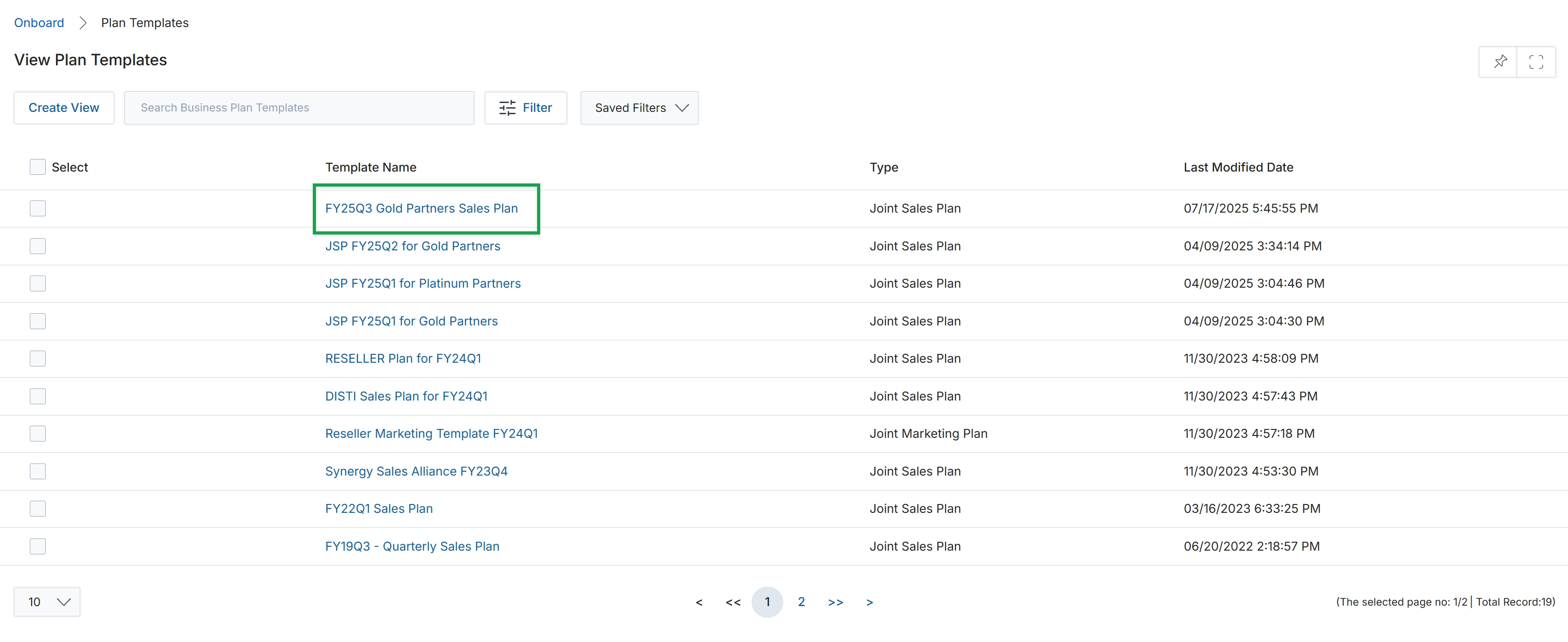
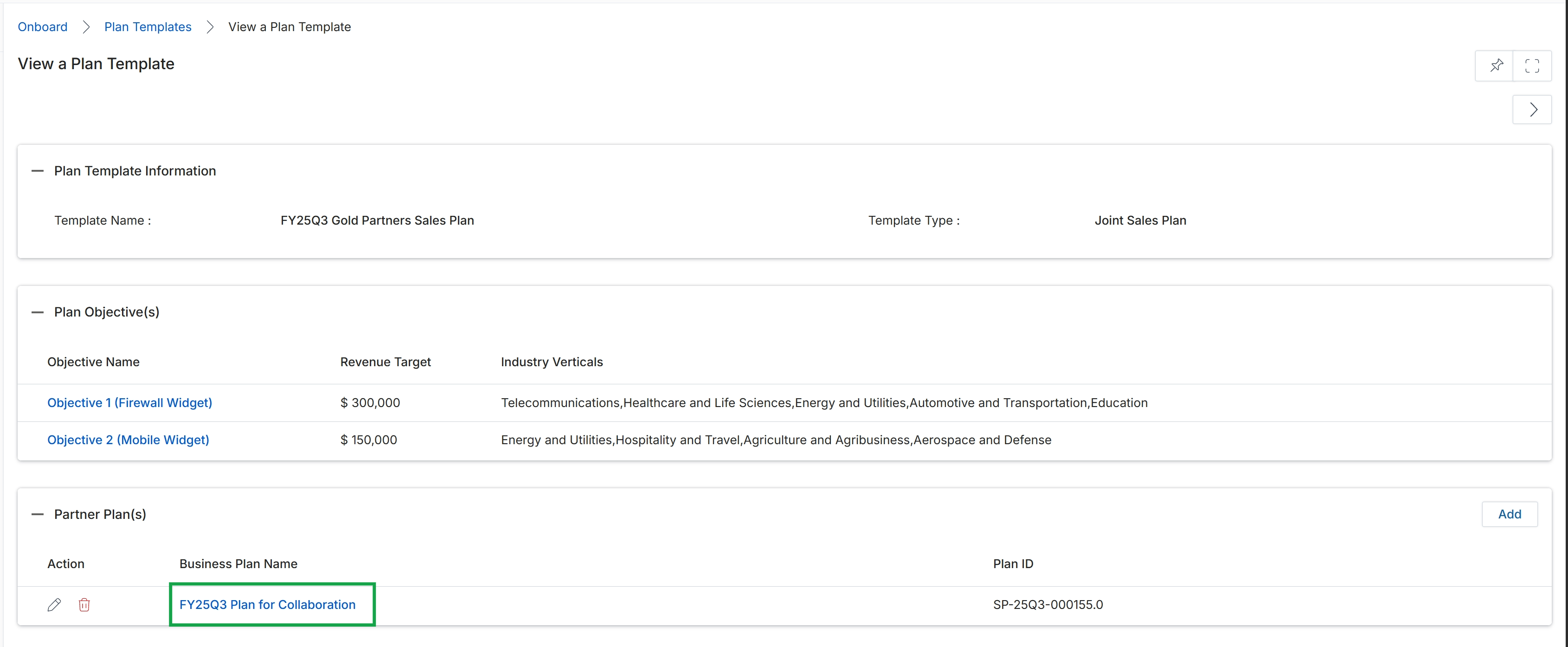
Click the FY25Q3 Gold Partners Sales Plan link.
Reviewing Template Details and Objectives
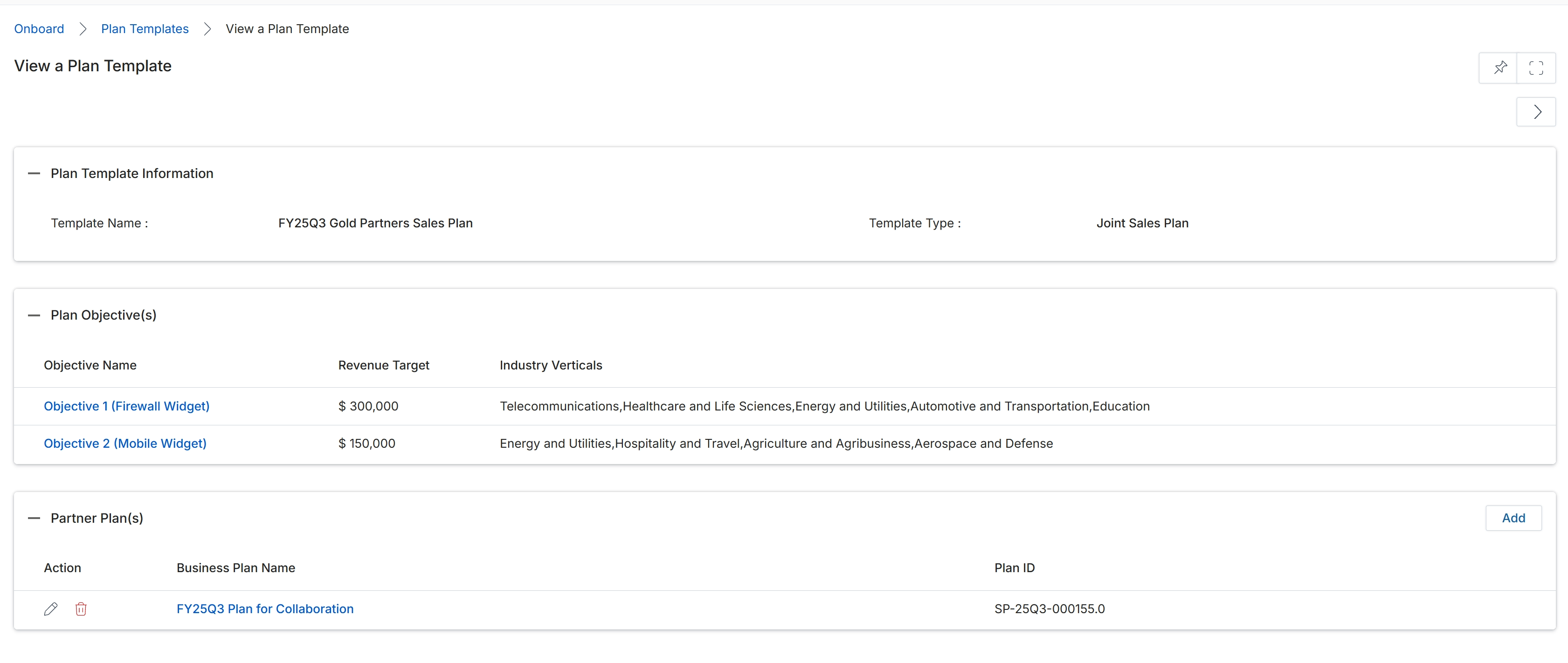
This screen provides a comprehensive view of a specific Plan Template, detailing its configuration and associated elements. Plan Templates are foundational structures used to define the objectives and framework for partner business plans within the UPM. This view allows administrators to review the template's general information, such as its name and type, as well as the specific objectives it outlines, including revenue targets and target industries. It also lists any individual partner plans that have been created using this template, providing a consolidated overview of its application across the partner ecosystem. This screen serves as a central point for understanding the design and deployment of strategic partner initiatives.
Review the details of the selected Plan Template, including its objectives and any associated partner plans.
Buttons
| Button | Description |
|---|---|
| Add | Adds a new partner plan to this template. |
Plan Template Information
| Field | Description |
|---|---|
| Template Name | The name assigned to this specific plan template. |
| Template Type | The category or type of this plan template, such as 'Joint Sales Plan'. |
Plan Objective(s)
| Column | Description |
|---|---|
| Objective Name | The name of a specific objective defined within this plan template. |
| Revenue Target | The financial goal associated with this objective. |
| Industry Verticals | The specific industries or market segments targeted by this objective. |
Partner Plan(s)
| Column | Description |
|---|---|
| Action | Contains icons to edit or delete the associated partner plan. |
| Business Plan Name | The name of a partner business plan created from this template. |
| Plan ID | A unique identifier for the partner business plan. |
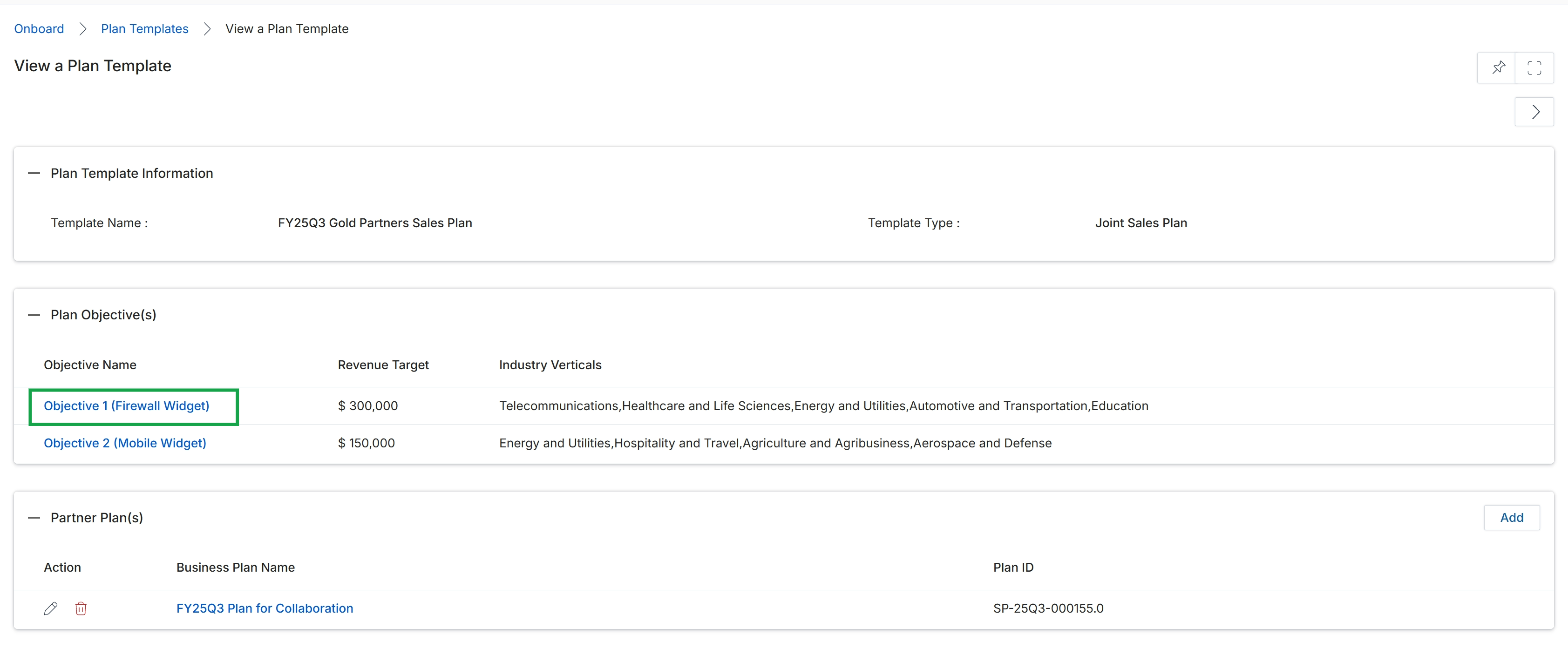
Click Objective 1 (Firewall Widget).
Inspecting Quarterly Objective Information
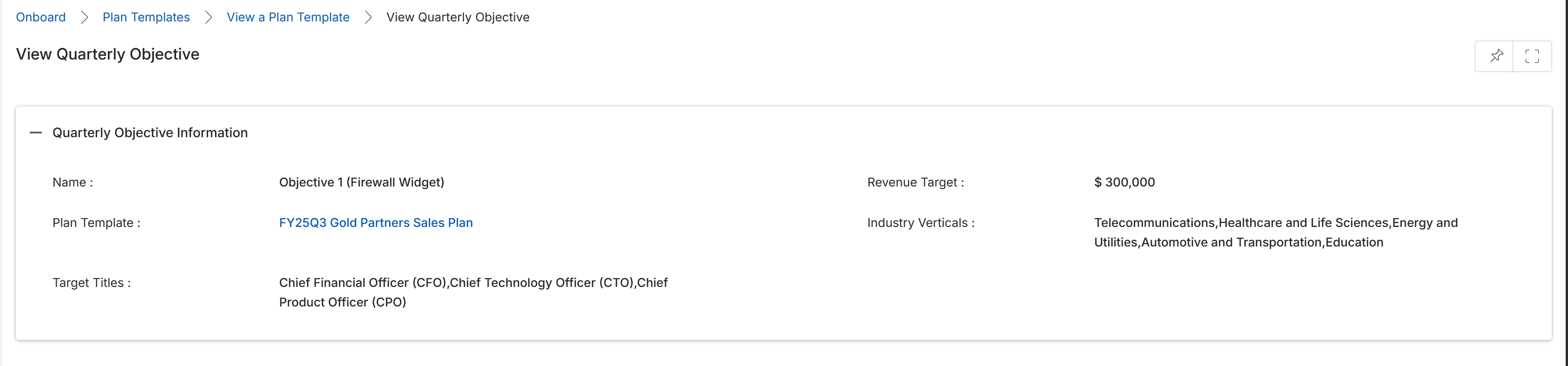
This screen displays the detailed information for a specific Quarterly Objective within a Plan Template. Quarterly Objectives are components of broader business plans that partners create and manage, often defining specific targets such as revenue goals, target industries, or key roles to engage. This view provides a read-only summary of the objective's configuration, including its name, associated plan template, revenue targets, relevant industry verticals, and target job titles. These objectives help structure partner activities and provide measurable goals for performance tracking within the partner program.
Review the details of the selected Quarterly Objective.
Quarterly Objective Information
| Field | Description |
|---|---|
| Name | The name of the quarterly objective, identifying its purpose or focus. |
| Revenue Target | The financial goal set for this quarterly objective. |
| Plan Template | The name of the business plan template to which this objective belongs. |
| Industry Verticals | The specific industries or sectors that this objective targets. |
| Target Titles | The job titles of individuals or roles that are the focus of this objective. |
Viewing Associated Partner Plans
Click the View a Plan Template link in the breadcrumb.
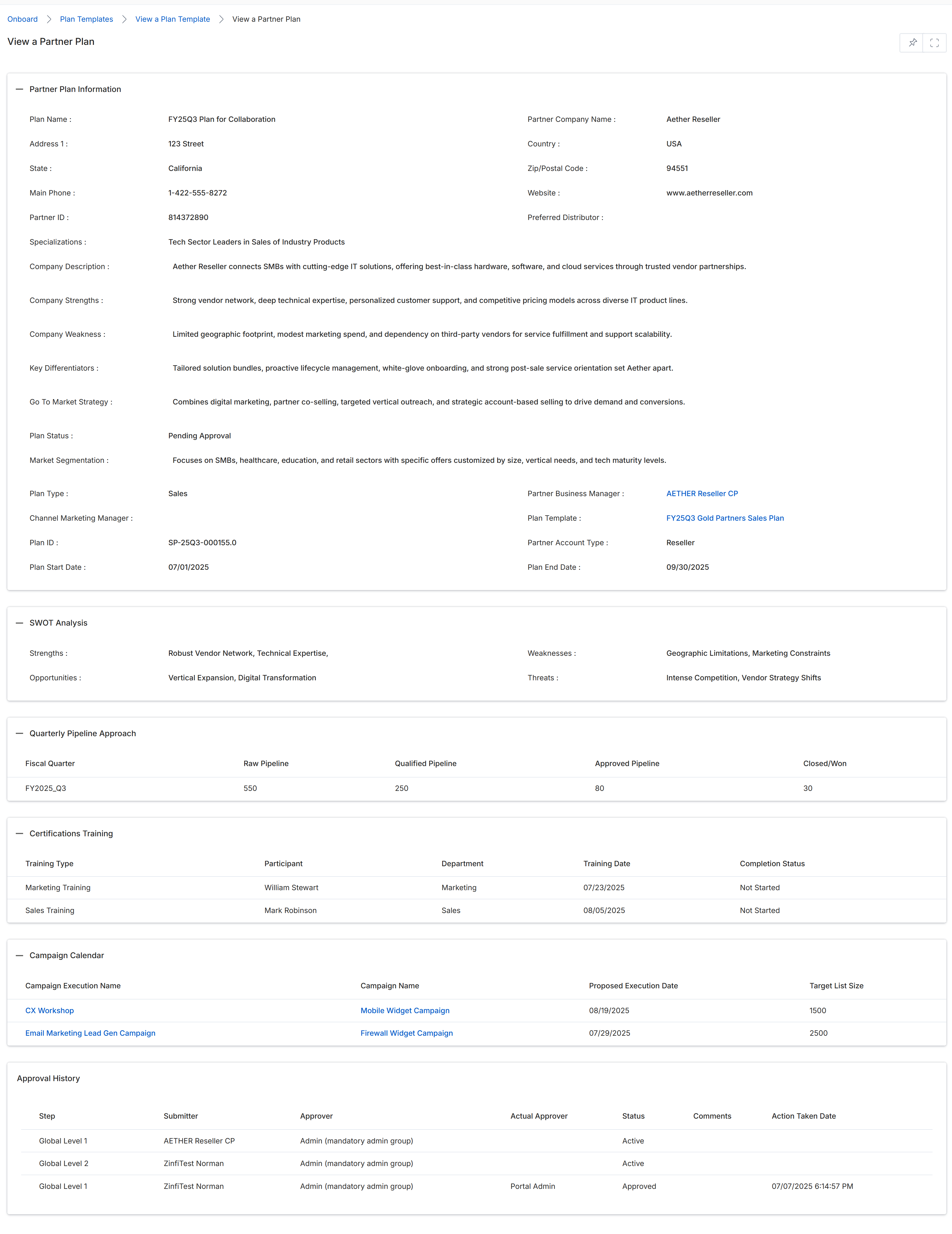
This screen displays a comprehensive overview of a specific partner business plan, detailing its current status and various strategic components. It provides administrators with a consolidated view of the plan's information, including the partner's profile, a SWOT analysis, quarterly pipeline targets, planned training certifications, and a campaign calendar. The view also includes a detailed approval history, showing the progression and status of the plan through different review stages within the platform's workflow.
Frequently asked questions
- What is the purpose of viewing a plan template?
Viewing a plan template allows administrators to understand the structured frameworks provided to partners for their planning. It helps them review template details, objectives, and any partner-specific plans created from them.
- What information can I see on the Plan Template details screen?
The Plan Template details screen shows general template information like its name and type, specific objectives including revenue targets, and a list of individual partner plans created using that template.
- How do administrators use plan templates?
Administrators use plan templates to guide partners in developing comprehensive business plans. By reviewing templates and derived partner plans, they monitor progress and ensure partners align with vendor goals.
- What details are included in a Quarterly Objective?
A Quarterly Objective details screen displays its name, associated plan template, revenue targets, relevant industry verticals, and target job titles. These objectives help structure partner activities and provide measurable goals.
- What information is available when viewing an associated partner business plan?
Viewing an associated partner business plan provides an overview of its current status, the partner's profile, a SWOT analysis, quarterly pipeline targets, planned training, campaign calendar, and approval history.