

Overview
The Referral Management module is crucial for tracking and processing sales opportunities generated by partners through referrals. When a partner identifies a potential customer and submits it as a referral, the vendor needs a clear and structured way to review, manage, and track its progress. This module provides administrators with the tools to gain full visibility into the referral pipeline, from initial submission to final resolution.
Administrators can access detailed information for each referral, including account and contact details, estimated value, sales stage, and associated products. This transparency ensures that vendor teams can effectively evaluate, accept, or reject referrals, and collaborate with partners to move deals forward, ultimately contributing to commission calculations and overall program success.
Viewing the Referral Deals List
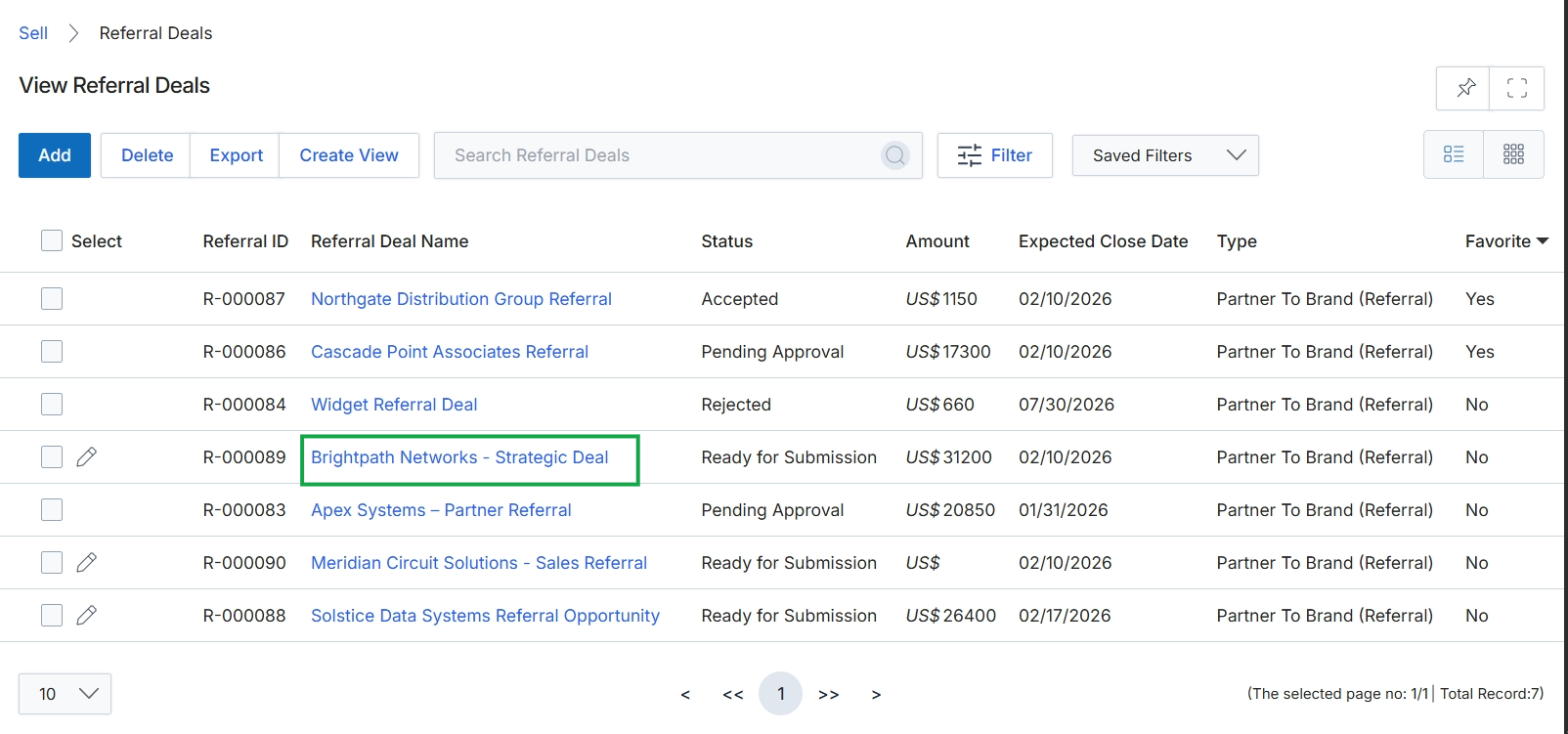
Click the Brightpath Networks - Strategic Deal link.
Accessing Referral Deal Details
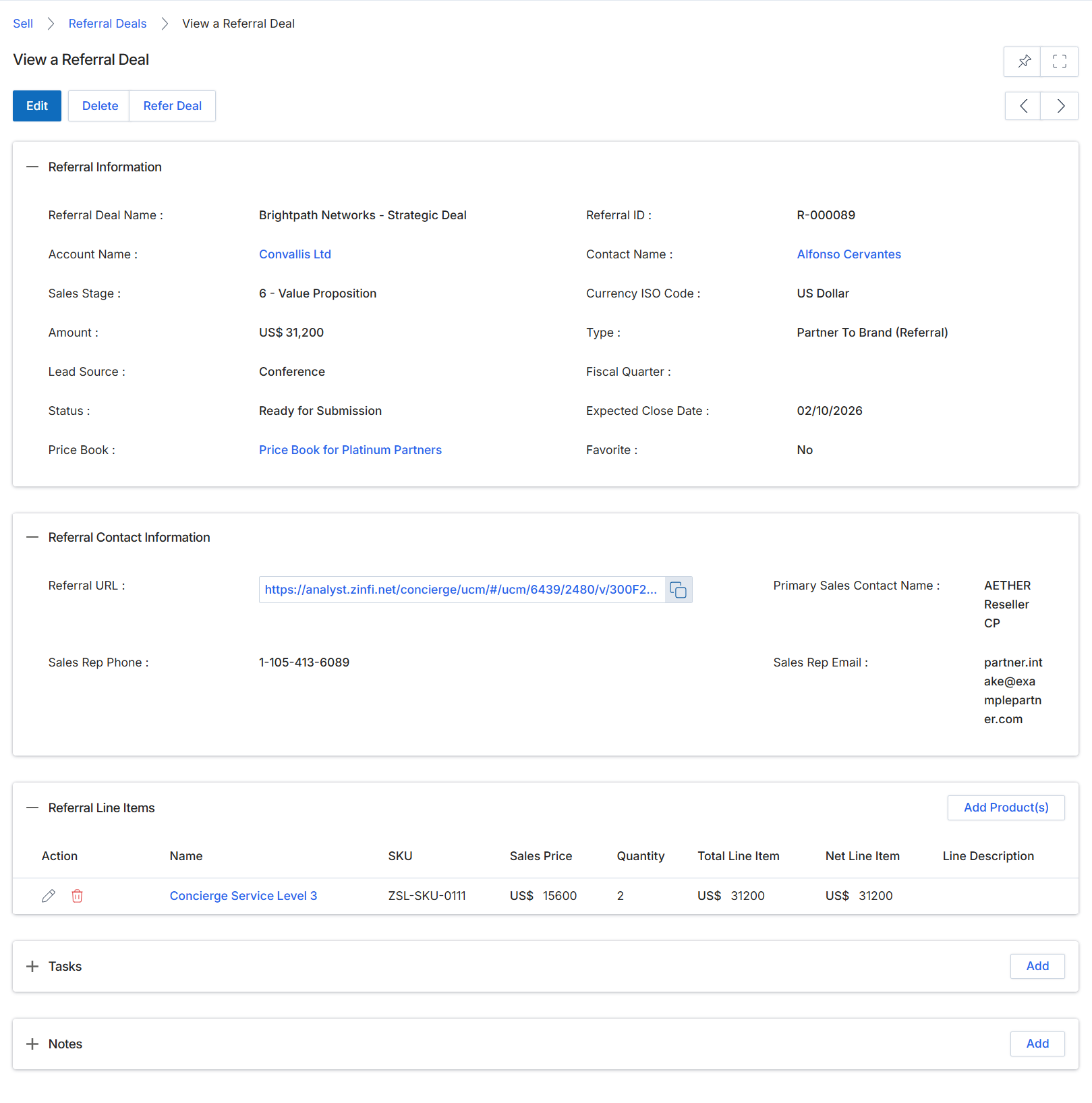
This screen displays the comprehensive details of a specific Referral Deal, which represents a qualified sales opportunity submitted by a partner that has generated revenue. Referral Deals are a basis for calculating referral commissions within the Incentivize module. The view is organized into distinct sections, providing a complete overview of the deal's general information, associated contact details, and the specific products or services included as line items. This detailed record allows vendor administrators to review the deal's progress, verify its components, and ensure all necessary information is captured for tracking and commission purposes. It serves as a central point for understanding the specifics of a partner-generated revenue event.
Review the detailed information for the selected Referral Deal, including its general attributes, contact information, and associated line items.
Buttons
| Button | Description |
|---|---|
| Edit | Allows modification of the Referral Deal's details. |
| Delete | Removes the Referral Deal record from the system. |
| Refer Deal | Initiates a process to refer this deal, potentially to another partner or internal sales team. |
| Add Product(s) | Adds new products or services to the referral deal's line items. |
| Add | Adds a new task related to this referral deal. |
| Add | Adds a new note or comment to this referral deal. |
Referral Information
| Field | Description |
|---|---|
| Referral Deal Name | The name or title assigned to this referral deal. |
| Account Name | The name of the company associated with this referral deal. |
| Sales Stage | The current stage of the sales process for this referral deal. |
| Amount | The total monetary value of the referral deal. |
| Lead Source | The origin or channel through which this lead was identified. |
| Status | The current processing status of the referral deal. |
| Price Book | The price book used for pricing products or services within this deal, indicating partner tier-specific pricing. |
| Referral ID | A unique identifier assigned to this referral deal. |
| Contact Name | The primary contact person associated with the referral deal. |
| Currency ISO Code | The ISO currency code used for the deal's monetary values. |
| Type | The classification or category of the referral, such as 'Partner To Brand (Referral)'. |
| Fiscal Quarter | The fiscal quarter in which the deal is expected to close or was closed. |
| Expected Close Date | The anticipated date for the deal to be finalized. |
| Favorite | Indicates if the deal is marked as a favorite. |
Referral Contact Information
| Field | Description |
|---|---|
| Referral URL | A URL associated with the referral, potentially linking to an external system or detailed record. |
| Sales Rep Phone | The phone number of the sales representative handling the deal. |
| Primary Sales Contact Name | The name of the primary sales contact for this referral. |
| Sales Rep Email | The email address of the sales representative. |
Referral Line Items
| Column | Description |
|---|---|
| Action | Actions available for each line item, such as edit or delete. |
| Name | The name of the product or service included in the line item. |
| SKU | The Stock Keeping Unit (SKU) for the product or service. |
| Sales Price | The unit sales price of the product or service. |
| Quantity | The number of units for the product or service. |
| Total Line Item | The total price for the quantity of the product or service. |
| Net Line Item | The net price for the quantity of the product or service after any discounts. |
| Line Description | A brief description of the product or service line item. |
Managing Referral Deal Status and Approval History
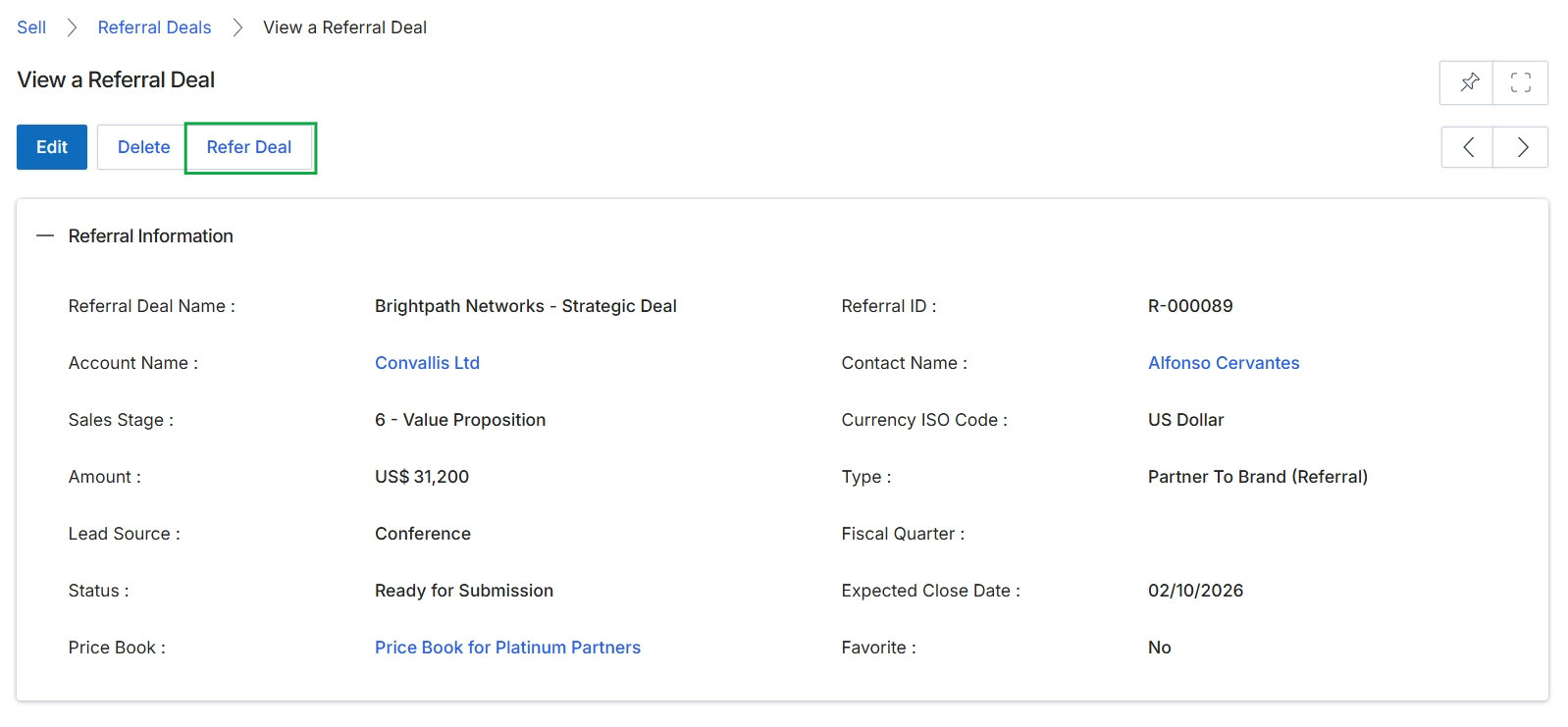
Click the Refer Deal button.
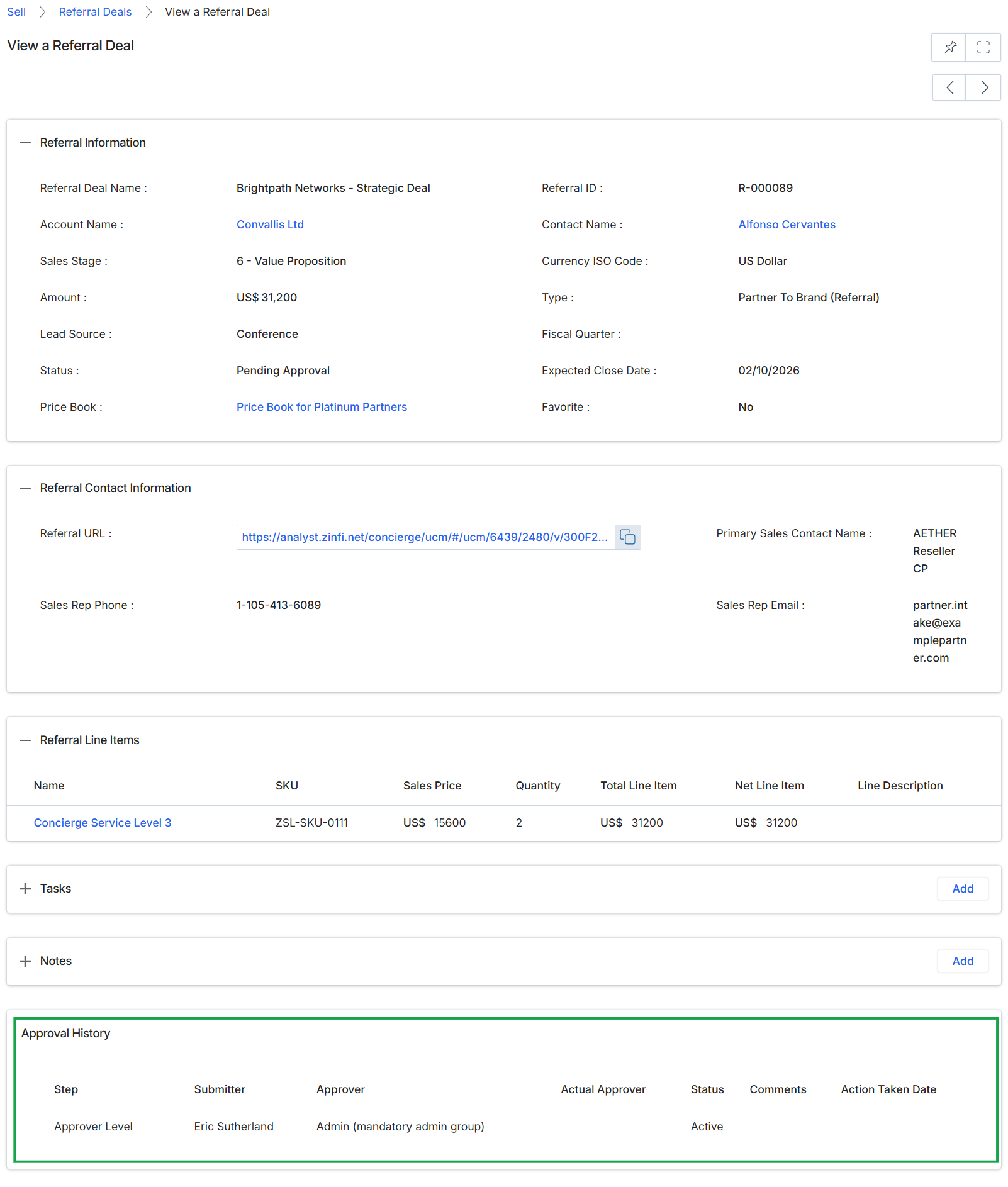
This screen provides a comprehensive view of a specific Referral Deal, allowing vendor-side users to review all associated details. Referral Deals represent qualified sales opportunities submitted by partners that have generated revenue, serving as the basis for referral commissions in the Incentivize module. This detailed view displays critical information such as the deal's status, estimated value, associated contacts, and product line items. It also includes an approval history section, which tracks the workflow and status of the deal's review process. Administrators use this screen to monitor the progress of referred deals, verify information, and ensure proper commission calculation upon deal closure.
Review the detailed information for the selected Referral Deal, including its status, contact information, line items, and approval history.
Buttons
| Button | Description |
|---|---|
| Add | Adds a new task related to this referral deal. |
| Add | Adds a new note or comment to this referral deal. |
Referral Information
| Field | Description |
|---|---|
| Referral Deal Name | The name given to the referral deal by the submitting partner. |
| Account Name | The name of the company associated with this referral deal. |
| Sales Stage | The current stage of the sales process for this referral. |
| Amount | The estimated monetary value of the referral deal. |
| Lead Source | The origin or method by which the partner identified this lead. |
| Status | The current approval status of the referral deal, indicating its position in the review workflow. |
| Price Book | The price book used for this referral deal, which determines product pricing based on partner tier. |
| Referral ID | A unique identifier assigned to the referral deal. |
| Contact Name | The primary contact person associated with the referral deal. |
| Currency ISO Code | The ISO currency code used for the deal's monetary values. |
| Type | The classification or type of the referral, such as 'Partner To Brand (Referral)'. |
| Fiscal Quarter | The fiscal quarter in which the deal is expected to close. |
| Expected Close Date | The anticipated date by which the deal is expected to close. |
| Favorite | Indicates if the referral deal has been marked as a favorite. |
Referral Contact Information
| Field | Description |
|---|---|
| Referral URL | A direct link to the referral's details within the platform. |
| Primary Sales Contact Name | The name of the primary sales contact for this referral. |
| Sales Rep Phone | The phone number of the sales representative associated with the referral. |
| Sales Rep Email | The email address of the sales representative associated with the referral. |
Referral Line Items
| Column | Description |
|---|---|
| Name | The name of the product or service included in the referral. |
| SKU | The Stock Keeping Unit (SKU) for the product or service. |
| Sales Price | The individual sales price of the product or service. |
| Quantity | The number of units for the product or service. |
| Total Line Item | The total price for the line item (Sales Price x Quantity). |
| Net Line Item | The net price for the line item after any discounts. |
| Line Description | A brief description of the product or service line item. |
Approval History
| Column | Description |
|---|---|
| Step | The name or identifier of the approval step in the workflow. |
| Submitter | The user who initiated or submitted the approval step. |
| Approver | The role or group designated to approve this step. |
| Actual Approver | The specific user who performed the approval action. |
| Status | The current status of the approval step (e.g., Active, Approved, Rejected). |
| Comments | Any comments or notes provided during the approval process. |
| Action Taken Date | The date and time when the approval action was taken. |