

Overview
The UPM Email Marketing Management application empowers both vendors and their partners to execute effective email marketing campaigns. Vendors can design and share email templates with partners, who can then customize these templates to align with their branding while maintaining vendor guidelines. This co-branding capability ensures consistent messaging across the partner ecosystem while allowing for local market relevance.
This application is designed to move beyond generic email blasts, enabling highly personalized communications through data-driven segmentation and integration with existing marketing tools via UPM's Connectors. It provides robust analytics to track key metrics like open rates, click-through rates, and ultimately, conversion rates, allowing administrators to compare marketing spend against generated deals to calculate the true ROI of each campaign. The seamless synchronization of contacts and automatic management of bounces and unsubscribes ensure data accuracy and compliance, making it a powerful tool for lead nurturing and revenue generation.
Key Features
- Higher Conversion Rates
- Seamlessly Synced Contacts
- Highly Personalized Emails
- ROI Measurement
- Advanced Segmentation
- Co-branded Email Templates
- Multi-touch Campaigns
- Integration with Marketing Tools
Email Creation and Management
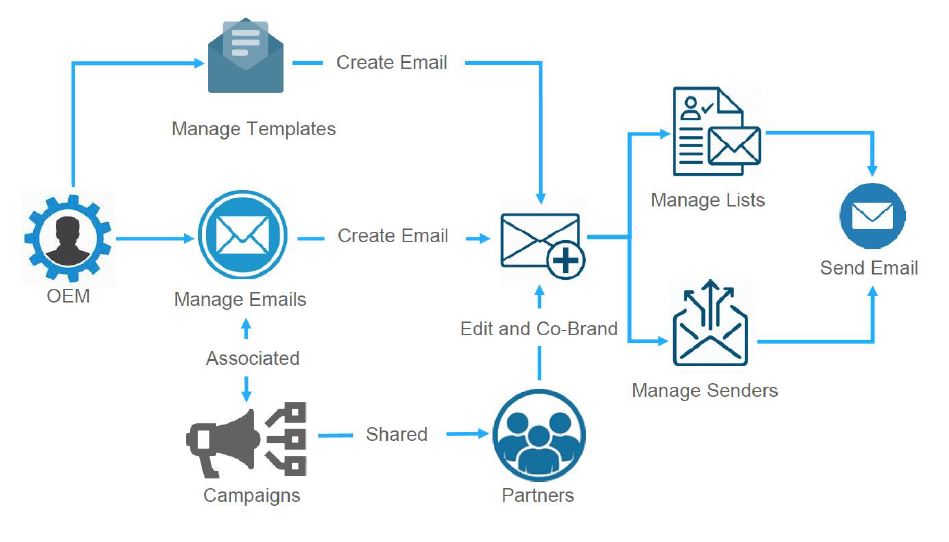
This diagram illustrates the comprehensive workflow for email marketing within UPM, detailing how both vendors (OEMs) and partners collaborate to create, customize, and send emails. It shows the vendor's role in managing email templates and overall email campaigns, which are then shared with partners. Partners can then edit and co-brand these emails, leveraging managed mailing lists and sender profiles before the final email dispatch. This process ensures brand consistency while allowing partners the flexibility to personalize communications.
Frequently asked questions
- What is the purpose of the the platform Email Marketing Management application?
It is a comprehensive tool for vendors and partners to create, manage, and send co-branded email campaigns. This module aims to generate leads and drive conversions through multi-touch marketing strategies.
- How do vendors and partners collaborate using this application?
Vendors design and share email templates, which partners then customize to align with their branding while adhering to vendor guidelines. This co-branding ensures consistent messaging.
- What are some key features of the Email Marketing Management application?
Key features include co-branded email templates, advanced segmentation, highly personalized emails, ROI measurement, seamlessly synced contacts, and integration with other marketing tools.
- How does the application help optimize email campaigns?
It provides robust analytics to track metrics like open rates, click-through rates, and conversion rates. This allows administrators to compare marketing spend against generated deals to calculate campaign ROI.
- What role do mailing lists and sender profiles play in the workflow?
Partners leverage managed mailing lists and sender profiles before dispatching emails. This ensures proper targeting and sender reputation for their personalized communications.