

Overview
Email marketing is a critical component of partner enablement and communication within the UPM platform. Both vendors and partners leverage email campaigns to engage prospects, nurture leads, and disseminate important information. This module provides the administrative oversight necessary to monitor all email activities, ensuring compliance, tracking performance, and troubleshooting delivery issues.
By offering a comprehensive view of all outgoing emails, UPM helps administrators maintain visibility into the effectiveness of marketing efforts, whether they are vendor-led campaigns or partner-executed initiatives. This transparency is vital for optimizing email strategies, supporting partners in their marketing endeavors, and ensuring consistent messaging across the channel.
Accessing and Viewing Outgoing Emails
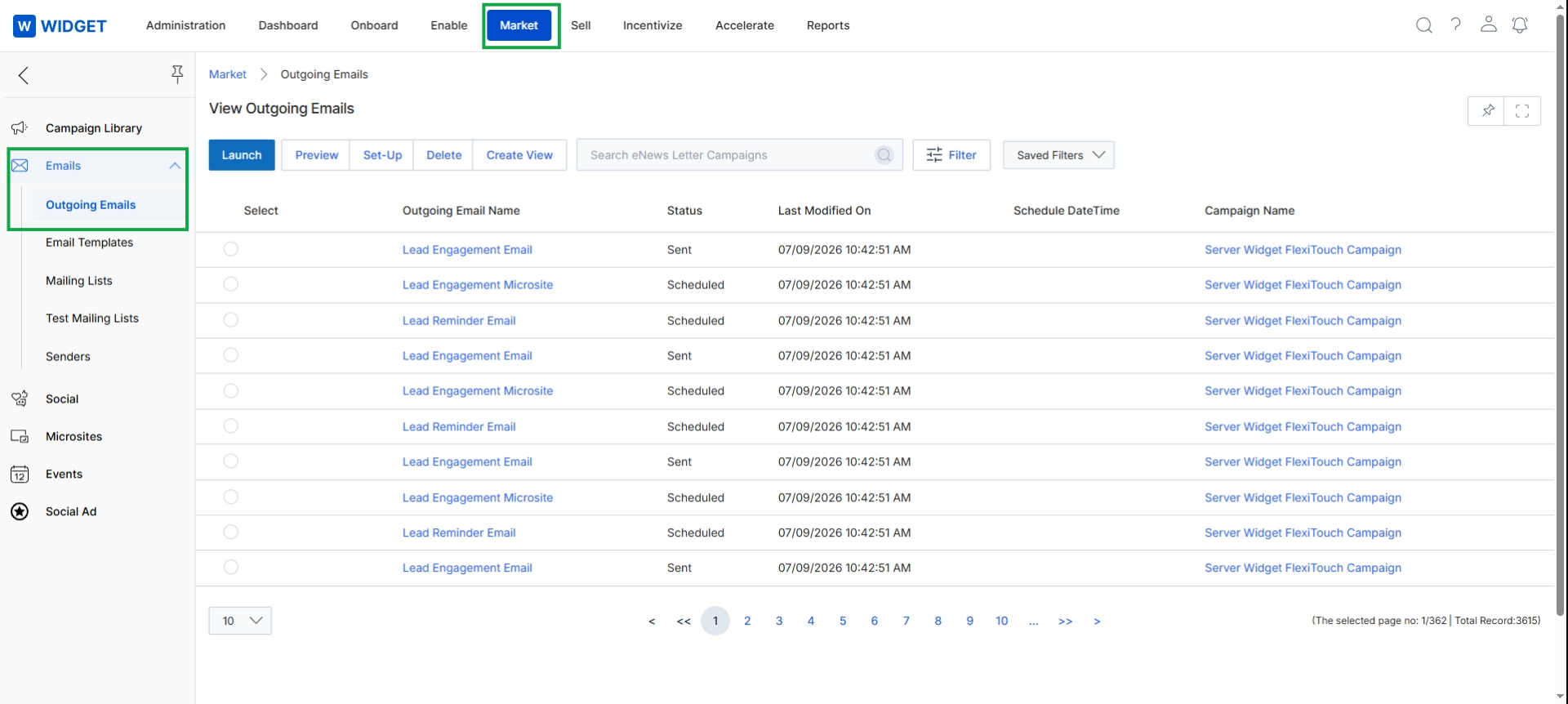
Click Market → Emails → Outgoing Emails.
Filtering and Customizing the View
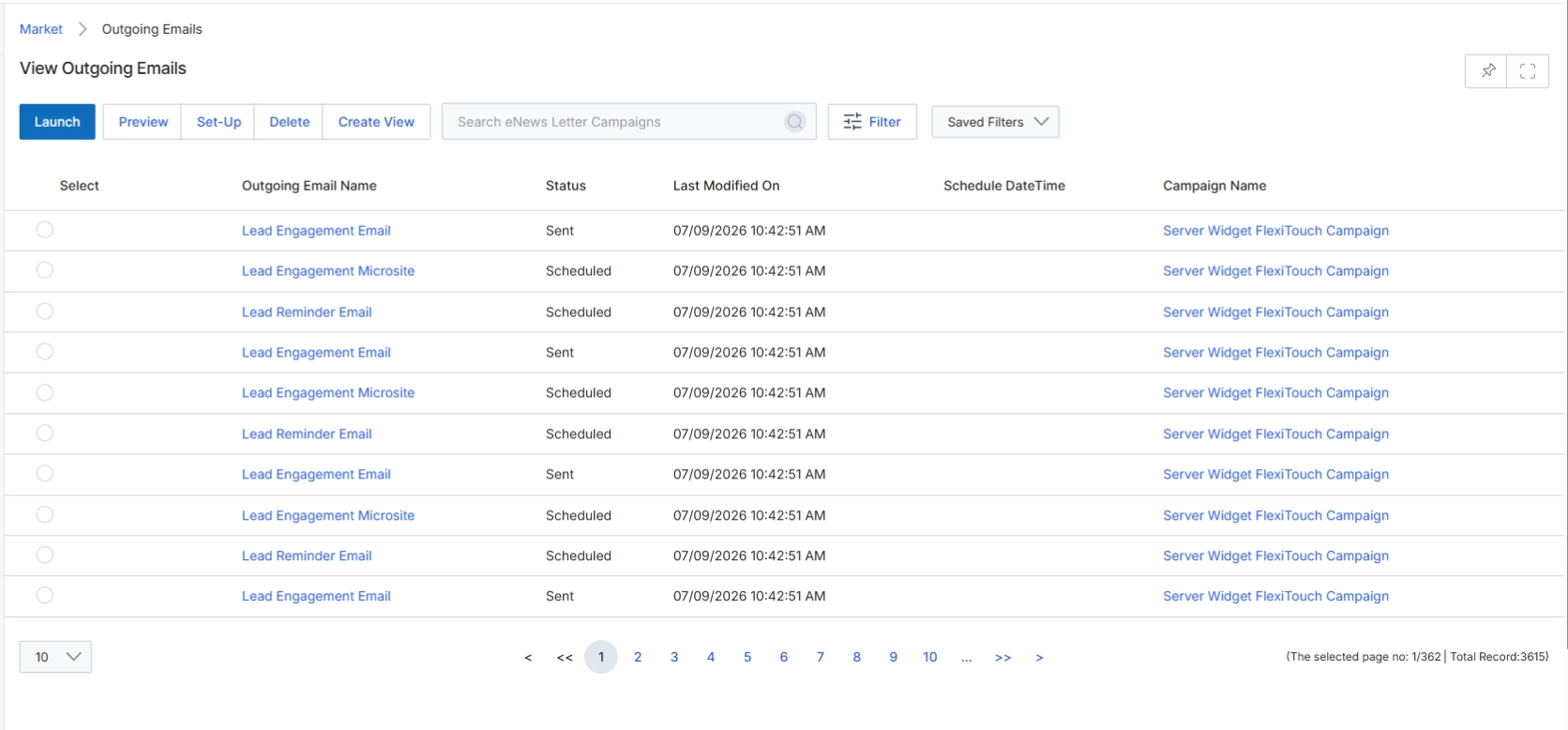
The Outgoing Emails list view provides a comprehensive overview of all email campaigns that have been sent or are scheduled to be sent through the UPM platform. This screen is part of the Market module, which enables vendors and partners to execute co-marketing activities, including email campaigns. Users can monitor the status of their email sends, review key details such as the last modification date and scheduled send times, and associate emails with specific campaigns. This view supports the workflow of managing email marketing efforts by allowing users to track performance and manage existing email assets.
Review the available buttons and columns on the Outgoing Emails list view.
Buttons
| Button | Description |
|---|---|
| Launch | Initiates the process to send a selected email campaign. |
| Preview | Displays a preview of the selected email campaign content. |
| Set-Up | Configures the settings and details for a selected email campaign. |
| Delete | Removes the selected email campaign from the system. |
| Create New | Opens a form or wizard to create a new outgoing email campaign. |
| Filter | Applies filters to narrow down the list of displayed email campaigns. |
| Saved Filters | Provides access to previously saved filter configurations for quick application. |
Fields
| Field | Description |
|---|---|
| Search eNews Letter Campaigns | Allows users to search for specific email campaigns by name. |
Column Headings
| Column | Description |
|---|---|
| Select | Checkbox to select individual email campaigns for bulk actions. |
| Outgoing Email Name | The name assigned to the outgoing email campaign. |
| Status | Indicates the current state of the email campaign, such as 'Sent' or 'Scheduled'. |
| Last Modified On | The date and time when the email campaign was last updated. |
| Schedule Date Time | The planned date and time for the email campaign to be sent. |
| Campaign Name | The name of the broader campaign to which the outgoing email belongs. |
CreateView
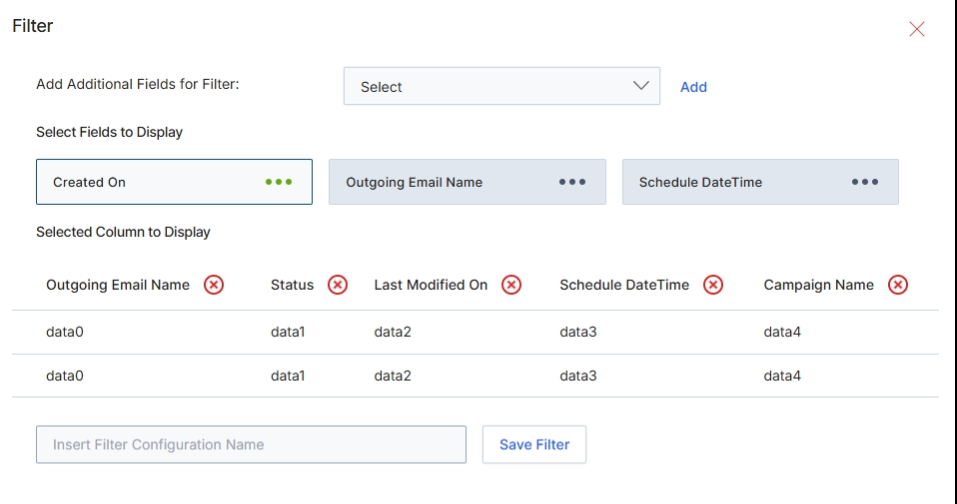
This 'Filter' slide panel allows users to customize the display and filtering criteria for the 'View Outgoing Emails' list. It enables dynamic adjustment of which columns are visible in the main table and which fields can be used for filtering the email records. By providing options to add additional filter fields and select specific columns for display, this panel enhances the user's ability to manage and analyze their email marketing campaigns within the Market module, supporting tasks like performance monitoring and data segmentation. The configuration made here can be saved as a custom view for future use, streamlining repetitive analysis tasks.
Select 'Created On' from the 'Add Additional Fields for Filter' dropdown, then click 'Add' to include it as a filter option.
Buttons
| Button | Description |
|---|---|
| Add | Adds the selected field from the 'Add Additional Fields for Filter' dropdown to the filter options. |
| Save Filter | Saves the current filter and display column configuration as a named view. |
Fields
| Field | Description |
|---|---|
| Add Additional Fields for Filter | A dropdown menu to select additional fields that can be used to filter the 'Outgoing Emails' list. |
| Insert Filter Configuration Name | An input field to provide a name for the custom filter configuration, allowing it to be saved for future use. |
Select Fields to Display
| Field | Description |
|---|---|
| Created On | A selected field that can be used for filtering or displayed as a column, indicating the creation date of the outgoing email. |
| Outgoing Email Name | A selected field representing the name of the outgoing email, available for display or filtering. |
| Schedule DateTime | A selected field indicating the scheduled date and time for the outgoing email, available for display or filtering. |
Column Headings
| Column | Description |
|---|---|
| Outgoing Email Name | A column header for the name of the outgoing email in the preview table. |
| Status | A column header for the status of the outgoing email in the preview table. |
| Last Modified On | A column header for the last modification date of the outgoing email in the preview table. |
| Schedule DateTime | A column header for the scheduled date and time of the outgoing email in the preview table. |
| Campaign Name | A column header for the associated campaign name of the outgoing email in the preview table. |
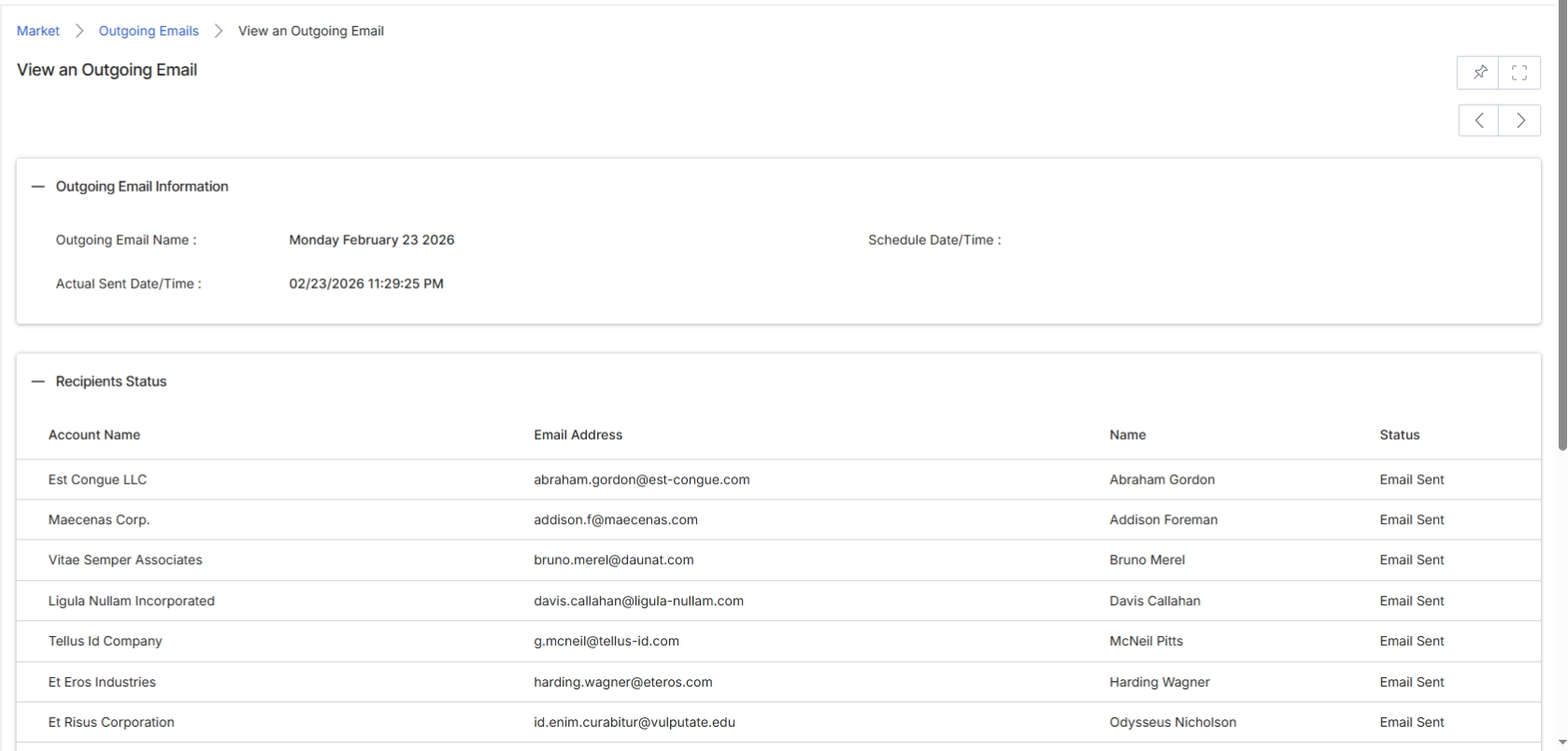
This screen displays the detailed information for a specific outgoing email, providing a comprehensive overview of its properties and the status of its delivery to individual recipients. Outgoing emails are a core component of the Market module's email campaign execution workflow, allowing vendors and partners to send targeted communications. This view consolidates key email metadata, such as the email's name and scheduling, alongside a granular breakdown of each recipient's delivery status. This level of detail is crucial for monitoring campaign performance, troubleshooting delivery issues, and ensuring compliance with communication policies, directly supporting the tracking and reporting capabilities outlined in the email campaign execution workflow.
View the details of an Outgoing Email, including its general information and the status of its recipients.
Outgoing Email Information
| Field | Description |
|---|---|
| Outgoing Email Name | The name of the outgoing email, typically reflecting the campaign or purpose. |
| Schedule Date/Time | The planned date and time for the email to be sent. |
| Actual Sent Date/Time | The actual date and time when the email was dispatched by the system. |
Column Headings
| Column | Description |
|---|---|
| Account Name | The name of the account associated with the recipient. |
| Email Address | The email address of the individual recipient. |
| Name | The name of the individual recipient. |
| Status | The delivery status of the email for each recipient (e.g., Sent, Delivered, Bounced, Opened, Clicked). |