

Overview
The co-sell marketplace within the Accelerate module empowers partners to showcase their products, services, and pre-built integrations to other members of the partner ecosystem. By facilitating discovery between technology partners, system integrators, and resellers, the marketplace establishes the groundwork for strategic alliances, solution bundling, and shared deal pipeline development.
Through the Add/Edit Listing interface, administrators and partners define rich listing profiles that ensure ecosystem quality and discoverability. Profiles capture essential marketing descriptions, industry alignment, media assets, pricing tiers, and direct technical requirements, enabling prospective partners and customers to evaluate compatibility and initiate joint co-sell workspaces.
Key Features
- Co-sell Marketplace Listings
- Offering Classification & Categorization
- Industry & Vertical Targeting
- Collateral & Media Management
- Pricing & Co-Sell Configuration
- Technical Integration Specifications
- Listing Publication Workflow
Navigating Marketplace Listings
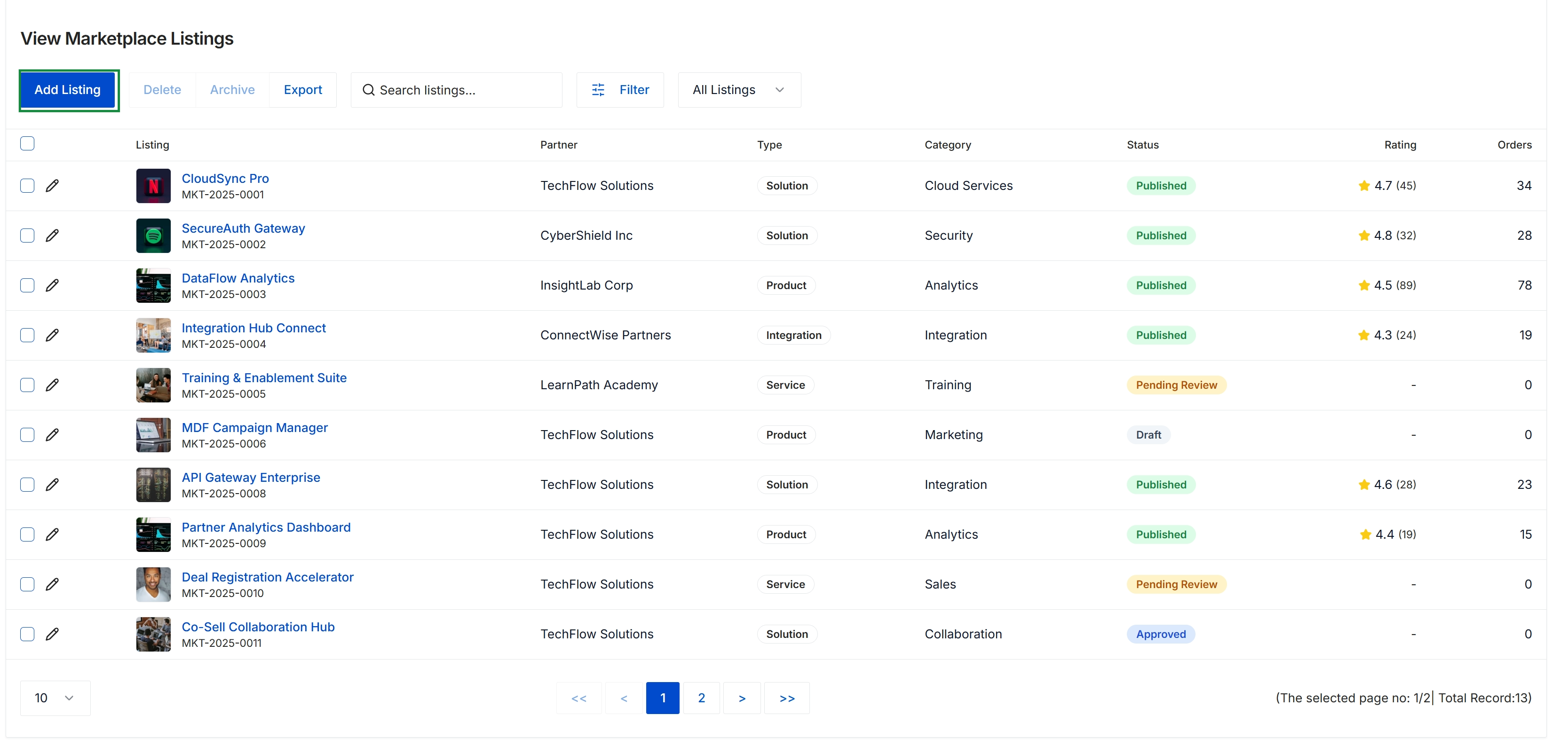
Click Add Listing.
Configuring Listing Details and Media
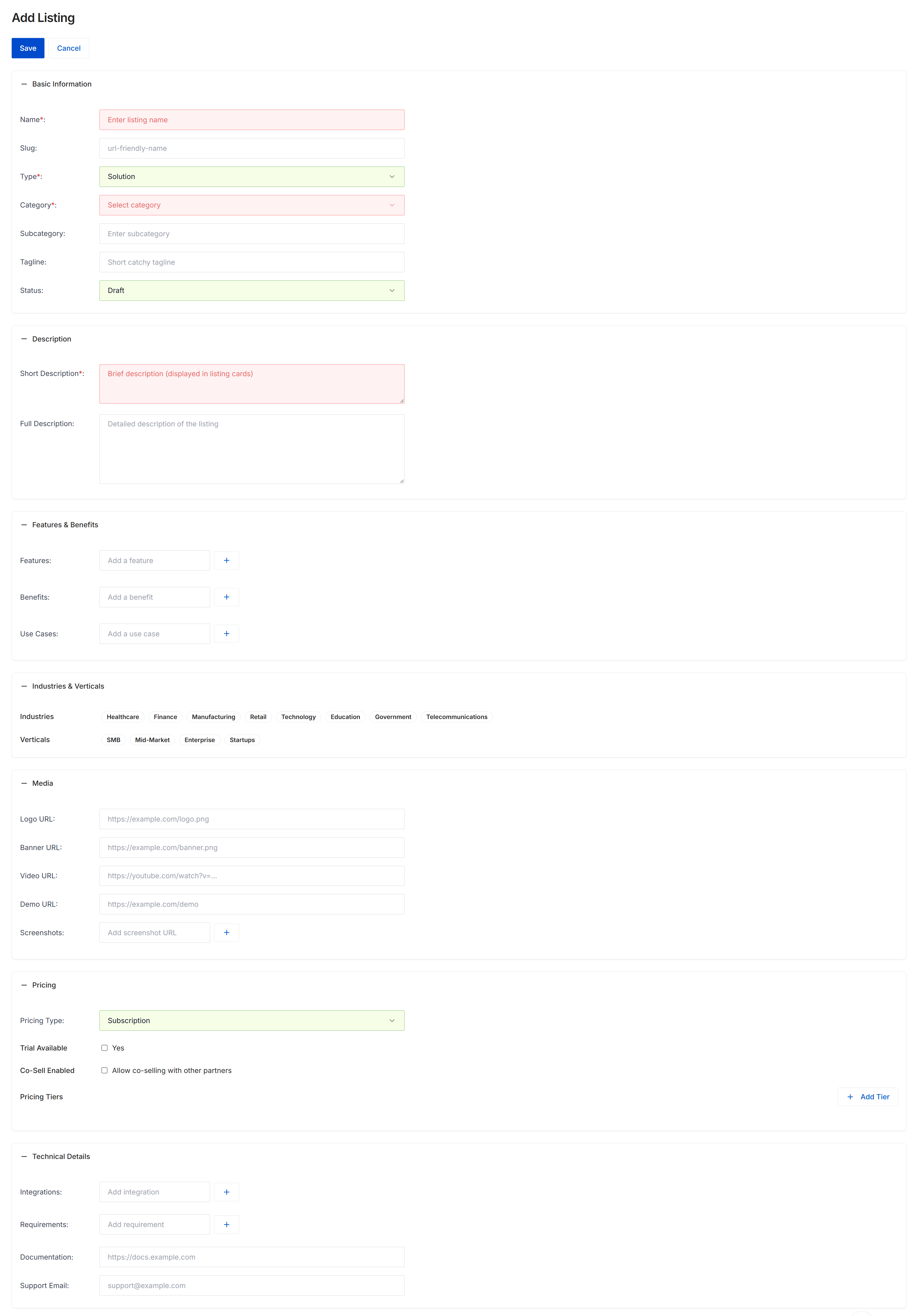
The Add Listing form allows administrators and partners to configure solution and service offerings published in the co-sell marketplace. Within the Accelerate module, marketplace listings enable partners—such as independent software vendors, systems integrators, and value-added resellers—to showcase complementary solutions, identify joint go-to-market opportunities, and initiate co-selling partnerships across the vendor ecosystem. The form captures comprehensive offering metadata including categorization, target industry verticals, pricing structure, promotional media, and technical integration specifications. Listings created here can be saved as drafts or published to the marketplace catalog following administrative approval.
Fill out the listing details across the configuration sections to define the marketplace offering.
Buttons
| Button | Description |
|---|---|
| Save | Saves the marketplace listing record. |
| Cancel | Discards unsaved changes and returns to the marketplace listing management view. |
| Add Tier | Adds a new pricing package or tier to the offering structure. |
Basic Information
| Field | Description |
|---|---|
| Name | The public title of the solution or service offering. |
| Slug | A URL-friendly permalink identifier for the listing page. |
| Type | The classification of the listing, such as Solution or Service. |
| Category | The primary category grouping under which the offering appears in marketplace filters. |
| Subcategory | A secondary categorization to further refine the offering classification. |
| Tagline | A concise headline summarizing the solution value proposition. |
| Status | The lifecycle state of the listing, such as Draft or Published. |
Description
| Field | Description |
|---|---|
| Short Description | A brief summary displayed on marketplace listing cards and catalog search results. |
| Full Description | An in-depth explanation of the solution, architecture, and business value. |
Features & Benefits
| Field | Description |
|---|---|
| Features | Individual solution capabilities added via text input. |
| Benefits | Key business outcomes and customer value points delivered by the solution. |
| Use Cases | Specific customer scenarios and problem statements addressed by the offering. |
Industries & Verticals
| Field | Description |
|---|---|
| Industries | Industry sector tags targeted by the offering, such as Healthcare, Finance, and Technology. |
| Verticals | Target company size tiers, including SMB, Mid-Market, Enterprise, and Startups. |
Media
| Field | Description |
|---|---|
| Logo URL | The web address pointing to the product or company logo image. |
| Banner URL | The web address pointing to the header banner image displayed on the listing profile. |
| Video URL | A link to an external video walkthrough or product demonstration. |
| Demo URL | The web address linking to an interactive demo or trial environment. |
| Screenshots | Image links showcasing product interfaces and screenshots. |
Pricing
| Field | Description |
|---|---|
| Pricing Type | The billing structure for the listing, such as Subscription or One-time. |
| Trial Available | Indicates whether prospective customers or partners can access a free trial. |
| Co-Sell Enabled | Enables joint go-to-market and co-selling collaboration with other ecosystem partners. |
Technical Details
| Field | Description |
|---|---|
| Integrations | Supported third-party platforms, tools, and system integrations. |
| Requirements | Prerequisites, system requirements, or dependencies needed to run the solution. |
| Documentation | The web URL pointing to external technical guides, API references, or documentation. |
| Support Email | The contact email address designated for partner inquiries and technical assistance. |
Frequently asked questions
- Who can create and manage marketplace listings?
Both administrators and channel partners can create, configure, and maintain solution or service profiles within the co-sell marketplace.
- What media assets can be added to a listing profile?
Profiles support web links for company logos, banner graphics, video demonstrations, interactive trials, and interface screenshots.
- How does enabling co-selling affect a marketplace listing?
Activating the co-sell option allows other ecosystem partners to initiate joint go-to-market activities, bundle complementary solutions, and build shared pipelines.
- Can listings be saved as drafts before publishing?
Yes, listings can be saved in draft status and published to the live catalog following review or administrative approval.
- What pricing structures are supported for marketplace offerings?
Listings support one-time or subscription billing models, trial availability indicators, and customizable pricing tiers created via the Add Tier action.