

Overview
The Incentivize module manages all financial rewards for partners, including commissions, SPIFs, and rebates. Rebates are retrospective, revenue-based rewards designed to incentivize partners to achieve specific sales targets over a defined period. Unlike commissions, which are often per-event, rebates are typically calculated at the end of a period (e.g., quarterly or annually) based on total revenue generated by the partner.
This feature allows administrators to access a comprehensive list of all rebates, review their individual configurations, and see the financial impact. It's crucial for understanding how partners are being incentivized and for verifying the accuracy of accrued and claimed rebate amounts before final payment processing.
Accessing the Rebates List
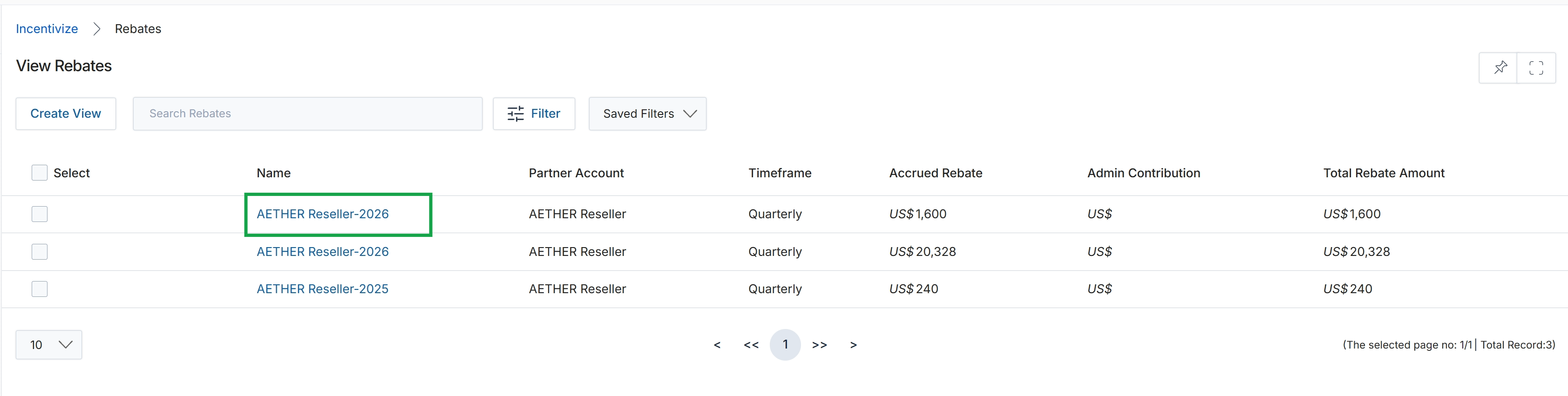
Click the AETHER Reseller-2026 link under the Name column.
Viewing Individual Rebate Details
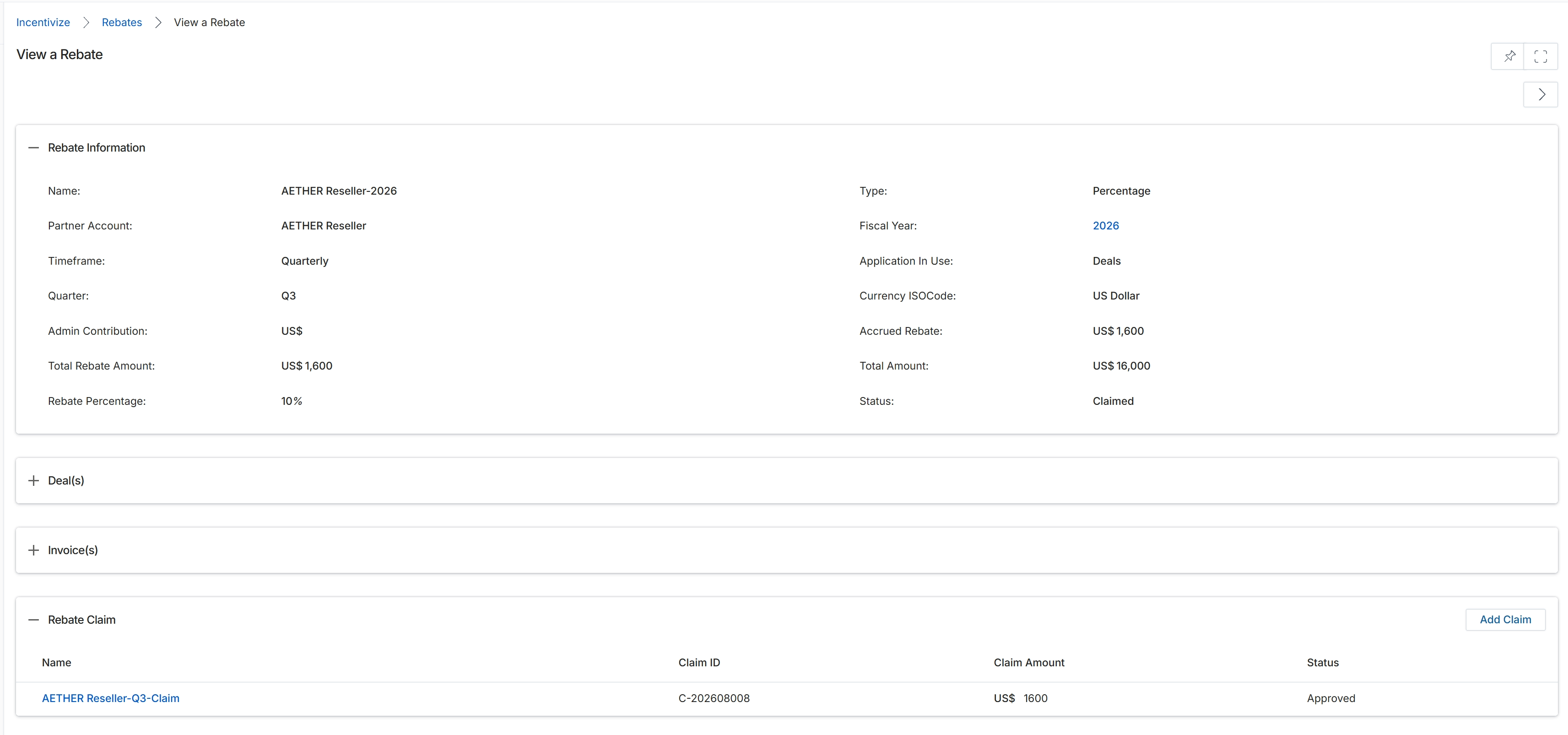
This screen provides a comprehensive view of a specific rebate record, detailing its configuration and associated claims. It displays key information about the rebate program, such as its name, the partner account it applies to, its timeframe (e.g., Quarterly), and the fiscal year. Financial specifics like the total rebate amount, the accrued rebate, and the rebate percentage are presented, along with the rebate type (e.g., Percentage) and its current status. Additionally, the screen lists any associated rebate claims, showing their unique identifiers, claimed amounts, and approval status, providing a complete overview of the rebate's lifecycle and financial impact.
Review the detailed information for the selected rebate, including its configuration and any associated rebate claims.
Buttons
| Button | Description |
|---|---|
| Add Claim | Initiates the process to add a new rebate claim. |
Rebate Information
| Field | Description |
|---|---|
| Name | The name assigned to this rebate program. |
| Partner Account | The partner account associated with this rebate. |
| Timeframe | The period over which the rebate is calculated, such as Quarterly. |
| Quarter | The specific quarter for which this rebate applies. |
| Admin Contribution | The administrative contribution amount, if any, associated with the rebate. |
| Total Rebate Amount | The total calculated rebate amount for the period. |
| Rebate Percentage | The percentage rate used to calculate the rebate. |
| Type | The type of rebate, such as 'Percentage' indicating it's based on a percentage of revenue. |
| Fiscal Year | The fiscal year to which the rebate applies. |
| Application In Use | Indicates which module or application generated the data for this rebate, such as 'Deals'. |
| Currency ISOCode | The ISO code for the currency in which the rebate is calculated and paid, displayed as 'US Dollar'. |
| Accrued Rebate | The amount of rebate that has been accrued. |
| Total Amount | The total amount of revenue or sales on which the rebate is based. |
| Status | The current status of the rebate, such as 'Claimed'. |
Rebate Claim
| Column | Description |
|---|---|
| Name | The name of the rebate claim. |
| Claim ID | A unique identifier for the rebate claim. |
| Claim Amount | The monetary value of the rebate claim. |
| Status | The current status of the rebate claim, such as 'Approved'. |