

Overview
Partner business plans are crucial for aligning partner activities with the vendor's strategic goals, especially in complex channel ecosystems. These plans typically detail a partner's sales targets, marketing initiatives, resource allocation, and overall strategy for the upcoming period. By providing a centralized platform for managing these plans, administrators can efficiently review submissions, provide feedback, and ensure that partners are focused on activities that drive mutual success. This also facilitates performance tracking and resource allocation based on the commitments outlined in the plans.
Accessing and Viewing Partner Plans
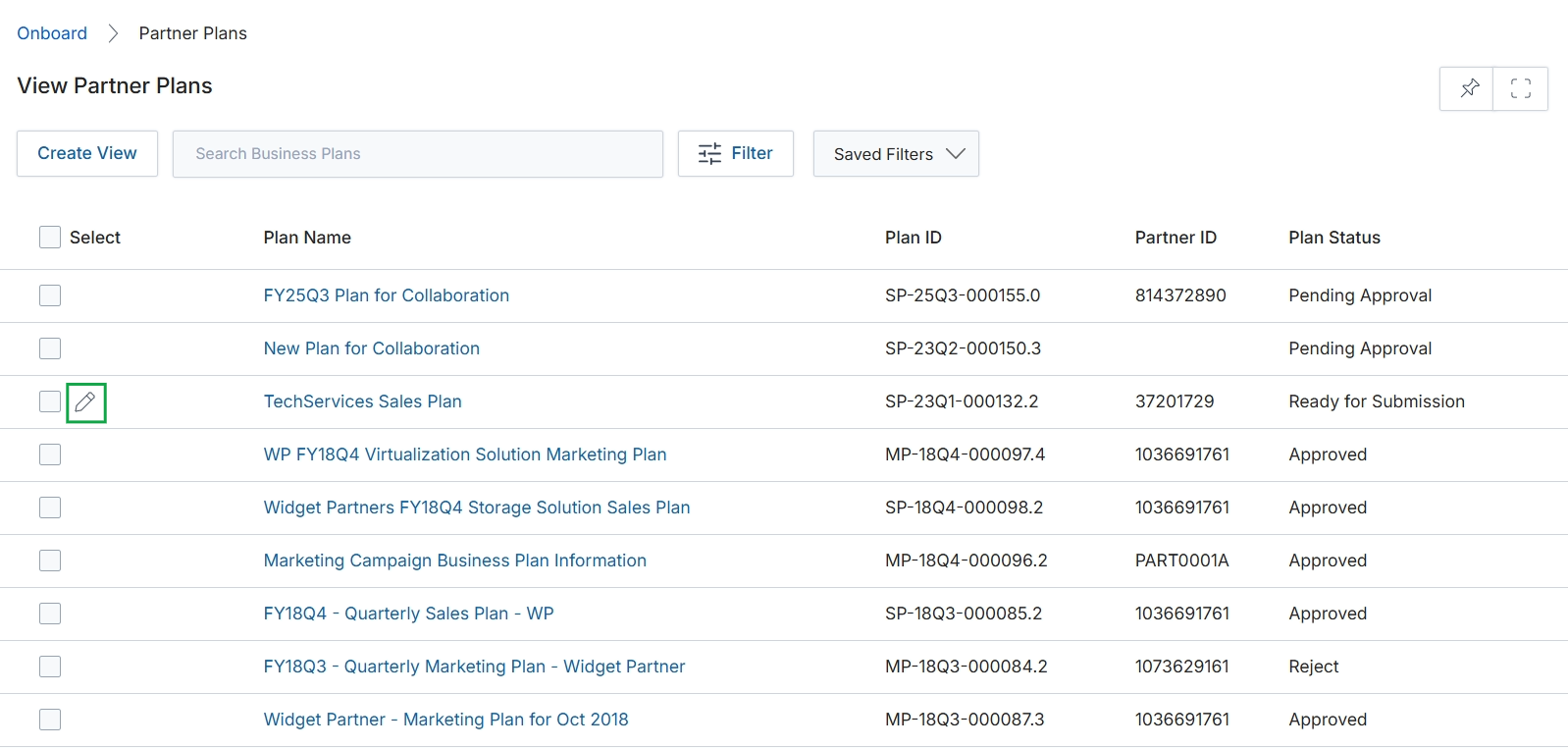
Click the Edit icon next to the "TechServices Sales Plan" entry.
Editing a Partner Plan
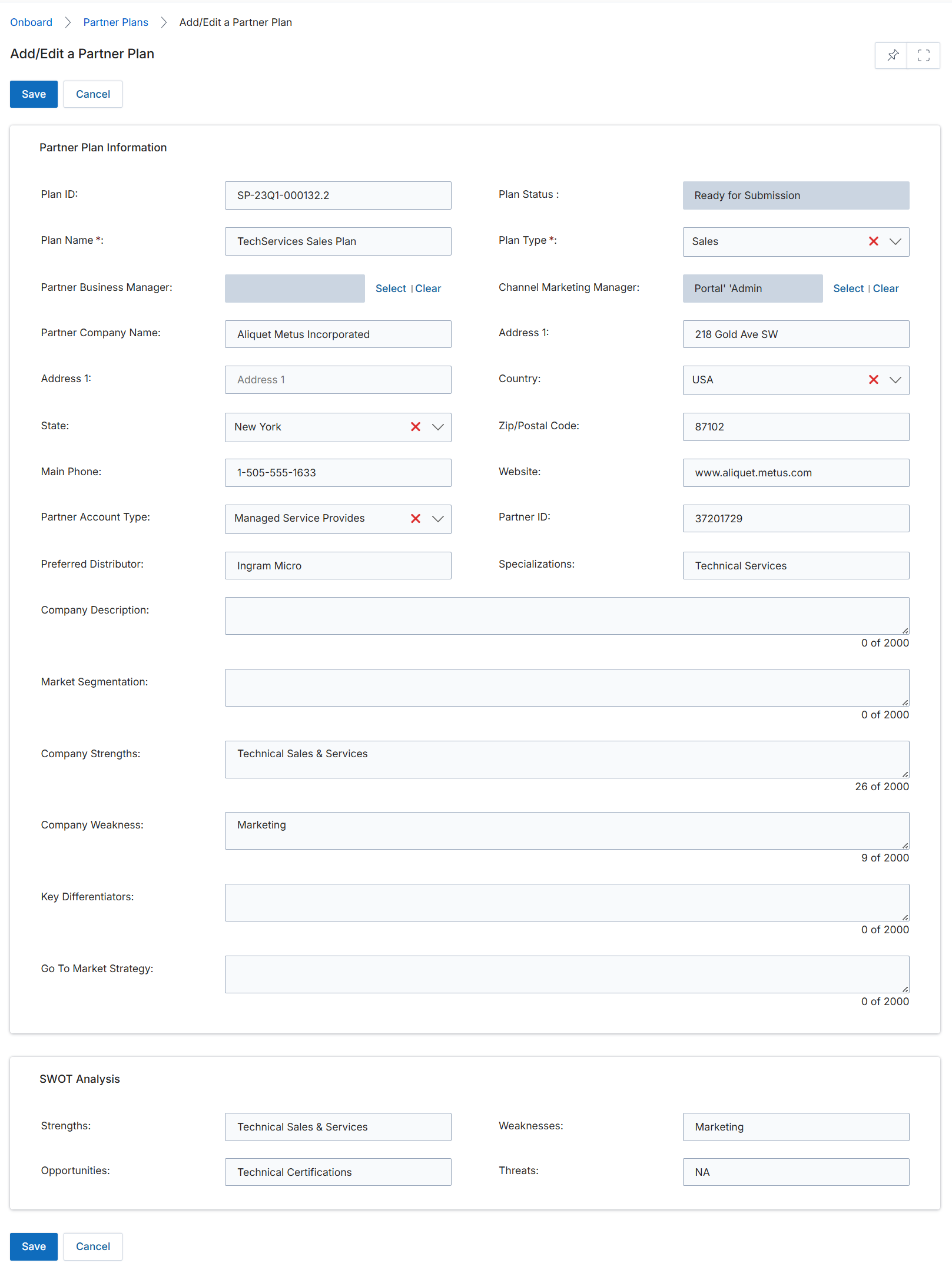
This screen displays the Add/Edit a Partner Plan form, which allows users to create or modify a partner's business plan. This form captures essential information about the partner's strategic objectives, market positioning, and operational details, which are crucial for aligning with the vendor's channel strategy. The plan includes sections for general partner information and a SWOT analysis, providing a comprehensive overview of the partner's capabilities and market approach. The data entered here helps in evaluating partner performance, allocating resources, and tailoring support to foster mutual growth. Many fields are pre-filled, likely from existing partner profile data, streamlining the plan creation process.
Review the pre-filled information in the 'Add/Edit a Partner Plan' form and make any necessary adjustments.
Buttons
| Button | Description |
|---|---|
| Save | Saves the current partner plan details. |
| Cancel | Discards any changes and returns to the previous screen. |
| Select | Opens a dialog to select the Partner Business Manager. |
| Clear | Clears the selected Partner Business Manager. |
| Select | Opens a dialog to select the Channel Marketing Manager. |
| Clear | Clears the selected Channel Marketing Manager. |
Partner Plan Information
| Field | Description |
|---|---|
| Plan ID | A unique identifier for the partner plan, typically auto-generated. |
| Plan Name * | The name of the partner's business plan. |
| Partner Business Manager | The vendor-side manager responsible for this partner's business plan. |
| Partner Company Name | The name of the partner company associated with this plan. |
| Address 1 | The primary street address of the partner company. |
| State | The state or province where the partner company is located. |
| Main Phone | The primary contact phone number for the partner company. |
| Partner Account Type | The classification of the partner account, such as Managed Service Provider. |
| Preferred Distributor | The preferred distributor for the partner. |
| Plan Status | The current status of the partner plan, such as 'Ready for Submission'. |
| Plan Type * | The type of partner plan, such as 'Sales'. |
| Channel Marketing Manager | The vendor-side marketing manager responsible for this partner. |
| Address 1 | The secondary street address of the partner company. |
| Country | The country where the partner company is located. |
| Zip/Postal Code | The zip or postal code for the partner company's address. |
| Website | The official website of the partner company. |
| Partner ID | A unique identifier for the partner. |
| Specializations | The areas of expertise or focus for the partner, such as 'Technical Services'. |
| Company Description | A detailed description of the partner company. |
| Market Segmentation | Describes how the partner segments their target market. |
| Company Strengths | Identifies the key strengths of the partner company. |
| Company Weakness | Identifies the key weaknesses of the partner company. |
| Key Differentiators | Describes what makes the partner unique or stand out from competitors. |
| Go To Market Strategy | Outlines the partner's strategy for reaching and acquiring customers. |
SWOT Analysis
| Field | Description |
|---|---|
| Strengths | Lists the internal strengths of the partner as part of a SWOT analysis. |
| Opportunities | Lists external opportunities for the partner as part of a SWOT analysis. |
| Weaknesses | Lists the internal weaknesses of the partner as part of a SWOT analysis. |
| Threats | Lists external threats to the partner as part of a SWOT analysis. |