

Overview
The Partner Business Plans Management module provides a structured framework for partners to submit their strategic plans to the vendor. These plans typically outline sales goals, marketing activities, training needs, and overall business objectives for a specific period. For administrators, this module is crucial for gaining visibility into partner strategies, ensuring alignment with vendor goals, and facilitating collaborative planning. It supports the approval process, allowing administrators to review and provide feedback on submitted plans, which is essential for effective channel management and partner enablement.
By centralizing partner plans, the platform helps administrators monitor partner commitments, track progress against agreed-upon targets, and identify areas where partners might need additional support or resources. This proactive approach to partner management fosters stronger relationships and drives mutual growth. The detailed view of each plan, including elements like SWOT analysis, pipeline projections, and campaign calendars, provides a comprehensive understanding of the partner's proposed activities and expected outcomes.
Accessing and Viewing Partner Plans
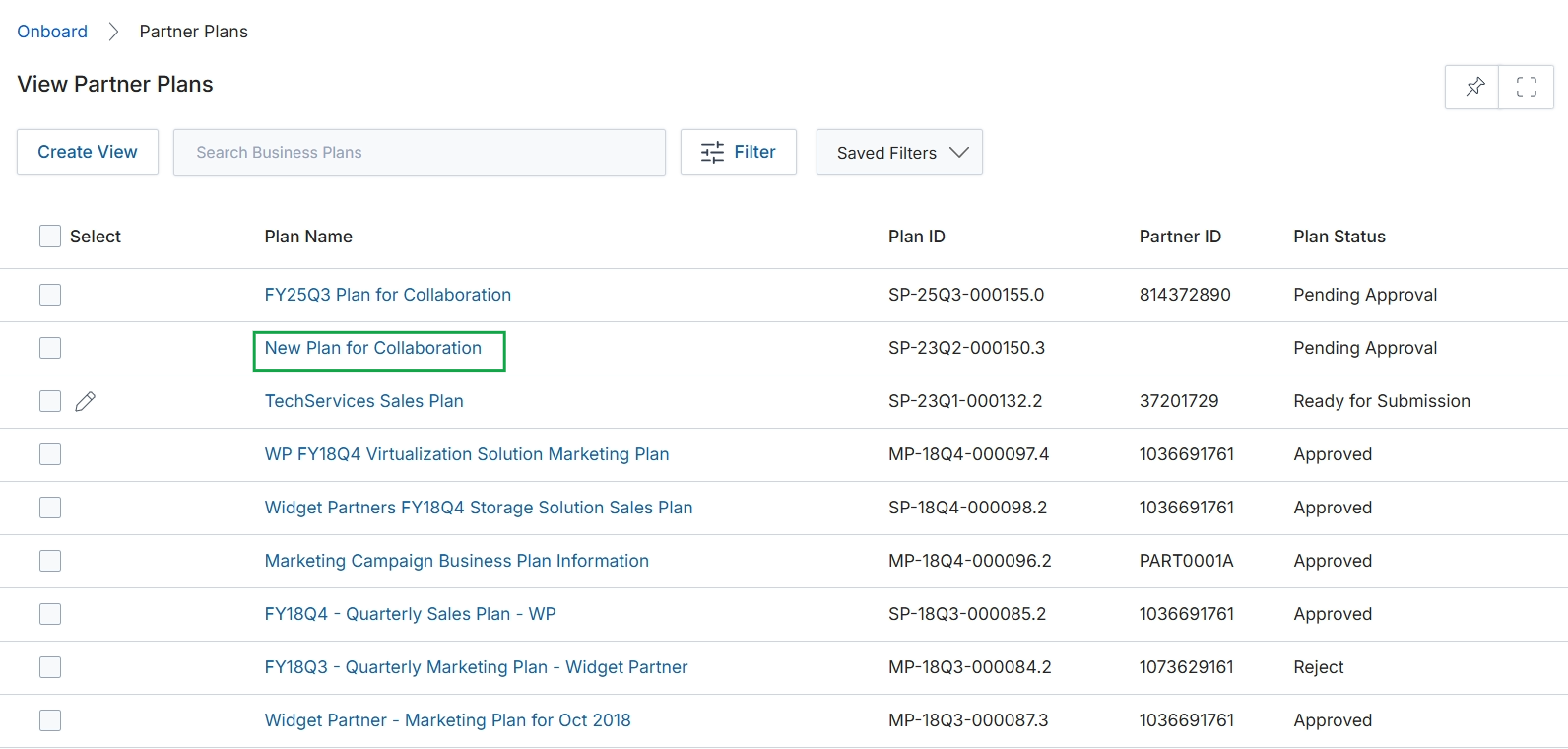
Click the New Plan for Collaboration link in the Plan Name column.
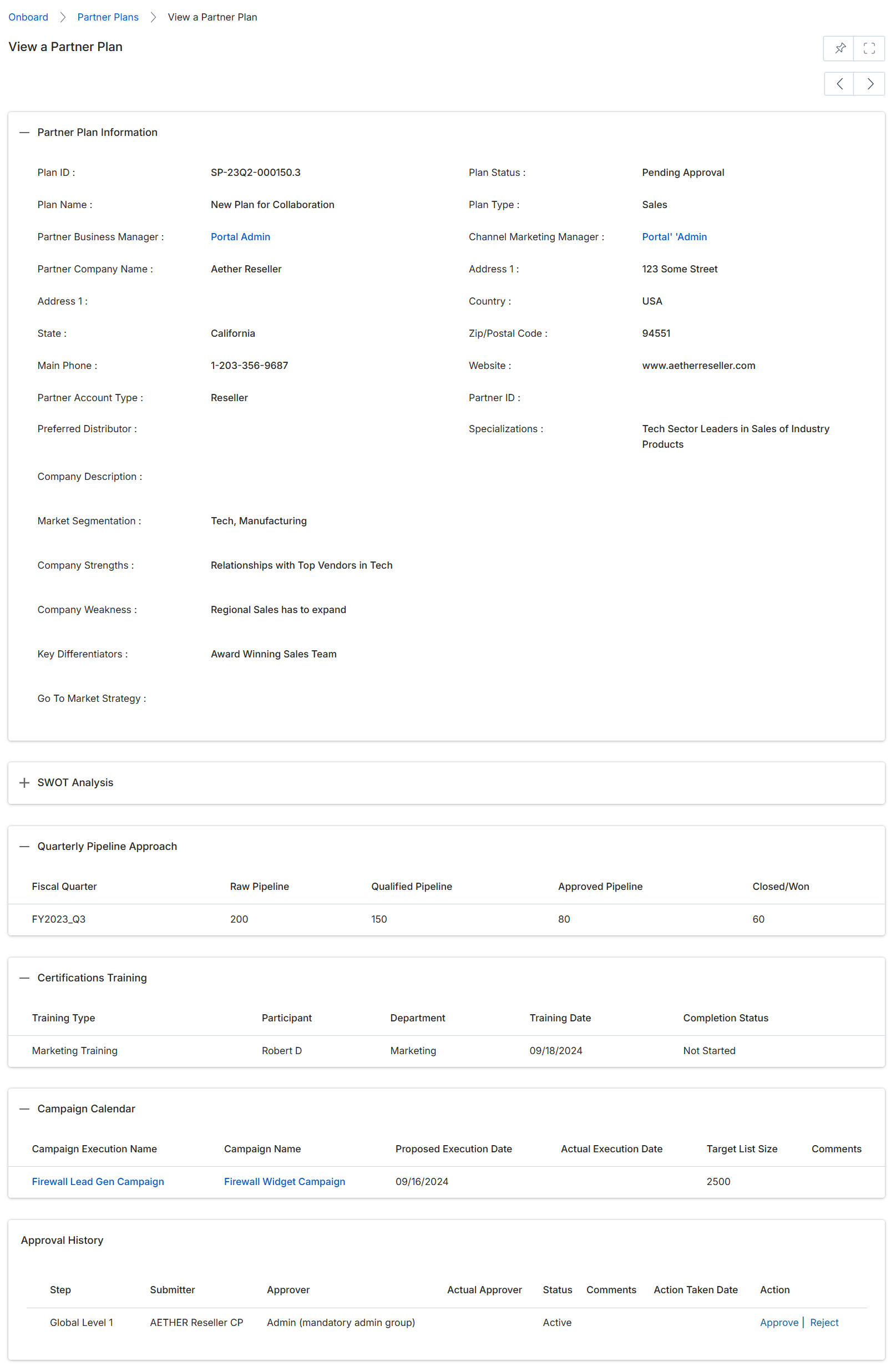
This screen displays the comprehensive details of a specific Partner Plan, providing administrators with a centralized view of a partner's strategic business objectives and performance metrics. It consolidates various aspects of the plan, including general information, pipeline targets, training certifications, and marketing campaign details. The 'Partner Plan Information' section outlines the foundational data of the plan, such as its ID, status, associated partner, and key business characteristics. The 'Quarterly Pipeline Approach' section tracks the partner's sales pipeline performance against set targets, while 'Certifications Training' details their progress in relevant training programs. The 'Campaign Calendar' provides an overview of planned and executed marketing activities. Finally, the 'Approval History' section logs the workflow and status of the plan's approval process, indicating who submitted and approved each step, and allowing for further action if the plan is pending review.
Review the details of the Partner Plan, including its status, pipeline approach, training, campaigns, and approval history.
Buttons
| Button | Description |
|---|---|
| Approve | Click to approve the partner plan at the current approval step. |
| Reject | Click to reject the partner plan at the current approval step. |
Partner Plan Information
| Field | Description |
|---|---|
| Plan ID | A unique identifier for the partner plan. |
| Plan Name | The name given to the partner's business plan. |
| Partner Business Manager | The vendor-side manager responsible for this partner's business plan. |
| Partner Company Name | The name of the partner company associated with this plan. |
| Address 1 | The primary street address of the partner company. |
| State | The state or province where the partner company is located. |
| Main Phone | The primary contact phone number for the partner company. |
| Partner Account Type | The classification of the partner account, such as Reseller or Affiliate. |
| Preferred Distributor | The preferred distributor for the partner, if applicable. |
| Company Description | A brief description of the partner company. |
| Market Segmentation | The market segments the partner focuses on. |
| Company Strengths | Key strengths of the partner company. |
| Company Weakness | Identified weaknesses or areas for improvement for the partner company. |
| Key Differentiators | What makes the partner company unique or stand out. |
| Go To Market Strategy | The partner's strategy for bringing products or services to market. |
| Plan Status | The current approval status of the partner plan. |
| Plan Type | The category or type of the business plan, such as Sales. |
| Channel Marketing Manager | The manager responsible for channel marketing activities related to this partner. |
| Address 1 | The primary street address of the partner company. |
| Country | The country where the partner company is located. |
| Zip/Postal Code | The postal code for the partner company's address. |
| Website | The official website of the partner company. |
| Partner ID | A unique identifier for the partner. |
| Specializations | Specific areas of expertise or focus for the partner. |
Quarterly Pipeline Approach
| Column | Description |
|---|---|
| Fiscal Quarter | The fiscal quarter for which pipeline data is reported. |
| Raw Pipeline | The total value of all opportunities in the pipeline for the fiscal quarter. |
| Qualified Pipeline | The value of opportunities that have met qualification criteria for the fiscal quarter. |
| Approved Pipeline | The value of opportunities that have been approved for the fiscal quarter. |
| Closed/Won | The value of opportunities that have been successfully closed and won for the fiscal quarter. |
Certifications Training
| Column | Description |
|---|---|
| Training Type | The category or type of training undertaken by the partner. |
| Participant | The individual from the partner company who participated in the training. |
| Department | The department of the participant within the partner company. |
| Training Date | The date the training was conducted. |
| Completion Status | The current status of the training completion (e.g., Not Started, In Progress, Complete). |
Campaign Calendar
| Column | Description |
|---|---|
| Campaign Execution Name | The specific name of the marketing campaign execution. |
| Campaign Name | The general name of the marketing campaign. |
| Proposed Execution Date | The planned date for the campaign's execution. |
| Actual Execution Date | The date the campaign was actually executed. |
| Target List Size | The number of individuals targeted by the campaign. |
| Comments | Any additional comments or notes regarding the campaign. |
Approval History
| Column | Description |
|---|---|
| Step | The stage or level in the approval workflow. |
| Submitter | The entity or user who submitted the plan for approval at this step. |
| Approver | The role or group responsible for approving the plan at this step. |
| Actual Approver | The specific user who performed the approval action. |
| Status | The current status of the approval step. |
| Comments | Any comments provided during the approval process. |
| Action Taken Date | The date when an action was taken on this approval step. |
| Action | Links to approve or reject the plan at this stage. |
Reviewing Plan Details and Approval History

Click the Approve button in the "Approval History" section.
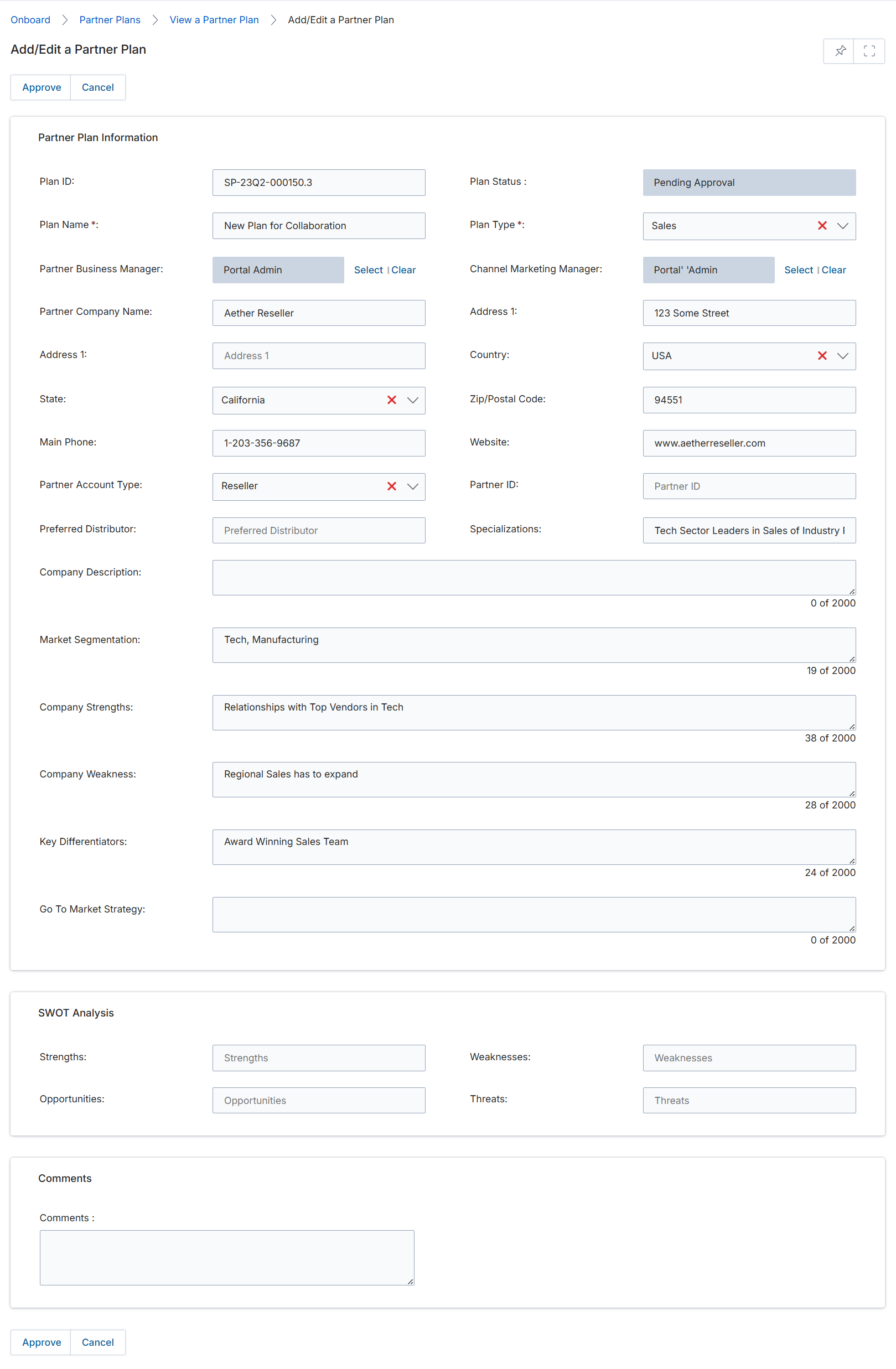
This screen displays the 'Add/Edit a Partner Plan' form, which is used to create or modify a partner's business plan within the UPM. Partner business plans are strategic documents outlining how a partner intends to achieve sales and marketing objectives, often including a SWOT analysis and go-to-market strategies. This form allows administrators to input detailed information about the plan, including its type, associated partner, key contacts, and strategic elements. The 'Plan Status' field indicates the current stage of the plan, such as 'Pending Approval', suggesting that plans may undergo a review process before finalization. The form captures essential data for tracking and managing partner performance and alignment with vendor goals.
Review the details of the partner plan on the 'Add/Edit a Partner Plan' form.
Buttons
| Button | Description |
|---|---|
| Approve | Approves the partner plan. |
| Cancel | Discards any changes and returns to the previous screen. |
Partner Plan Information
| Field | Description |
|---|---|
| Plan ID | A unique identifier for the partner plan. |
| Plan Name * | The name of the partner plan. |
| Partner Business Manager | The vendor-side manager responsible for this partner's business plan. |
| Partner Company Name | The name of the partner company associated with this plan. |
| Address 1 | The primary address line for the partner company. |
| State | The state where the partner company is located. |
| Main Phone | The primary contact phone number for the partner company. |
| Partner Account Type | The type of partner account, such as Reseller. |
| Preferred Distributor | The partner's preferred distributor. |
| Company Description | A description of the partner company. |
| Market Segmentation | The market segments the partner focuses on. |
| Company Strengths | Key strengths of the partner company. |
| Company Weakness | Key weaknesses of the partner company. |
| Key Differentiators | What sets the partner company apart from competitors. |
| Go To Market Strategy | The partner's strategy for entering and succeeding in the market. |
| Plan Status | The current approval status of the partner plan. |
| Plan Type * | The type of business plan, such as Sales. |
| Channel Marketing Manager | The vendor-side marketing manager responsible for this partner. |
| Address 1 | The primary address line for the partner company. |
| Country | The country where the partner company is located. |
| Zip/Postal Code | The zip or postal code for the partner company's address. |
| Website | The website URL for the partner company. |
| Partner ID | The unique identifier for the partner. |
| Specializations | The areas of expertise or specialization for the partner company. |
SWOT Analysis
| Field | Description |
|---|---|
| Strengths | Input field for the partner's strengths as part of the SWOT analysis. |
| Opportunities | Input field for the partner's opportunities as part of the SWOT analysis. |
| Weaknesses | Input field for the partner's weaknesses as part of the SWOT analysis. |
| Threats | Input field for the partner's threats as part of the SWOT analysis. |
Comments
| Field | Description |
|---|---|
| Comments | A text area for adding any additional comments related to the partner plan. |
Editing a Partner Plan

Click Reject.
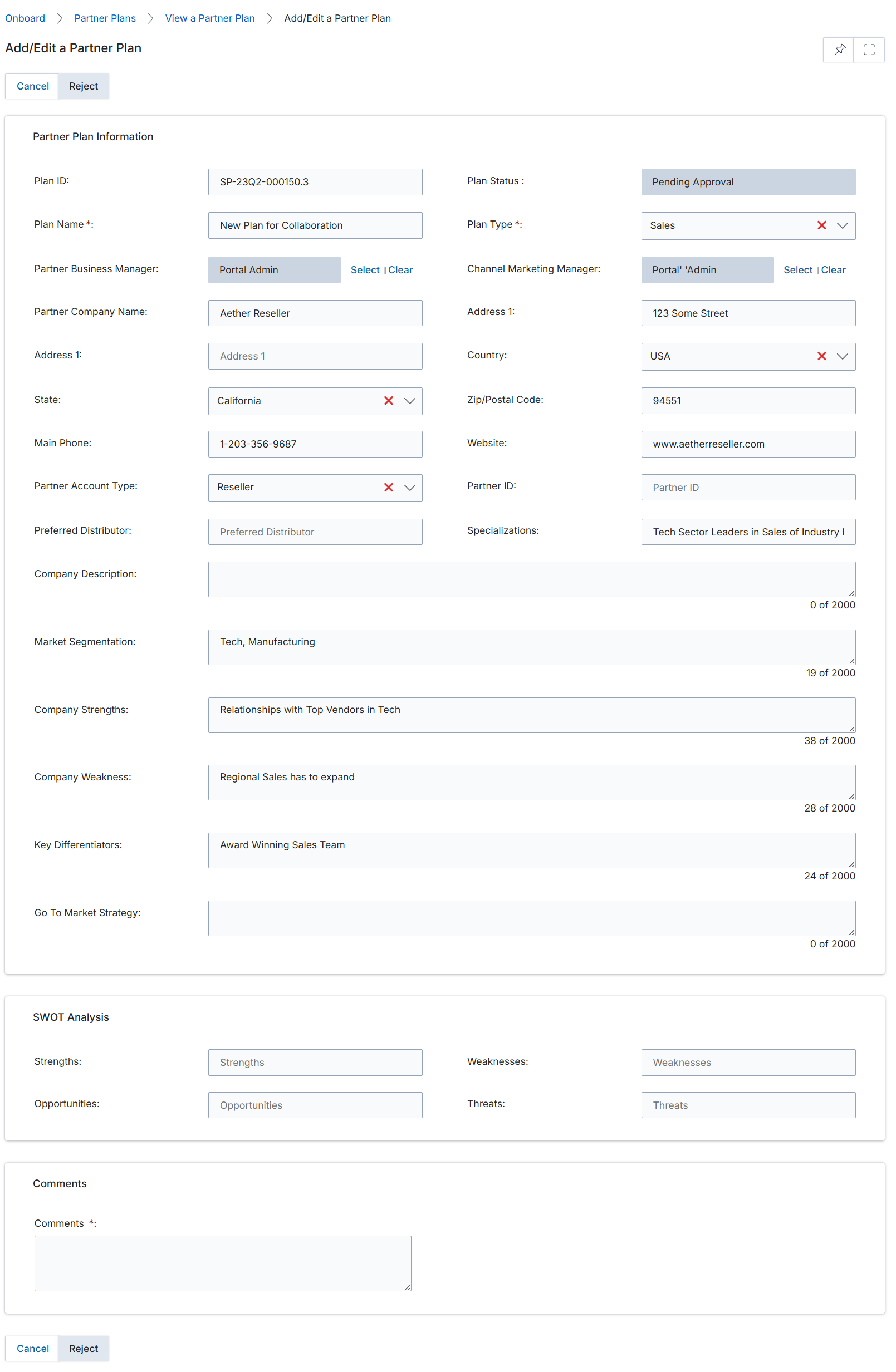
This screen displays the Add/Edit Partner Plan form, which allows administrators to review and modify the details of a partner's business plan. Business plans are critical components of the Accelerate module, enabling partners to outline their strategies, set goals, and define how they will collaborate with the vendor. This form captures essential information about the plan, including its status, associated managers, company details, and strategic analyses like SWOT. The 'Pending Approval' status indicates that the plan has been submitted by a partner and is awaiting review by a program manager. The various fields allow for a comprehensive understanding of the partner's proposed activities and capabilities, which informs the approval process and subsequent support from the vendor.
Review the details of the partner plan and click 'Reject' to decline the plan.
Buttons
| Button | Description |
|---|---|
| Cancel | Discards any changes and returns to the previous screen. |
| Reject | Rejects the partner plan, typically requiring comments for the reason. |
Partner Plan Information
| Field | Description |
|---|---|
| Plan ID | A unique identifier automatically assigned to the partner plan. |
| Plan Name * | The name given to the partner's business plan. |
| Partner Business Manager | The vendor-side manager responsible for this partner's business plan, with options to select or clear the assigned manager. |
| Partner Company Name | The name of the partner company submitting the plan. |
| Address 1 | The primary street address of the partner company. |
| State | The state or province where the partner company is located. |
| Main Phone | The primary contact phone number for the partner company. |
| Partner Account Type | The classification of the partner, such as Reseller or Affiliate. |
| Preferred Distributor | The distributor preferred by the partner, if applicable. |
| Company Description | A brief description of the partner company. |
| Market Segmentation | The market segments the partner targets. |
| Company Strengths | Key strengths of the partner company. |
| Company Weakness | Identified weaknesses of the partner company. |
| Key Differentiators | Unique aspects that set the partner apart from competitors. |
| Go To Market Strategy | The partner's strategy for bringing products or services to market. |
| Plan Status | The current approval status of the partner plan, which is 'Pending Approval' in this instance. |
| Plan Type * | The category or type of the business plan, such as 'Sales' or 'Marketing'. |
| Channel Marketing Manager | The vendor-side marketing manager assigned to this partner, with options to select or clear the assigned manager. |
| Address 1 | The primary street address of the partner company. |
| Country | The country where the partner company is located. |
| Zip/Postal Code | The postal code for the partner company's address. |
| Website | The official website of the partner company. |
| Partner ID | A unique identifier for the partner. |
| Specializations | Specific areas of expertise or focus for the partner. |
SWOT Analysis
| Field | Description |
|---|---|
| Strengths | Identified strengths of the partner as part of the SWOT analysis. |
| Opportunities | Identified opportunities for the partner as part of the SWOT analysis. |
| Weaknesses | Identified weaknesses of the partner as part of the SWOT analysis. |
| Threats | Identified threats to the partner as part of the SWOT analysis. |
Comments
| Field | Description |
|---|---|
| Comments * | A required field for adding comments or feedback regarding the partner plan. |
Viewing Campaign Calendar Details

Click the Firewall Lead Gen Campaign link.
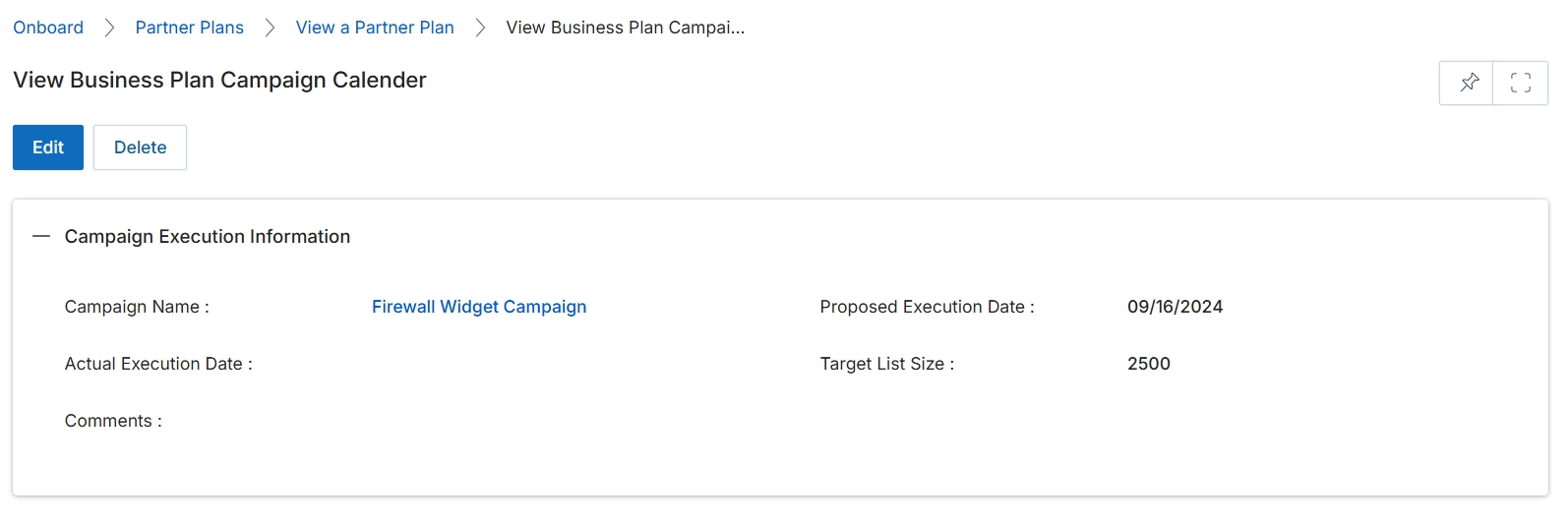
This screen displays the detailed information for a specific business plan campaign calendar entry. It provides an overview of the campaign's execution details, including its name, proposed and actual execution dates, and target list size. This view allows administrators to review the specifics of planned and completed marketing activities associated with a partner's business plan, ensuring alignment with strategic goals and facilitating performance tracking. The information presented here is crucial for evaluating the effectiveness of individual campaigns within the broader partner enablement and marketing efforts.
After clicking on a campaign name from the previous list, the details of the selected business plan campaign are displayed here.
Buttons
| Button | Description |
|---|---|
| Edit | Click to edit the details of this business plan campaign calendar entry. |
| Delete | Click to delete this business plan campaign calendar entry. |
Campaign Execution Information
| Field | Description |
|---|---|
| Campaign Name | The name of the campaign associated with this business plan execution. |
| Proposed Execution Date | The planned date for the campaign's execution. |
| Actual Execution Date | The actual date when the campaign was executed. |
| Target List Size | The number of individuals or accounts targeted by this campaign. |
| Comments | Additional notes or remarks regarding the campaign execution. |