

Overview
Program Levels are used to structure the partner journey, often representing stages like 'Pre-boarding', 'Onboarding', or 'Active'. Each Program Level can have a series of associated tasks that partners must complete to progress. These tasks guide partners through necessary steps, which can range from signing agreements and completing training courses to submitting business plans or registering deals. By defining these tasks, administrators ensure a consistent and guided experience for partners, facilitating their enablement and engagement within the program.
This feature provides the tools to specify the details of each task, including its type, estimated completion time, and any prerequisites. Furthermore, individual tasks can be broken down into smaller, more granular requirements, allowing for detailed tracking and management of partner progress. This structured approach helps in automating parts of the partner lifecycle and provides clear visibility into partner readiness and compliance.
Add a New Task to a Level
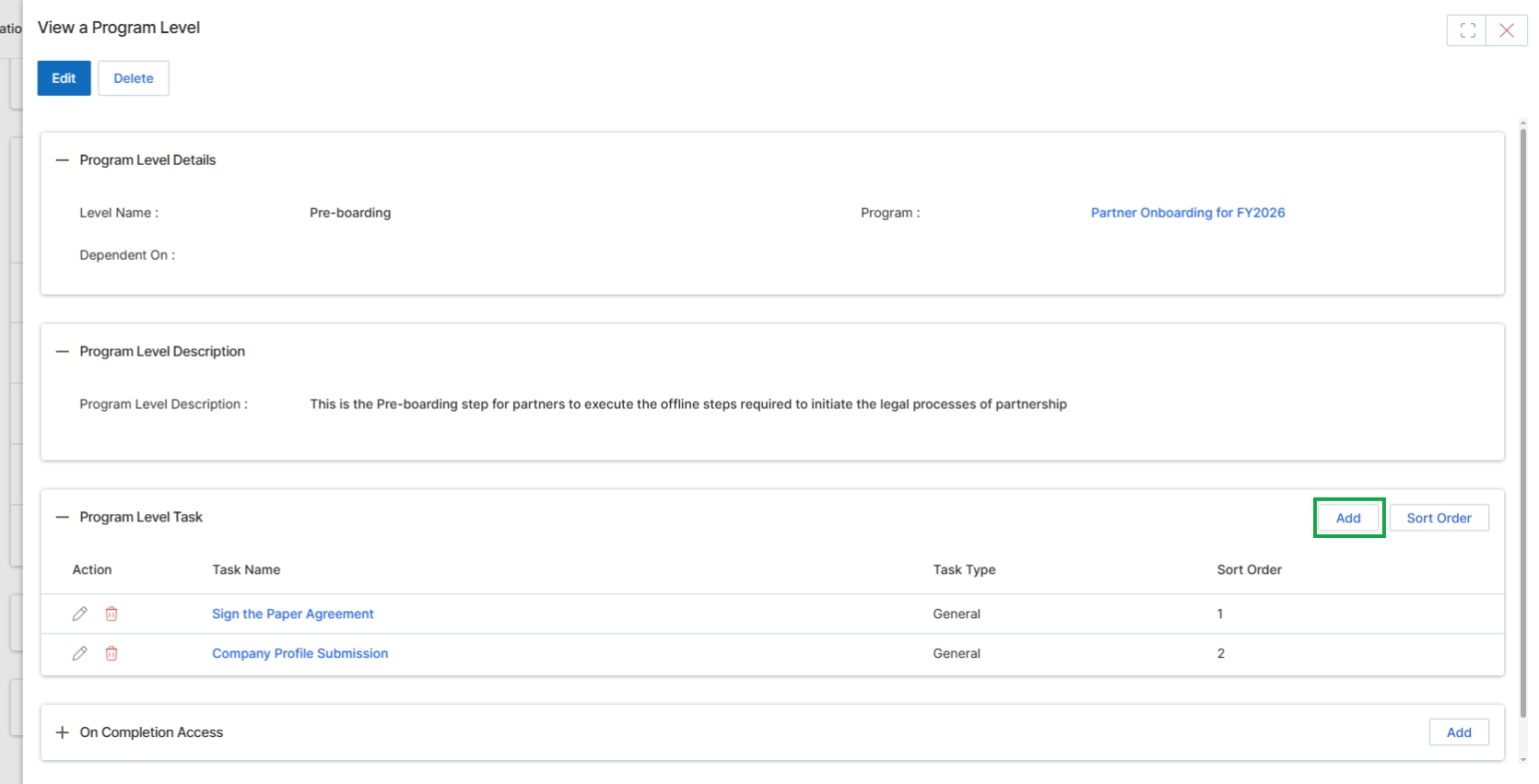
Click the Add button in the "Program Level Task" section.
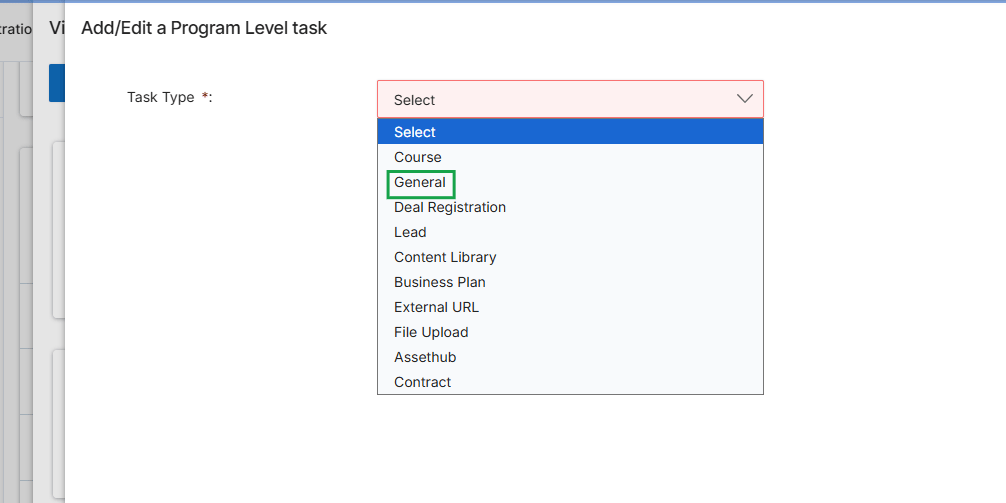
This screen, titled 'Add/Edit a Program Level task', is part of the Onboard module and allows administrators to define individual tasks that partners must complete as part of their onboarding journey or ongoing program participation. These tasks contribute to the overall partner onboarding checklist and can be configured to gate access to certain portal functionalities or reward eligibility. The 'Task Type' field is crucial as it determines the nature of the task, such as completing a course, registering a deal, or uploading a file, and dictates the subsequent configuration options available for that specific task.
Select "General" from the "Task Type" dropdown to define a general program-level task.
Fields
| Field | Description |
|---|---|
| Task Type | A required dropdown field to select the category of the task, which determines the subsequent configuration options. Options include Course, General, Deal Registration, Lead, Content Library, Business Plan, External URL, File Upload, Assethub, and Contract. |
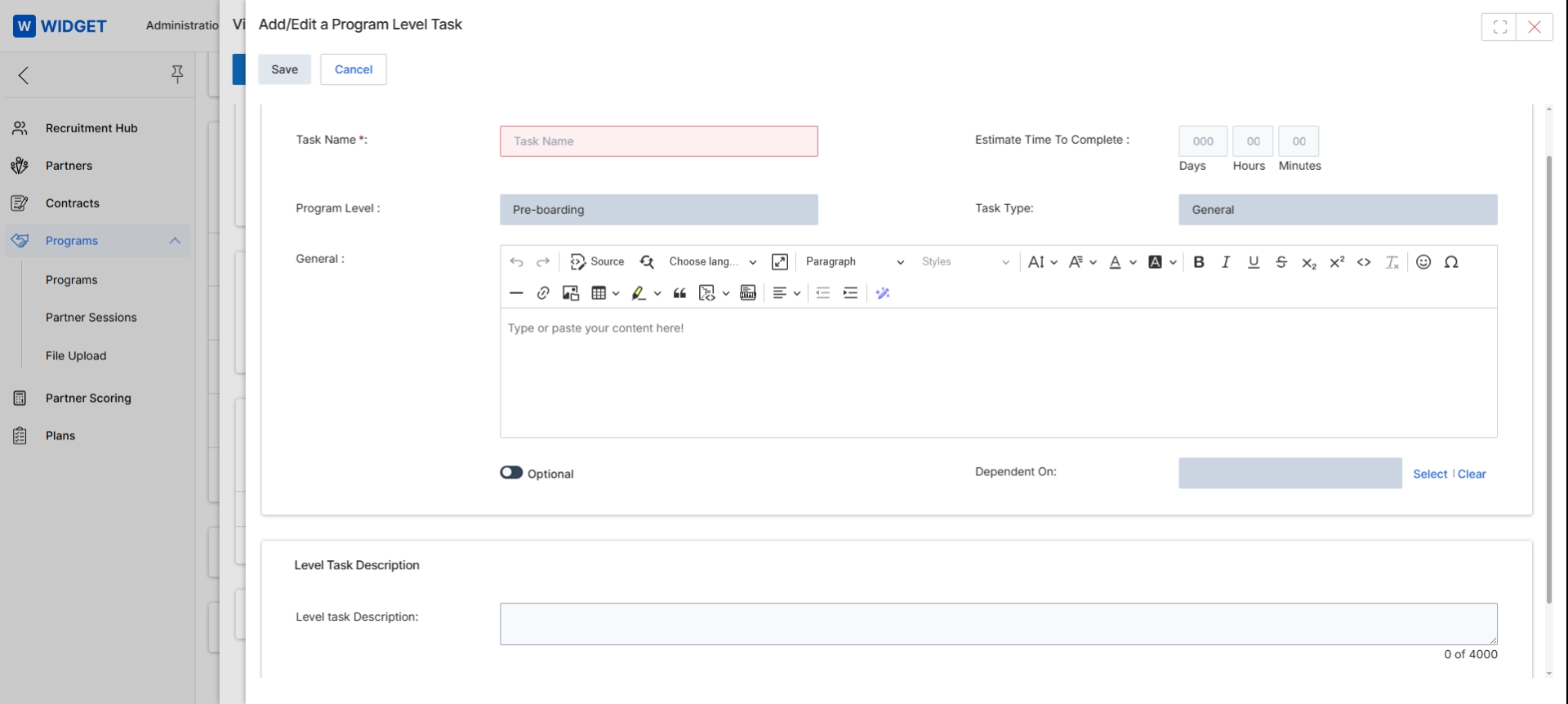
This screen, titled 'Add/Edit a Program Level Task', allows administrators to define and configure individual tasks that partners must complete as part of their onboarding journey within a specific program level. These tasks are crucial for structuring the partner onboarding workflow, ensuring partners meet necessary requirements such as training completion, agreement signing, or profile setup before gaining full access or eligibility for certain benefits. The form captures essential details about each task, including its name, estimated completion time, and a detailed description, which can be formatted using a rich text editor. Tasks can be marked as optional or made dependent on the completion of other tasks, enabling complex, sequential onboarding flows. This granular control over onboarding tasks helps ensure partners are properly enabled and compliant from the outset.
Fill in the details for the new program level task, including its name, estimated completion time, and a detailed description.
Buttons
| Button | Description |
|---|---|
| Save | Saves the newly configured program level task. |
| Cancel | Discards any changes and closes the task creation form. |
| Select | Opens a dialog to select a dependent task. |
| Clear | Clears any selected dependent task. |
Fields
| Field | Description |
|---|---|
| Task Name * | The required name for the program level task. |
| Estimate Time To Complete | The estimated time required to complete the task, broken down into days, hours, and minutes. |
| Program Level | Indicates the stage of the partner journey to which this task belongs, such as 'Pre-boarding'. This field is display-only. |
| Task Type | The type of task being created, which is 'General' in this instance. |
| General | A rich text editor for providing a detailed description or instructions for the task. |
| Optional | A toggle to mark the task as optional for partners. |
| Dependent On | Allows selection of another task that must be completed before this task can be started. |
| Level task Description | A text area for providing additional details or a longer description for the task. |
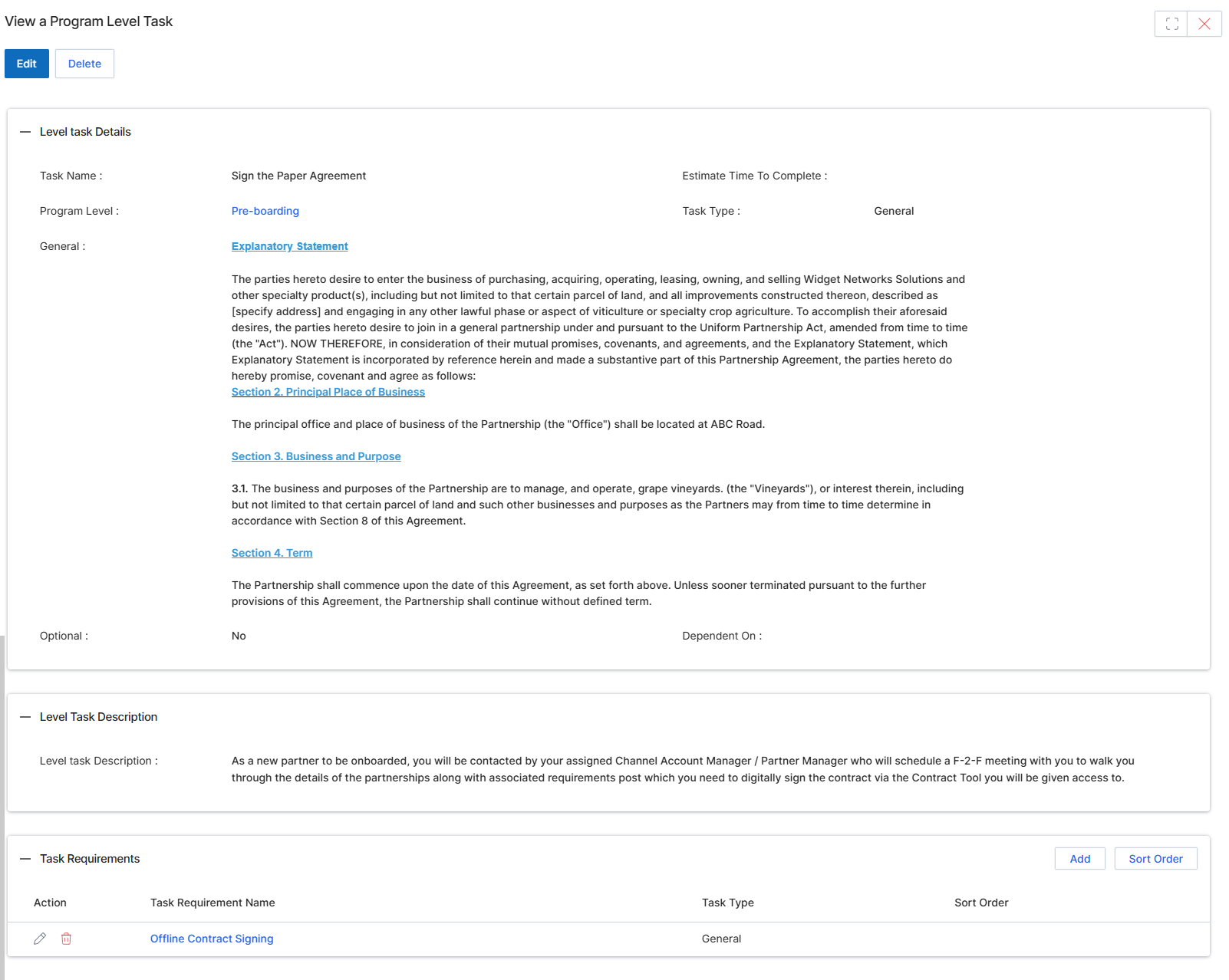
This screen displays the detailed view of a program-level task, which is a specific action or requirement partners must complete as part of their onboarding journey or program participation. These tasks are configured by UPM administrators to guide partners through various stages, such as pre-boarding, training, or agreement signing. The details provided here include the task's name, the program level it applies to, a general description, and any associated requirements that must be fulfilled. This view allows administrators to review the task's configuration and manage its components, ensuring partners have clear instructions and prerequisites for successful completion.
Review the details of the program-level task, including its description and any associated requirements.
Buttons
| Button | Description |
|---|---|
| Edit | Click to modify the details of this program-level task. |
| Delete | Click to remove this program-level task. |
| Add | Click to add a new requirement to this task. |
| Sort Order | Click to reorder the existing task requirements. |
Level task Details
| Field | Description |
|---|---|
| Task Name | The name of the program-level task. |
| Program Level | The stage or level of the partner program to which this task belongs, such as 'Pre-boarding'. |
| General | A general description or statement related to the task, often containing legal or contextual information. |
| Estimate Time To Complete | The estimated time required for a partner to complete this task. |
| Task Type | The classification or category of the task, such as 'General'. |
| Optional | Indicates whether the task is optional for partners to complete. |
| Dependent On | Specifies if this task is dependent on the completion of another task. |
Level Task Description
| Field | Description |
|---|---|
| Level task Description | A detailed description of the task, providing instructions and context for partners. |
Task Requirements
| Column | Description |
|---|---|
| Action | Column header for actions that can be performed on task requirements, such as editing or deleting. |
| Task Requirement Name | Column header for the name of an individual requirement associated with the task. |
| Task Type | Column header for the type of the task requirement. |
| Sort Order | Column header for the display order of the task requirement. |

Click the Add button in the Task Requirements section.
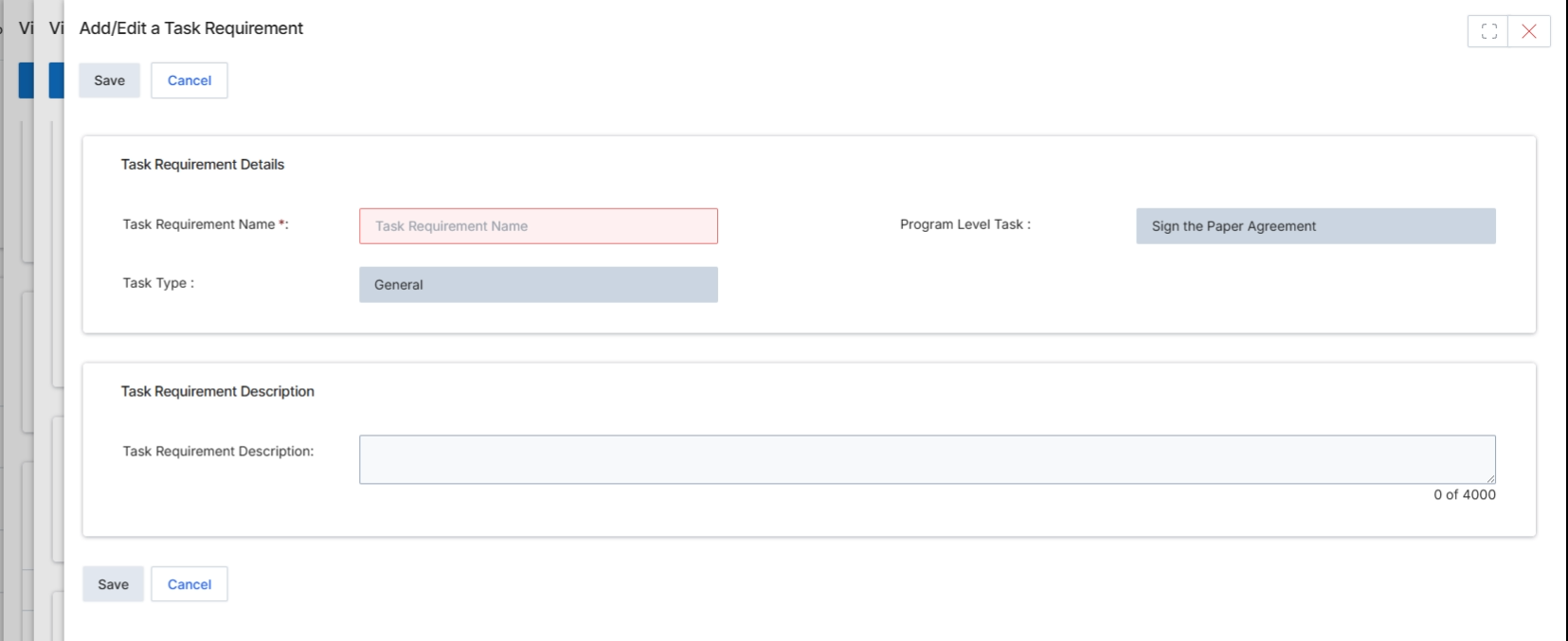
This screen allows administrators to define or modify a specific task requirement within a program level. Task requirements are crucial components of the onboarding journey and partner enablement, ensuring partners complete necessary steps such as signing agreements or completing training before gaining full access or eligibility for certain benefits. By defining these tasks, the platform helps structure the partner's progression and ensures compliance with program rules. The details entered here will determine how the task is presented to partners and its role in their overall onboarding or enablement checklist.
Enter the details for the new task requirement in the provided fields.
Buttons
| Button | Description |
|---|---|
| Save | Saves the current task requirement details. |
| Cancel | Discards any changes and closes the form. |
Task Requirement Details
| Field | Description |
|---|---|
| Task Requirement Name | The name of the task requirement, which is a mandatory field. |
| Program Level Task | Indicates the program level task this requirement is associated with, currently set to 'Sign the Paper Agreement'. |
| Task Type | The type of task, currently set to 'General'. |
Task Requirement Description
| Field | Description |
|---|---|
| Task Requirement Description | A detailed description of the task requirement, with a character limit of 4000. |