

Overview
Effective partner management requires granular visibility into each partner's engagement and progress within their assigned programs. The Partner Program Sessions feature offers administrators a centralized hub to oversee these individual journeys. From initial onboarding to ongoing enablement, partners typically follow a structured path defined by program levels and associated activities. This feature allows administrators to track where each partner stands in this journey, identify potential bottlenecks, and ensure partners are completing necessary steps to become fully productive and engaged.
This oversight is crucial for maintaining program health, ensuring compliance, and maximizing partner success. By providing tools to view and manage individual program sessions, UPM empowers channel managers to proactively support partners, ensuring they complete critical milestones such as agreement signing, training, and goal setting, which are foundational for successful collaboration and revenue generation.
Viewing Partner Program Sessions

The Partner Program Sessions section provides a detailed overview of individual partner engagements within defined partner programs. This view allows administrators to track the progress of specific partners through various program levels or stages, which are structured to guide partners through onboarding and development. Each session entry indicates a unique identifier, the associated partner account, the enrolled user from that account, and the current status of their participation. This functionality is crucial for managing partner journeys, ensuring they complete necessary steps like agreement signing or training, and ultimately enabling their full participation in the partner ecosystem.
Review the Partner Program Sessions to monitor individual partner progress through the defined program levels.
Partner Program Sessions
| Column | Description |
|---|---|
| Partner Program Session | A unique identifier for a specific partner's session within a program. |
| Partner Account | The name of the partner company enrolled in the session. |
| Enrolled User | The specific user from the partner account who is enrolled in the session. |
| Last Session Activity Date | The date of the most recent activity within the partner program session. |
| Status | The current status of the partner's progress in the program session (e.g., In Progress). |
| Completion Date | The date when the partner program session was completed. |
Reviewing Program Session Details
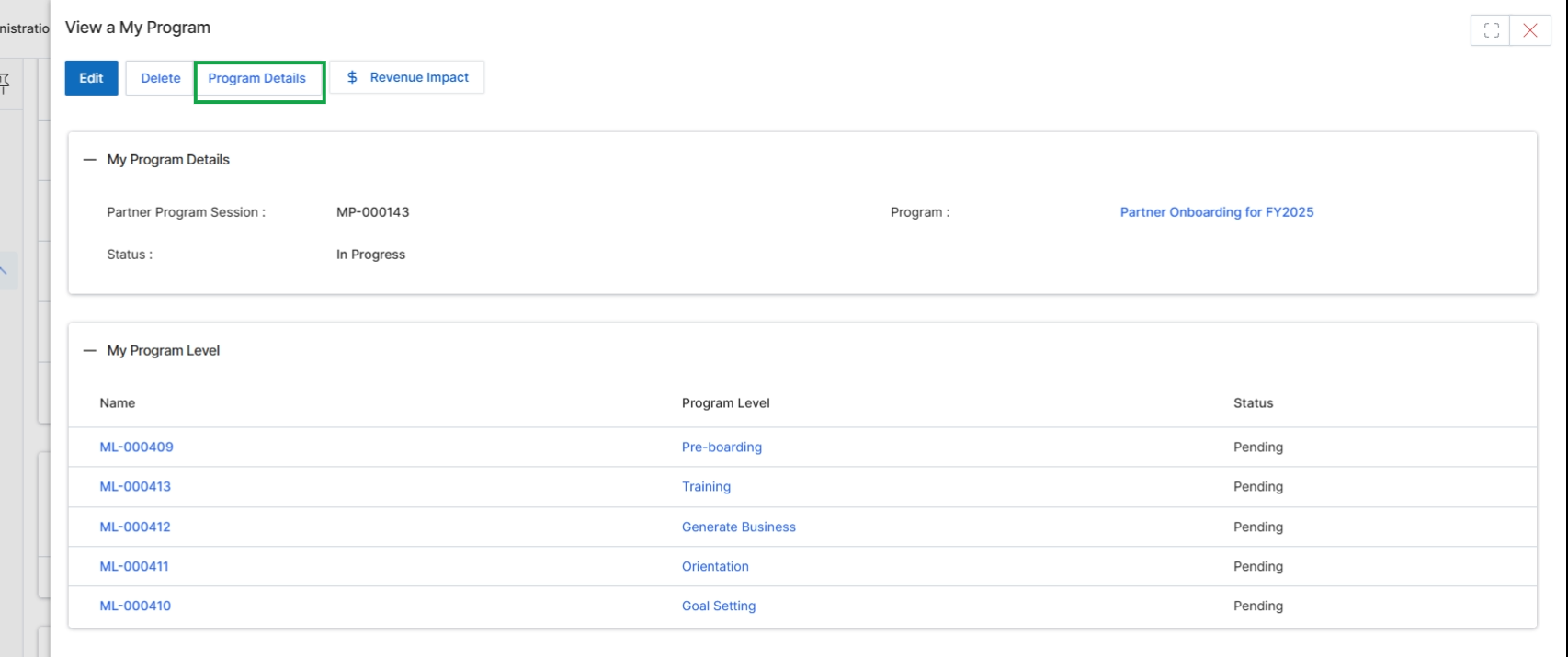
This screen displays the detailed view of a specific Partner Program Session within the UPM Onboard module. It provides administrators with an overview of the program's current status and its constituent levels. Partner Programs are central to organizing and managing partner engagements, defining the terms, activities, and benefits available to partners. This view allows administrators to quickly ascertain the progress of a program session and review the status of each associated program level, which often correspond to stages in a partner's onboarding or development journey. The information presented here helps in monitoring the overall health and advancement of partner programs.
Review the details of the selected Partner Program Session, including its overall status and the status of each program level.
Buttons
| Button | Description |
|---|---|
| Edit | Allows editing the details of the current program session. |
| Delete | Deletes the current program session. |
| Program Details | Navigates to a view showing more comprehensive details about the program. |
| Revenue Impact | Displays the financial impact or revenue generated by the program. |
My Program Details
| Field | Description |
|---|---|
| Partner Program Session | A unique identifier for the specific partner program session. |
| Program | The name of the partner program associated with this session. |
| Status | The current overall status of the partner program session, indicating its progress. |
My Program Level
| Column | Description |
|---|---|
| Name | The identifier or code for each program level. |
| Program Level | The descriptive name of each stage or level within the program, such as 'Pre-boarding' or 'Training'. |
| Status | The current status of each individual program level. |
Managing Program Level Status
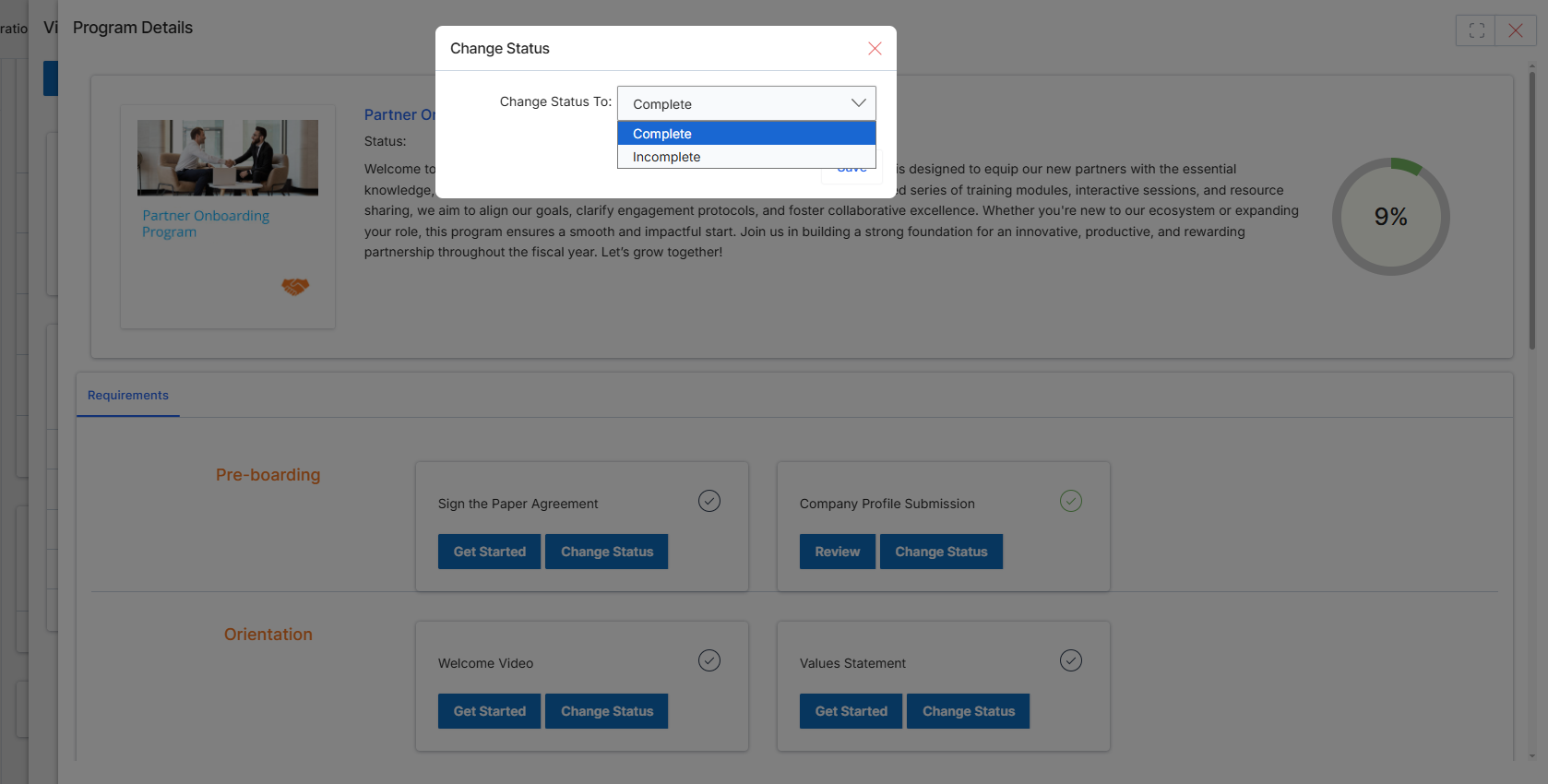
This dialog box allows an administrator to manually update the status of a specific program requirement or session within the Partner Onboarding Program. In UPM, onboarding journeys for partners are structured with various requirements, such as signing agreements or completing profile submissions. While many of these statuses are updated automatically upon partner action, administrators can use this feature to override or manually mark a step as complete, for instance, if an action was performed offline or needs to be fast-tracked. This ensures flexibility in managing partner onboarding progress and helps maintain accurate records of each partner's journey through the system.
Select the new status for the program requirement from the dropdown menu.
Buttons
| Button | Description |
|---|---|
| Save | Click to save the selected status and apply the change to the program requirement. |
Fields
| Field | Description |
|---|---|
| Change Status To | A dropdown menu to select the desired new status for the program requirement. Options typically include 'Complete', 'Incomplete' or other relevant statuses depending on the requirement. |