

Overview
Program Levels provide a framework for guiding partners through their journey, from initial onboarding to advanced engagement. Each level can be configured with specific tasks that partners need to complete, such as signing agreements or submitting company profiles. This structured approach ensures that partners meet all necessary requirements and are properly enabled at each stage of their participation.
By defining dependencies between levels, administrators can create a logical progression, ensuring partners complete foundational steps before moving to more advanced stages. Upon completion of a level, the system can automatically grant access to new profiles or groups, streamlining the partner's access to relevant resources and functionalities within the platform.
Managing Program Levels
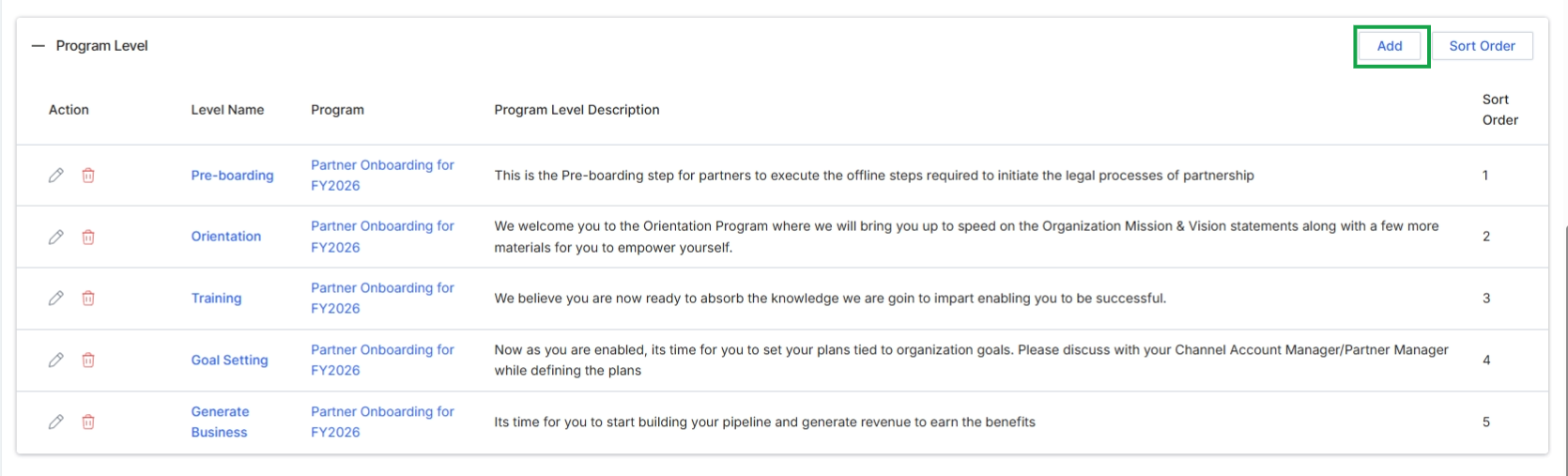
This screen displays the list of defined Program Levels, which represent distinct stages or milestones within a partner program's onboarding journey or ongoing engagement. Each level is associated with a specific program and includes a descriptive overview of its purpose. Administrators use this view to manage the structured progression of partners through various stages, ensuring they complete necessary steps, training, or activities. The ability to add new levels and sort their order allows for flexible configuration of partner journeys, aligning with the overall goals of the partner program.
Click the "Add" button to create a new program level.
Buttons
| Button | Description |
|---|---|
| Add | Click to add a new program level to the list. |
| Sort Order | Click to reorder the existing program levels. |
Column Headings
| Column | Description |
|---|---|
| Action | Column header for actions that can be performed on each program level, such as editing or deleting. |
| Level Name | Column header for the name of each program level. |
| Program | Column header for the partner program to which the level belongs. |
| Program Level Description | Column header for a brief description of what each program level entails. |
| Sort Order | Column header indicating the numerical order of the program levels. |
Adding a New Program Level
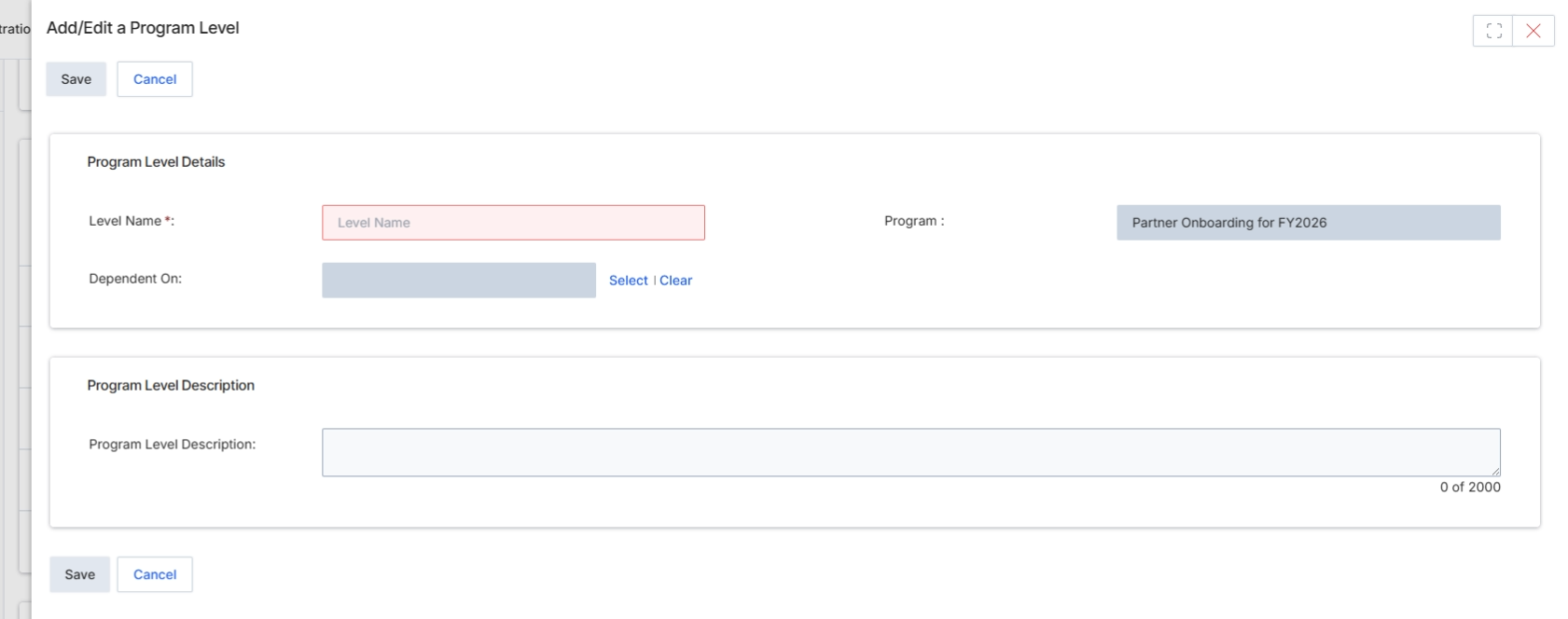
This screen, 'Add/Edit a Program Level', is a modal dialog used by UPM administrators to define or modify a specific level within a partner program. Program levels, often synonymous with partner tiers, are crucial for structuring partner benefits, access to resources, and performance-based incentives. Each program level is associated with a particular partner program and can optionally be made dependent on another existing level, implying a hierarchical structure or prerequisite. Administrators use this form to set the name and provide a detailed description for each level, which helps in clearly communicating the expectations and advantages of each tier to partners.
Enter the required details for the new program level in the 'Add/Edit a Program Level' form.
Buttons
| Button | Description |
|---|---|
| Save | Saves the current program level details. |
| Cancel | Discards any changes and closes the form. |
Program Level Details
| Field | Description |
|---|---|
| Level Name | The name of the program level, which is a required field. |
| Program | The partner program to which this level belongs, pre-filled as 'Partner Onboarding for FY2026'. |
| Dependent On | Allows selecting an existing program level that this new level depends on. |
Program Level Description
| Field | Description |
|---|---|
| Program Level Description | A detailed description of the program level, with a character limit of 2000. |
Viewing Program Level Details
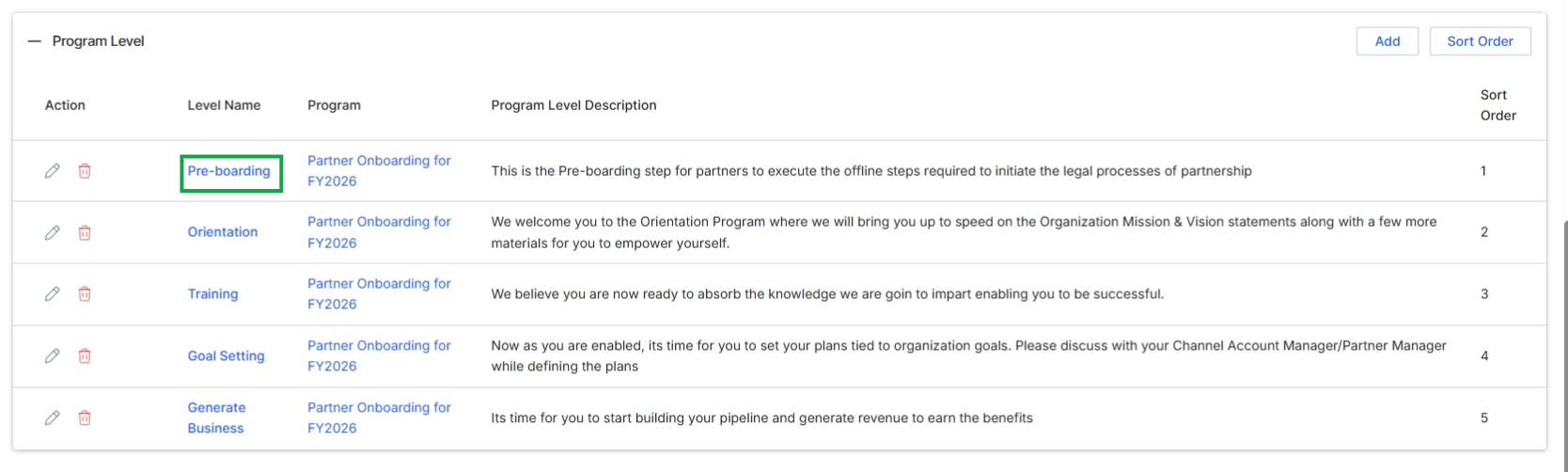
Click a level link in the "Level Name" column.
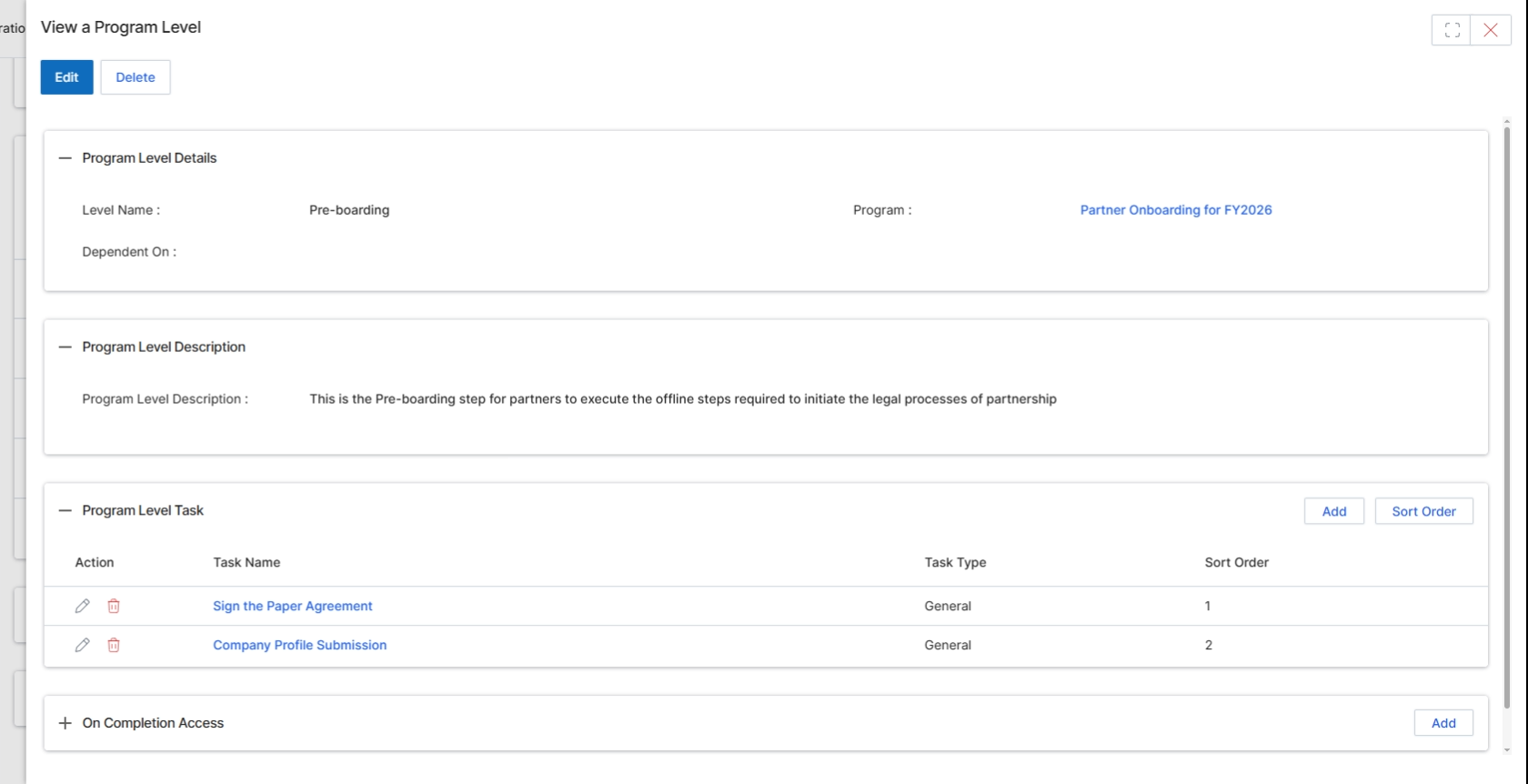
This screen displays the details of a specific Program Level, which represents a stage within a partner program's onboarding workflow. Program Levels define a sequence of tasks that partners must complete to progress through their onboarding journey, ensuring all necessary steps, such as agreement signing or profile submission, are fulfilled. Each level can be configured with specific tasks and can grant access to certain portal functionalities upon completion. This view provides a comprehensive overview of the level's configuration, including its name, associated program, description, and the individual tasks it comprises, allowing administrators to review and manage the onboarding process for partners.
Review the details of the selected Program Level.
Buttons
| Button | Description |
|---|---|
| Edit | Click to modify the details of this Program Level. |
| Delete | Click to remove this Program Level. |
| Add | Click to add a new task to this Program Level. |
| Sort Order | Click to reorder the tasks within this Program Level. |
| Add | Click to add new access permissions that are granted upon completion of this Program Level. |
Program Level Details
| Field | Description |
|---|---|
| Level Name | The name of the Program Level, indicating its purpose or stage in the onboarding process. |
| Program | The partner program to which this level belongs. |
| Dependent On | Indicates if this Program Level is dependent on the completion of another level. |
Program Level Description
| Field | Description |
|---|---|
| Program Level Description | A detailed explanation of the purpose and requirements of this Program Level. |
Program Level Task
| Column | Description |
|---|---|
| Action | Allows editing or deleting individual tasks within the Program Level. |
| Task Name | The name of the task that partners must complete at this level. |
| Task Type | The category or type of the task. |
| Sort Order | The numerical order in which the task appears within the Program Level. |
Configuring On Completion Access

Click the Add button in the "On Completion Access" section.
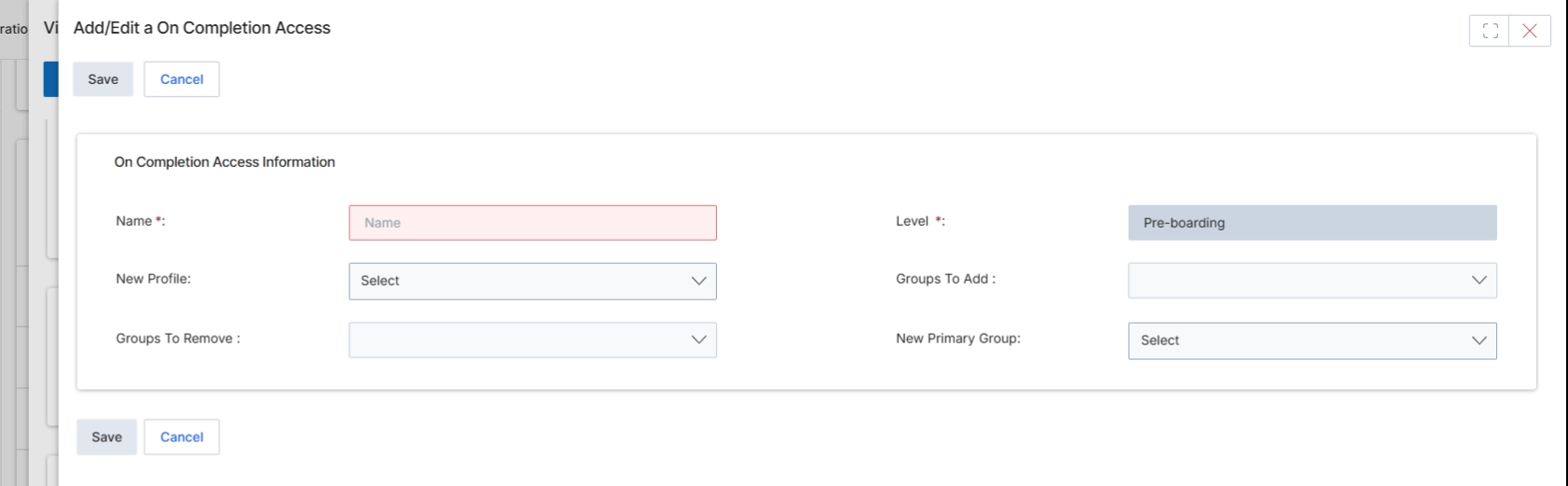
This modal dialog, titled 'Add/Edit a On Completion Access', is used to configure access rules that apply upon the completion of a specific program level or other defined event. Administrators use this screen to define what happens to a partner's profile and group memberships once they achieve a certain status or complete a required action. This includes assigning a new profile, adding or removing partners from specific groups, and setting a new primary group, ensuring that partner access and permissions are dynamically updated based on their progress within the partner program.
Fill in the details for the 'On Completion Access' rule, specifying the name, new profile, and any group modifications.
Buttons
| Button | Description |
|---|---|
| Save | Saves the configured 'On Completion Access' rule. |
| Cancel | Discards any changes and closes the modal without saving. |
On Completion Access Information
| Field | Description |
|---|---|
| Name * | The name for this 'On Completion Access' rule, which is a required field. |
| Level * | Indicates the program level or status to which this access rule applies. In this instance, it is set to 'Pre-boarding'. |
| New Profile | Allows selection of a new profile to be assigned to partners upon completion, which can alter their permissions and portal view. |
| Groups To Add | Specifies any groups that partners should be added to upon completion of the defined level or event. |
| Groups To Remove | Specifies any groups that partners should be removed from upon completion of the defined level or event. |
| New Primary Group | Allows selection of a new primary group for partners upon completion, which can affect their default access and visibility. |