

Overview
Partner Programs are fundamental to structuring how partners engage with a vendor's ecosystem. Each program defines the specific terms, onboarding steps, and resources available to a particular segment or type of partner. This feature provides administrators with a detailed view of each program, from its overarching description and accreditation to the individual sessions and levels partners must complete.
Effective program management ensures that partners are properly onboarded, enabled, and incentivized according to their program's design. Administrators use this view to understand program structure, track partner progress through sessions, and manage access permissions, ensuring that the right partners have visibility and engagement with the appropriate program content and benefits.
Accessing and Viewing Program Details
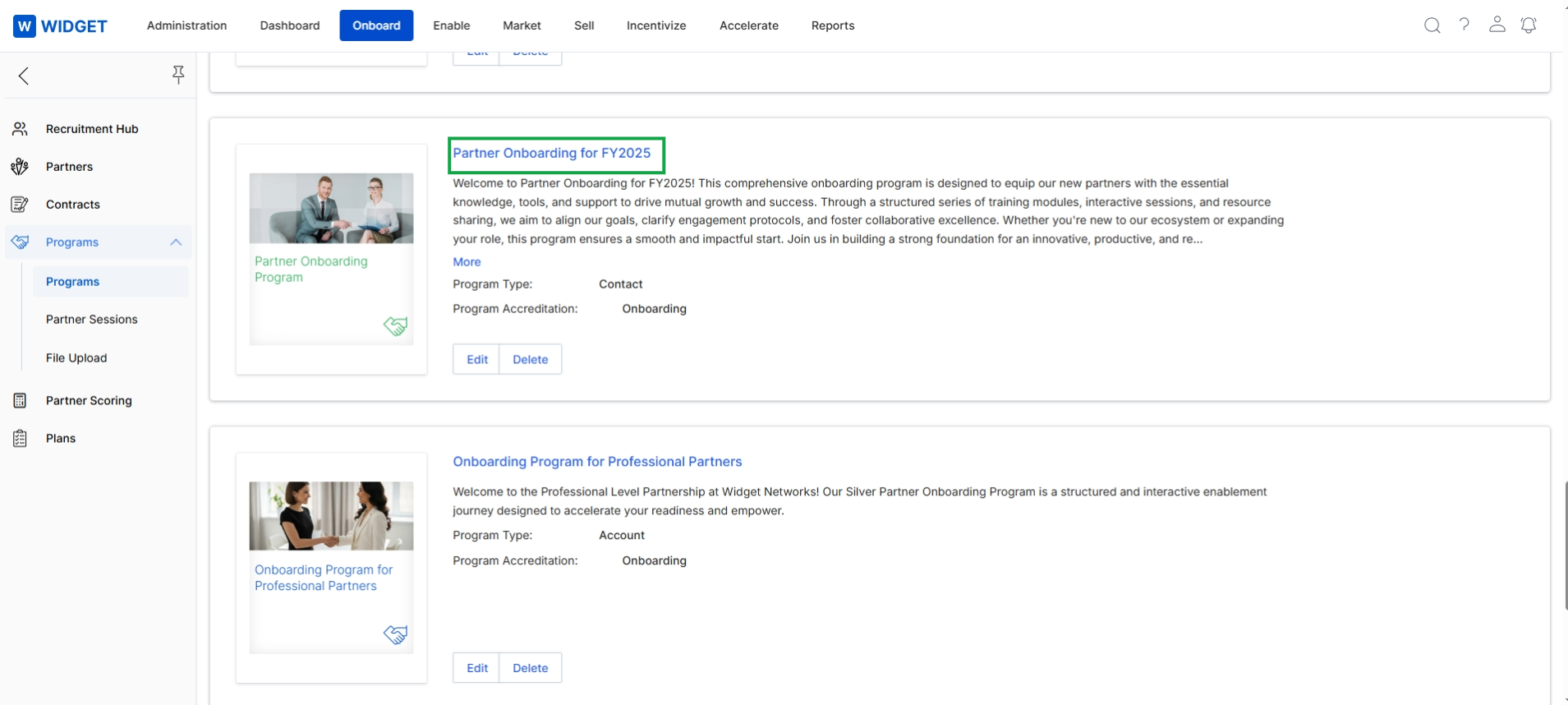
Click Program Name to view the program details.
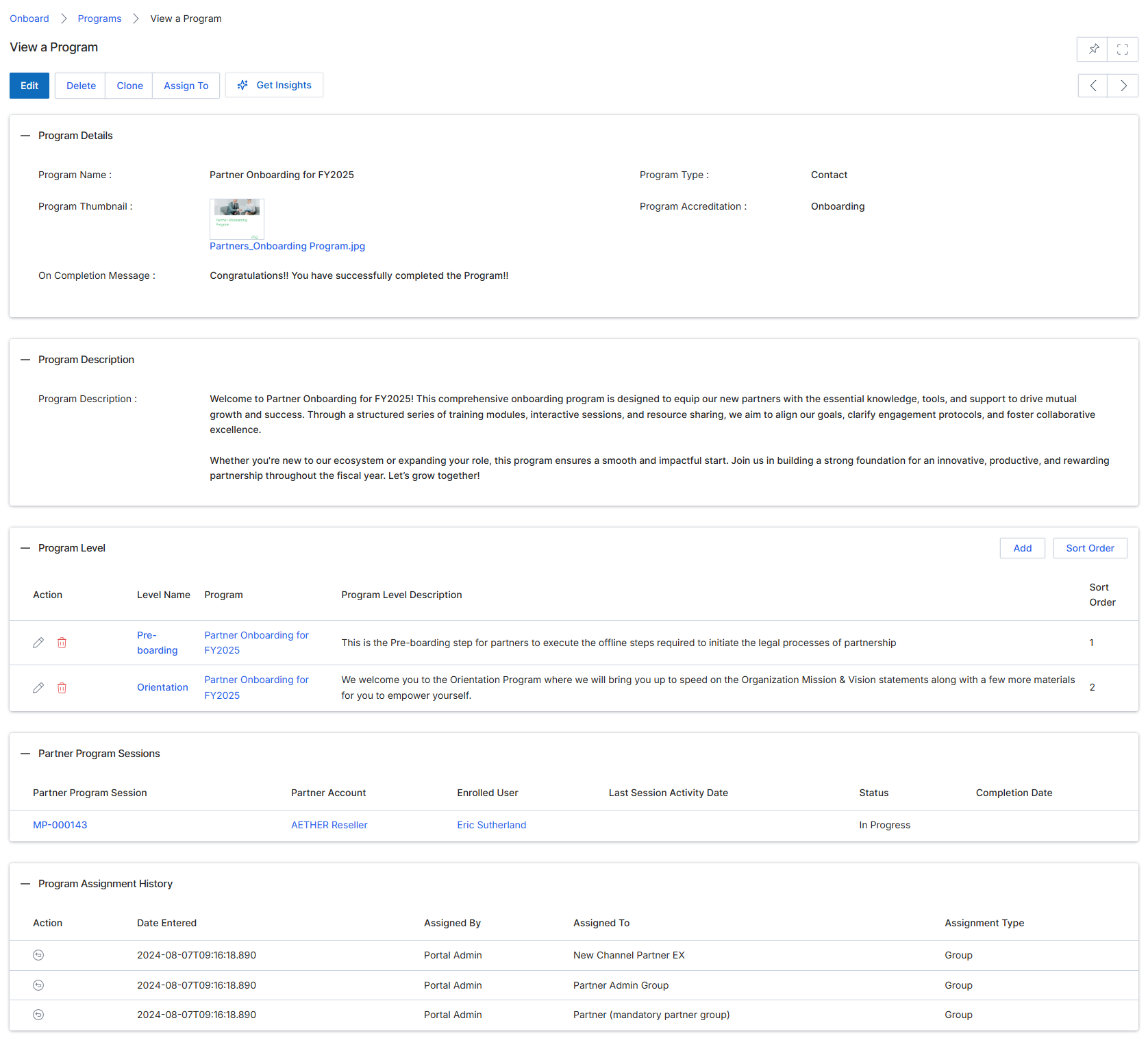
This screen displays the detailed view of a specific Partner Program within the Onboard module. Partner Programs are central to UPM, defining the structure, terms, and content partners engage with during their onboarding journey. This view provides a comprehensive overview of the program's configuration, including its name, type, accreditation, and the message partners receive upon completion. It also outlines the program's description, the various levels or stages partners progress through, associated partner program sessions, and a history of how the program has been assigned to different partner groups or individuals. This detailed information is crucial for vendor administrators to manage and understand the specifics of each onboarding program, ensuring partners are guided effectively through their initial engagement with the platform.
Review the details of the selected partner program, including its description, levels, and assignment history.
Buttons
| Button | Description |
|---|---|
| Edit | Allows editing the details of the current program. |
| Delete | Deletes the current program. |
| Clone | Creates a duplicate of the current program. |
| Assign To | Assigns the program to specific partners or groups. |
| Get Insights | Provides analytical insights related to the program's performance. |
Program Details
| Field | Description |
|---|---|
| Program Name | The name of the partner onboarding program. |
| Program Type | The category or type of the program, such as 'Contact'. |
| Program Thumbnail | A visual thumbnail image associated with the program. |
| Partners_Onboarding Program.jpg | The filename of the program's thumbnail image. |
| Program Accreditation | The accreditation status or type of the program, such as 'Onboarding'. |
| On Completion Message | The message displayed to partners upon successful completion of the program. |
Program Description
| Field | Description |
|---|---|
| Program Description | A detailed description of the program's purpose, content, and benefits. |
Program Level
| Column | Description |
|---|---|
| Action | Actions available for each program level, such as edit or delete. |
| Level Name | The name of each specific level within the program, such as 'Pre-boarding' or 'Orientation'. |
| Program | The program associated with the level. |
| Program Level Description | A brief description of what each program level entails. |
| Sort Order | The numerical order in which the program levels are displayed. |
Partner Program Sessions
| Column | Description |
|---|---|
| Partner Program Session | The unique identifier for a partner program session. |
| Partner Account | The partner account associated with the program session. |
| Enrolled User | The user enrolled in the program session. |
| Last Session Activity Date | The date of the last activity in the program session. |
| Status | The current status of the program session, such as 'In Progress'. |
| Completion Date | The date when the program session was completed. |
Program Assignment History
| Column | Description |
|---|---|
| Action | An icon indicating an action related to the program assignment history entry. |
| Date Entered | The date and time when the program assignment was recorded. |
| Assigned By | The user role or entity that assigned the program. |
| Assigned To | The entity or group to which the program was assigned. |
| Assignment Type | The method or category of assignment, such as 'Group'. |
Assigning Program Access
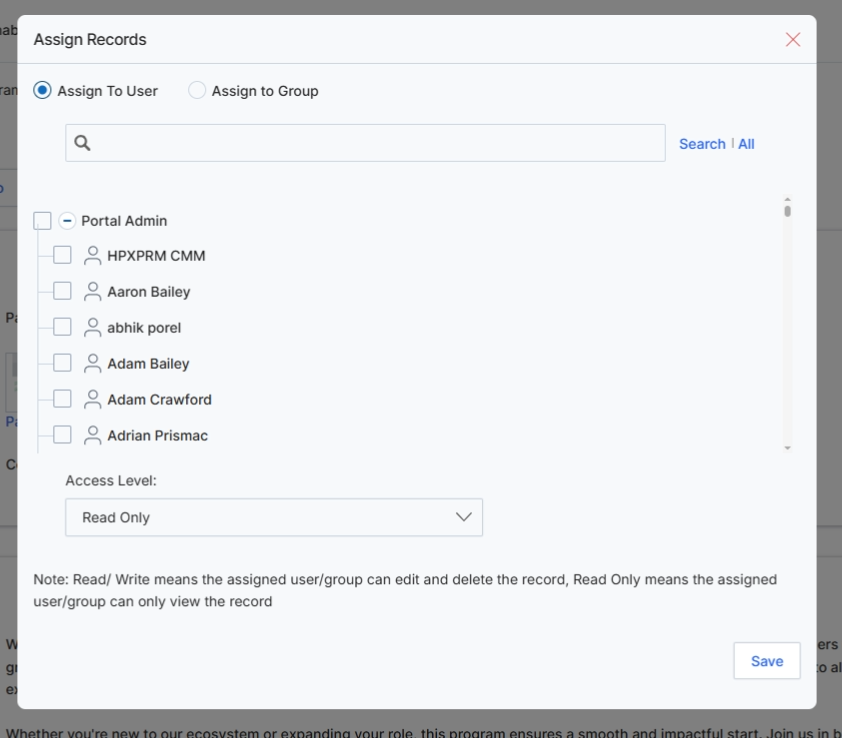
This modal window, 'Assign Records,' allows UPM administrators to manage access permissions for a specific partner program. It provides granular control over which individual users or user groups can view or edit the program details. This functionality is crucial for maintaining data security and ensuring that only authorized personnel can modify or access sensitive program configurations. By assigning programs to specific users or groups with defined access levels, the system enforces role-based access control, aligning with the platform's security architecture and administrative capabilities.
Select the 'Assign To User' option to assign the program to individual users.
Buttons
| Button | Description |
|---|---|
| Save | Click to save the assigned users/groups and their access levels to the program. |
Fields
| Field | Description |
|---|---|
| Assign To User | Select this radio button to assign the program to specific individual users. |
| Assign to Group | Select this radio button to assign the program to a predefined user group. |
| Search | Enter keywords to search for specific users or groups in the list. |
| Access Level | A dropdown menu to define the access level (Read Only or Read/Write) for the selected users or groups. |
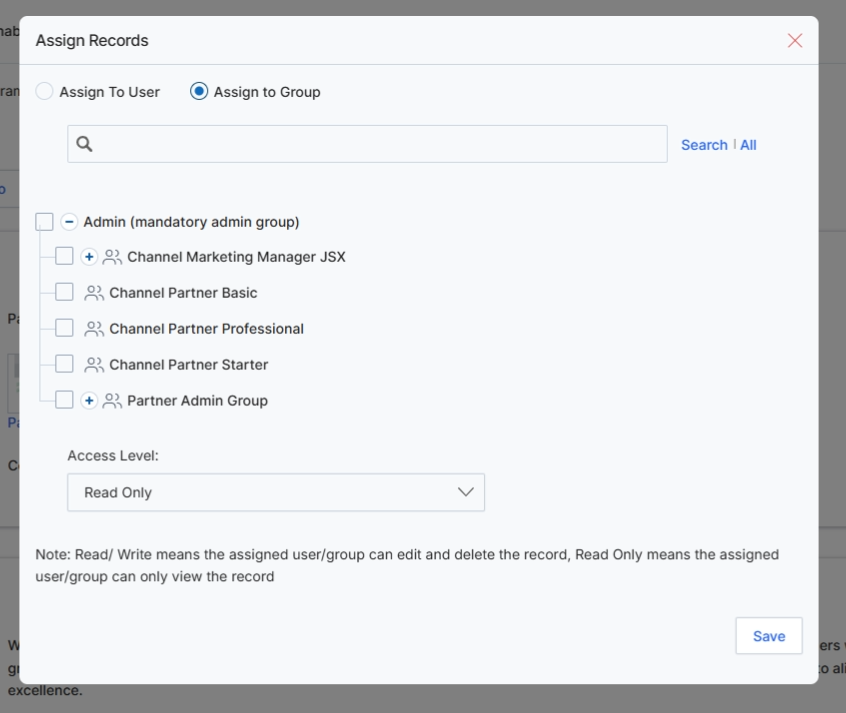
This modal window, 'Assign Records,' allows UPM administrators to control access to the currently viewed Program record by assigning it to specific user groups. This functionality is crucial for managing permissions and ensuring that only authorized personnel or teams can view, edit, or delete program configurations. By assigning programs to groups, administrators can implement granular access control, aligning with the platform's role-based access control (RBAC) mechanisms. The modal provides options to assign either to individual users or to predefined groups, with configurable access levels such as 'Read Only' or 'Read/Write', thereby governing how different internal teams interact with partner programs within the Onboard module.
Select the 'Assign to Group' option to assign the program to a user group.
Buttons
| Button | Description |
|---|---|
| Save | Button to save the assignment changes. |
Fields
| Field | Description |
|---|---|
| Assign To User | Radio button to assign the record to an individual user. |
| Assign to Group | Radio button to assign the record to a predefined user group. |
| Search | Search bar to find specific users or groups. |
| Access Level | Dropdown to select the access level for the assigned user or group, such as 'Read Only' or 'Read/Write'. |