

Overview
The Partner Profile Management functionality is crucial for maintaining accurate and comprehensive records of all partners within the ecosystem. Administrators can access and modify various attributes of a partner account, including general information, contact details, program-specific settings, and even rich text descriptions for their public-facing partner locator profiles. This ensures that all partner data is current, supporting effective partner engagement, segmentation, and incentive management across the platform.
Accessing the Partner Accounts List
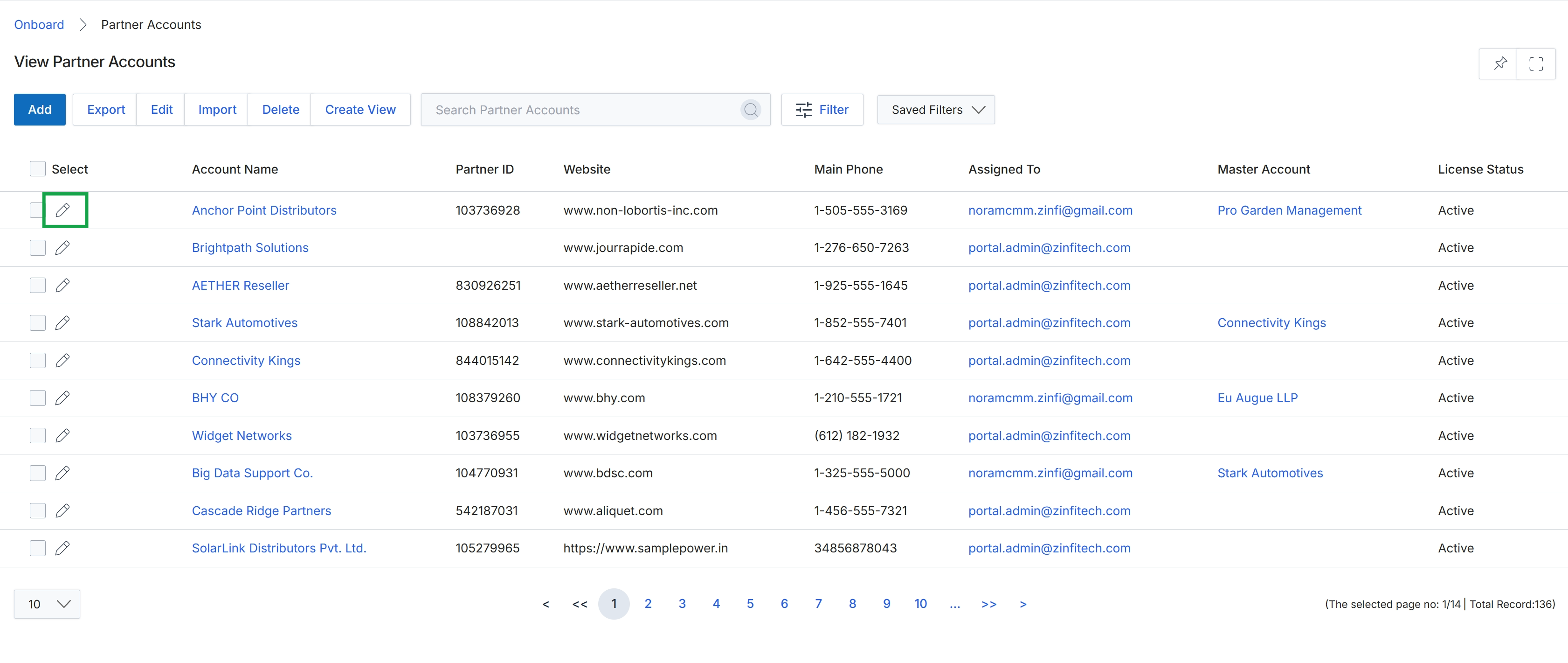
Click the pencil icon next to the partner account you want to edit.
Editing a Partner Account
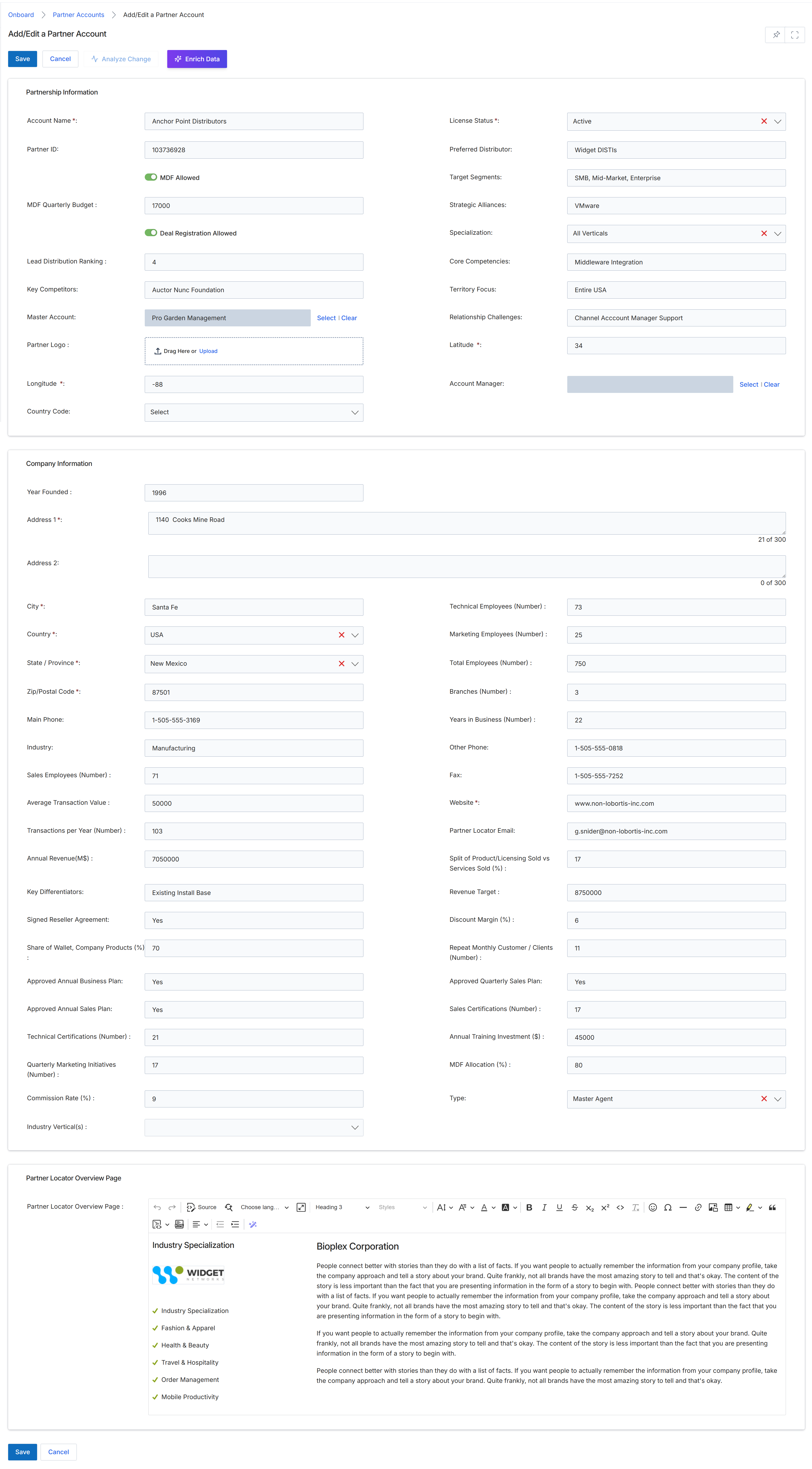
This screen, titled 'Add/Edit a Partner Account', is a comprehensive form used by UPM administrators to manage detailed information for individual partner accounts. It allows for the creation of new partner records or the modification of existing ones, covering various aspects of a partner's profile, including partnership details, company information, and their public-facing locator page content. This centralized view supports the 'Partner profile management' workflow within the Onboard module, enabling administrators to maintain accurate and up-to-date partner data, which is crucial for segmentation, tier management, and overall program operations. The form is structured into several sections to organize the extensive data points associated with a partner, ensuring all relevant information can be captured and reviewed.
Update the necessary fields within the 'Partnership Information', 'Company Information', and 'Partner Locator Overview Page' sections to modify the partner account details.
Buttons
| Button | Description |
|---|---|
| Save | Saves the changes made to the partner account details. |
| Cancel | Discards any changes and returns to the previous screen. |
| Analyze Change | Initiates an analysis of the changes made to the partner account. |
| Enrich Data | Triggers an external data enrichment process to populate or update partner information. |
| Select | Button to select a master account. |
| Clear | Button to clear the selected master account. |
Partnership Information
| Field | Description |
|---|---|
| Account Name | The official name of the partner company, which is a required field and unique per program. |
| Partner ID | A unique, auto-generated identifier for the partner account, which is read-only after creation. |
| MDF Allowed | A toggle indicating whether the partner is eligible for Market Development Funds. |
| MDF Quarterly Budget | The allocated quarterly budget for Market Development Funds for this partner. |
| Deal Registration Allowed | A toggle indicating whether the partner is permitted to register deals. |
| Lead Distribution Ranking | The ranking of the partner for lead distribution. |
| Key Competitors | A list of the partner's primary competitors. |
| Master Account | The parent account if this partner is part of a larger organizational structure. |
| Partner Logo | Allows uploading or dragging and dropping the partner's company logo. |
| Longitude | The geographical longitude coordinate for the partner's location. |
| Country Code | The country code for the partner's location, selected from a dropdown. |
| License Status | The current licensing status of the partner, selected from a dropdown. |
| Preferred Distributor | The partner's preferred distributor. |
| Target Segments | The market segments that the partner primarily targets. |
| Strategic Alliances | Any strategic alliances or partnerships the partner maintains. |
| Specialization | The areas of expertise or specialization of the partner, selected from a dropdown. |
| Core Competencies | The fundamental capabilities and strengths of the partner. |
| Territory Focus | The geographical region or territory where the partner primarily operates. |
| Relationship Challenges | Any challenges identified in the relationship with the partner. |
| Latitude | The geographical latitude coordinate for the partner's location. |
| Account Manager | The assigned account manager for this partner. |
Company Information
| Field | Description |
|---|---|
| Year Founded | The year the partner company was established. |
| Address 1 | The primary street address of the partner company. |
| Address 2 | The secondary street address or apartment/suite number of the partner company. |
| City | The city where the partner company is located. |
| Country | The country where the partner company is located, selected from a dropdown. |
| State / Province | The state or province where the partner company is located, selected from a dropdown. |
| Zip/Postal Code | The zip or postal code for the partner company's address. |
| Main Phone | The primary contact phone number for the partner company. |
| Industry | The industry in which the partner company operates. |
| Sales Employees (Number) | The number of sales employees at the partner company. |
| Average Transaction Value | The average monetary value of a transaction with the partner. |
| Transactions per Year (Number) | The total number of transactions conducted by the partner per year. |
| Annual Revenue(M$) | The partner company's annual revenue in millions of dollars. |
| Key Differentiators | The unique aspects or advantages that set the partner apart from competitors. |
| Signed Reseller Agreement | Indicates whether a reseller agreement has been signed with the partner. |
| Share of Wallet, Company Products (%) | The percentage of the partner's total relevant spending that is directed toward the company's products. |
| Approved Annual Business Plan | Indicates whether the partner's annual business plan has been approved. |
| Approved Annual Sales Plan | Indicates whether the partner's annual sales plan has been approved. |
| Technical Certifications (Number) | The number of technical certifications held by the partner's employees. |
| Quarterly Marketing Initiatives (Number) | The number of marketing initiatives undertaken by the partner each quarter. |
| Commission Rate (%) | The commission rate percentage applicable to the partner. |
| Industry Vertical(s) | The specific industry verticals the partner focuses on, selected from a dropdown. |
| Technical Employees (Number) | The number of technical employees at the partner company. |
| Marketing Employees (Number) | The number of marketing employees at the partner company. |
| Total Employees (Number) | The total number of employees at the partner company. |
| Branches (Number) | The number of branch offices or locations the partner company has. |
| Years in Business (Number) | The number of years the partner company has been in business. |
| Other Phone | An alternative contact phone number for the partner company. |
| Fax | The fax number for the partner company. |
| Website | The official website URL of the partner company. |
| Partner Locator Email | The email address designated for the partner locator. |
| Split of Product/Licensing Sold vs Services Sold (%) | The percentage breakdown of product/licensing sales versus services sales. |
| Revenue Target | The target revenue amount for the partner. |
| Discount Margin (%) | The percentage of discount margin offered to the partner. |
| Repeat Monthly Customer / Clients (Number) | The number of repeat customers or clients the partner has on a monthly basis. |
| Approved Quarterly Sales Plan | Indicates whether the partner's quarterly sales plan has been approved. |
| Sales Certifications (Number) | The number of sales certifications held by the partner's employees. |
| Annual Training Investment ($) | The annual investment made by the partner in training. |
| MDF Allocation (%) | The percentage of Market Development Funds allocated to the partner. |
| Type | The classification or type of partner, selected from a dropdown. |
Partner Locator Overview Page
| Field | Description |
|---|---|
| Partner Locator Overview Page | A rich text editor for composing the content that will appear on the partner's public-facing locator overview page. |