

Overview
The 'Partner Prospects' section is a critical component of the partner recruitment workflow, enabling vendors to track and nurture potential partners before they formally join a program. It serves as a centralized repository for pre-application leads, allowing program managers to maintain an organized pipeline of recruitment targets. By capturing and managing prospect information, vendors can strategically engage with suitable candidates, moving them through the initial stages of the partner journey.
Administrators use this module to update prospect information, such as contact details, company background, and their current status in the recruitment funnel. The ability to enrich data helps in qualifying prospects more effectively, ensuring that recruitment efforts are focused on partners who align with the program's objectives and ideal partner profile. This proactive management of prospects streamlines the transition from initial contact to formal application and onboarding.
Accessing and Viewing Partner Prospects
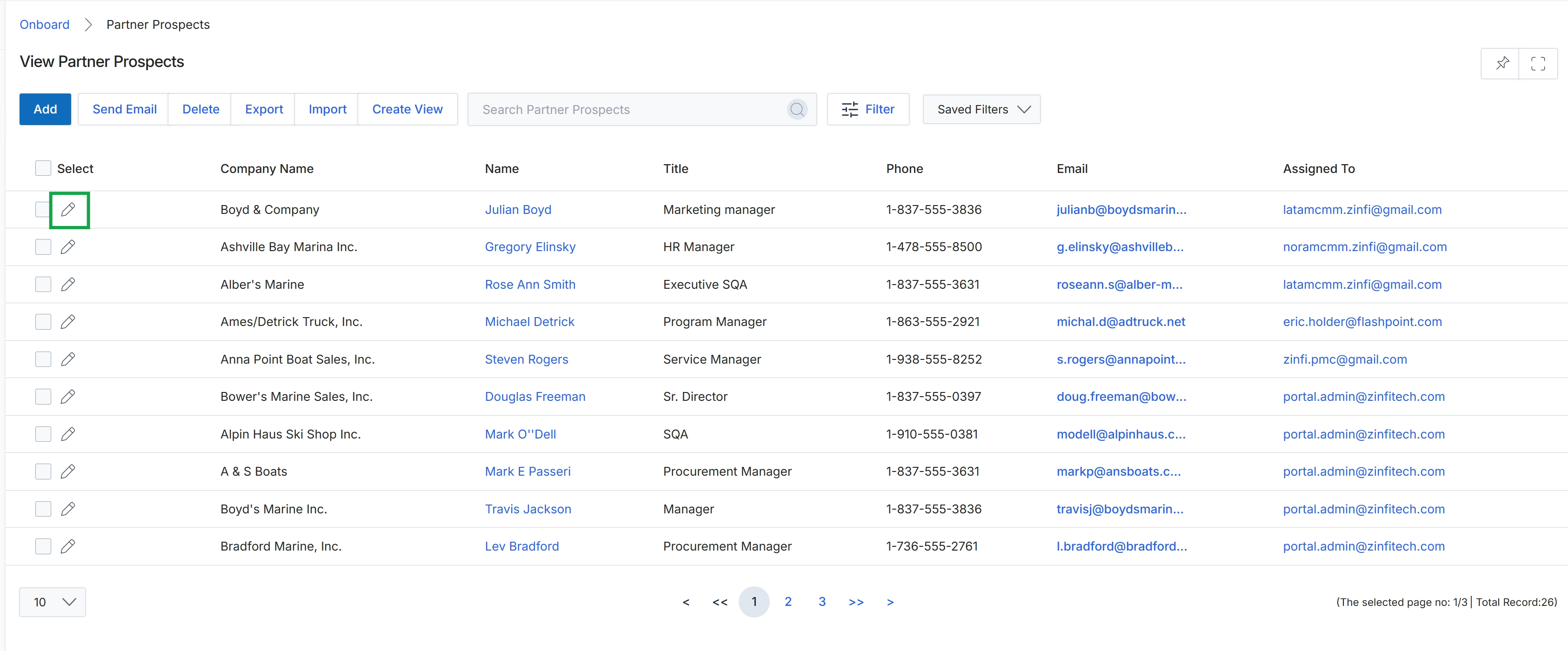
Click the pencil icon next to the desired prospect to edit their details.
Editing Partner Prospect Details
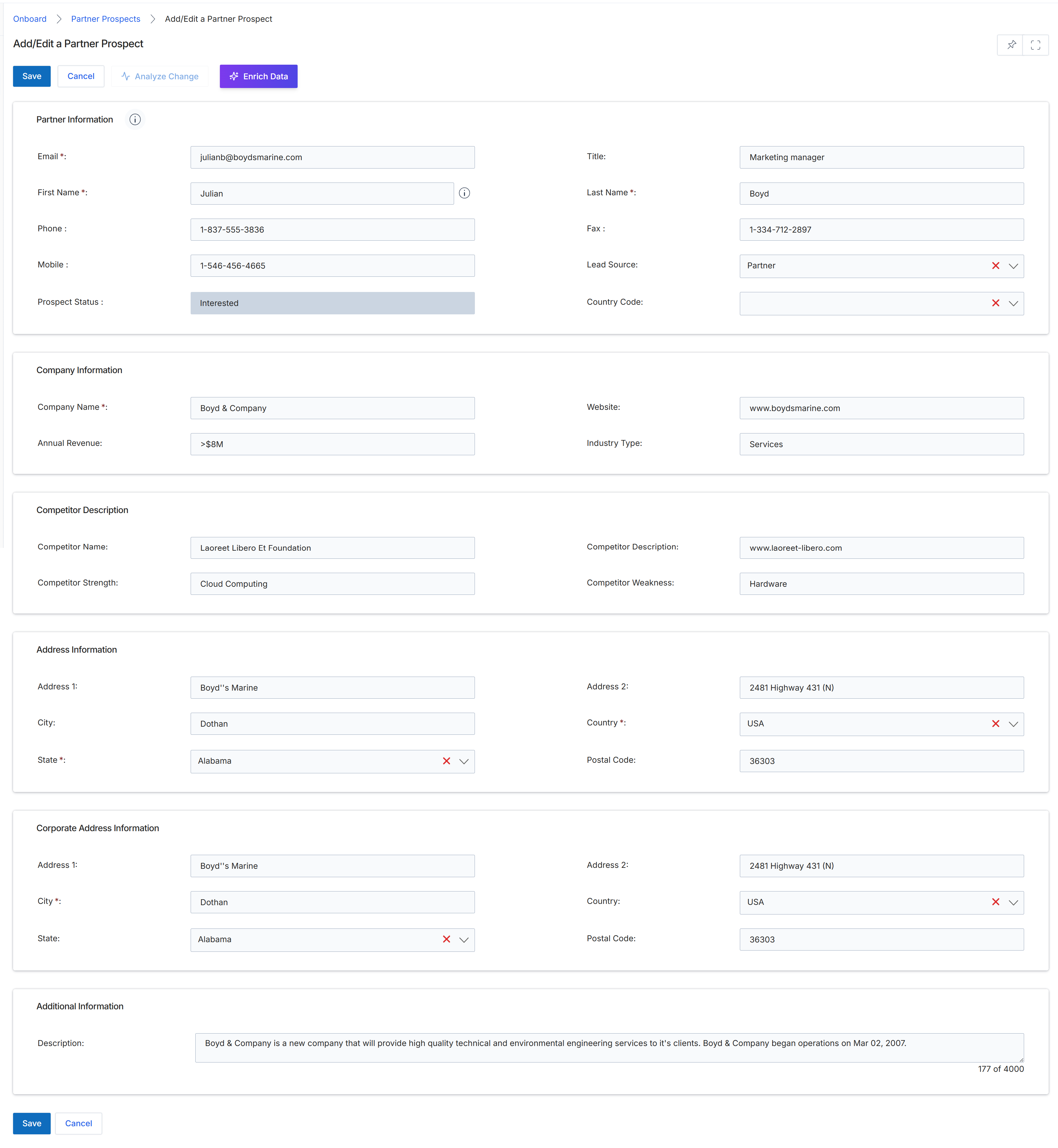
This screen displays the Add/Edit a Partner Prospect form, which allows UPM administrators to manage details for potential partners before they formally apply to a program. Prospects are early-stage sales contacts that can be manually created, imported, or synced from a CRM. The form captures essential contact, company, and address information, and includes sections for competitor details and additional notes. Administrators can use this form to update prospect information, enrich data, or analyze changes before moving the prospect through the recruitment workflow, potentially leading to an invitation to apply to a partner program.
Review the pre-filled information for the partner prospect and make any necessary edits to their details.
Buttons
| Button | Description |
|---|---|
| Save | Saves the changes made to the partner prospect. |
| Cancel | Discards any changes and returns to the previous screen. |
| Analyze Change | Analyzes the impact of proposed changes to the prospect's information. |
| Enrich Data | Enriches the prospect's data with additional information from external sources. |
Partner Information
| Field | Description |
|---|---|
| Email * | The prospect's email address, which is a required field. |
| Title | The prospect's job title. |
| First Name * | The prospect's first name, which is a required field. |
| Last Name * | The prospect's last name, which is a required field. |
| Phone | The prospect's primary phone number. |
| Fax | The prospect's fax number. |
| Mobile | The prospect's mobile phone number. |
| Lead Source | The source from which the prospect was acquired, selected from a dropdown. |
| Prospect Status | The current status of the prospect, indicating their stage in the recruitment process. |
| Country Code | The country code associated with the prospect's contact information, selected from a dropdown. |
Company Information
| Field | Description |
|---|---|
| Company Name * | The name of the prospect's company, which is a required field. |
| Website | The prospect company's website URL. |
| Annual Revenue | The estimated annual revenue of the prospect's company. |
| Industry Type | The industry sector of the prospect's company. |
Competitor Description
| Field | Description |
|---|---|
| Competitor Name | The name of a competitor to the prospect's company. |
| Competitor Description | A description of the competitor. |
| Competitor Strength | A description of the competitor's strengths. |
| Competitor Weakness | A description of the competitor's weaknesses. |
Address Information
| Field | Description |
|---|---|
| Address 1 | The first line of the prospect's address. |
| Address 2 | The second line of the prospect's address. |
| City | The city of the prospect's address. |
| Country * | The country of the prospect's address, which is a required field selected from a dropdown. |
| State * | The state of the prospect's address, which is a required field selected from a dropdown. |
| Postal Code | The postal code of the prospect's address. |
Corporate Address Information
| Field | Description |
|---|---|
| Address 1 | The first line of the prospect's corporate address. |
| Address 2 | The second line of the prospect's corporate address. |
| City * | The city of the prospect's corporate address, which is a required field. |
| Country | The country of the prospect's corporate address, selected from a dropdown. |
| State | The state of the prospect's corporate address, selected from a dropdown. |
| Postal Code | The postal code of the prospect's corporate address. |
Additional Information
| Field | Description |
|---|---|
| Description | Additional descriptive information about the prospect. |