

Overview
The Partner Accounts section within the UPM is a critical component of partner profile management, allowing administrators to access and manage the foundational data for all enrolled partners. From this central hub, administrators can review a partner's status, financial details, program participation, and historical activity. This detailed visibility is essential for effective partner relationship management, enabling informed decisions regarding partner support, incentives, and overall program strategy.
Administrators can not only view extensive partner information but also perform key administrative actions such as editing profile details, duplicating partner records for similar new partners, and, crucially, assigning specific partner accounts to internal users or user groups. This assignment capability ensures that the right internal teams or individuals have appropriate access and responsibility for managing particular partner relationships, streamlining workflows and accountability within the partner program.
Accessing and Viewing Partner Accounts
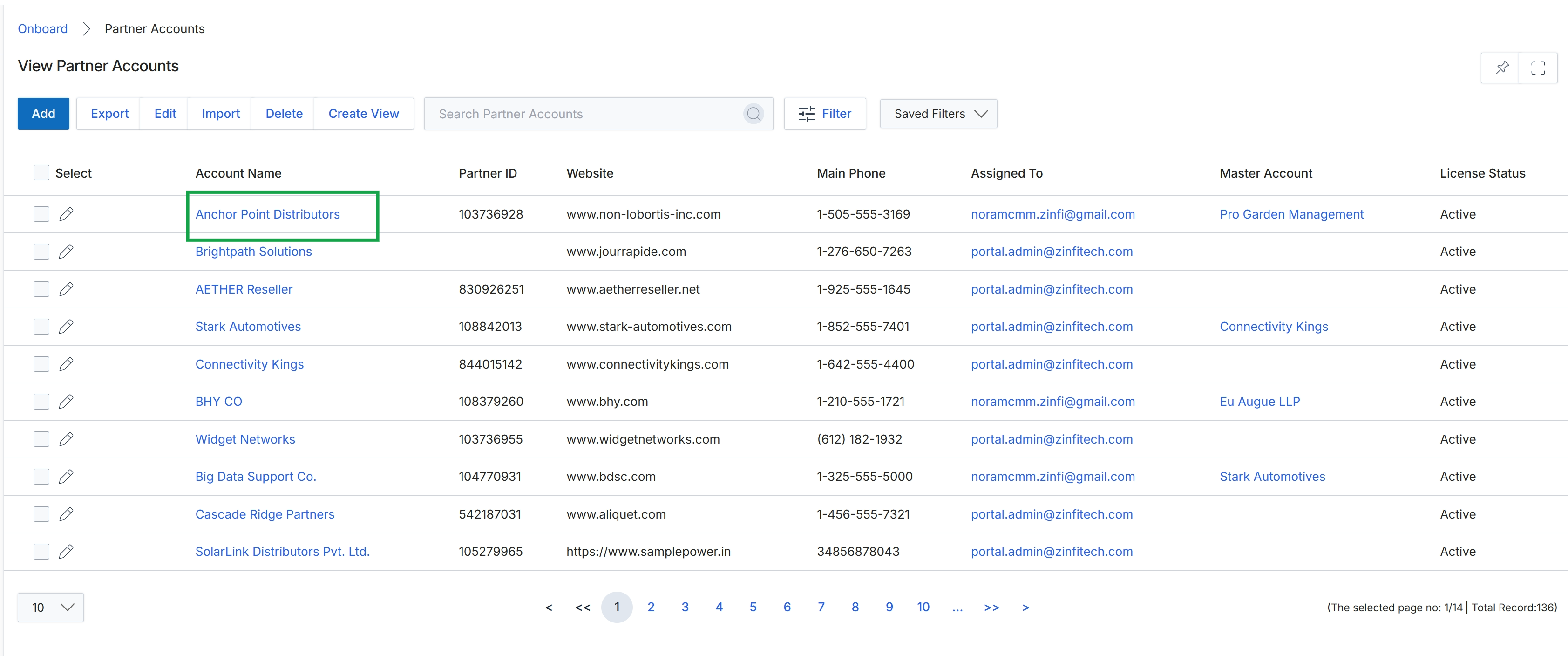
Click Anchor Point Distributors in the Account Name column.
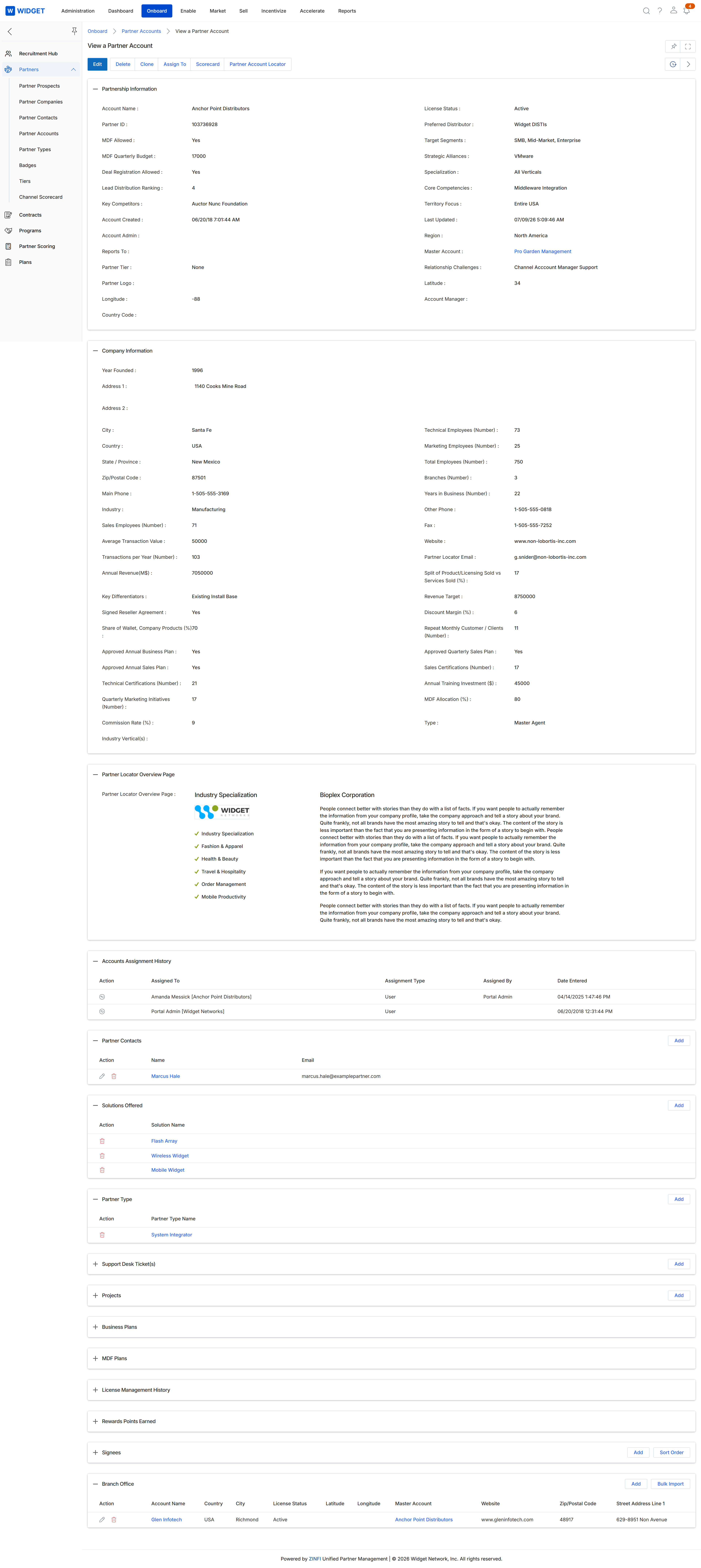
This screen provides a comprehensive, detailed view of a specific partner account, serving as a central hub for administrators to manage and understand their partners. It consolidates critical information from various stages of the partner lifecycle, including their company details, partnership status, historical assignments, contacts, and solutions offered. This holistic overview supports effective partner relationship management, enabling administrators to assess a partner's engagement, performance, and capabilities at a glance, which is crucial for informed decision-making regarding partner enablement, incentives, and overall program management. The screen is organized into several sections, each displaying a specific category of information, such as 'Partnership Information' and 'Company Information', along with related lists like 'Accounts Assignment History' and 'Partner Contacts'.
After selecting a partner from the list view, review the detailed information presented on the View a Partner Account page.
Buttons
| Button | Description |
|---|---|
| Edit | Allows administrators to modify the partner account details. |
| Delete | Deletes the current partner account. |
| Clone | Creates a duplicate of the current partner account. |
| Assign To | Assigns the partner account to a different owner or manager. |
| Scorecard | Displays the partner's performance scorecard. |
| Partner Account Locator | Navigates to the partner account locator feature. |
| Add | Adds a new entry to the Accounts Assignment History. |
| Add | Adds a new partner contact. |
| Add | Adds a new solution offered by the partner. |
| Add | Adds a new partner type. |
| Add | Adds a new branch office. |
| Bulk Import | Imports multiple branch offices from a file. |
Partnership Information
| Field | Description |
|---|---|
| Account Name | The official name of the partner company. |
| Partner ID | A unique identifier assigned to the partner account. |
| MDF Allowed | Indicates whether the partner is eligible for Market Development Funds. |
| MDF Quarterly Budget | The allocated quarterly budget for Market Development Funds. |
| Deal Registration Allowed | Indicates whether the partner is permitted to register deals. |
| Lead Distribution Ranking | The partner's ranking for lead distribution. |
| Key Competitors | Lists the main competitors identified for this partner. |
| Account Created | The date and time when the partner account was created. |
| Account Admin | The administrator responsible for this partner account. |
| Reports To | The entity or individual to whom this partner reports. |
| Partner Tier | The performance level or tier assigned to the partner. |
| Partner Logo | The logo associated with the partner company. |
| Longitude | The longitude coordinate of the partner's primary location. |
| Country Code | The country code for the partner's location. |
| License Status | The current status of the partner's license. |
| Preferred Distributor | The preferred distributor associated with this partner. |
| Target Segments | The market segments that the partner targets. |
| Strategic Alliances | Lists the strategic alliances maintained by the partner. |
| Specialization | The areas of expertise or focus for the partner. |
| Core Competencies | The primary skills and capabilities of the partner. |
| Territory Focus | The geographic regions where the partner operates. |
| Last Updated | The date and time when the partner account information was last modified. |
| Region | The broader geographical region of the partner. |
| Master Account | The master account associated with this partner, if applicable. |
| Relationship Challenges | Notes on any challenges in the partner relationship. |
| Latitude | The latitude coordinate of the partner's primary location. |
| Account Manager | The name of the account manager assigned to this partner. |
Company Information
| Field | Description |
|---|---|
| Year Founded | The year the partner company was established. |
| Address 1 | The first line of the partner company's street address. |
| Address 2 | The second line of the partner company's street address. |
| City | The city where the partner company is located. |
| Country | The country where the partner company is located. |
| State / Province | The state or province where the partner company is located. |
| Zip/Postal Code | The postal code for the partner company's address. |
| Main Phone | The primary contact phone number for the partner company. |
| Industry | The industry in which the partner company operates. |
| Sales Employees (Number) | The number of sales employees at the partner company. |
| Average Transaction Value | The average monetary value of transactions for the partner. |
| Transactions per Year (Number) | The total number of transactions conducted by the partner annually. |
| Annual Revenue(M$) | The annual revenue of the partner company in millions of dollars. |
| Key Differentiators | Highlights what makes the partner unique or stand out. |
| Signed Reseller Agreement | Indicates whether a reseller agreement has been signed with the partner. |
| Share of Wallet, Company Products (%) | The percentage of the partner's business that involves the company's products. |
| Approved Annual Business Plan | Indicates if the partner's annual business plan has been approved. |
| Approved Annual Sales Plan | Indicates if the partner's annual sales plan has been approved. |
| Technical Certifications (Number) | The number of technical certifications held by the partner's staff. |
| Quarterly Marketing Initiatives (Number) | The number of marketing initiatives undertaken by the partner quarterly. |
| Commission Rate (%) | The commission rate percentage applicable to the partner. |
| Industry Vertical(s) | The specific industry verticals the partner operates in. |
| Technical Employees (Number) | The number of technical employees at the partner company. |
| Marketing Employees (Number) | The number of marketing employees at the partner company. |
| Total Employees (Number) | The total number of employees at the partner company. |
| Branches (Number) | The number of branch offices the partner company has. |
| Years in Business (Number) | The number of years the partner company has been in business. |
| Other Phone | An alternative contact phone number for the partner company. |
| Fax | The fax number for the partner company. |
| Website | The official website of the partner company. |
| Partner Locator Email | The email address used for the partner locator service. |
| Split of Product/Licensing Sold vs Services Sold (%) | The percentage breakdown of product/licensing sales versus services sales. |
| Revenue Target | The target revenue set for the partner. |
| Discount Margin (%) | The percentage of discount margin offered to the partner. |
| Repeat Monthly Customer / Clients (Number) | The number of repeat customers or clients the partner acquires monthly. |
| Approved Quarterly Sales Plan | Indicates if the partner's quarterly sales plan has been approved. |
| Sales Certifications (Number) | The number of sales certifications held by the partner's staff. |
| Annual Training Investment ($) | The annual investment made by the partner in training. |
| MDF Allocation (%) | The percentage of Market Development Funds allocated to the partner. |
| Type | The type of partner, such as 'Master Agent'. |
Partner Locator Overview Page
| Field | Description |
|---|---|
| Partner Locator Overview Page | A section displaying information relevant to the partner locator, including industry specialization and a company description. |
Accounts Assignment History
| Column | Description |
|---|---|
| Action | Provides options to manage the assignment entry. |
| Assigned To | The individual or entity to whom the account was assigned. |
| Assignment Type | The type of assignment made for the account. |
| Assigned By | The user who made the account assignment. |
| Date Entered | The date and time when the assignment was recorded. |
Partner Contacts
| Column | Description |
|---|---|
| Action | Provides options to manage the partner contact. |
| Name | The name of the partner contact. |
| The email address of the partner contact. |
Solutions Offered
| Column | Description |
|---|---|
| Action | Provides options to manage the solution offered. |
| Solution Name | The name of a solution offered by the partner. |
Partner Type
| Column | Description |
|---|---|
| Action | Provides options to manage the partner type. |
| Partner Type Name | The name of the partner type. |
Branch Office
| Column | Description |
|---|---|
| Action | Provides options to manage the branch office entry. |
| Account Name | The name of the branch office account. |
| Country | The country where the branch office is located. |
| City | The city where the branch office is located. |
| License Status | The current license status of the branch office. |
| Latitude | The latitude coordinate of the branch office location. |
| Longitude | The longitude coordinate of the branch office location. |
| Master Account | The master account associated with the branch office. |
| Website | The website of the branch office. |
| Zip/Postal Code | The postal code for the branch office address. |
| Street Address Line 1 | The first line of the street address for the branch office. |
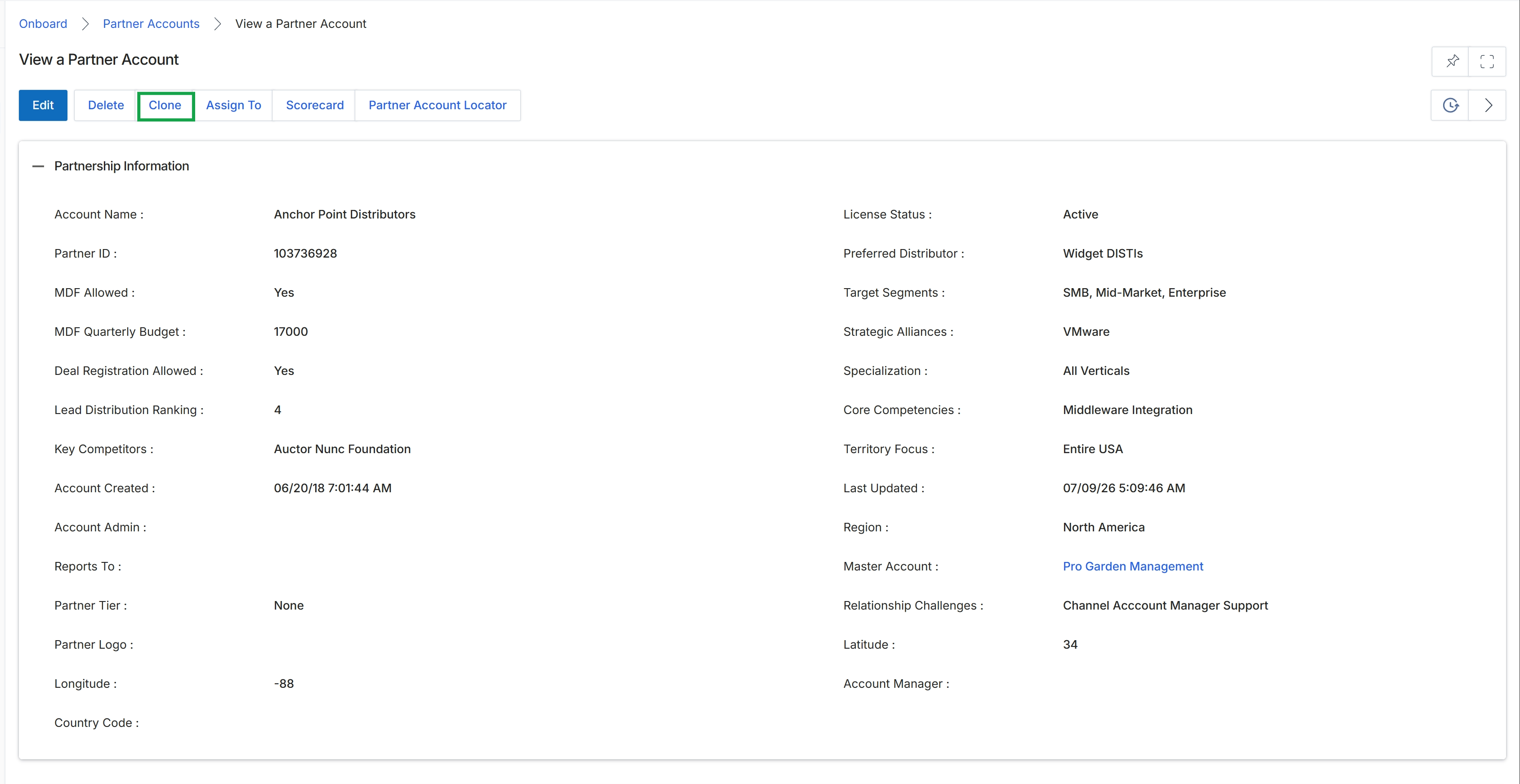
Click the Clone button.
Editing and Cloning Partner Accounts
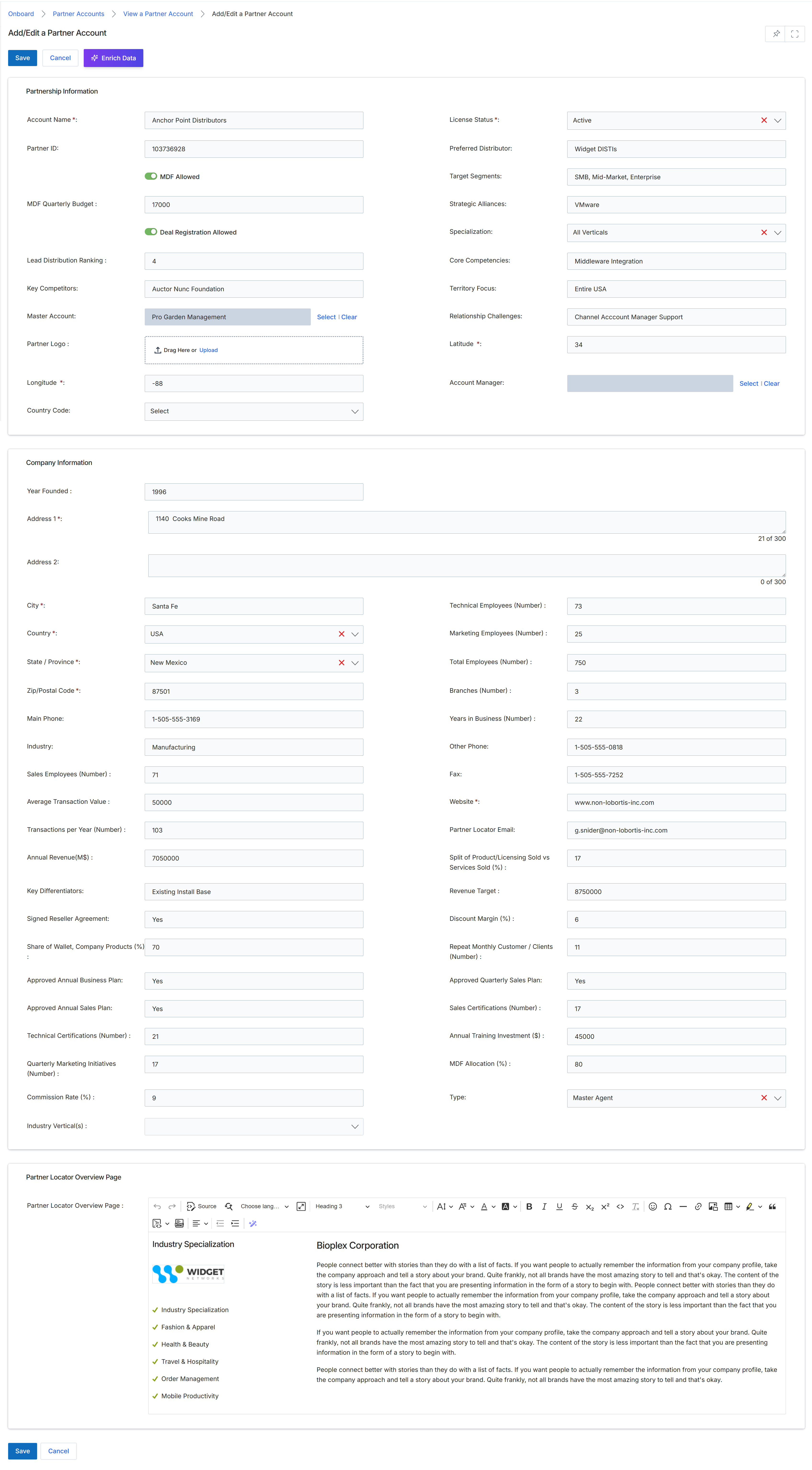
The Add/Edit a Partner Account form is a central component of the Onboard module, enabling administrators to manage comprehensive details for each partner. This form consolidates various types of information, including partnership specifics, company demographics, and performance metrics, into a single editable view. It allows for the modification of critical partner attributes such as their assigned tier, manager, and various operational settings like MDF allowances and deal registration permissions. The form also supports the input of detailed company information, including contact details, industry focus, and employee counts, which are crucial for segmentation, scoring, and targeted program management. The 'Partner Locator Overview Page' section further allows for the customization of the partner's public-facing profile, which can be syndicated to partner-facing directories or microsites.
After clicking 'Edit' from the 'View a Partner Account' screen, review or modify the partner account details in the 'Add/Edit a Partner Account' form.
Buttons
| Button | Description |
|---|---|
| Save | Saves the changes made to the partner account. |
| Cancel | Discards any changes and returns to the previous screen. |
| Enrich Data | Automatically populates certain company information fields using an external data enrichment service. |
Partnership Information
| Field | Description |
|---|---|
| Account Name * | The official name of the partner company. This field is required and unique per program. |
| Partner ID | A unique identifier automatically assigned to the partner account. |
| MDF Allowed | A toggle to indicate whether the partner is eligible for Market Development Funds (MDF). |
| MDF Quarterly Budget | The allocated quarterly budget for Market Development Funds for this partner. |
| Deal Registration Allowed | A toggle to indicate whether the partner is permitted to register deals. |
| Lead Distribution Ranking | A numerical ranking indicating the partner's priority for lead distribution. |
| Key Competitors | Lists the main competitors of the partner. |
| Master Account | The master account associated with this partner, if applicable. |
| Partner Logo | Allows uploading or dragging a file to set the partner's logo. |
| Longitude * | The geographical longitude of the partner's primary location. |
| Country Code | The country code for the partner's location, selected from a dropdown. |
| License Status * | The current license status of the partner, selected from a dropdown. |
| Preferred Distributor | The partner's preferred distributor. |
| Target Segments | The market segments that the partner targets. |
| Strategic Alliances | Lists any strategic alliances the partner has formed. |
| Specialization | The areas of expertise or specialization of the partner, selected from a dropdown. |
| Core Competencies | The primary skills and capabilities of the partner. |
| Territory Focus | The geographical or market territory that the partner focuses on. |
| Relationship Challenges | Describes any challenges in the relationship with the partner. |
| Latitude * | The geographical latitude of the partner's primary location. |
| Account Manager | The internal account manager assigned to this partner. |
Company Information
| Field | Description |
|---|---|
| Year Founded | The year the partner company was founded. |
| Address 1 * | The first line of the partner company's street address. |
| Address 2 | The second line of the partner company's street address. |
| City * | The city where the partner company is located. |
| Country * | The country where the partner company is located, selected from a dropdown. |
| State / Province * | The state or province where the partner company is located, selected from a dropdown. |
| Zip/Postal Code * | The zip or postal code for the partner company's address. |
| Main Phone | The primary phone number for the partner company. |
| Industry | The industry in which the partner company operates. |
| Sales Employees (Number) | The number of sales employees at the partner company. |
| Average Transaction Value | The average value of transactions processed by the partner. |
| Transactions per Year (Number) | The total number of transactions conducted by the partner annually. |
| Annual Revenue (M$) | The partner company's annual revenue in millions of dollars. |
| Key Differentiators | Describes what makes the partner company unique or superior to competitors. |
| Signed Reseller Agreement | Indicates whether a reseller agreement has been signed with the partner. |
| Share of Wallet, Company Products (%) | The percentage of the partner's total business that is dedicated to the company's products. |
| Approved Annual Business Plan | Indicates whether an annual business plan has been approved for the partner. |
| Approved Annual Sales Plan | Indicates whether an annual sales plan has been approved for the partner. |
| Technical Certifications (Number) | The number of technical certifications held by the partner's employees. |
| Quarterly Marketing Initiatives (Number) | The number of marketing initiatives undertaken by the partner quarterly. |
| Commission Rate (%) | The commission rate percentage applicable to the partner. |
| Industry Vertical(s) | The specific industry verticals the partner operates within, selected from a dropdown. |
| Technical Employees (Number) | The number of technical employees at the partner company. |
| Marketing Employees (Number) | The number of marketing employees at the partner company. |
| Total Employees (Number) | The total number of employees at the partner company. |
| Branches (Number) | The number of branch offices the partner company has. |
| Years in Business (Number) | The number of years the partner company has been in business. |
| Other Phone | An alternative phone number for the partner company. |
| Fax | The fax number for the partner company. |
| Website * | The official website URL for the partner company. |
| Partner Locator Email | The email address used for the partner locator service. |
| Split of Product/Licensing Sold vs Services Sold (%) | The percentage breakdown of product/licensing sales versus services sales. |
| Revenue Target | The target revenue for the partner. |
| Discount Margin (%) | The percentage of discount margin offered to the partner. |
| Repeat Monthly Customer / Clients (Number) | The number of repeat customers or clients the partner has monthly. |
| Approved Quarterly Sales Plan | Indicates whether a quarterly sales plan has been approved for the partner. |
| Sales Certifications (Number) | The number of sales certifications held by the partner's employees. |
| Annual Training Investment ($) | The annual investment made by the partner in training. |
| MDF Allocation (%) | The percentage of MDF allocated to the partner. |
| Type | The type of partner, selected from a dropdown. |
Partner Locator Overview Page
| Field | Description |
|---|---|
| Partner Locator Overview Page | A rich text editor for creating the partner's public-facing overview page content. |
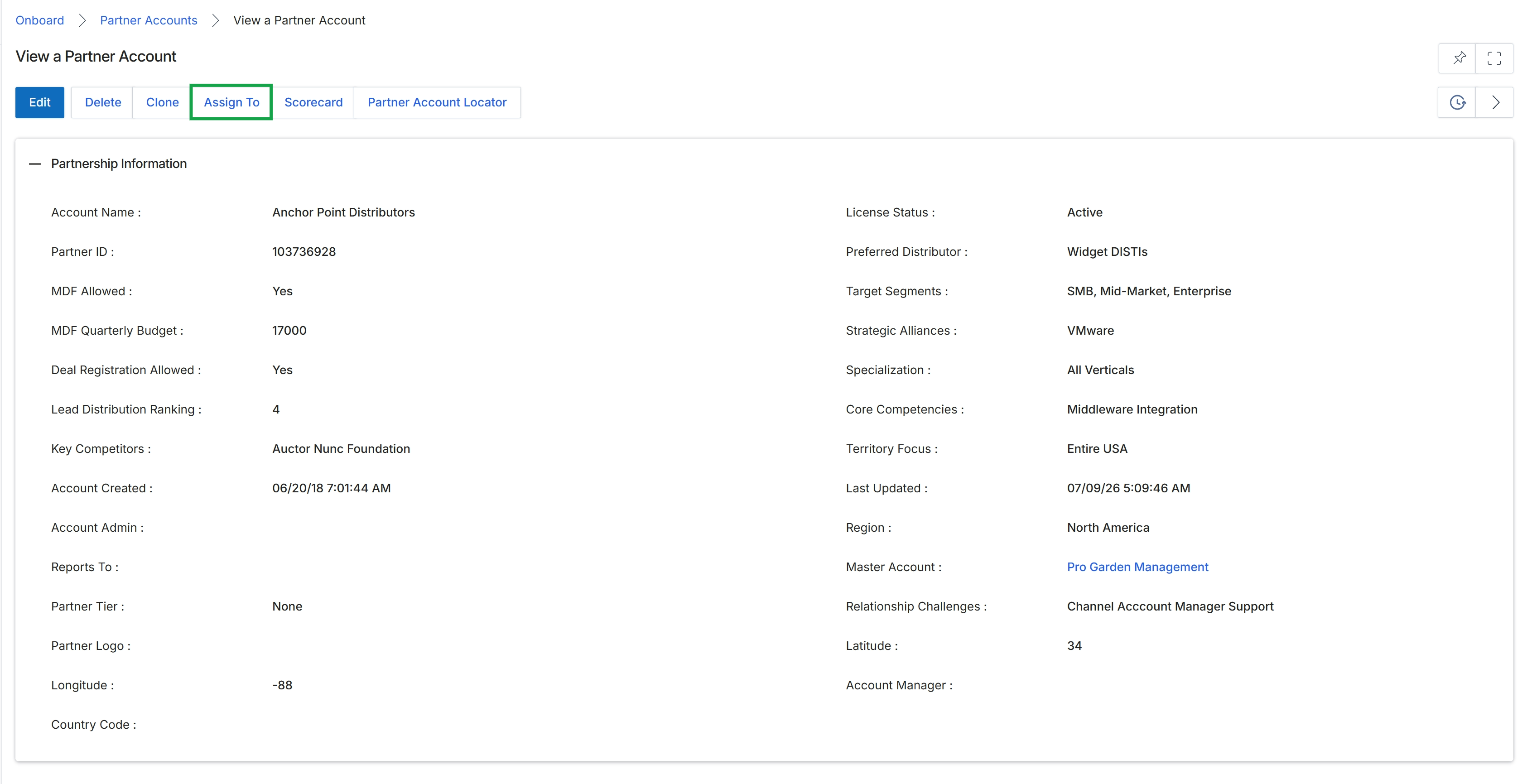
Click the Assign To button.
Assigning Partner Accounts to Users or Groups
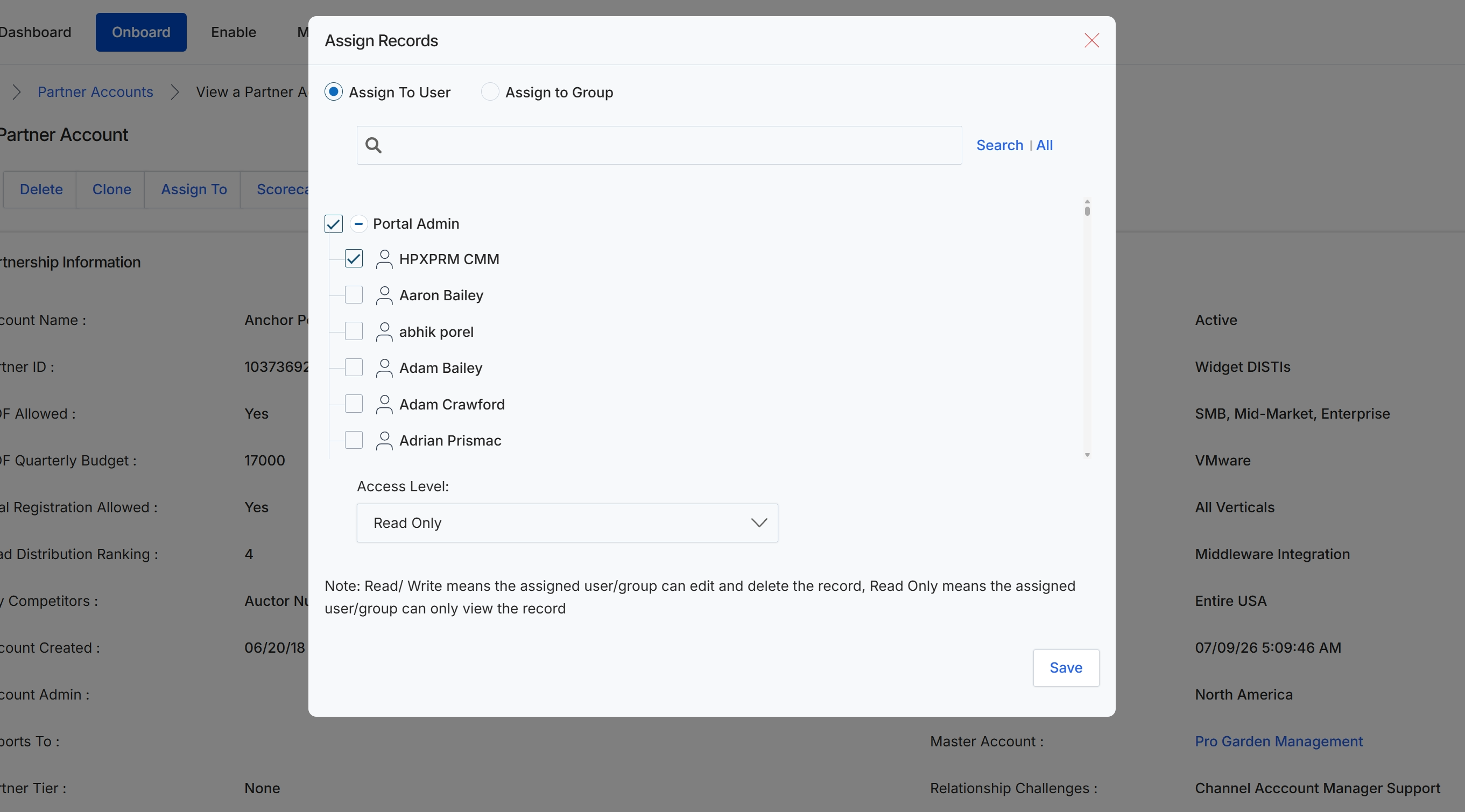
The 'Assign Records' dialog facilitates the delegation of ownership and access permissions for a specific partner account. This functionality is critical for UPM administrators to manage workloads, enforce access control policies, and define which users or groups can view or modify partner records. Administrators can choose to assign the record to an individual user or a predefined user group, and then specify the appropriate access level, which dictates whether the assigned entity has read-only or read/write privileges over the partner account. This ensures that sensitive partner data is handled in accordance with organizational roles and security requirements.
Select the 'HPXPRM CMM' checkbox to assign the partner account to this specific user.
Buttons
| Button | Description |
|---|---|
| All | A button to display all available users or groups. |
| Save | A button to save the assignment changes. |
Fields
| Field | Description |
|---|---|
| Assign To User | A radio button to select the option of assigning the record to an individual user. |
| Assign to Group | A radio button to select the option of assigning the record to a predefined user group. |
| Search | An input field to search for users or groups to assign the record to. |
| Portal Admin | A checkbox to select or deselect all users listed under the 'Portal Admin' category. |
| HPXPRM CMM | A checkbox to select the user 'HPXPRM CMM' for assignment. |
| Aaron Bailey | A checkbox to select the user 'Aaron Bailey' for assignment. |
| abhik porel | A checkbox to select the user 'abhik porel' for assignment. |
| Adam Bailey | A checkbox to select the user 'Adam Bailey' for assignment. |
| Adam Crawford | A checkbox to select the user 'Adam Crawford' for assignment. |
| Adrian Prismac | A checkbox to select the user 'Adrian Prismac' for assignment. |
| Access Level | A dropdown menu to select the access level (Read Only or Read/Write) for the assigned user or group. |
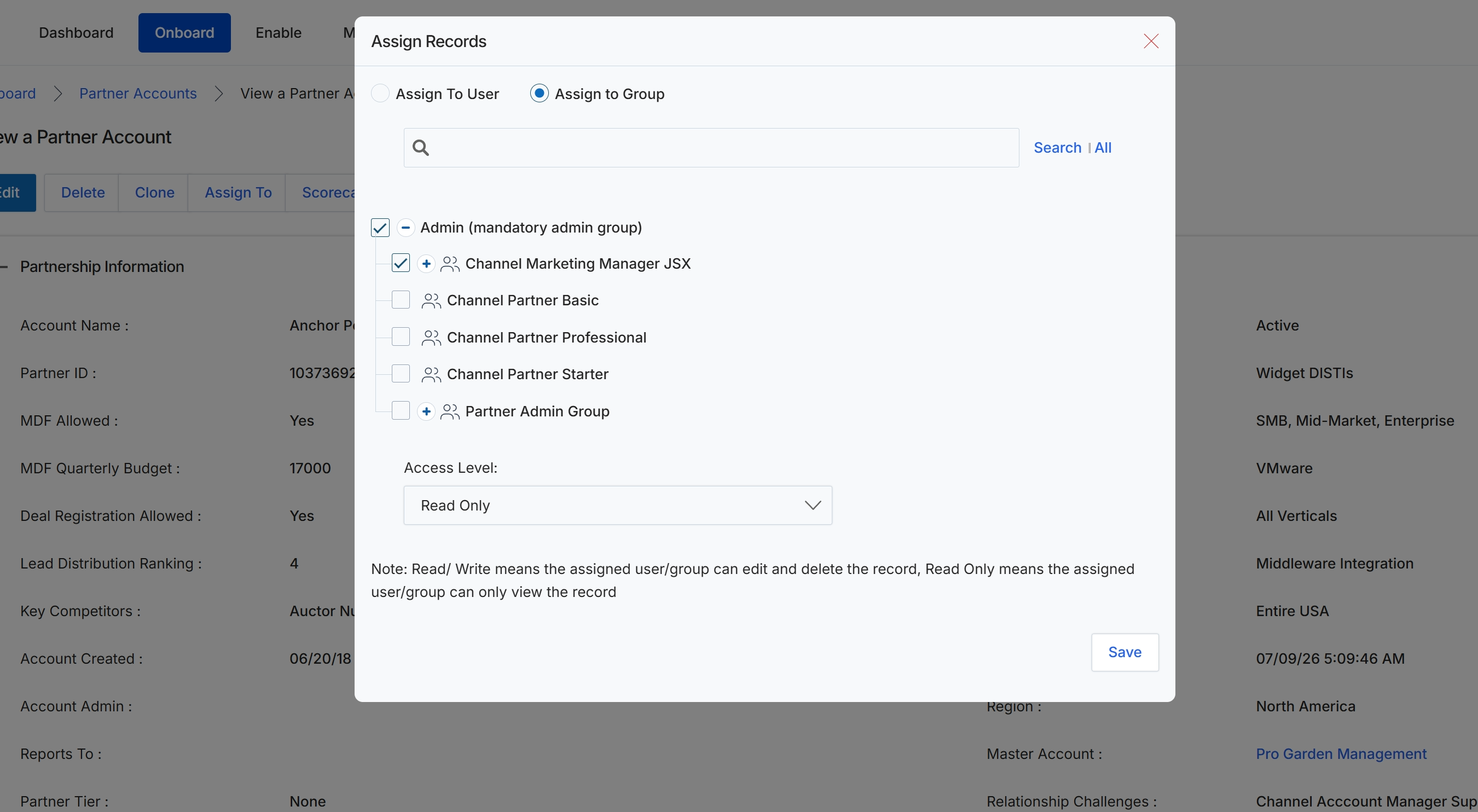
The 'Assign Records' modal window is a critical component for UPM administrators to manage access and visibility of partner account records within the platform. This feature ensures that only authorized personnel or teams can view or modify specific partner information, supporting robust role-based access control. Administrators use this modal to assign partner records to specific users or user groups, defining their permission levels (read-only or read/write) over the assigned data. This mechanism is essential for maintaining data security and operational efficiency, particularly in organizations with multiple channel managers or support teams, by controlling who can interact with sensitive partner data.
Click the 'Save' button to apply the assignment changes and close the 'Assign Records' modal.
Buttons
| Button | Description |
|---|---|
| Save | Saves the assignment changes and closes the modal window. |
Fields
| Field | Description |
|---|---|
| Assign To User | A radio button to assign the record to a specific user. |
| Assign to Group | A radio button to assign the record to a user group. This option is currently selected. |
| Search | A search input field to find specific users or groups within the assignment list. |
| Admin (mandatory admin group) | A checkbox to assign the record to the mandatory administrator group. This checkbox is currently selected. |
| Channel Marketing Manager JSX | A checkbox to assign the record to the 'Channel Marketing Manager JSX' group. This group can be expanded to view its members. |
| Channel Partner Basic | A checkbox to assign the record to the 'Channel Partner Basic' group. |
| Channel Partner Professional | A checkbox to assign the record to the 'Channel Partner Professional' group. |
| Channel Partner Starter | A checkbox to assign the record to the 'Channel Partner Starter' group. |
| Partner Admin Group | A checkbox to assign the record to the 'Partner Admin Group'. This group can be expanded to view its members. |
| Access Level | A dropdown menu to define the permission level (Read Only or Read/Write) for the assigned user or group. |
Viewing Partner Scorecards and Location
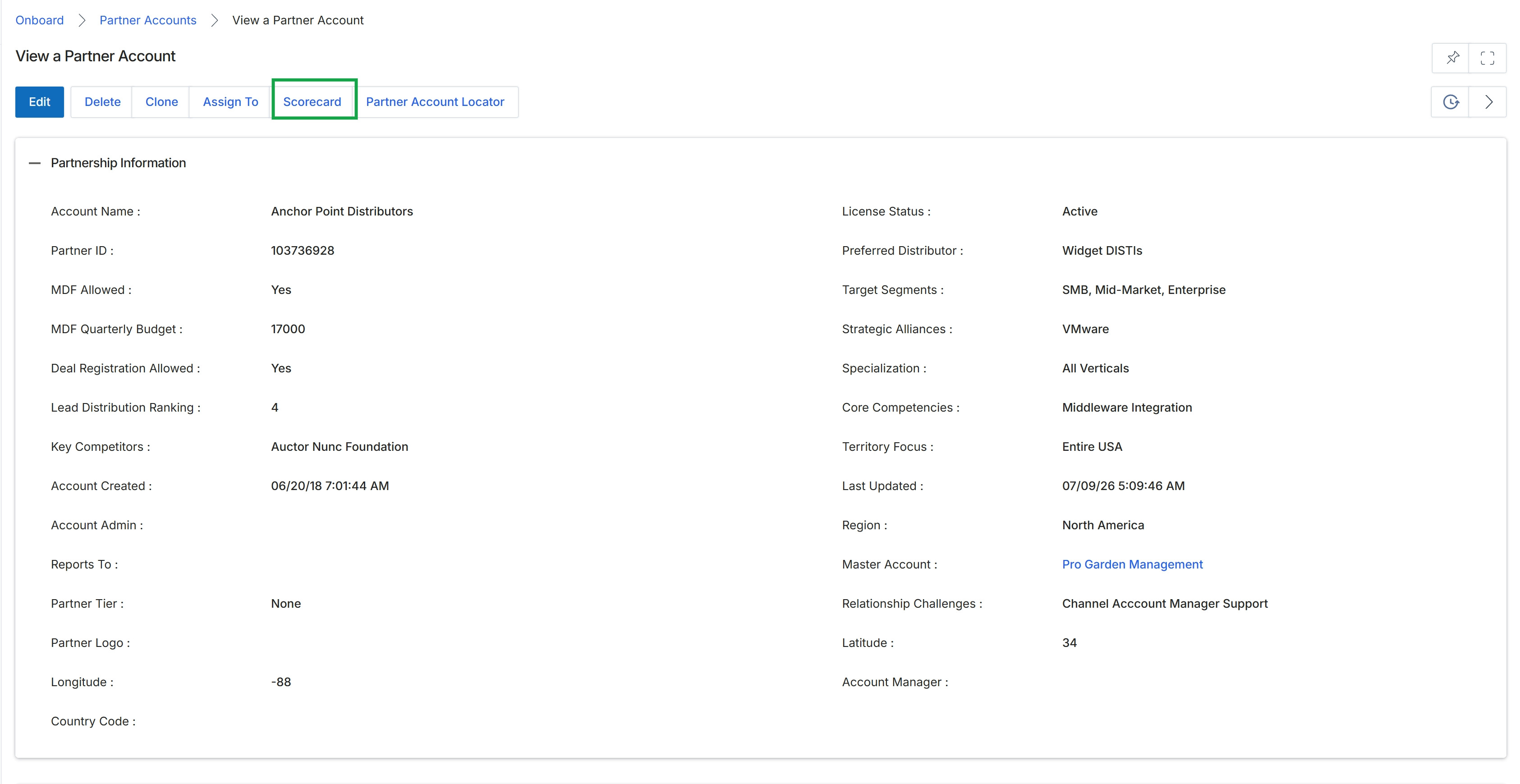
Click Scorecard.
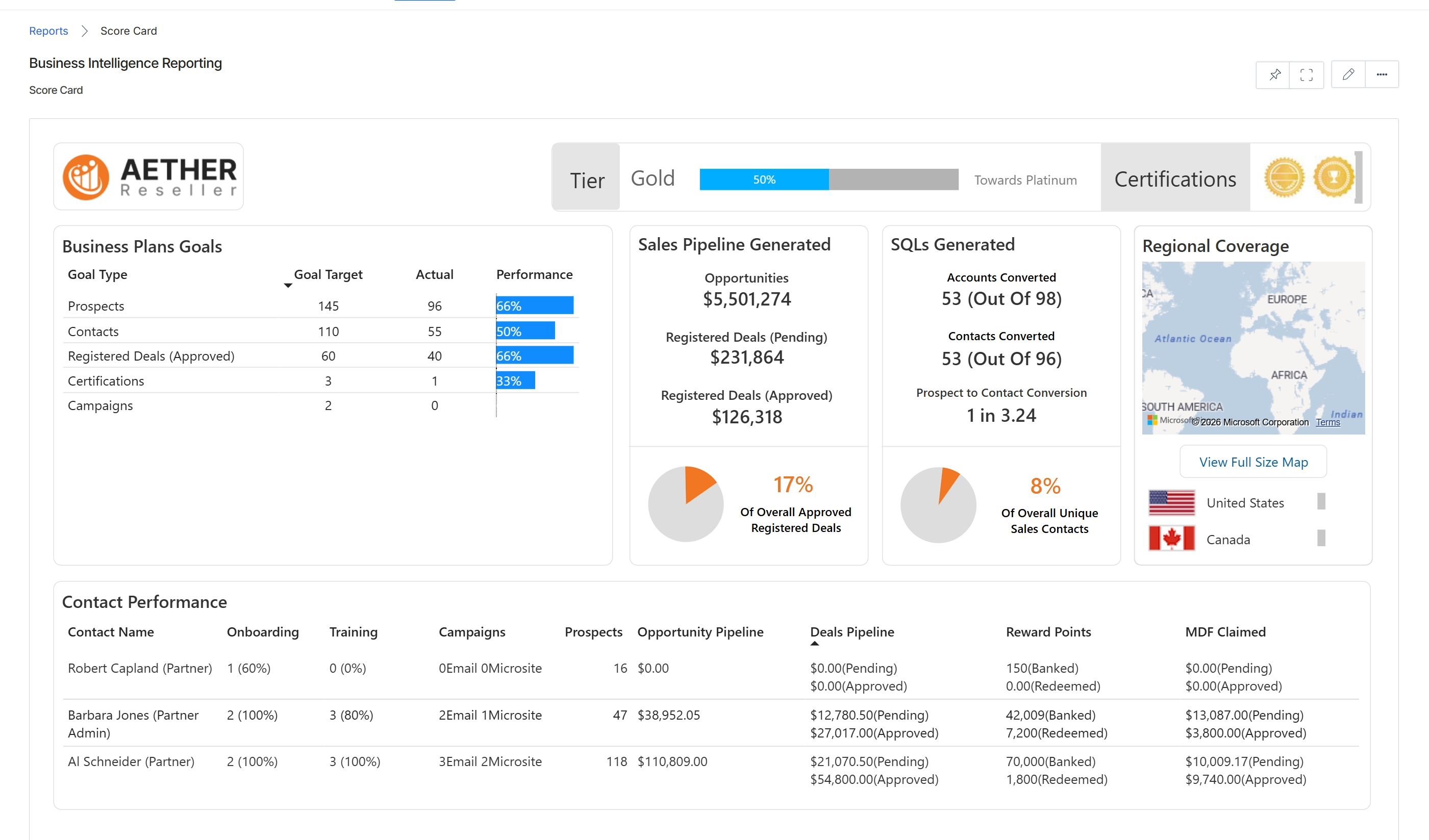
Click the Scorecard button.
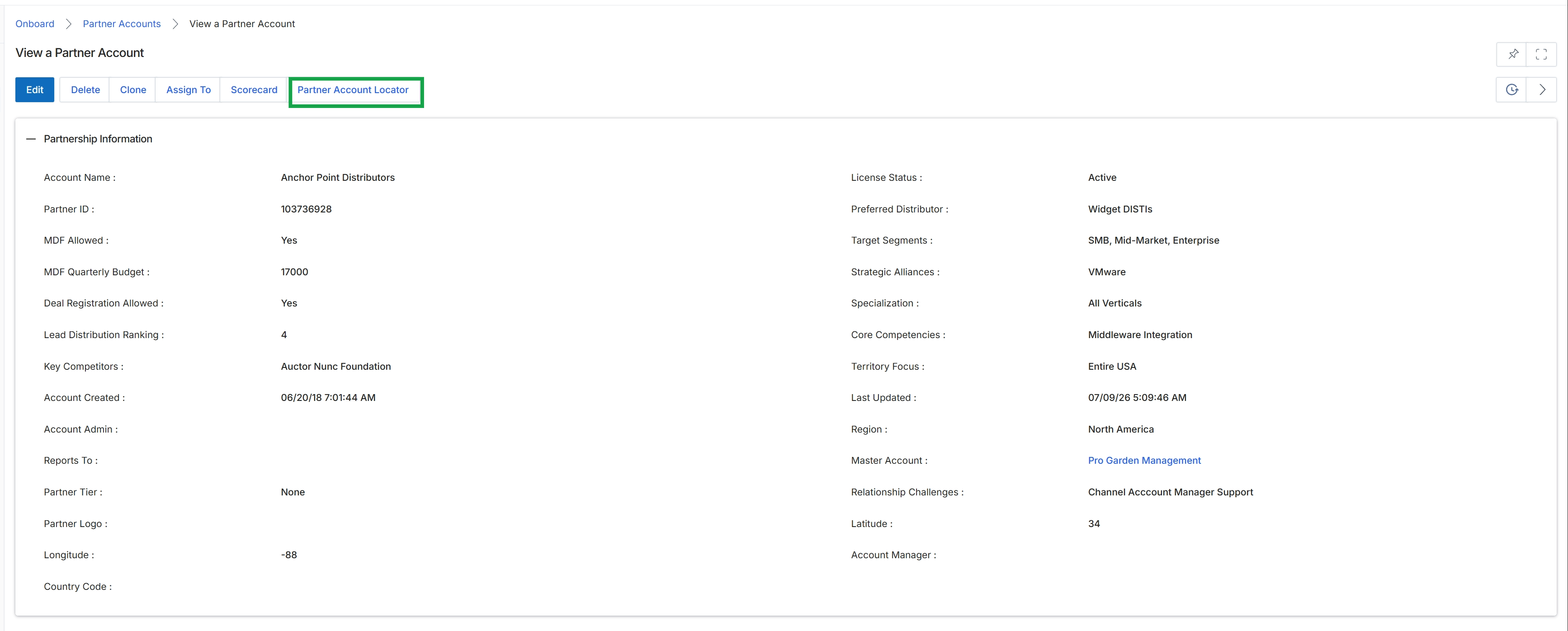
Click the Partner Account Locator button.
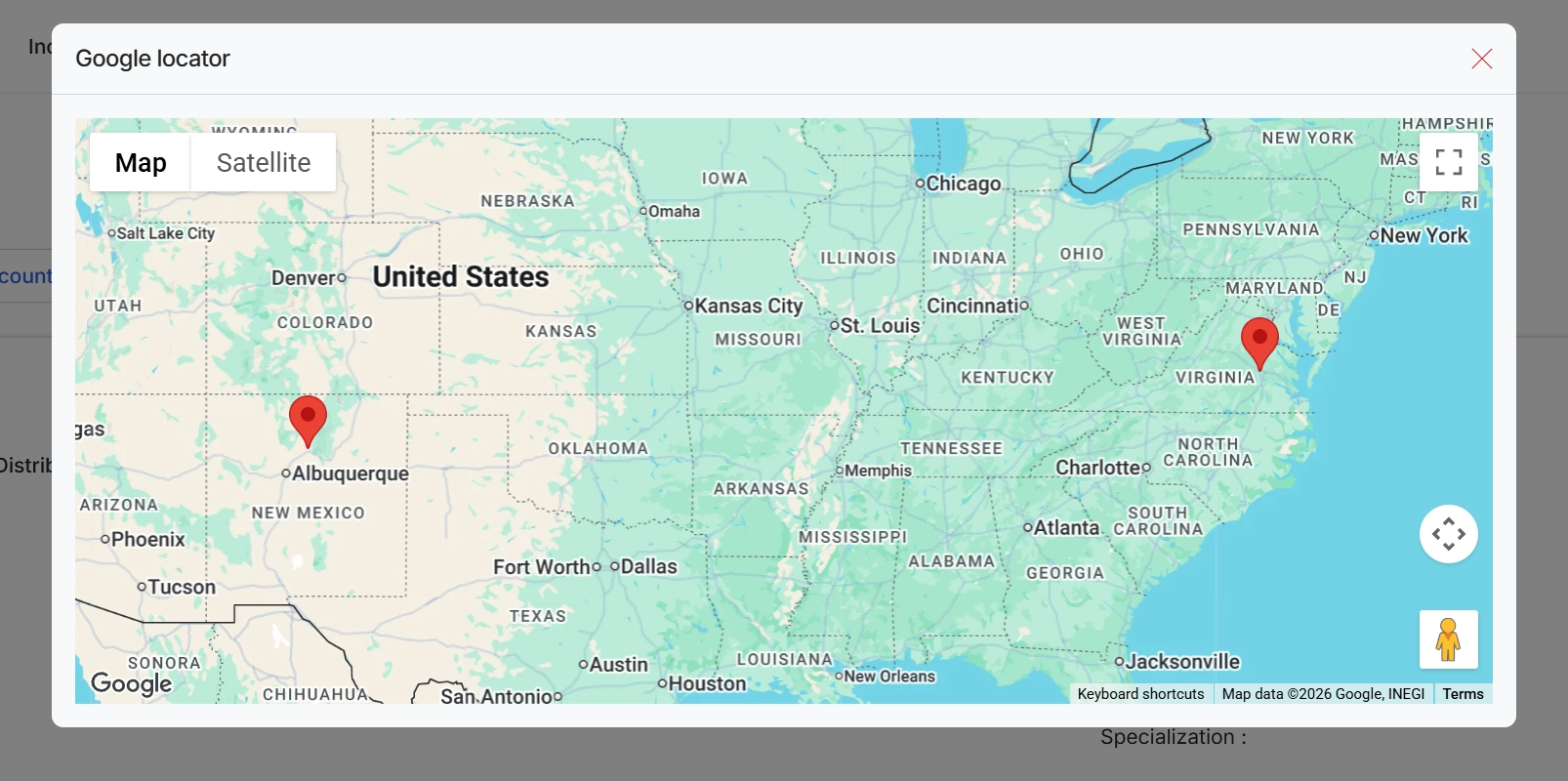
Click Partner Account Locator.