

Overview
In the ZINFI UPM Sell module, 'Prospects' represent potential contacts or companies that are in the early stages of the sales or partner recruitment pipeline, prior to becoming a formal lead or registered deal. This feature provides a centralized location for administrators to manage these pre-qualified entities, capturing essential contact, company, and competitive information. It's crucial for nurturing relationships and tracking engagement before they progress to more formal stages within the partner program or sales cycle.
By maintaining a comprehensive database of prospects, vendors can strategically plan outreach, assign internal owners, and monitor the progression of potential partners or customers. The detailed information captured, including competitive descriptions and campaign data, supports informed decision-making and targeted engagement strategies, ultimately contributing to a more robust and efficient sales and partner recruitment process.
Accessing and Viewing Prospects
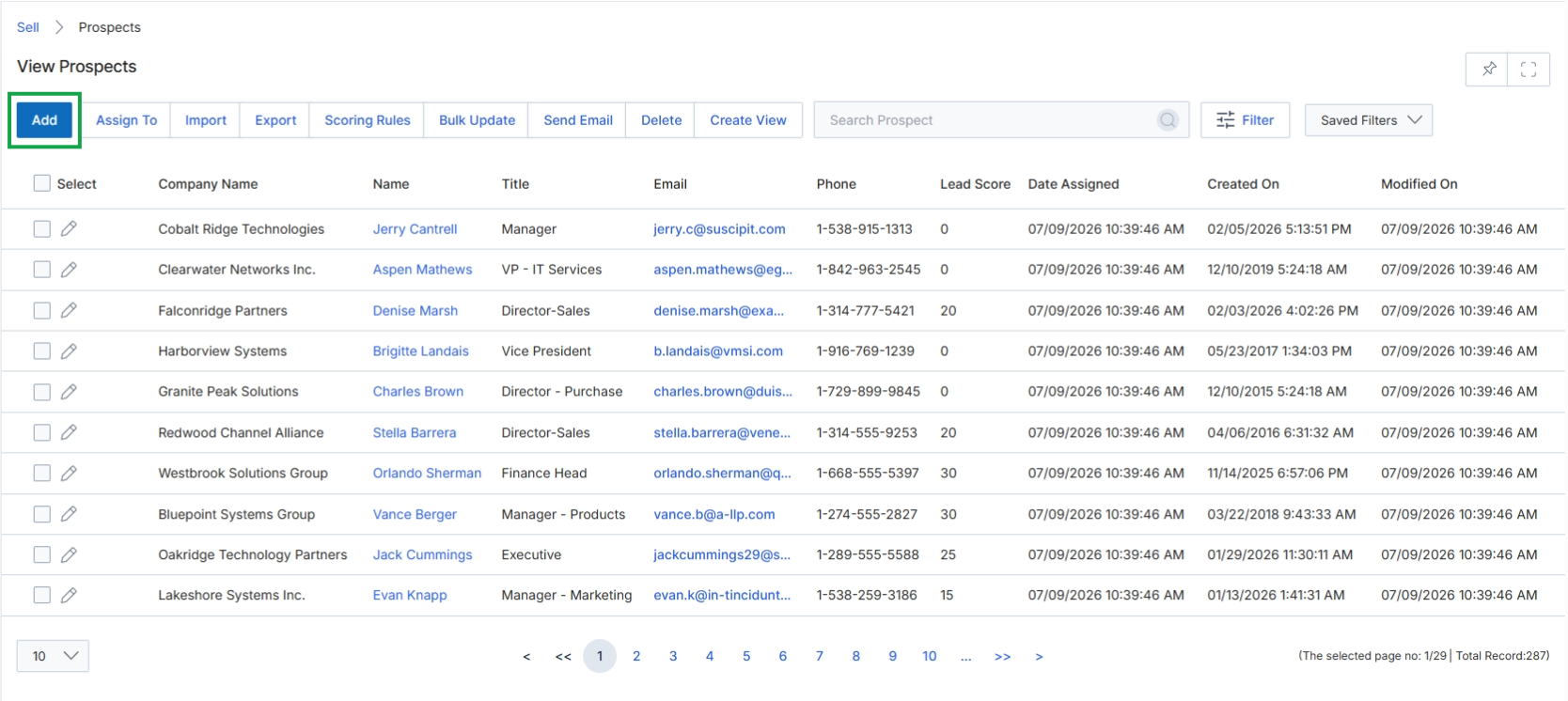
Click the Add button to create a new prospect record.
Adding or Editing a Prospect
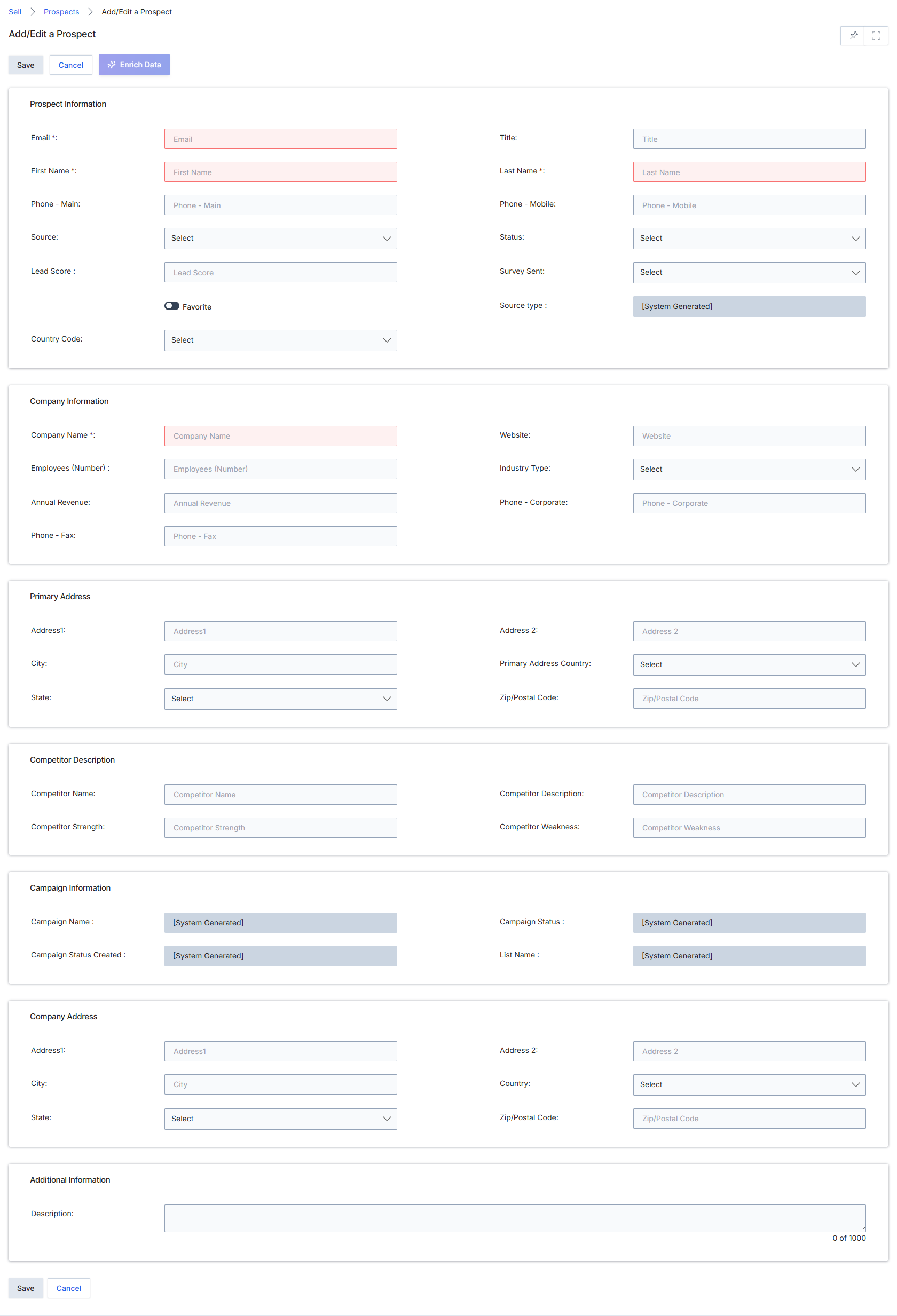
This screen displays the Add/Edit Prospect form, which is used by ZINFI UPM administrators to create new prospect records or modify existing ones. Prospects represent early-stage sales contacts that have not yet been qualified into leads or opportunities, sitting at the top of the channel sales funnel. This form allows for comprehensive data capture, including personal, company, and address details, as well as competitive and campaign-related information. The data entered here is crucial for tracking potential sales opportunities and can later be used for lead assignment, deal registration, or co-selling activities within the Sell module. The form supports both manual data entry and integration with CRM systems, ensuring that all relevant prospect information is centralized and accessible for partner management.
Fill out the Add/Edit Prospect form with the prospect's details across various sections.
Buttons
| Button | Description |
|---|---|
| Save | Saves the entered prospect details. |
| Cancel | Discards any changes and returns to the previous view. |
Prospect Information
| Field | Description |
|---|---|
| Email * | The prospect's email address, which is a required field and serves as a primary contact identifier. |
| Title | The prospect's job title within their organization. |
| First Name * | The prospect's first name, which is a required field. |
| Last Name * | The prospect's last name, which is a required field. |
| Phone - Main | The prospect's primary phone number. |
| Phone - Mobile | The prospect's mobile phone number. |
| Source | The source from which the prospect was identified, selected from a dropdown list. |
| Status | The current status of the prospect in the sales pipeline, selected from a dropdown list. |
| Lead Score | The prospect's lead score, which indicates their qualification level. |
| Survey Sent | Indicates whether a survey has been sent to the prospect, selected from a dropdown list. |
| Country Code | The country code for the prospect's phone number, selected from a dropdown list. |
| Source type | The type of source from which the prospect originated, which is a system-generated field. |
Company Information
| Field | Description |
|---|---|
| Company Name * | The name of the prospect's company, which is a required field. |
| Website | The company's website address. |
| Employees (Number) | The number of employees at the prospect's company. |
| Industry Type | The industry sector of the prospect's company, selected from a dropdown list. |
| Annual Revenue | The annual revenue of the prospect's company. |
| Phone - Corporate | The main corporate phone number for the prospect's company. |
| Phone - Fax | The fax number for the prospect's company. |
Primary Address
| Field | Description |
|---|---|
| Address1 | The first line of the prospect's primary address. |
| Address 2 | The second line of the prospect's primary address. |
| City | The city of the prospect's primary address. |
| Primary Address Country | The country of the prospect's primary address, selected from a dropdown list. |
| State | The state or province of the prospect's primary address, selected from a dropdown list. |
| Zip/Postal Code | The zip or postal code of the prospect's primary address. |
Competitive Description
| Field | Description |
|---|---|
| Competitor Name | The name of a competitor associated with this prospect. |
| Competitor Description | A description of the competitor. |
| Competitor Strength | A description of the competitor's strengths. |
| Competitor Weakness | A description of the competitor's weaknesses. |
Campaign Information
| Field | Description |
|---|---|
| Campaign Name | The name of the campaign associated with this prospect, which is a system-generated field. |
| Campaign Status | The status of the campaign associated with this prospect, which is a system-generated field. |
| Campaign Status Created | The creation date of the campaign status, which is a system-generated field. |
| List Name | The name of the list this prospect belongs to, which is a system-generated field. |
Company Address
| Field | Description |
|---|---|
| Address1 | The first line of the prospect's company address. |
| Address 2 | The second line of the prospect's company address. |
| City | The city of the prospect's company address. |
| Zip/Postal Code | The zip or postal code of the prospect's company address. |
| State | The state or province of the prospect's company address, selected from a dropdown list. |
Additional Information
| Field | Description |
|---|---|
| Description | Additional descriptive information about the prospect. |