

Overview
Deal registration is a critical component of partner programs, enabling partners to claim and protect sales opportunities they identify. This process ensures that partners are recognized and compensated for their efforts in bringing new business. The platform provides a robust system for managing these registered deals, allowing administrators to maintain full visibility into the partner sales pipeline.
Administrators can access a comprehensive list of all registered deals, review their statuses, and make necessary edits. This functionality supports the entire deal lifecycle, from initial submission and approval to tracking progress through various sales stages, ultimately leading to a closed-won or closed-lost outcome. Accurate deal registration data is essential for calculating partner commissions and rebates, which are processed through the Incentivize module.
Accessing the Registered Deals List
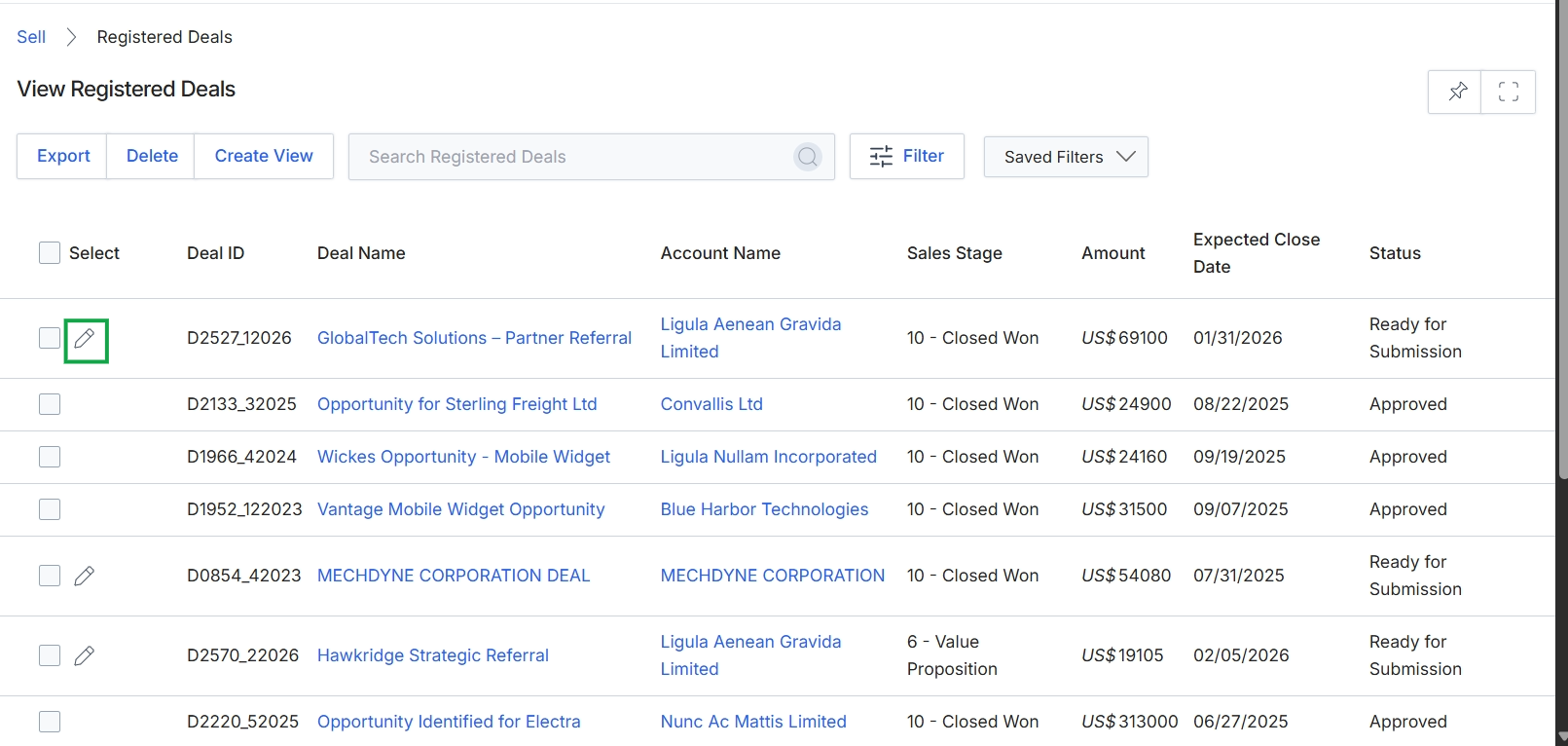
Click the pencil icon next to the deal you want to edit.
Editing a Registered Deal
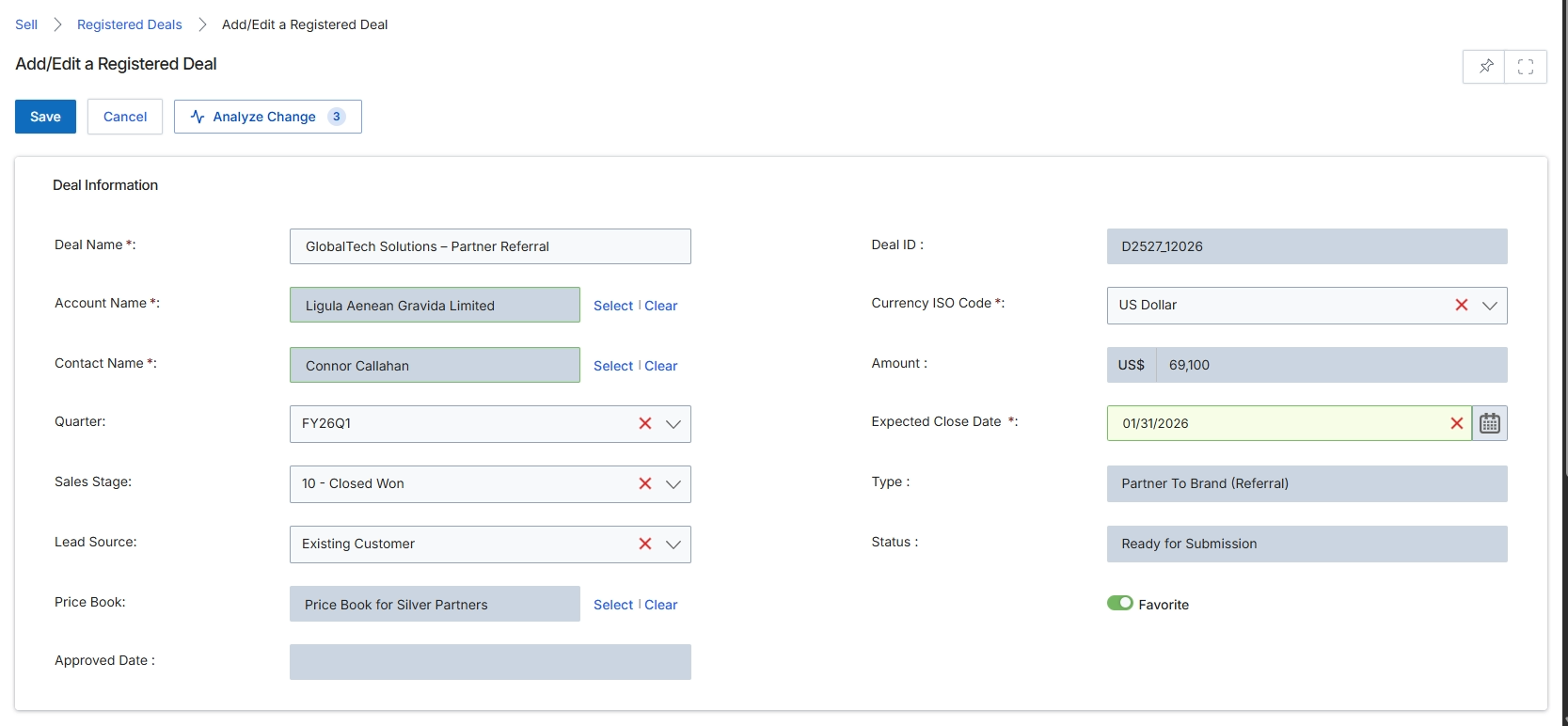
The Add/Edit a Registered Deal form allows administrators to view and modify the details of a registered deal. This form is central to the 'Sell' module's workflow, where partners claim and protect sales opportunities. It displays critical information such as the deal's name, associated account and contact, financial details, sales stage, and current status. The data entered here directly influences the deal's progression through the sales pipeline and can trigger commission calculations in the Incentivize module upon successful closure. Administrators use this screen to ensure deal information is accurate, manage its lifecycle, and track its status from submission to closure.
Click the "Save" button to save the changes made to the registered deal.
Buttons
| Button | Description |
|---|---|
| Save | Saves the current deal information. |
| Cancel | Discards any changes and returns to the previous screen. |
| Analyze Change | Analyzes the changes made to the deal. |
Deal Information
| Field | Description |
|---|---|
| Deal Name | The name of the registered deal. |
| Account Name | The name of the account associated with this deal. This field can be selected from existing accounts or a new one can be created. |
| Contact Name | The primary contact person at the associated account for this deal. |
| Quarter | The financial quarter in which the deal is active. |
| Sales Stage | The current stage of the deal in the sales pipeline, such as 'Closed Won'. |
| Lead Source | Indicates how the lead for this deal was acquired, e.g., 'Existing Customer'. |
| Price Book | The price book used for this deal, which determines product pricing based on partner tier. |
| Approved Date | The date when the deal registration was approved by the vendor. |
| Deal ID | A unique identifier for the registered deal. |
| Currency ISO Code | The ISO code for the currency in which the deal amount is denominated. |
| Amount | The total estimated or actual monetary value of the deal. |
| Expected Close Date | The anticipated date by which the deal is expected to close. |
| Type | The type of deal, such as 'Partner To Brand (Referral)'. |
| Status | The current status of the deal, indicating its progress or state, e.g., 'Ready for Submission'. |
| Favorite | A toggle to mark the deal as a favorite for quick access or prioritization. |

This screen displays the 'Partner' section of the Add/Edit Registered Deal form, allowing users to specify the primary sales contact associated with the deal. This section is crucial for identifying the partner representative responsible for the deal, ensuring proper communication and attribution within the deal registration workflow. The system pre-populates contact details if the user confirms they are the primary sales contact, streamlining data entry. Accurate contact information here facilitates co-selling efforts and ensures that commission calculations in the Incentivize module are correctly linked to the partner representative.
Confirm or update the partner sales contact details for the registered deal.
Buttons
| Button | Description |
|---|---|
| Save | Saves the entered partner contact details and any other changes made to the registered deal. |
| Cancel | Discards any changes made and returns to the previous screen without saving. |
Partner
| Field | Description |
|---|---|
| Are you the primary sales contact | A dropdown field to indicate whether the current user is the primary sales contact for this registered deal. Selecting 'Yes' typically pre-fills the Name, Contact Email, and Phone fields with the user's information. |
| Name | The full name of the primary sales contact for the registered deal. |
| Contact Email | The email address of the primary sales contact. |
| Phone | The phone number of the primary sales contact. |