

Overview
Accurate deal registration and quoting are critical for tracking sales opportunities and ensuring correct commission calculations. The ability to add specific products and services as line items to a deal allows for precise valuation and clear communication with both partners and customers. This process leverages the pre-configured Price Book, ensuring that all pricing, including partner-specific rates, is consistently applied. By detailing each component of a deal, administrators can maintain transparency and facilitate a smooth sales process from registration to order fulfillment.
Adding Products to a Deal

The Deal Line Items section within the Deals Management module displays the individual products or services that comprise a specific deal. This view is critical for defining the exact scope and financial value of a sales opportunity, which directly influences commission calculations and revenue tracking within the Sell module. It allows users to review existing line items, including their names, sales prices, quantities, and calculated totals, ensuring the deal accurately reflects agreed-upon items and pricing. From this screen, users can add new products to the deal or manage existing entries, which is essential for maintaining accurate deal records and facilitating the quoting and ordering processes.
Click the "Add Product(s)" button to add new items to the deal.
Buttons
| Button | Description |
|---|---|
| Add Product(s) | Click this button to add one or more products or services to the deal as line items. |
Deal Line Items
| Column | Description |
|---|---|
| Action | This column contains actions that can be performed on each line item, such as deleting it. |
| Name | The name of the product or service included in the line item. |
| Sales Price | The unit sales price of the product or service. |
| Quantity | The number of units of the product or service. |
| Line Item Total | The total price for the line item, calculated as Sales Price multiplied by Quantity. |
| Line Item Net | The net price for the line item, which may reflect discounts or adjustments. |
| SKU | The Stock Keeping Unit (SKU) identifier for the product. |
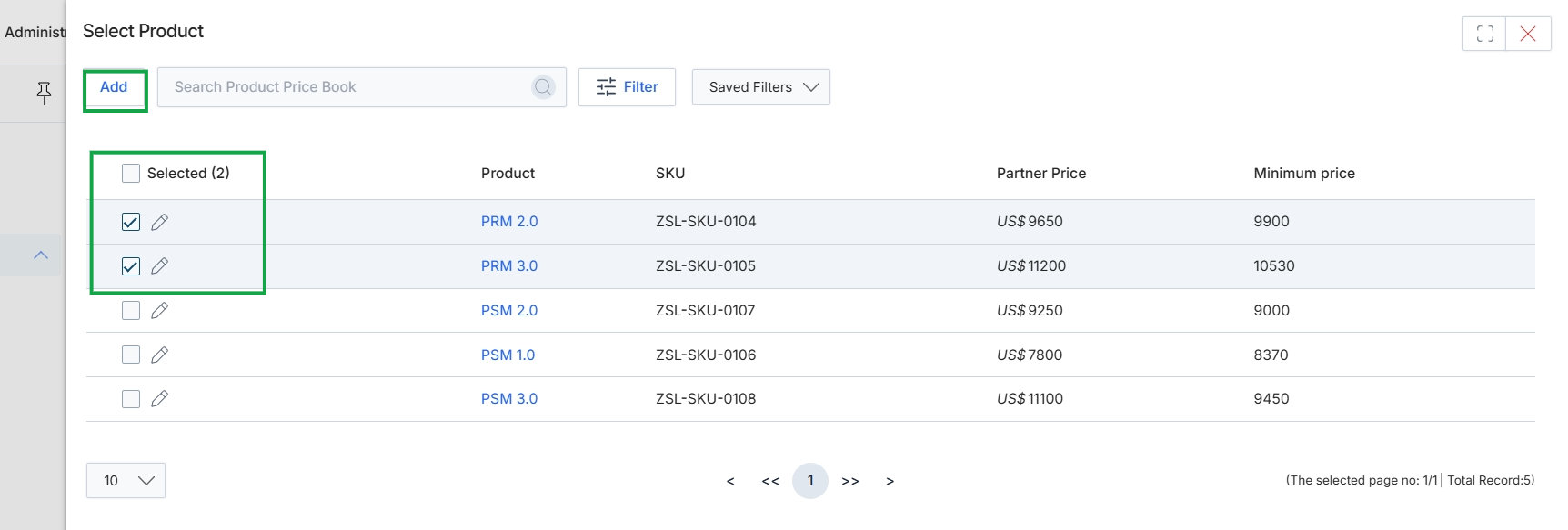
This screen presents a product selection interface within the Deals module, enabling users to choose items from a price book to include as line items in a deal. It displays a list of available products, each with its SKU, partner price, and minimum price. Users can select multiple products using checkboxes, and the interface indicates the number of products currently selected, facilitating the process of building a comprehensive deal proposal.
Configuring Product Details
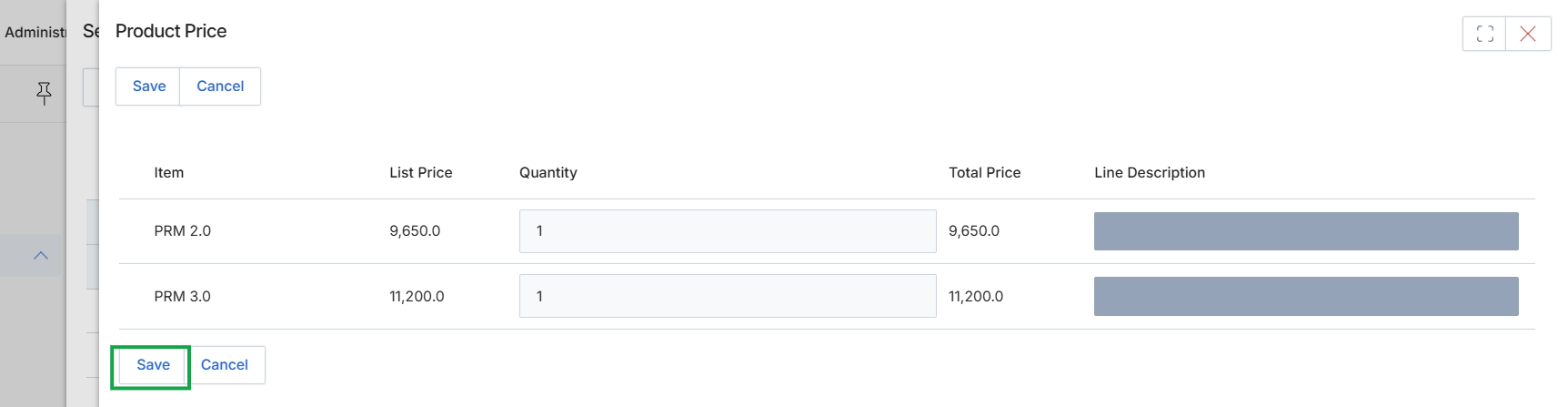
This modal dialog, titled 'Product Price', is an integral part of the deal management workflow, allowing users to define the specific products and services included in a deal. It displays a list of selected products, their standard list prices, and provides editable fields for quantity and an optional line description. The system automatically calculates the total price for each line item based on the quantity entered. This screen ensures the accurate configuration of the financial components of a deal, directly influencing the overall deal value and subsequent commission calculations within the Incentivize module. Users can adjust quantities and add detailed descriptions to precisely reflect the deal's scope before finalizing the line items.
Click the "Save" button to confirm the product price details and add the line items to the deal.
Buttons
| Button | Description |
|---|---|
| Save | Saves the current product price configurations and line item details. |
| Cancel | Discards any changes made and closes the Product Price dialog. |
Column Headings
| Column | Description |
|---|---|
| Item | Displays the name of the product. |
| List Price | Shows the standard list price for the product. |
| Quantity | An editable field to specify the number of units for each product. |
| Total Price | Displays the calculated total price for the line item (List Price x Quantity). |
| Line Description | An optional field to add a specific description for the line item. |
Reviewing Added Products
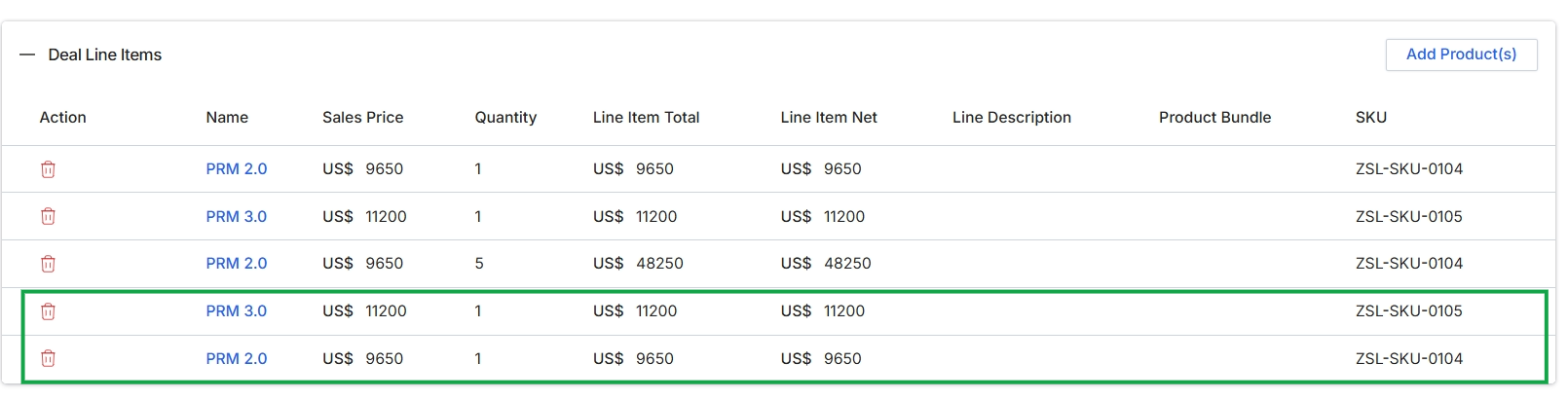
This screen displays the line items associated with a deal, representing the products or services included in a sales opportunity. Each row details a specific product, its sales price, quantity, and the calculated total and net amounts, along with its SKU. The table allows for the management of these individual product entries, which are fundamental to defining the value and scope of a deal within the Sell module. The highlighted rows indicate recently added products, demonstrating the dynamic nature of deal configuration.