

Overview
Effective task management is crucial for streamlining operations and ensuring that all necessary steps are taken to advance leads and deals through the sales pipeline. This module provides a structured way for administrators to define, assign, and monitor tasks, ensuring accountability and visibility across the partner ecosystem. By associating tasks directly with records like deals, the platform helps maintain context and keeps all relevant information organized in one place.
Administrators can use this feature to manage various activities, such as follow-ups, document submissions, internal reviews, or partner enablement actions. The ability to track task status and history provides a clear audit trail and helps identify bottlenecks, ultimately contributing to more efficient deal progression and stronger partner relationships.
Adding a New Task

Click the Add button.
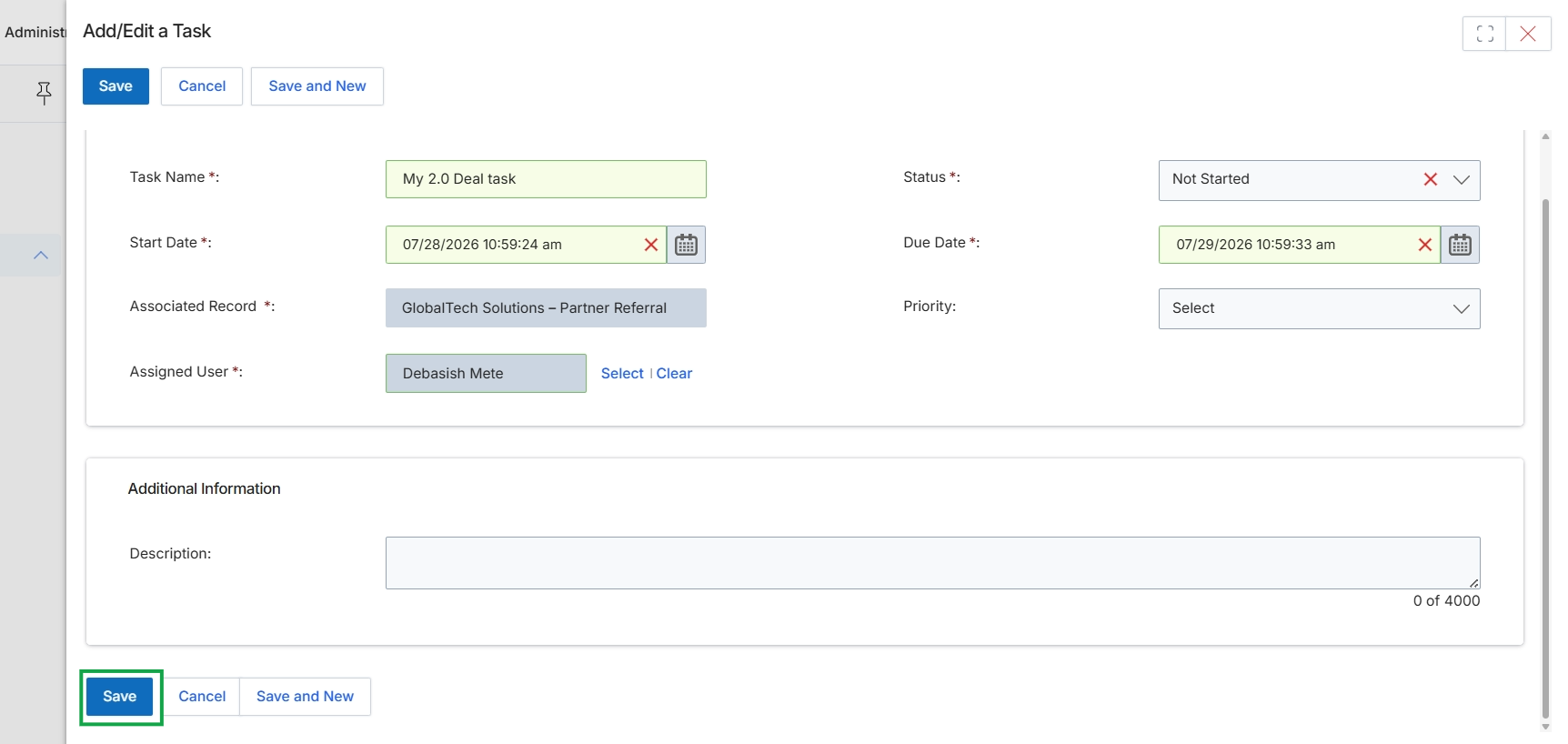
The Add/Edit a Task screen allows users to create or modify tasks associated with various records within the platform, such as deals, accounts, or leads. This functionality is crucial for managing workflows, ensuring follow-ups, and tracking progress on sales opportunities or other partner-related activities. Tasks can be assigned to specific users, given due dates, and prioritized to help manage workload and ensure timely completion. The association with a record provides context for the task, linking it directly to the relevant entity in the sales or partner management process. This form supports the detailed input of task-related information, ensuring all necessary details for effective task management are captured.
Click the "Save" button to save the task details.
Buttons
| Button | Description |
|---|---|
| Save | Saves the current task details. |
| Cancel | Discards any changes and closes the task editor. |
| Save and New | Saves the current task and opens a new blank task form. |
Fields
| Field | Description |
|---|---|
| Task Name | The name or title of the task. |
| Status | The current status of the task, indicating its progress (e.g., Not Started, In Progress, Completed). |
| Start Date | The date and time when the task is scheduled to begin. |
| Due Date | The date and time by which the task is expected to be completed. |
| Associated Record | The record (e.g., deal, account, lead) to which this task is linked. |
| Priority | The urgency or importance level of the task. |
| Assigned User | The user responsible for completing the task. |
Additional Information
| Field | Description |
|---|---|
| Description | A detailed explanation or additional notes for the task. |
Viewing Task Details

Click the Save button.
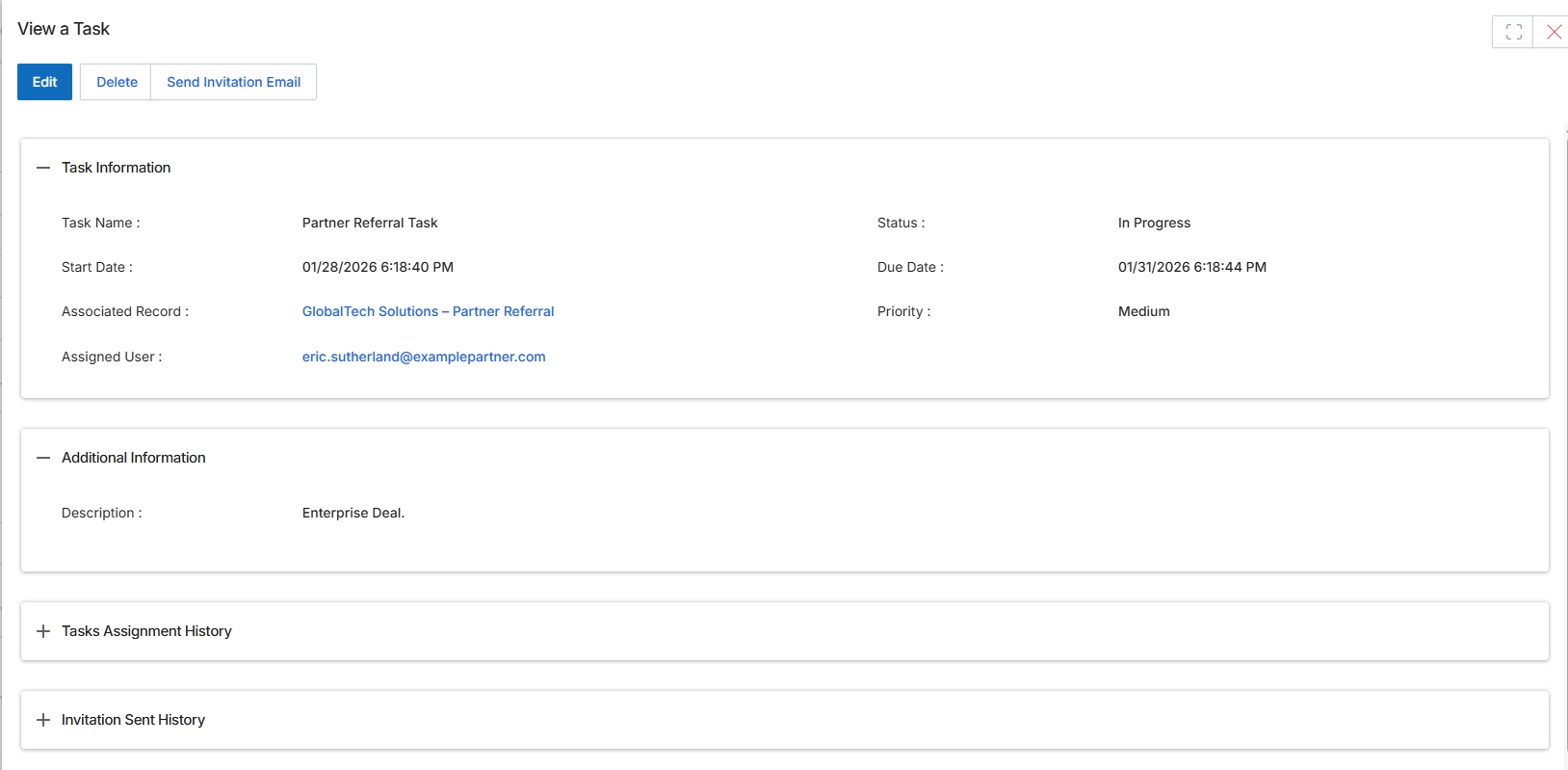
This screen provides a detailed view of a specific task within the Deals Management module, allowing users to review all relevant information at a glance. Tasks are critical for tracking activities associated with leads, deals, or other records, ensuring that both partners and vendor-side personnel can effectively manage their sales pipeline. The display includes key details such as the task's status, important dates, the record it's linked to, and the assigned user, which helps in assessing progress and accountability. UPM administrators and program managers utilize this view to monitor task performance, identify potential bottlenecks, and determine if any modifications or follow-up actions are necessary. The collapsible sections for 'Tasks Assignment History' and 'Invitation Sent History' offer an audit trail for changes and communications, supporting transparency and oversight.
Review the details of the 'Partner Referral Task' displayed on this screen.
Buttons
| Button | Description |
|---|---|
| Edit | Click to modify the details of this task. |
| Delete | Click to remove this task from the system. |
| Send Invitation Email | Click to send an invitation email related to this task. |
Task Information
| Field | Description |
|---|---|
| Task Name | The name or title of the task. |
| Status | The current progress status of the task. |
| Start Date | The date and time when the task was initiated. |
| Due Date | The deadline for completing the task. |
| Associated Record | The lead, deal, or other record to which this task is linked. |
| Priority | The importance level assigned to the task. |
| Assigned User | The user responsible for completing the task. |
Additional Information
| Field | Description |
|---|---|
| Description | A detailed explanation or context for the task. |
Fields
| Field | Description |
|---|---|
| Tasks Assignment History | Expand to view a log of all assignments and reassignments for this task. |
| Invitation Sent History | Expand to view a record of all invitation emails sent in relation to this task. |