

Overview
The Registered Deals module is a central repository for all sales opportunities that partners have formally claimed for protection and tracking. When a partner identifies a qualified sales opportunity, they submit a deal registration to the vendor. This process ensures that the partner receives credit and potential commission for the deal, and it allows the vendor to avoid channel conflicts and gain visibility into the partner's sales pipeline. Each registered deal progresses through various stages, from submission and approval to eventual closure as 'Won' or 'Lost'.
Viewing a registered deal provides administrators with a granular look at all aspects of a specific deal. This includes critical data points like the deal's value, sales stage, expected close date, and the partner associated with it. Admins can also review product line items, track tasks related to the deal, and access any notes or communications logged against it. This detailed view is crucial for managing the partner sales pipeline, facilitating co-selling efforts, and ensuring accurate commission calculations once a deal is closed.
Accessing Registered Deal Details
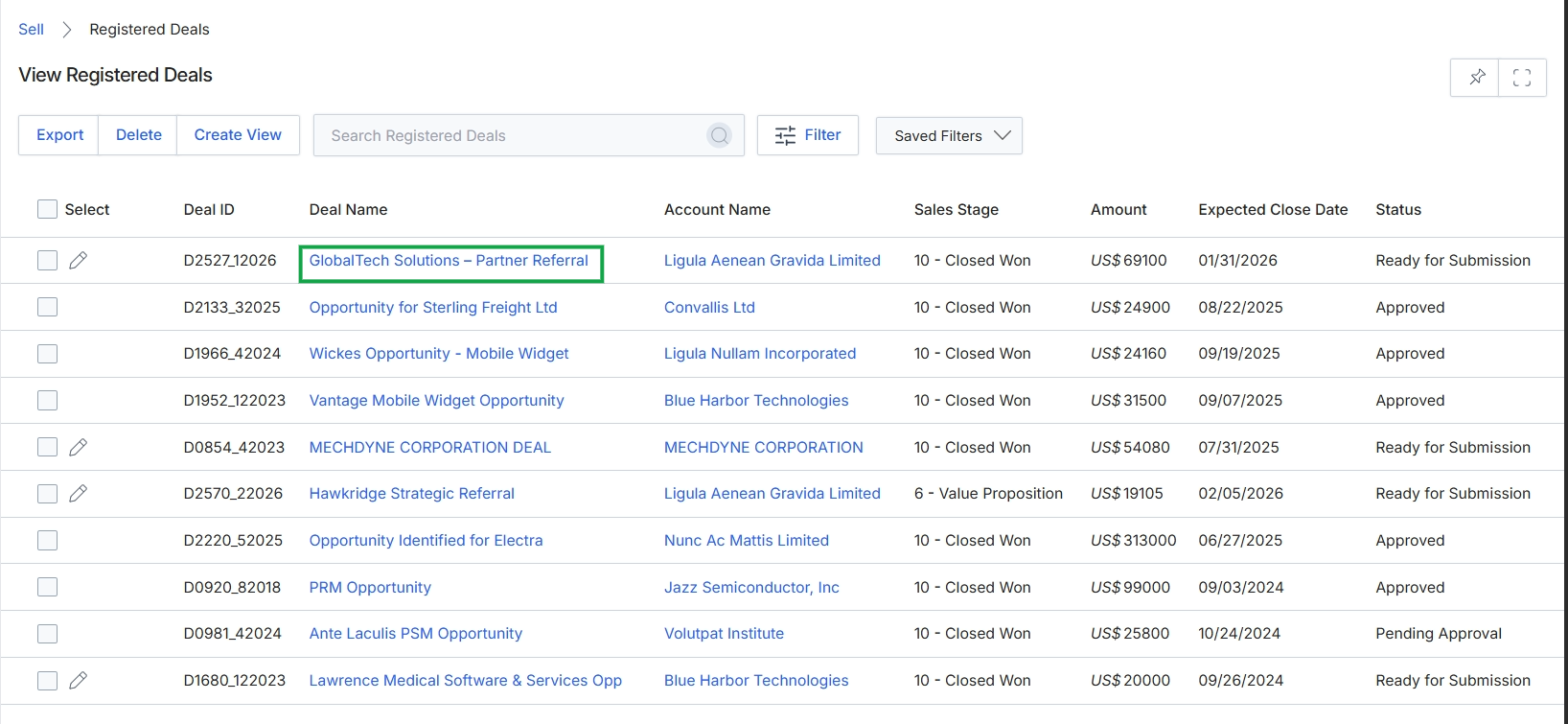
Click the GlobalTech Solutions - Partner Referral link in the Deal Name column.
Reviewing Deal Information
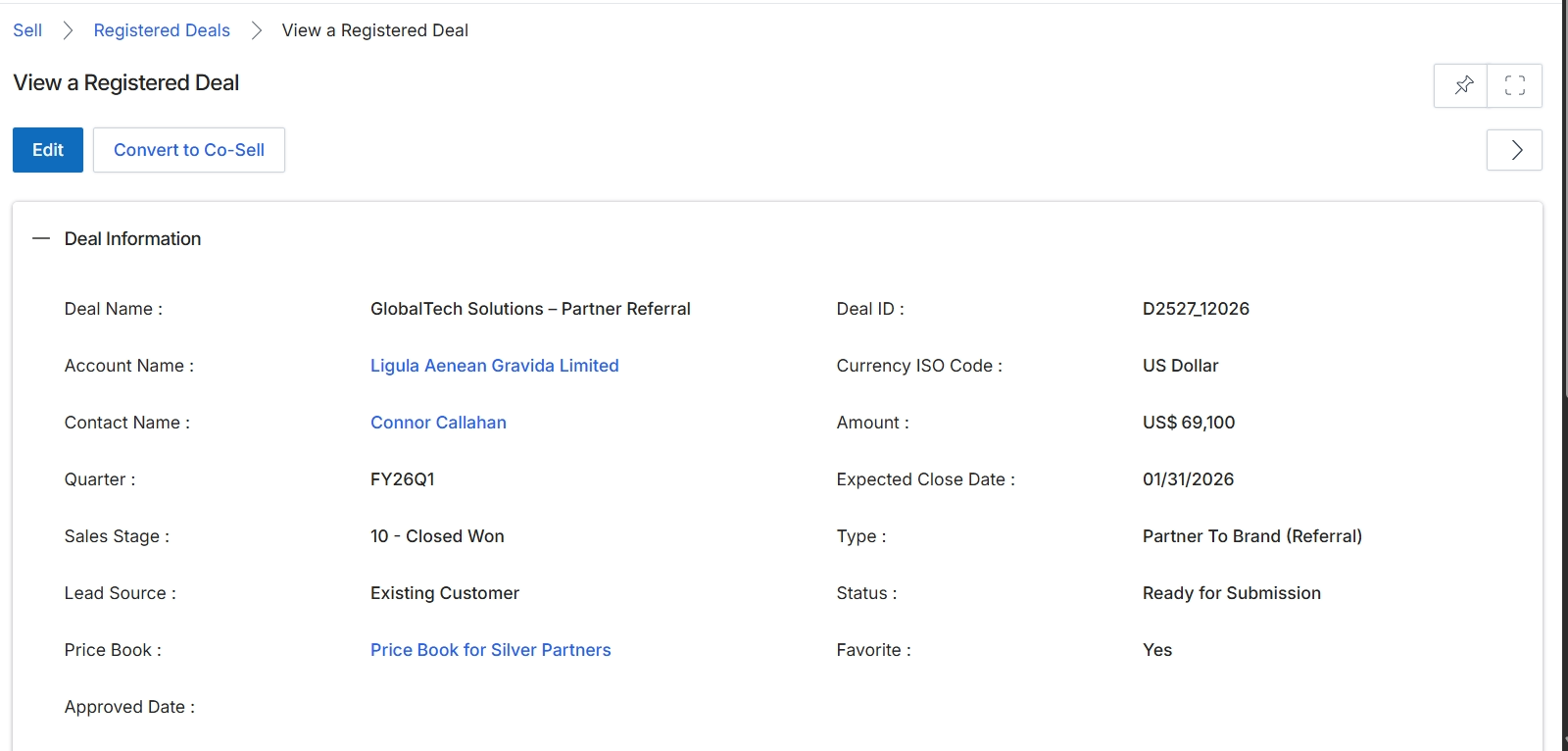
This screen displays the detailed information for a specific registered deal. Registered deals are qualified opportunities claimed by a partner for protection, ensuring that the partner receives credit for the sale if it closes successfully. This view provides a comprehensive summary of the deal, including its financial value, associated account and contact, sales stage, and other relevant attributes. Administrators and partners use this screen to review the status and specifics of a deal, track its progress, and determine if further action, such as converting it to a co-sell opportunity, is required. The displayed information is critical for pipeline management and for triggering commission calculations in the Incentivize module upon deal closure.
Review the details of the selected registered deal.
Buttons
| Button | Description |
|---|---|
| Edit | Allows modification of the registered deal's details. |
| Convert to Co-Sell | Initiates the process to convert this registered deal into a co-sell opportunity, enabling joint selling efforts between the vendor and partner. |
Deal Information
| Field | Description |
|---|---|
| Deal Name | The name or title given to the registered deal. |
| Account Name | The name of the target company associated with this deal. |
| Contact Name | The key individual contact at the account for this deal. |
| Quarter | The fiscal quarter in which the deal is being tracked. |
| Sales Stage | The current stage of the deal in the sales pipeline. |
| Lead Source | Indicates how the lead for this deal was originally identified. |
| Price Book | The price book used for products associated with this deal, which may reflect partner-specific pricing. |
| Approved Date | The date on which the deal registration was approved by the vendor. |
| Deal ID | A unique identifier for the registered deal. |
| Currency ISO Code | The ISO currency code for the deal's monetary value. |
| Amount | The estimated or actual monetary value of the deal. |
| Expected Close Date | The anticipated date by which the deal is expected to close. |
| Type | The classification of the deal, such as 'Partner To Brand (Referral)'. |
| Status | The current status of the deal, indicating its progress through the registration and sales process. |
| Favorite | Indicates if the deal has been marked as a favorite for quick access or prioritization. |
Viewing Partner and Line Item Details
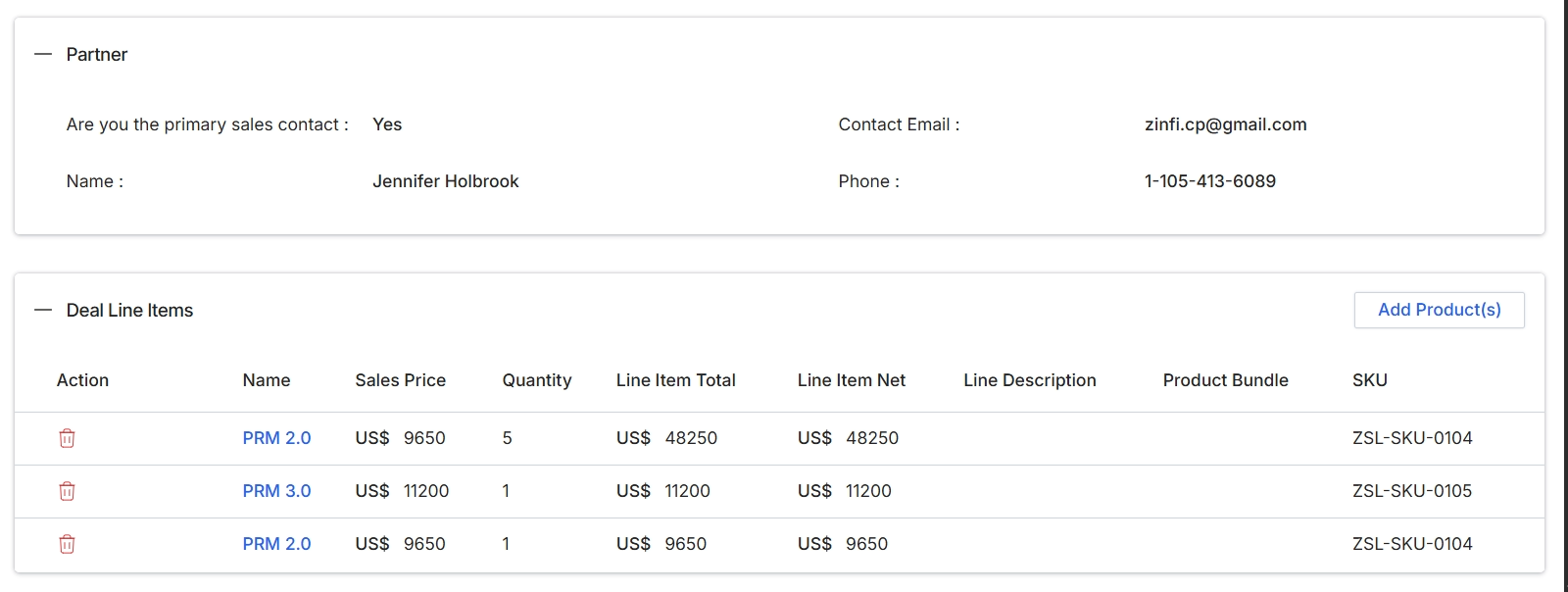
This screen displays the details of a registered deal, specifically focusing on the partner contact information and the products included in the deal. The 'Partner' section provides key contact details for the partner associated with this deal, which is crucial for communication and collaboration throughout the deal lifecycle. The 'Deal Line Items' section lists the individual products or services that constitute the deal, showing their sales price, quantity, and total value. This information is essential for understanding the scope and financial value of the deal, and it directly informs subsequent processes such as quoting and commission calculations within the Incentivize module.
Review the partner contact information and the deal line items for this registered deal.
Buttons
| Button | Description |
|---|---|
| Add Product(s) | Button to add new products to the deal line items. |
Partner
| Field | Description |
|---|---|
| Are you the primary sales contact | Indicates whether the partner contact listed is the primary sales contact for this deal. |
| Name | The name of the primary sales contact at the partner organization. |
| Contact Email | The email address of the primary sales contact. |
| Phone | The phone number of the primary sales contact. |
Deal Line Items
| Column | Description |
|---|---|
| Action | Column containing actions that can be performed on each line item, such as deleting it. |
| Name | The name of the product or service included in the deal. |
| Sales Price | The individual sales price of the product. |
| Quantity | The number of units for the product. |
| Line Item Total | The total price for the line item (Sales Price x Quantity). |
| Line Item Net | The net total price for the line item. |
| SKU | The Stock Keeping Unit identifier for the product. |
Managing Tasks and Notes
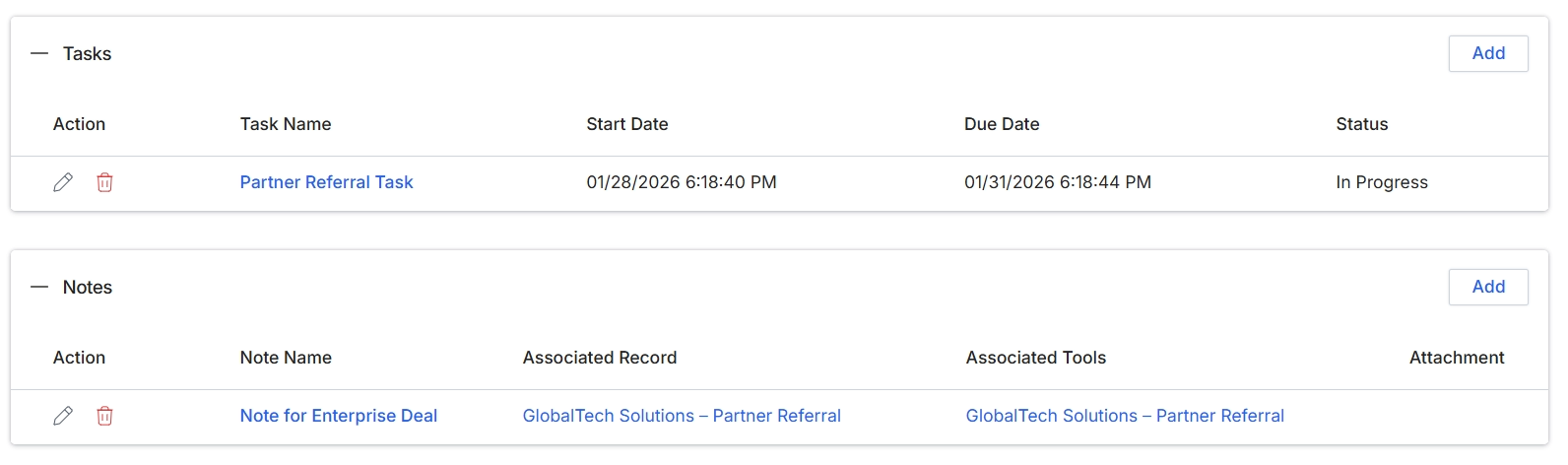
This screen displays the tasks and notes associated with a specific Registered Deal, providing a comprehensive overview of all related activities and communications. The 'Tasks' section allows users to track actionable items, including their start dates, due dates, and current status, ensuring that all necessary steps for deal progression are managed efficiently. The 'Notes' section serves as a repository for textual information, allowing users to document important details, discussions, or contextual information related to the deal, which can be linked to specific records or tools for enhanced traceability. Together, these sections facilitate collaboration and provide a historical record of all interactions and progress for the Registered Deal.
Review the tasks and notes associated with the Registered Deal.
Buttons
| Button | Description |
|---|---|
| Add | Adds a new task to the list for the Registered Deal. |
| Add | Adds a new note to the list for the Registered Deal. |
Tasks
| Column | Description |
|---|---|
| Action | Displays icons to edit or delete a task. |
| Task Name | The name or description of the task. |
| Start Date | The date and time when the task was started. |
| Due Date | The date and time by which the task is expected to be completed. |
| Status | The current status of the task, such as 'In Progress'. |
Notes
| Column | Description |
|---|---|
| Action | Displays icons to edit or delete a note. |
| Note Name | The title or subject of the note. |
| Associated Record | The record to which the note is linked, such as a partner referral. |
| Associated Tools | Any tools or systems related to the note. |
| Attachment | Indicates if any files are attached to the note. |