

Overview
Effective partner relationship management relies on accurate and up-to-date contact information. The Partner Contacts module serves as a central repository for all individuals associated with your partner organizations, ensuring that communications, access permissions, and roles are correctly assigned. Maintaining precise contact details is crucial for successful onboarding, enablement, and ongoing collaboration with your partners, allowing administrators to reach the right person for specific tasks or information.
Administrators can use this feature to update roles, contact methods, and other relevant information for partner personnel. This ensures that the platform's user accounts are tied to the correct individuals, facilitating smooth operations across all modules, from lead distribution in the Sell module to training assignments in the Enable module.
Accessing and Viewing Partner Contacts
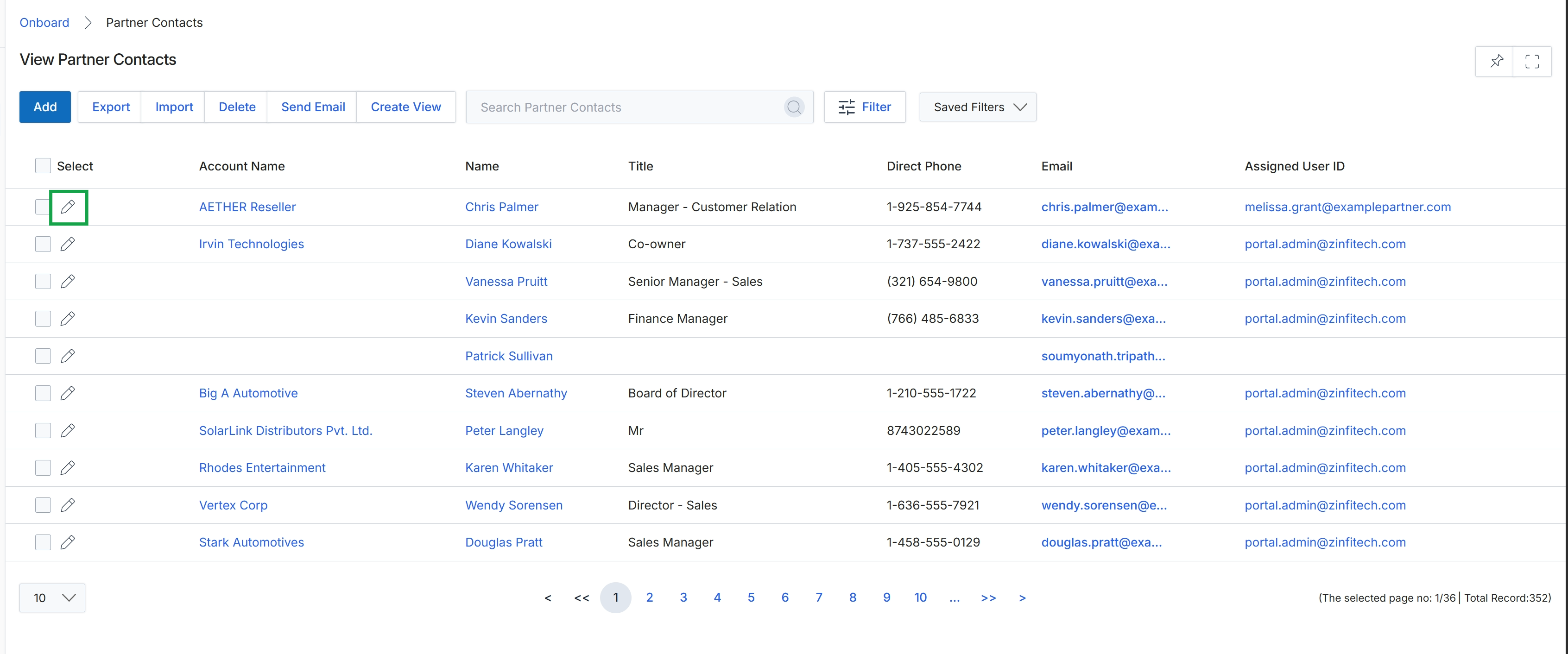
Click the pencil icon next to the contact you want to edit.
Editing Partner Contact Information
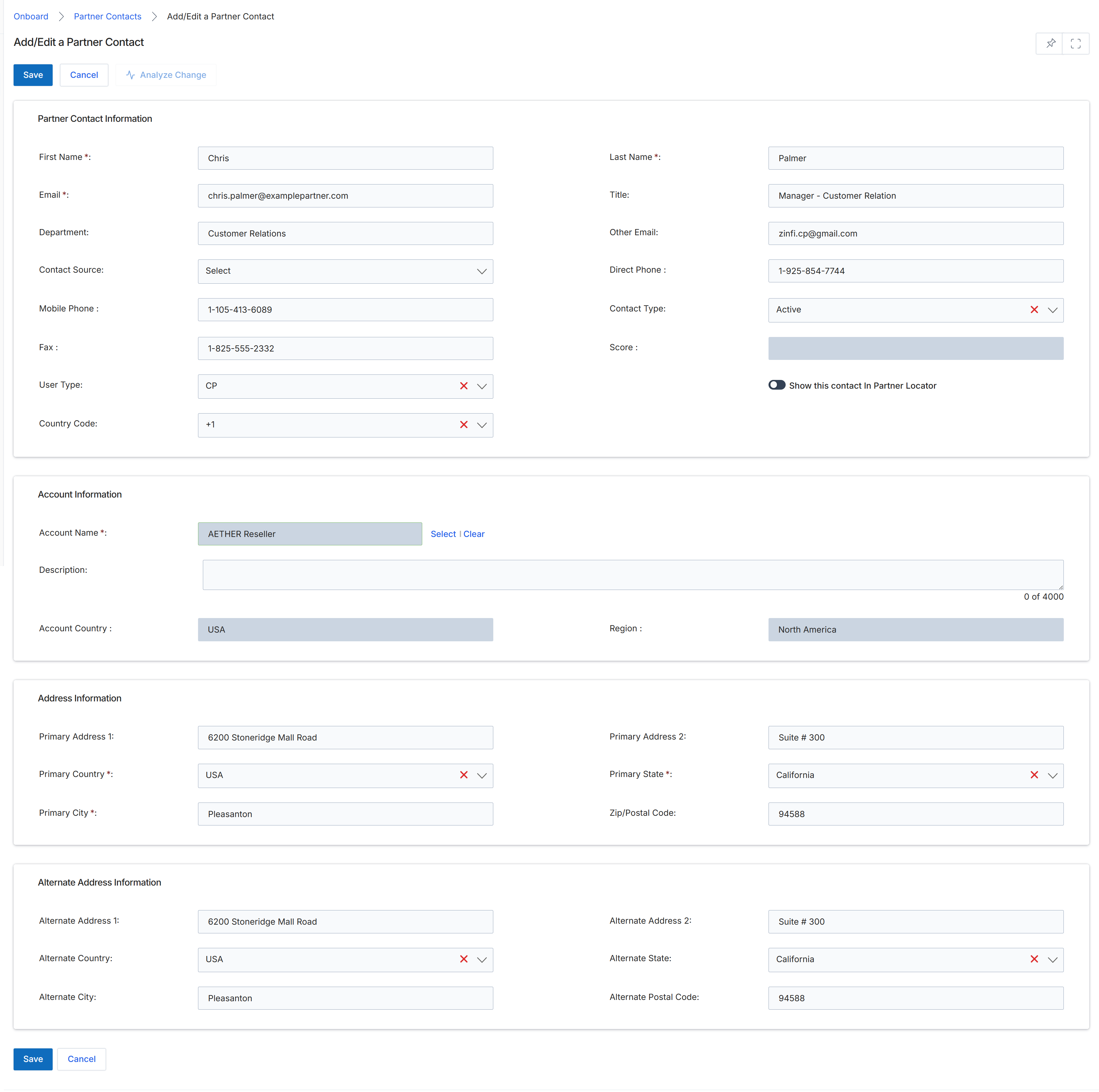
The Add/Edit a Partner Contact form allows administrators to manage individual contact records associated with a partner account. This form is part of the Partner Profile Management workflow within the Onboard module, enabling detailed information capture for each person at a partner organization. It includes fields for personal contact details, their role within the partner company, and associated address information, which can be critical for communication and operational purposes. The form also allows for the association of the contact with a specific partner account and provides an option to display the contact in the Partner Locator, enhancing visibility for co-selling or referral opportunities. This granular control over contact information ensures that the correct individuals are targeted for communications, training, and other partner program activities.
Update the necessary fields in the 'Add/Edit a Partner Contact' form to modify the contact's details.
Buttons
| Button | Description |
|---|---|
| Save | Saves the changes made to the partner contact information. |
| Cancel | Discards any changes and returns to the previous screen. |
| Analyze Change | Analyzes the impact of the changes made to the contact. |
Partner Contact Information
| Field | Description |
|---|---|
| First Name * | The first name of the partner contact. |
| Last Name * | The last name of the partner contact. |
| Email * | The primary email address of the partner contact, used for communications and login credentials. |
| Title | The job title of the partner contact within their organization. |
| Department | The department within the partner organization where the contact works. |
| Other Email | An alternative email address for the partner contact. |
| Contact Source | The source from which this contact was acquired. |
| Direct Phone | The direct phone number for the partner contact. |
| Mobile Phone | The mobile phone number for the partner contact. |
| Contact Type | The type of contact, indicating their status or role. |
| Fax | The fax number for the partner contact. |
| Score | A numerical score associated with the contact, potentially indicating engagement or importance. |
| User Type | The type of user role assigned to this contact. |
| Country Code | The international dialing code for the contact's phone numbers. |
| Show this contact in Partner Locator | A toggle to determine if this contact should be visible in the Partner Locator directory. |
Account Information
| Field | Description |
|---|---|
| Account Name * | The name of the partner account this contact is associated with. |
| Description | A brief description of the partner account. |
| Account Country | The country where the partner account is located. |
| Region | The geographical region associated with the partner account. |
Address Information
| Field | Description |
|---|---|
| Primary Address 1 | The first line of the primary address for the partner contact. |
| Primary Address 2 | The second line of the primary address for the partner contact. |
| Primary Country * | The country of the primary address. |
| Primary State * | The state of the primary address. |
| Primary City * | The city of the primary address. |
| Zip/Postal Code | The zip or postal code of the primary address. |
Alternate Address Information
| Field | Description |
|---|---|
| Alternate Address 1 | The first line of an alternate address for the partner contact. |
| Alternate Address 2 | The second line of an alternate address for the partner contact. |
| Alternate Country | The country of the alternate address. |
| Alternate State | The state of the alternate address. |
| Alternate City | The city of the alternate address. |
| Alternate Postal Code | The zip or postal code of the alternate address. |