

Overview
Co-selling is a critical component of a robust partner program, enabling partners and the vendor to collaborate on sales opportunities to achieve mutual success. The Co-Sell Hub provides a dedicated space within the platform for managing these joint engagements. It ensures that all relevant information about a co-sell deal, such as the account, contact, expected close date, and sales stage, is accurately captured and tracked.
Administrators use this module to oversee the co-sell pipeline, monitor the progress of individual co-sell opportunities, and ensure proper attribution and commission calculation upon deal closure. This visibility helps in optimizing partner engagement, identifying successful co-sell strategies, and ultimately driving revenue growth through collaborative selling efforts.
Accessing the Co-Sell Hub
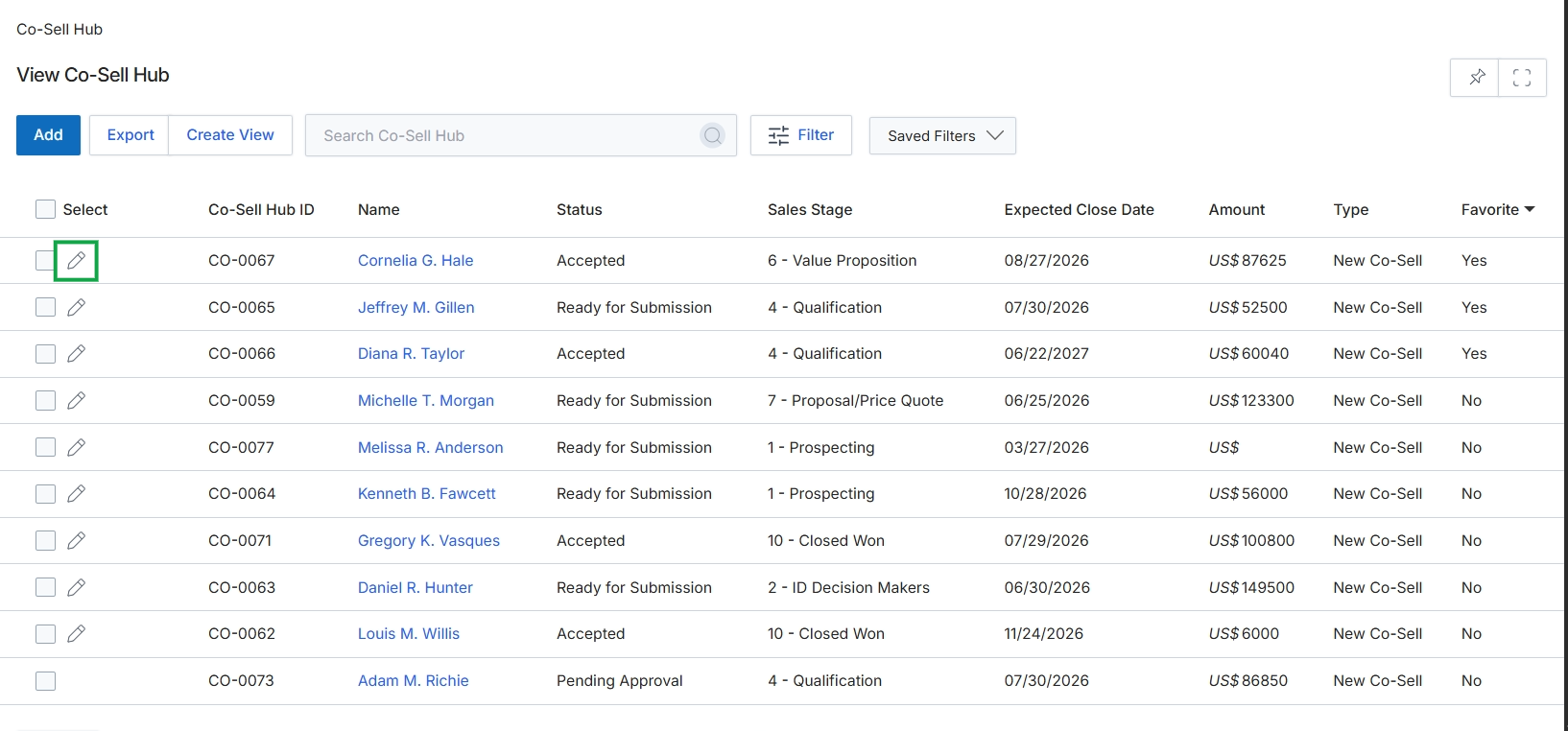
Click the Edit icon next to the desired co-sell record.
Adding or Editing a Co-Sell Opportunity
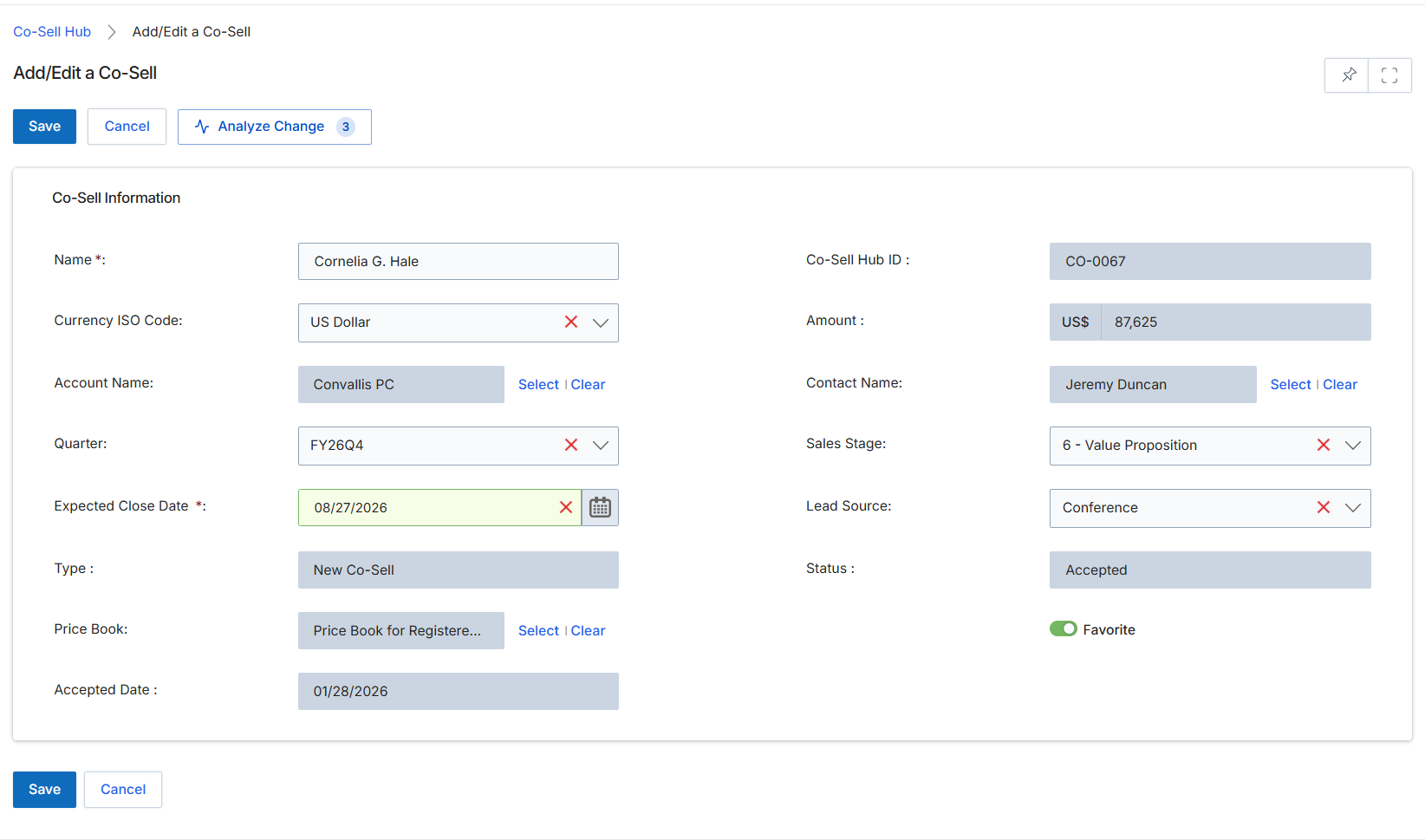
This screen serves as the interface for administrators to add new co-sell records or modify existing ones within the platform. Co-sell records document joint selling engagements between the vendor and a partner, capturing critical details about the opportunity, involved parties, and financial aspects. This form allows for the input and management of information such as the co-sell name, associated account and contact, financial value, expected close date, and sales stage. The data entered here is crucial for tracking collaborative deals, assessing partner engagement, and potentially triggering commission calculations in the Incentivize module upon successful deal closure. The form includes fields for both mandatory and optional information, ensuring comprehensive record-keeping for co-selling activities.
Review or update the details for the co-sell record in the 'Co-Sell Information' section.
Buttons
| Button | Description |
|---|---|
| Save | Saves any changes made to the co-sell record. |
| Cancel | Discards any unsaved changes and returns to the previous view. |
| Analyze Change | Analyzes the impact or history of changes made to the co-sell record. |
Co-Sell Information
| Field | Description |
|---|---|
| Name * | The name of the co-sell engagement, typically identifying the opportunity or project. |
| Co-Sell Hub ID | A system-generated unique identifier for the co-sell record. |
| Currency ISO Code | The ISO currency code for the financial values associated with this co-sell. |
| Amount | The estimated financial value of the co-sell deal. |
| Account Name | The name of the customer account associated with this co-sell opportunity. This can be selected from existing accounts. |
| Contact Name | The primary contact person at the customer account for this co-sell. This can be selected from existing contacts. |
| Quarter | The financial quarter in which the co-sell is active or expected to close. |
| Sales Stage | The current stage of the sales process for this co-sell opportunity. |
| Expected Close Date * | The anticipated date by which this co-sell opportunity is expected to close. |
| Lead Source | The origin or source from which this co-sell opportunity was identified. |
| Type | The classification or category of the co-sell engagement. |
| Status | The current status of the co-sell record, indicating its progress or state (e.g., Accepted, Requested, Active, Won, Lost, Declined). |
| Price Book | The price book used for products and services within this co-sell deal, which may reflect partner-specific pricing. |
| Favorite | A toggle switch to mark this co-sell record as a favorite for quick access or prioritization. |
| Accepted Date | The date when the co-sell request was officially accepted. |