

Overview
The Co-Sell Hub is a critical component within the Sell module, facilitating collaborative sales efforts between the vendor and its partners. Co-selling allows both parties to combine resources and expertise to pursue and close deals more effectively. This feature provides a comprehensive view of all co-sell requests and active engagements, enabling administrators to track progress, manage associated tasks and documents, and review the approval history of each co-sell opportunity. This visibility ensures that joint sales initiatives are aligned, supported, and ultimately contribute to shared revenue goals.
Viewing the Co-Sell Hub List
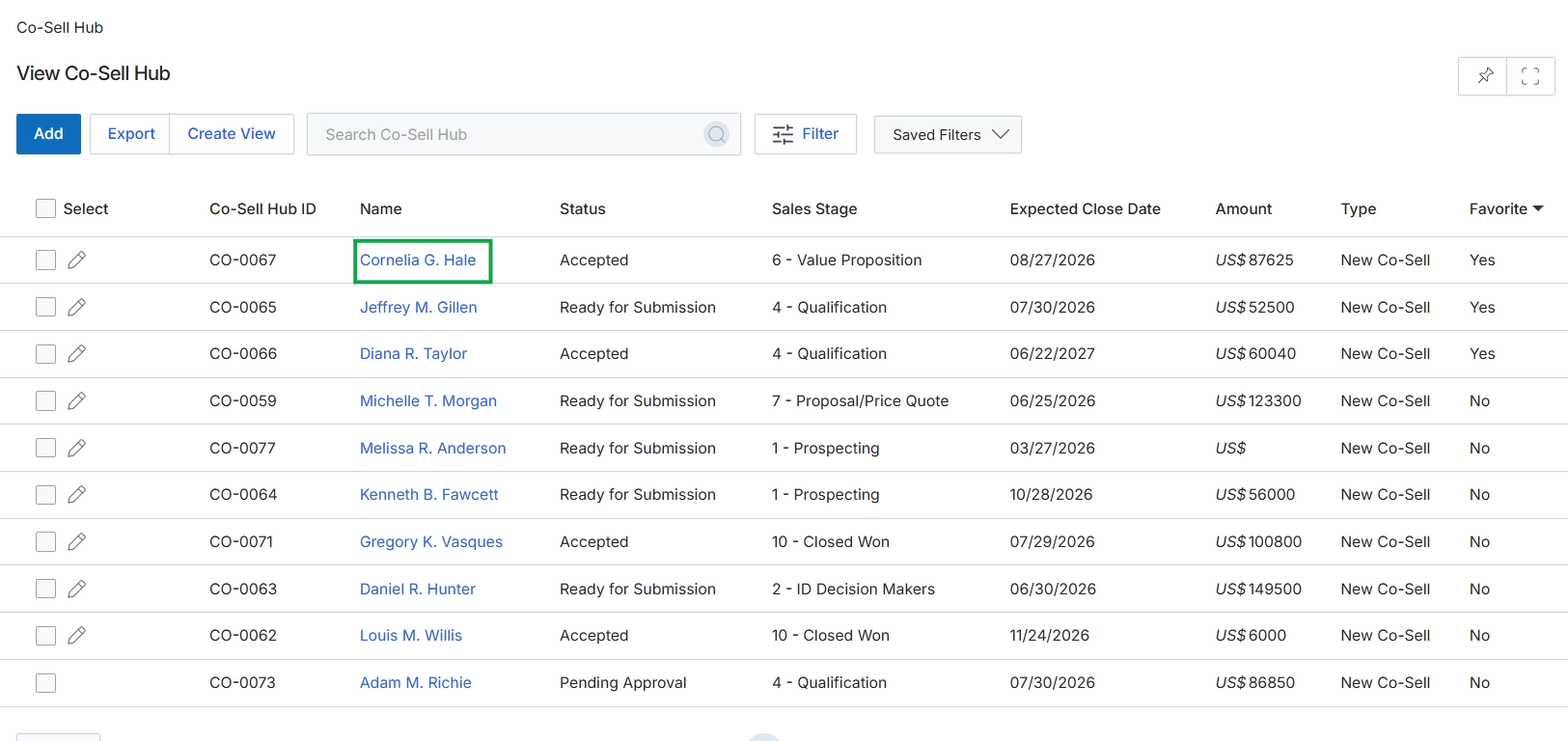
Click the Cornelia G. Hale link in the Name column to view the co-sell details.
Reviewing Co-Sell Details
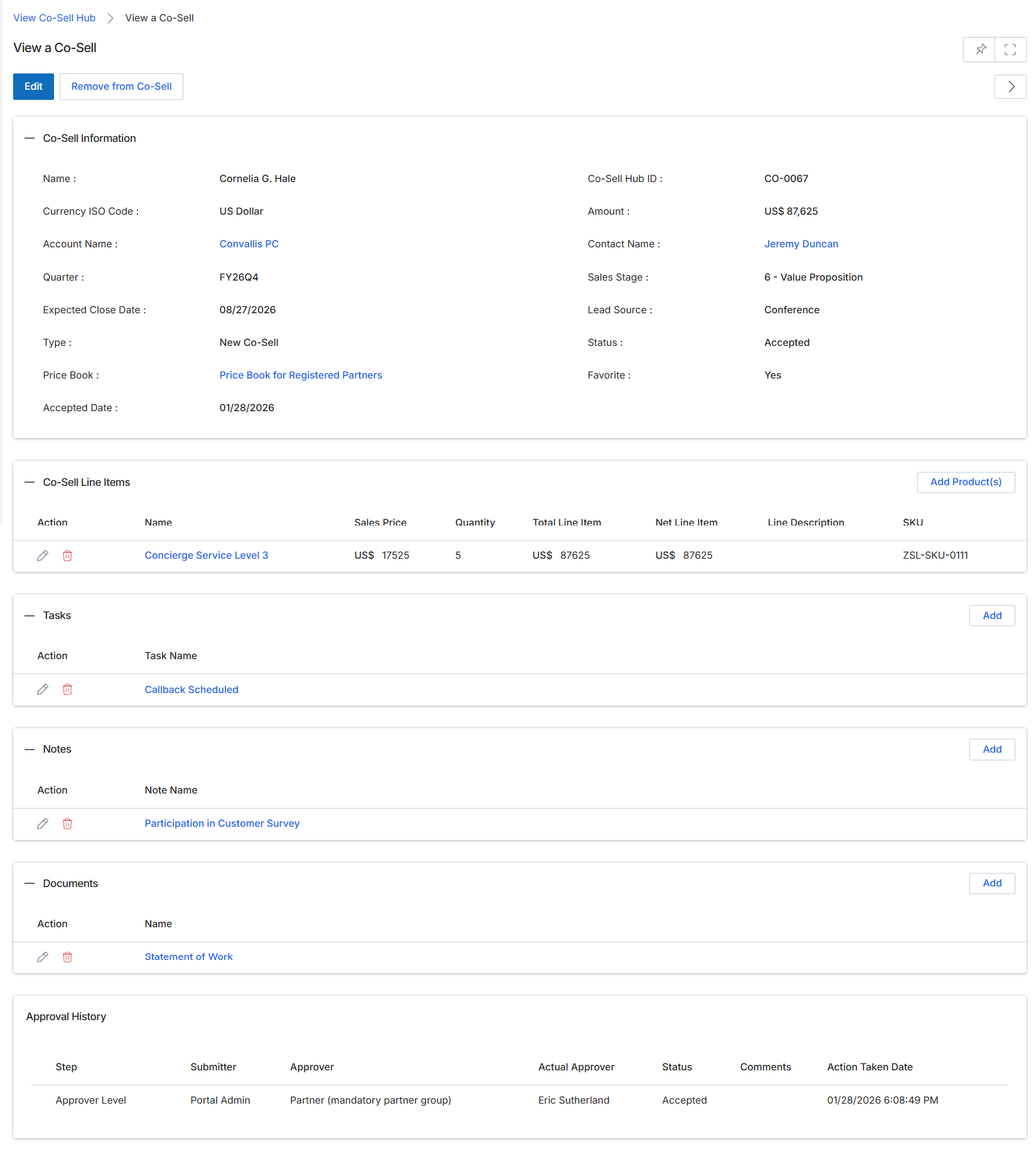
This screen displays the comprehensive details of a specific Co-Sell record, which represents a joint selling engagement between a vendor and a partner. It consolidates key data points such as deal information, associated products, collaborative tasks, notes, and documents, providing a centralized view of the co-selling activity. Users can review the current status of the co-sell, track its progress, and understand the historical approval workflow. This detailed view is crucial for both partners and vendor-side administrators to monitor joint opportunities, ensure alignment, and manage the collaborative sales process from initiation to closure, ultimately contributing to the overall pipeline visibility and commission calculations within the Sell module.
Review the detailed information for the selected Co-Sell record, including its general information, line items, tasks, notes, documents, and approval history.
Buttons
| Button | Description |
|---|---|
| Edit | Allows modification of the Co-Sell record details. |
| Remove from Co-Sell | Removes the current record from the Co-Sell Hub, typically indicating a cancellation or disqualification of the joint engagement. |
| Add Product(s) | Adds new products or services to the co-sell line items. |
| Add | Adds a new task related to the co-sell opportunity. |
| Add | Adds a new note to the co-sell record. |
| Add | Adds a new document to the co-sell record. |
Co-Sell Information
| Field | Description |
|---|---|
| Name | The name of the individual or entity associated with the co-sell opportunity. |
| Currency ISO Code | The ISO currency code used for financial values within this co-sell record. |
| Account Name | The name of the customer account associated with this co-sell opportunity. |
| Quarter | The financial quarter to which this co-sell opportunity is assigned. |
| Expected Close Date | The anticipated date by which this co-sell opportunity is expected to close. |
| Type | The classification or type of co-sell engagement. |
| Price Book | The price book used for products and services within this co-sell. |
| Accepted Date | The date on which the co-sell opportunity was accepted. |
| Co-Sell Hub ID | A unique identifier for this co-sell record. |
| Amount | The total estimated financial value of the co-sell opportunity. |
| Contact Name | The name of the primary contact person for this co-sell opportunity. |
| Sales Stage | The current stage of the sales process for this co-sell opportunity. |
| Lead Source | The origin or channel through which the lead for this co-sell was acquired. |
| Status | The current status of the co-sell record, indicating its progress or state. |
| Favorite | Indicates whether this co-sell record has been marked as a favorite. |
Co-Sell Line Items
| Column | Description |
|---|---|
| Action | Provides options to edit or delete a co-sell line item. |
| Name | The name of the product or service included in the co-sell. |
| Sales Price | The individual sales price of the product or service. |
| Quantity | The number of units for the product or service. |
| Total Line Item | The total price for the specific line item (Sales Price x Quantity). |
| Net Line Item | The net price for the specific line item, potentially after discounts. |
| Line Description | A brief description of the product or service line item. |
| SKU | The Stock Keeping Unit identifier for the product. |
Tasks
| Column | Description |
|---|---|
| Action | Provides options to edit or delete a task. |
| Task Name | The name or description of the task. |
Notes
| Column | Description |
|---|---|
| Action | Provides options to edit or delete a note. |
| Note Name | The title or subject of the note. |
Documents
| Column | Description |
|---|---|
| Action | Provides options to edit or delete a document. |
| Name | The name of the attached document. |
Approval History
| Column | Description |
|---|---|
| Step | The stage of the approval process. |
| Submitter | The user or role that initiated the approval step. |
| Approver | The user or role responsible for approving the step. |
| Actual Approver | The specific individual who performed the approval action. |
| Status | The outcome of the approval step (e.g., Accepted, Pending, Rejected). |
| Action Taken Date | The date and time when the approval action was taken. |