

Overview
The platform's integration capabilities are crucial for maintaining data consistency and enabling automated workflows between external systems like Salesforce and the UPM. Salesforce Outbound Messages (OBM) are a key mechanism for real-time or near real-time data synchronization, allowing changes in Salesforce to automatically trigger updates or actions within the platform. This setup ensures that critical information, such as deal updates, contact changes, or account modifications, is accurately reflected across both systems without manual intervention.
By configuring SFDC OBM Setups, administrators can define specific triggers and data mappings, ensuring that only relevant information is transferred and processed correctly. This not only streamlines operations but also enhances the accuracy of partner-related data, supporting various modules like Sell and Onboard with up-to-date information from the CRM.
Viewing Existing SFDC OBM Setups
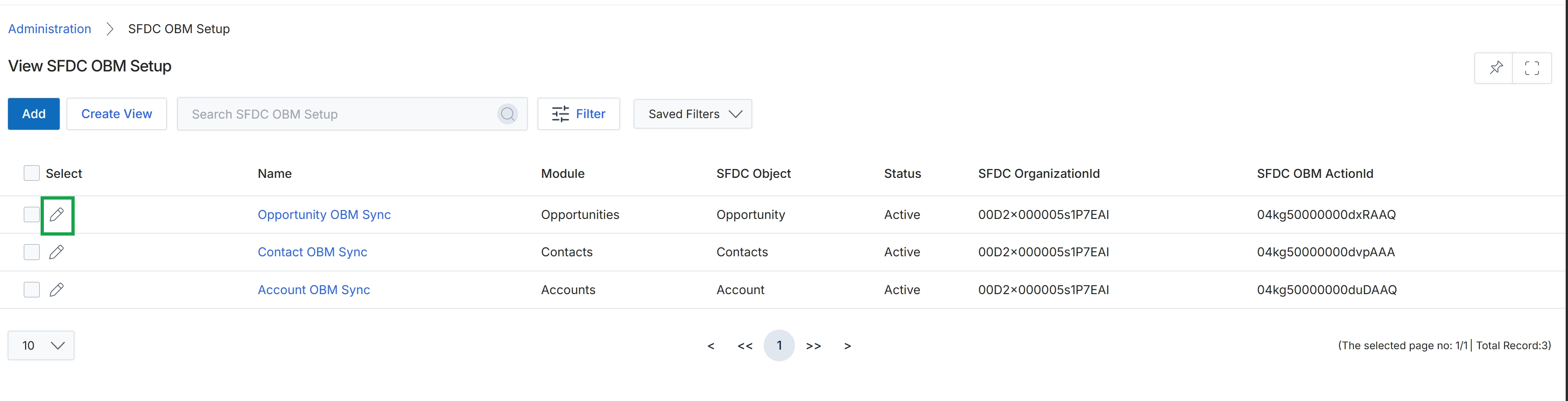
Click the pencil icon next to "Opportunity OBM Sync" to edit the SFDC OBM Setup.
Adding or Editing an SFDC OBM Setup
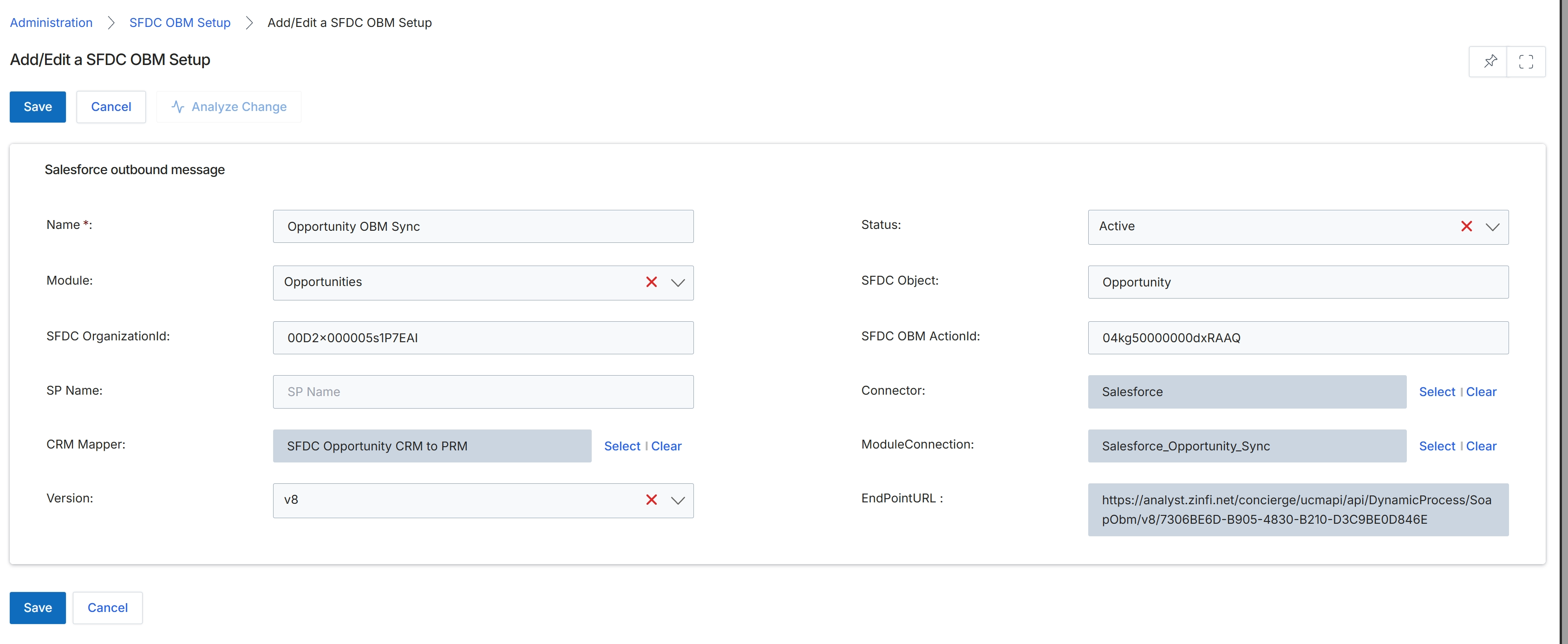
This screen, titled 'Add/Edit a SFDC OBM Setup', is part of the Connectors Management feature within the Administration module. It allows administrators to configure the details for an outbound message (OBM) setup, specifically for Salesforce (SFDC) integration. Outbound messages are a critical component for enabling real-time or near real-time data synchronization from Salesforce to the platform, ensuring that changes in Salesforce, such as updates to opportunities, are reflected accurately and promptly within the UPM environment. This setup defines which Salesforce object triggers the message, the associated module within the platform, and how the data is mapped and transmitted, facilitating seamless data flow between the CRM and the UPM system.
Configure the details for the Salesforce outbound message setup by filling in the required fields.
Buttons
| Button | Description |
|---|---|
| Save | Saves the current Salesforce outbound message setup. |
| Cancel | Discards any changes and returns to the previous screen. |
| Analyze Change | Analyzes potential impacts or changes related to the current setup. |
Salesforce outbound message
| Field | Description |
|---|---|
| Name * | The unique name for this Salesforce outbound message setup. |
| Status | Indicates whether the outbound message setup is active or inactive. |
| Module | The UPM module that this outbound message will update (e.g., Opportunities). |
| SFDC Object | The Salesforce object that triggers this outbound message (e.g., Opportunity). |
| SFDC OrganizationId | The unique identifier for the Salesforce organization. |
| SFDC OBM ActionId | The action ID associated with the Salesforce outbound message. |
| SP Name | The name of the stored procedure or service provider associated with this setup. |
| Connector | The specific connector used for this integration, typically Salesforce. |
| CRM Mapper | The mapping configuration that defines how fields from Salesforce are translated to platform fields. |
| ModuleConnection | The specific connection string or identifier for the module's integration. |
| Version | The version of the outbound message setup. |
| EndPointURL | The URL to which the Salesforce outbound message will be sent. |