

Overview
The Event Marketing Management module within the platform provides a comprehensive toolset for creating, managing, and tracking marketing events. This includes the ability for administrators to set up various event types, configure their visibility, and monitor their performance. As part of ongoing campaign management, it's essential to maintain a clean and current list of events. This functionality supports that by allowing administrators to easily remove events that are no longer active or needed, ensuring the event catalog remains organized and relevant for partners.
Key Features
- Event Deletion
- Event Management
- Maintain Event Catalog
- Admin Control
Deleting an Event
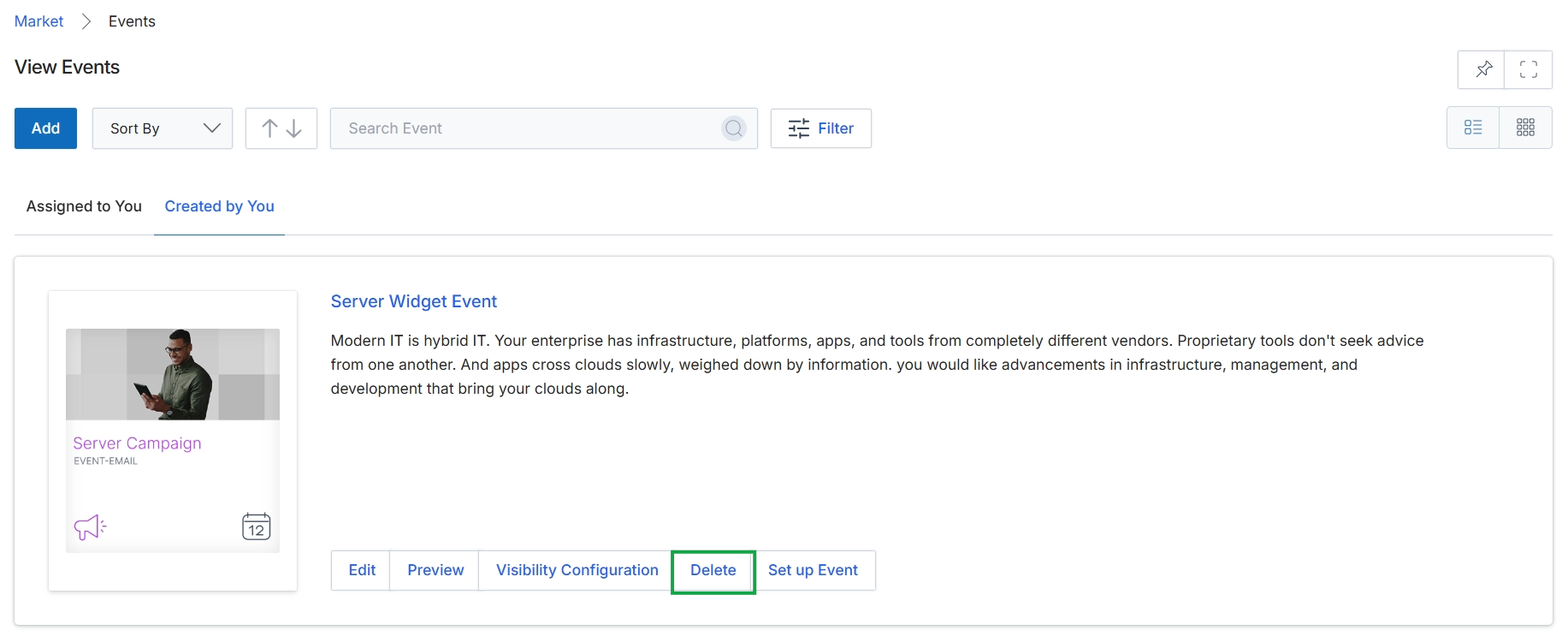
Click the Delete button to remove the event.
Frequently asked questions
- What is the purpose of deleting an event?
Deleting an event removes it from the platform's event catalog, helping to maintain an organized and current list of marketing events. This ensures that only relevant and active events are visible to partners.
- Who can delete events?
UPM administrators use this feature to delete events from the platform's event catalog.
- How does event deletion contribute to campaign management?
Event deletion allows administrators to remove events that are no longer active or needed. This is essential for maintaining a clean and current event list as part of ongoing campaign management.