

Overview
Lead scoring is a critical component of effective lead management, allowing organizations to quantify the value of a lead based on their engagement and demographic information. By integrating lead scoring directly into event management, the platform ensures that interactions with events, such as registration, attendance, or content downloads, contribute meaningfully to a lead's overall score. This helps partners and vendors focus their efforts on the most promising leads generated from their marketing events.
Administrators can configure detailed rules, specifying which activities associated with a particular event should generate a score, how much that score should be, and for which partner groups it applies. This granular control ensures that lead scoring accurately reflects the strategic importance of different event interactions and aligns with the overall lead qualification strategy.
Accessing Lead Scoring Rules for an Event
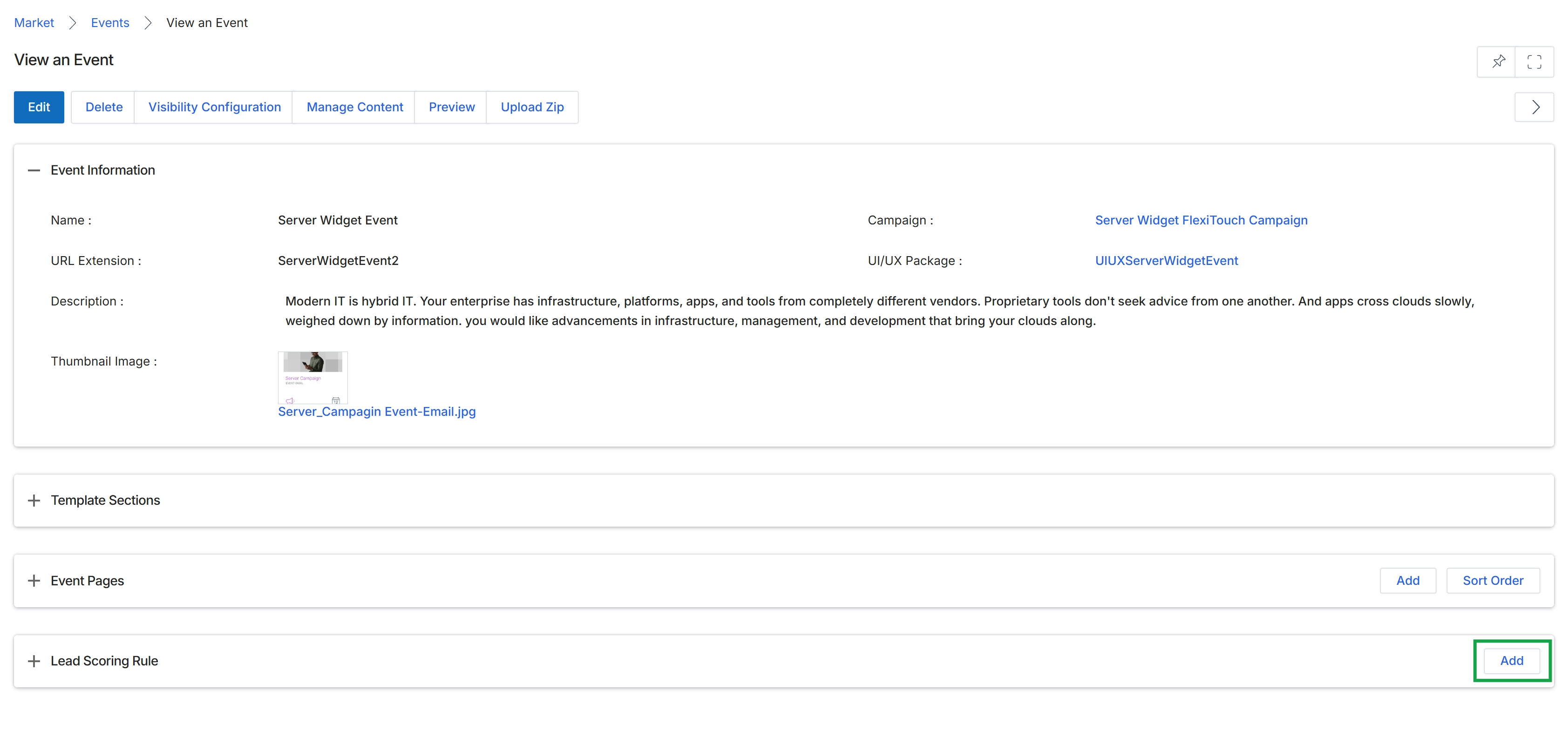
This screen displays the details of a specific event within the Market module, providing a comprehensive overview of its configuration. Administrators use this view to manage various aspects of an event, including its basic information, associated content, and lead scoring rules. The screen is organized into collapsible sections, allowing for focused management of different event components. This particular view shows the event's general information, such as its name, URL extension, description, and linked campaign, and also provides options to add or manage event pages and lead scoring rules, which are crucial for tracking attendee engagement and qualifying prospects.
Click the "Add" button within the "Lead Scoring Rule" section to define a new lead scoring rule for this event.
Buttons
| Button | Description |
|---|---|
| Edit | Allows modification of the event's details. |
| Delete | Removes the event from the system. |
| Visibility Configuration | Configures who can view and access the event. |
| Manage Content | Provides options to manage the content associated with the event. |
| Preview | Displays a preview of the event page. |
| Upload Zip | Uploads a ZIP file containing event-related assets. |
| Add | Adds a new event page. |
| Sort Order | Arranges the order of event pages. |
| Add | Adds a new lead scoring rule for the event. |
Event Information
| Field | Description |
|---|---|
| Name | The name of the event. |
| Campaign | The marketing campaign associated with this event. |
| URL Extension | The customizable part of the event's URL. |
| UI/UX Package | The user interface and user experience package applied to the event. |
| Description | A detailed description of the event. |
| Thumbnail Image | A small image representing the event. |
Defining a New Lead Scoring Rule
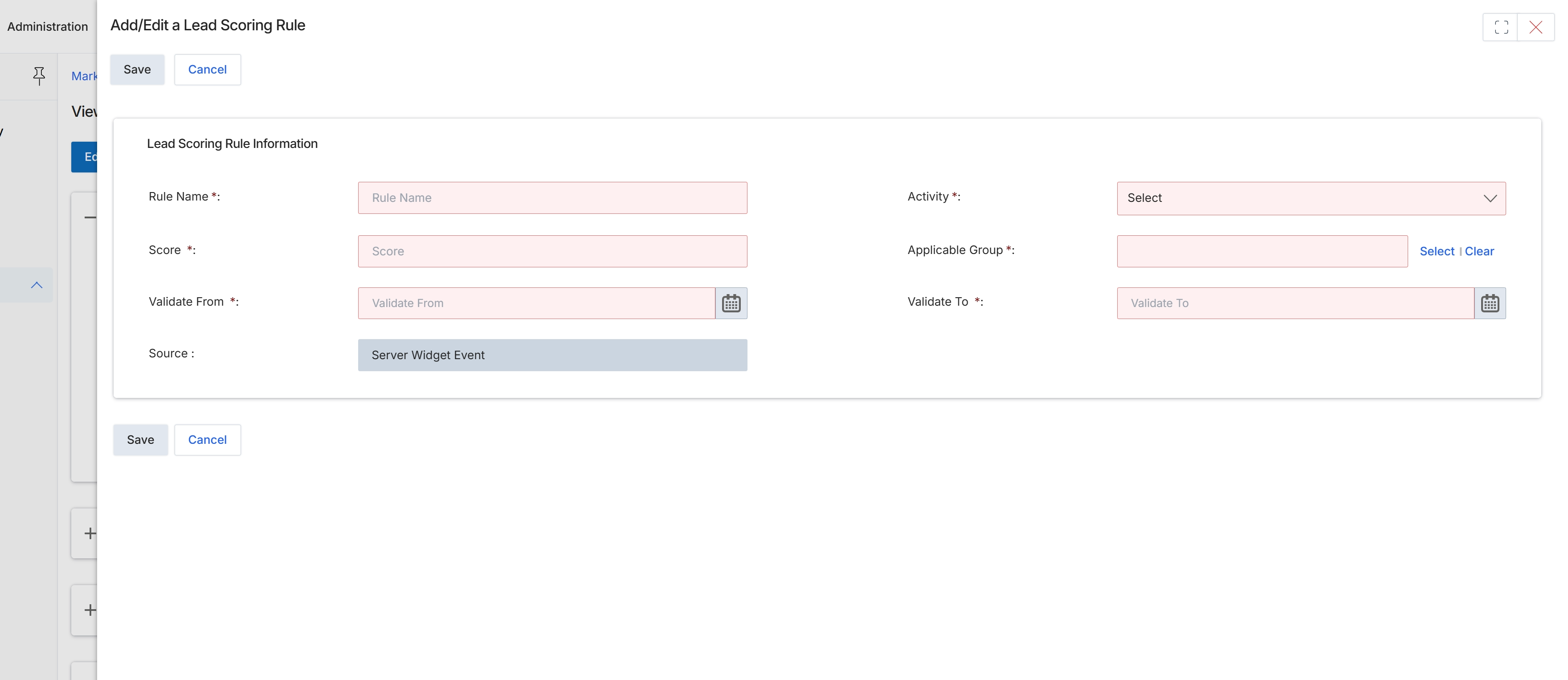
The Add/Edit a Lead Scoring Rule form allows administrators to define criteria for assigning scores to leads based on specific activities. This functionality is part of the Event Marketing Management module, enabling the system to automatically qualify leads generated from various marketing efforts. Each rule specifies an activity, a score value, and a validity period, contributing to a lead's overall score which can then be used for lead nurturing, routing, or prioritization within the Sell module. The source of the activity, in this case, is pre-defined as a 'Server Widget Event', indicating that this rule is specifically designed to score interactions originating from a particular type of system event.
Fill out the Add/Edit a Lead Scoring Rule form to define a new lead scoring criterion.
Buttons
| Button | Description |
|---|---|
| Save | Saves the newly configured lead scoring rule. |
| Cancel | Discards any changes and closes the form without saving. |
Lead Scoring Rule Information
| Field | Description |
|---|---|
| Rule Name * | Enter a descriptive name for the lead scoring rule. |
| Activity * | Select the specific activity that will trigger this lead scoring rule. |
| Score * | Enter the numerical score to be assigned when the specified activity occurs. |
| Applicable Group * | Select the group(s) to which this lead scoring rule applies. |
| Validate From * | Specify the start date from which this lead scoring rule becomes active. |
| Validate To * | Specify the end date until which this lead scoring rule remains active. |
| Source | Displays the read-only source of the event that triggers this lead scoring rule, pre-filled as 'Server Widget Event'. |