

Overview
Mailing lists are fundamental to executing targeted email marketing campaigns within the platform. They enable vendors and partners to segment their audience and deliver relevant content, ensuring that marketing efforts reach the intended recipients. Effective management of these lists is crucial for maintaining data accuracy, adhering to communication preferences, and maximizing campaign effectiveness.
Viewing Mailing Lists

Click the Mailing List New link.
Reviewing Mailing List Details
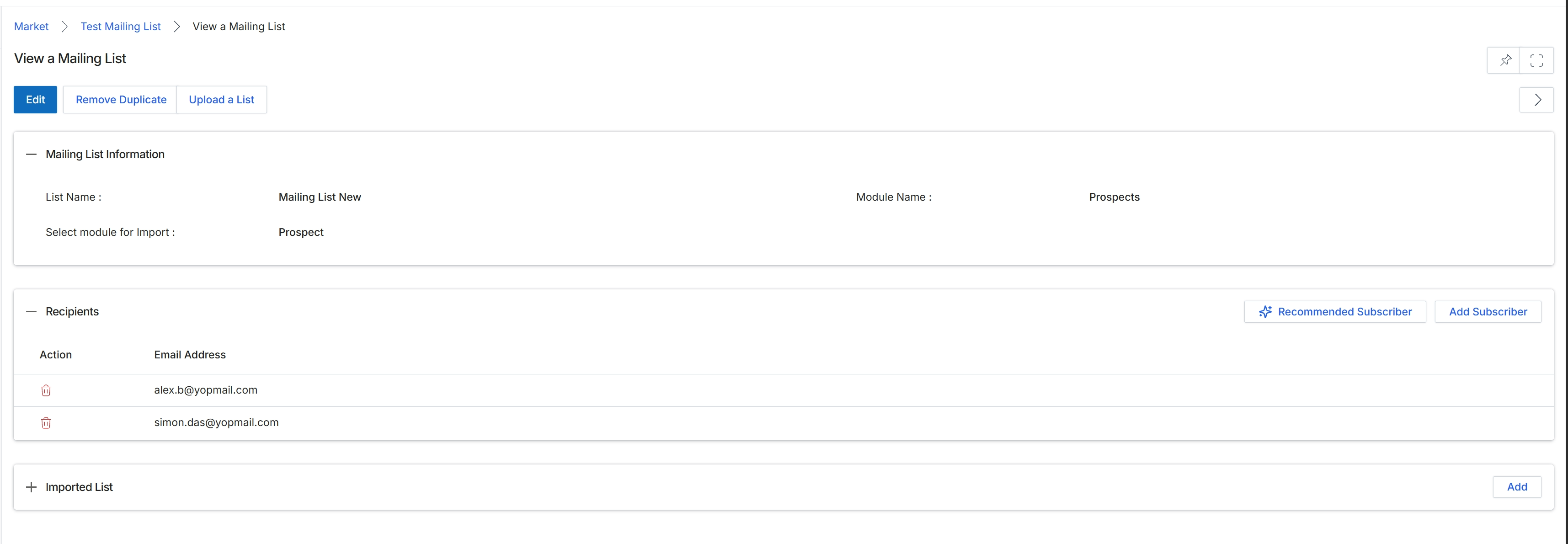
This screen provides a detailed view of a specific mailing list within the Market module, which is essential for managing email campaigns. Mailing lists are used to define the target audience for email communications, allowing vendors and partners to send messages to specific groups of contacts. This view displays the core properties of the list, including its name and the UPM module from which its recipients are sourced, such as Prospects. It also enumerates the individual recipients currently included in the list, providing options for managing them. This level of detail enables administrators to verify list composition and ensure accurate targeting for marketing initiatives.
Review the details of the mailing list, including its information and the list of recipients.
Buttons
| Button | Description |
|---|---|
| Edit | Allows modification of the mailing list's properties. |
| Remove Duplicate | Removes duplicate entries from the mailing list. |
| Upload a List | Uploads a new list of recipients to be added to this mailing list. |
| Recommended Subscriber | Suggests or adds subscribers based on predefined criteria or system recommendations. |
| Add Subscriber | Allows manual addition of a new subscriber to the mailing list. |
| Add | Adds an imported list to the current mailing list. |
Mailing List Information
| Field | Description |
|---|---|
| List Name | Displays the name assigned to this mailing list. |
| Mailing List New | The current name of the mailing list. |
| Select module for Import | Indicates the UPM module from which the recipients for this mailing list are sourced. |
| Prospect | The specific entity type within the source module that populates this mailing list. |
| Module Name | Displays the name of the module from which recipients are imported. |
| Prospects | The name of the module (e.g., Prospects) providing the recipients for this mailing list. |
Recipients
| Column | Description |
|---|---|
| Action | Column header for actions that can be performed on individual recipients. |
| Email Address | Column header for the email addresses of the recipients in the list. |