

Overview
Effective partner program management relies on clear, legally binding agreements. The platform's Agreement Templates functionality ensures that all partners operate under the correct terms and conditions. By providing a robust system for creating and managing these templates, administrators can standardize legal processes, reduce manual effort, and maintain compliance across their entire partner ecosystem. This is crucial for safeguarding intellectual property, defining operational responsibilities, and establishing the financial terms of engagement with partners.
These templates are integral to the partner onboarding workflow, where new partners are required to e-sign relevant agreements before gaining full access to the portal and program benefits. The system supports both digital and non-digital agreement types, accommodating various legal and operational requirements. Administrators can easily update, activate, or deactivate templates, ensuring that partners always sign the most current versions of legal documents.
Accessing Agreement Templates
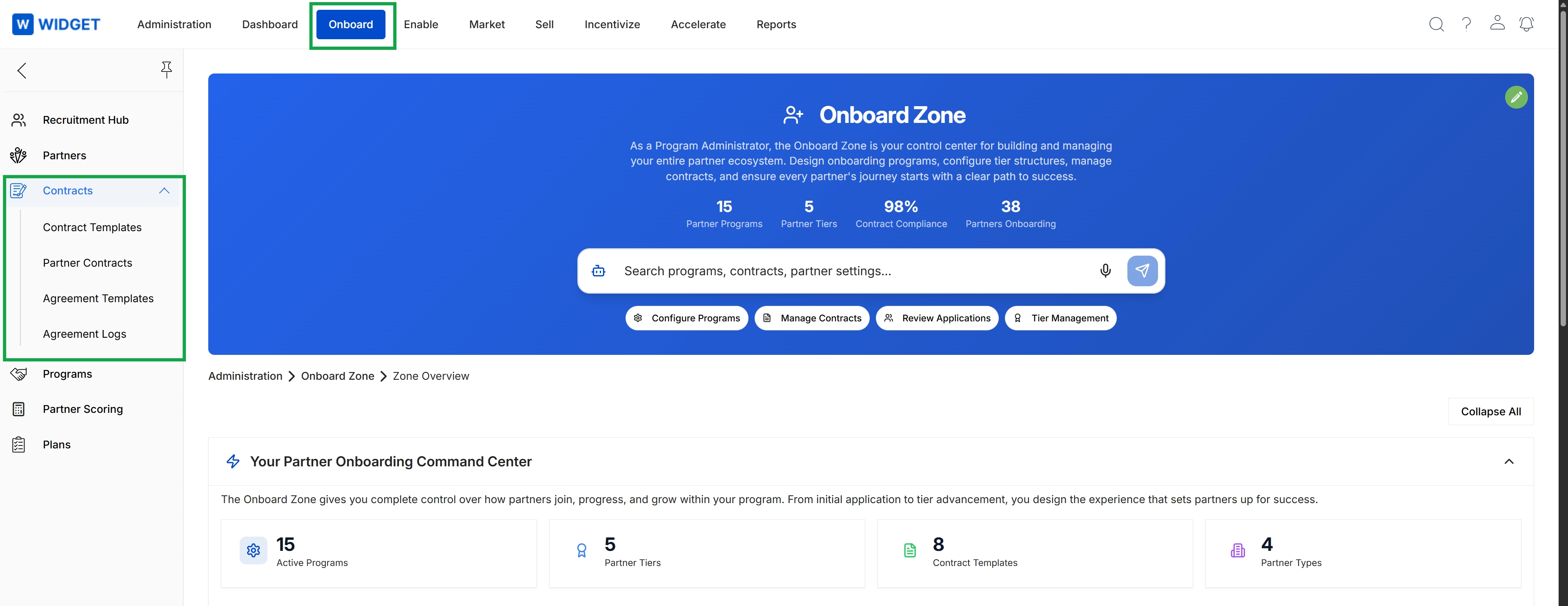
Click Onboard in the top navigation bar, then click Contracts in the left navigation menu, and then click Agreement Templates.
Viewing Existing Templates
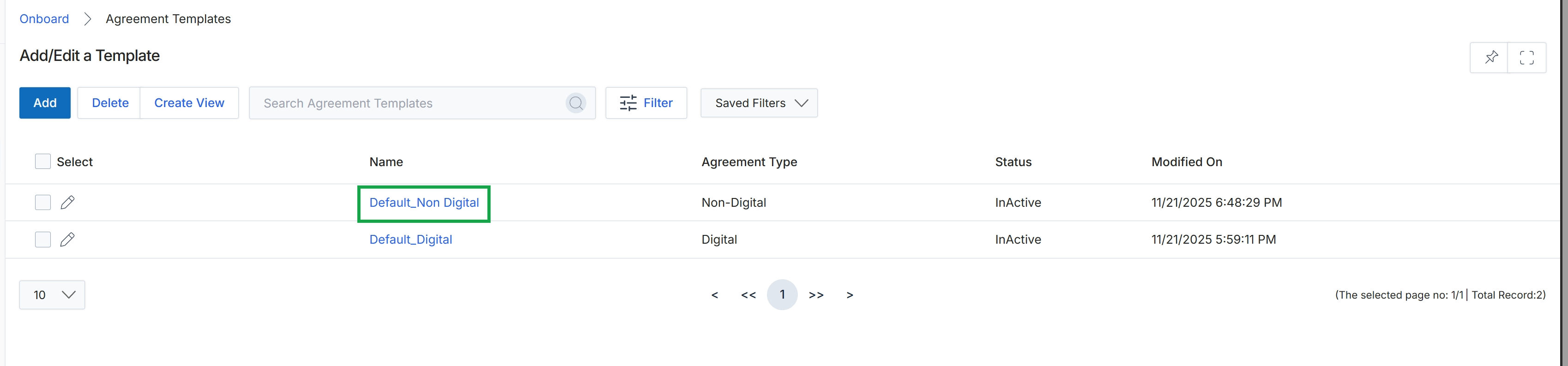
This screen displays the list of agreement templates available within the Onboard module, which are used to manage the legal contracts partners sign during their onboarding journey or for renewals. These templates define the terms and conditions for various partner types and programs, ensuring legal compliance and outlining partner responsibilities and benefits. Administrators use this view to manage existing templates, add new ones, or modify their properties, such as agreement type, status, and content. The platform tracks the modification date for each template, providing an audit trail for changes.
Click the name of the "Default_Non Digital" agreement template to view its details.
Buttons
| Button | Description |
|---|---|
| Add | Adds a new agreement template to the system. |
| Delete | Deletes selected agreement templates. |
| Create View | Creates a custom view for filtering and displaying agreement templates. |
| Filter | Opens a panel to apply filters to the list of agreement templates. |
| Saved Filters | Displays a dropdown of previously saved filter configurations. |
| Default_Non Digital | The name of a non-digital agreement template. |
Fields
| Field | Description |
|---|---|
| Search Agreement Templates | Allows searching for agreement templates by keyword. |
Column Headings
| Column | Description |
|---|---|
| Select | A checkbox to select individual agreement templates for bulk actions. |
| Name | The name of the agreement template. |
| Agreement Type | The category or type of the agreement, such as 'Digital' or 'Non-Digital'. |
| Status | The current status of the agreement template, indicating if it is active or inactive. |
| Modified On | The date and time when the agreement template was last modified. |
Reviewing Template Details and Content
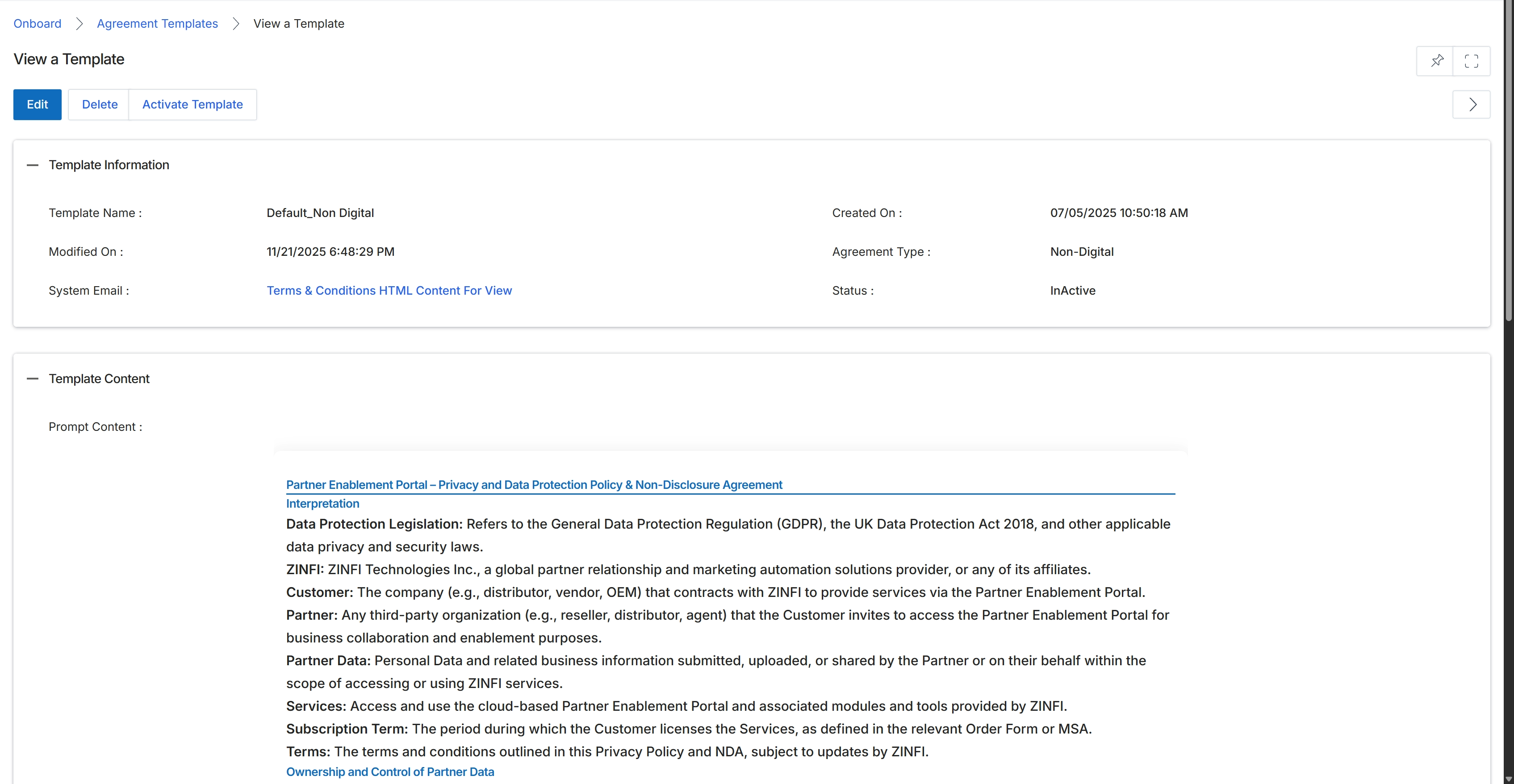
This screen displays the details of a specific agreement template, providing a comprehensive overview of its configuration and content. Agreement templates are crucial for standardizing the legal terms and conditions that partners must accept during the onboarding process. Administrators use this view to review template information such as its name, creation and modification dates, type, and current status. The screen also presents the full content of the agreement, allowing for a thorough review of the legal text, definitions, and clauses that will be presented to partners for e-signing. This detailed view is essential for ensuring that all legal requirements are met and that partners understand the terms of their engagement with the vendor.
Review the details of the selected agreement template, including its information and content.
Buttons
| Button | Description |
|---|---|
| Edit | Allows administrators to modify the details and content of this agreement template. |
| Delete | Removes this agreement template from the system. |
| Activate Template | Changes the status of the agreement template to active, making it available for use in partner programs. |
Template Information
| Field | Description |
|---|---|
| Template Name | The unique identifier for the agreement template. |
| Modified On | The date and time when the agreement template was last updated. |
| System Email | A link to view the HTML content of the terms and conditions as they would appear in a system email. |
| Created On | The date and time when the agreement template was initially created. |
| Agreement Type | Indicates whether the agreement is a digital or non-digital type. |
| Status | The current operational status of the agreement template (e.g., InActive). |
Template Content
| Field | Description |
|---|---|
| Prompt Content | Displays the full text and legal clauses of the agreement template. |