

Overview
The Co-Sell Marketplace within the Accelerate module is designed to foster collaboration among partners, enabling them to discover and engage with each other for joint go-to-market initiatives. This feature specifically manages the requests partners send to each other when they identify a potential joint solution or sales opportunity. A partner might propose combining their offering with another partner's solution to create a 'Marketplace Bundle' for a specific customer need or market segment.
Administrators play a crucial role in overseeing these co-sell requests, ensuring that proposed bundles align with program guidelines and facilitating the negotiation process. This management capability helps the vendor build a robust partner ecosystem where partners can leverage each other's strengths to deliver more comprehensive solutions to end customers, ultimately driving increased revenue and market reach for all parties involved.
Viewing Co-Sell Requests
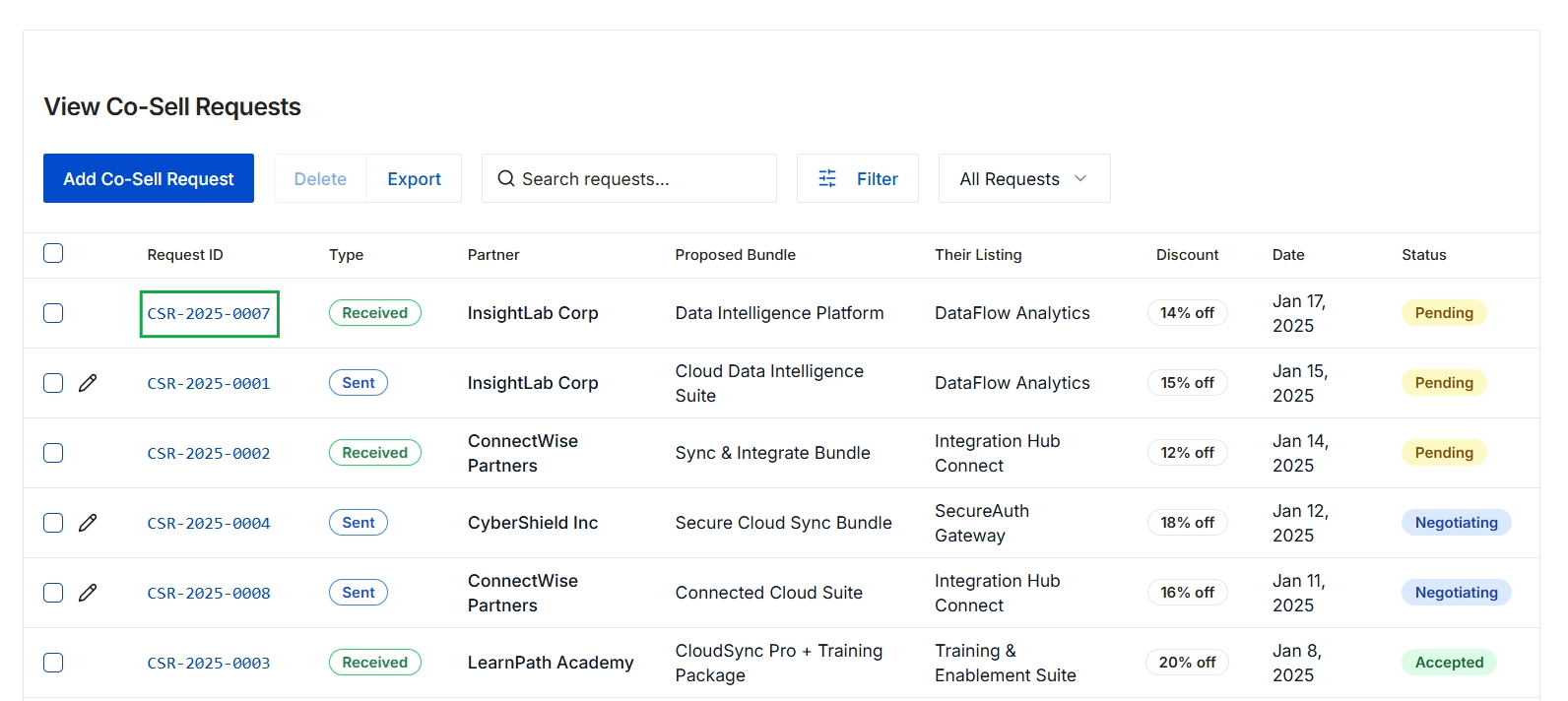
Click the CSR-2025-0007 link.
Reviewing Request Details and Actions
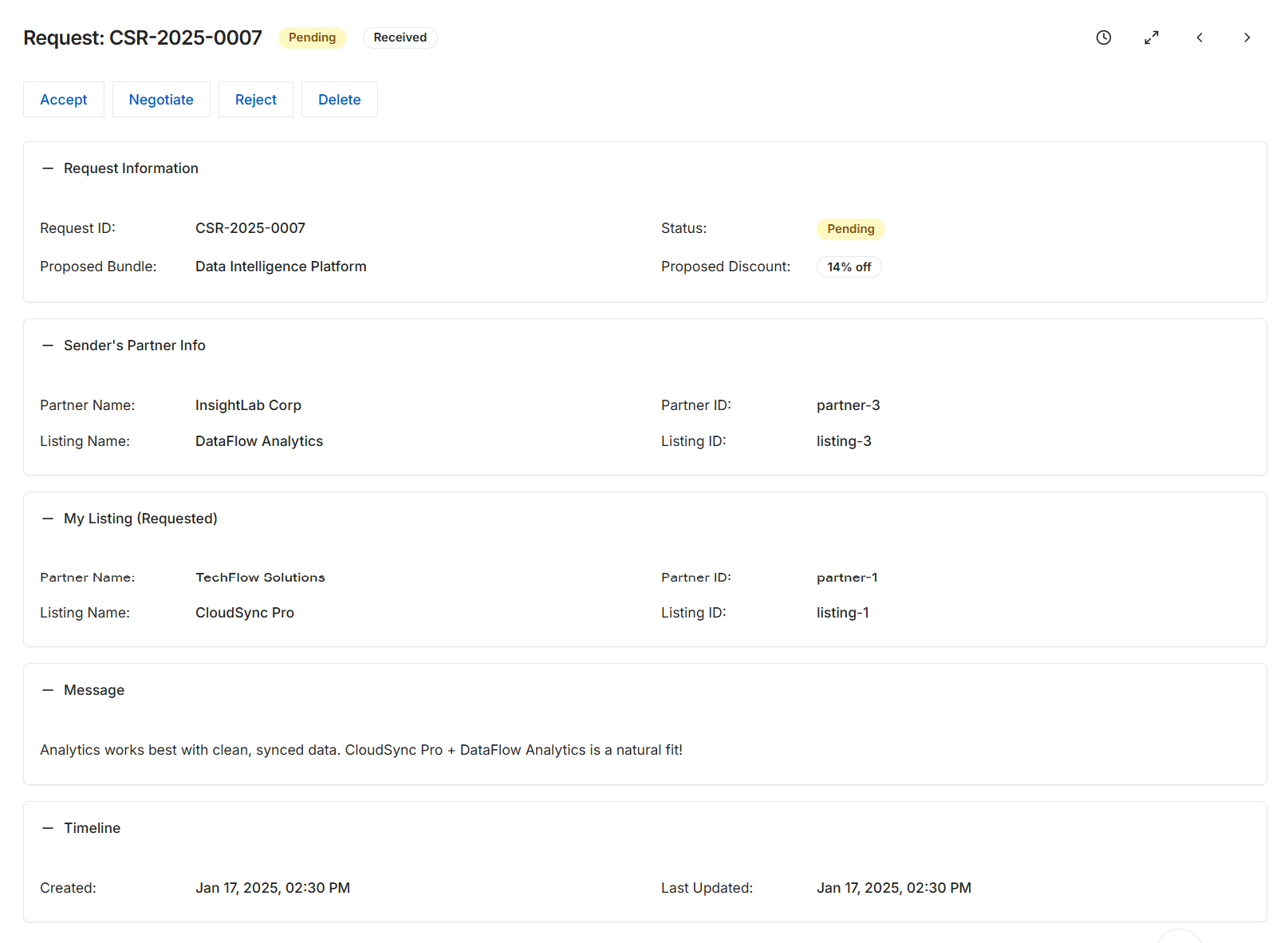
This screen displays the detailed information for a specific Co-Sell Request within the Accelerate module, which facilitates partner-to-partner collaboration. Co-sell requests are initiated when one partner identifies a potential joint opportunity with another partner's marketplace listing and sends a connection request. This view provides all relevant details about the request, including the proposed bundle, discount, information about both the sender and receiver partners and their respective listings, and any accompanying message. The status of the request is clearly indicated, and the timeline tracks its creation and last update. Partners can use the available actions to manage the request, moving it through the co-sell workflow.
Review the details of the Co-Sell Request to determine the appropriate action.
Buttons
| Button | Description |
|---|---|
| Accept | Accepts the co-sell request, indicating agreement to collaborate on the proposed opportunity. |
| Negotiate | Initiates a negotiation process for the co-sell request, allowing for adjustments to the proposed terms or bundle. |
| Reject | Declines the co-sell request, ending the potential collaboration. |
| Delete | Removes the co-sell request from the system. |
Request Information
| Field | Description |
|---|---|
| Request ID | A unique identifier for the co-sell request. |
| Proposed Bundle | The combined solution offering suggested for co-selling. |
| Status | The current state of the co-sell request, such as Pending, Accepted, or Rejected. |
| Proposed Discount | The percentage discount proposed for the co-sell bundle. |
Sender's Partner Info
| Field | Description |
|---|---|
| Partner Name | The name of the partner who initiated the co-sell request. |
| Listing Name | The name of the marketplace listing from the sending partner that is part of this request. |
| Partner ID | A unique identifier for the sending partner. |
| Listing ID | A unique identifier for the sending partner's marketplace listing. |
My Listing (Requested)
| Field | Description |
|---|---|
| Partner Name | The name of the partner whose listing was requested for co-selling. |
| Listing Name | The name of the marketplace listing from the receiving partner that is part of this request. |
| Partner ID | A unique identifier for the receiving partner. |
| Listing ID | A unique identifier for the receiving partner's marketplace listing. |
Message
| Field | Description |
|---|---|
| Message | A free-text message from the sending partner explaining the co-sell opportunity. |
Timeline
| Field | Description |
|---|---|
| Created | The date and time when the co-sell request was initially created. |
| Last Updated | The date and time when the co-sell request was last modified. |