

Overview
The Marketplace Management module within UPM's Accelerate zone enables vendors to curate and manage a catalog of offerings that partners can leverage for co-selling. This marketplace facilitates partner-to-partner discovery, allowing technology alliances and system integrators to find complementary solutions and services. By providing a structured environment for listing management, the platform ensures that all offerings are properly categorized, reviewed, and tracked for performance, supporting the strategic goal of fostering a collaborative partner ecosystem.
Partners create these listings to showcase their company, solutions, target verticals, and integration capabilities. The vendor's role is to review and approve these listings, ensuring quality and alignment with program objectives. Once approved and published, these listings become discoverable by other partners, fostering joint opportunities and expanding the reach of both vendor and partner solutions.
Key Features
- Listing Management
- Search & Filter Listings
- Listing Status Tracking
- Performance Metrics (Views
- Orders)
- Bulk Actions (Delete
- Archive)
- Export Listing Data
Accessing and Viewing Marketplace Listings
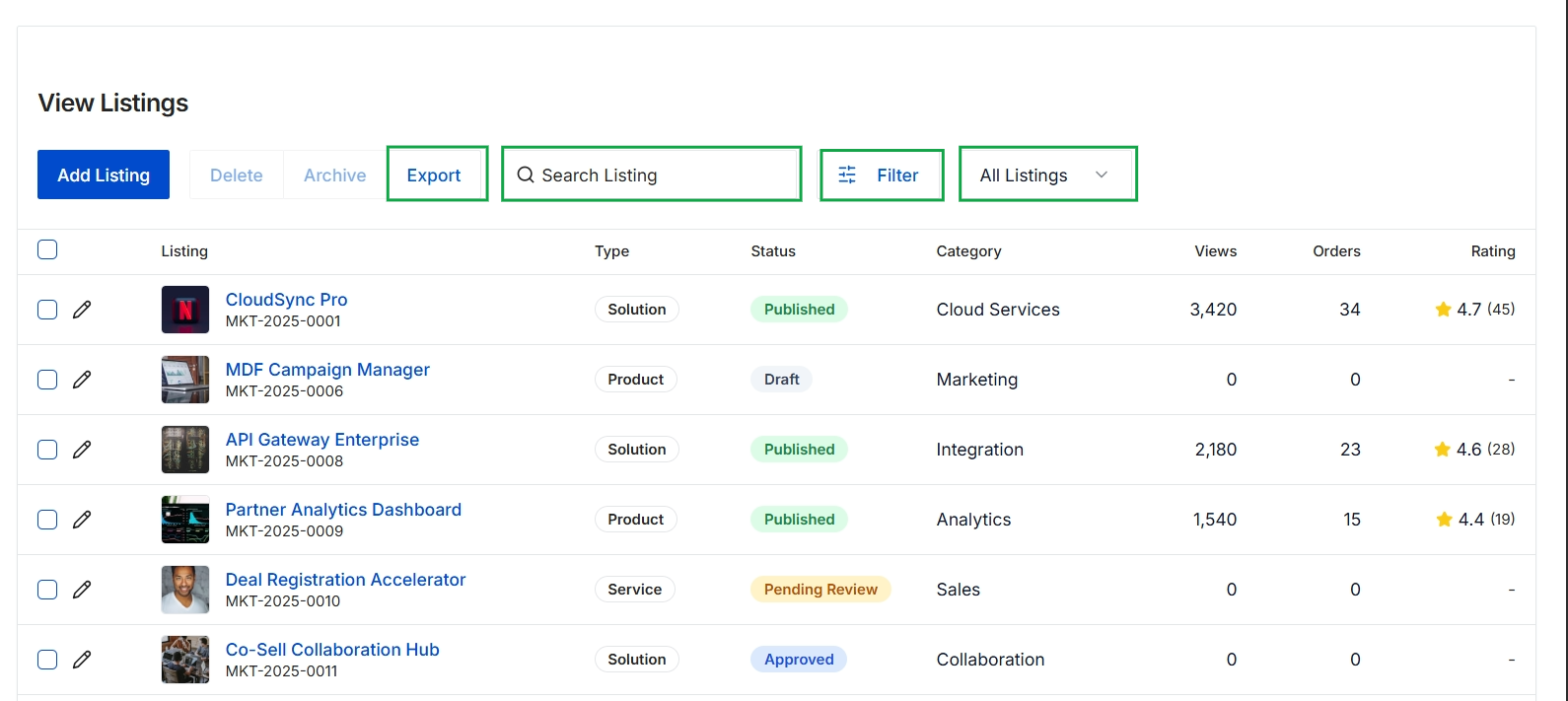
This screen displays a comprehensive list of all marketplace listings created by partners, which are part of the Co-sell Marketplace within the Accelerate module. It provides administrators with an overview of each listing's type, current status (e.g., Published, Draft, Pending Review, Approved), category, and performance metrics such as views, orders, and ratings. This view enables administrators to manage the visibility and status of partner offerings, supporting the ecosystem's co-selling and partner-to-partner discovery capabilities.
Managing Listings with Bulk Actions
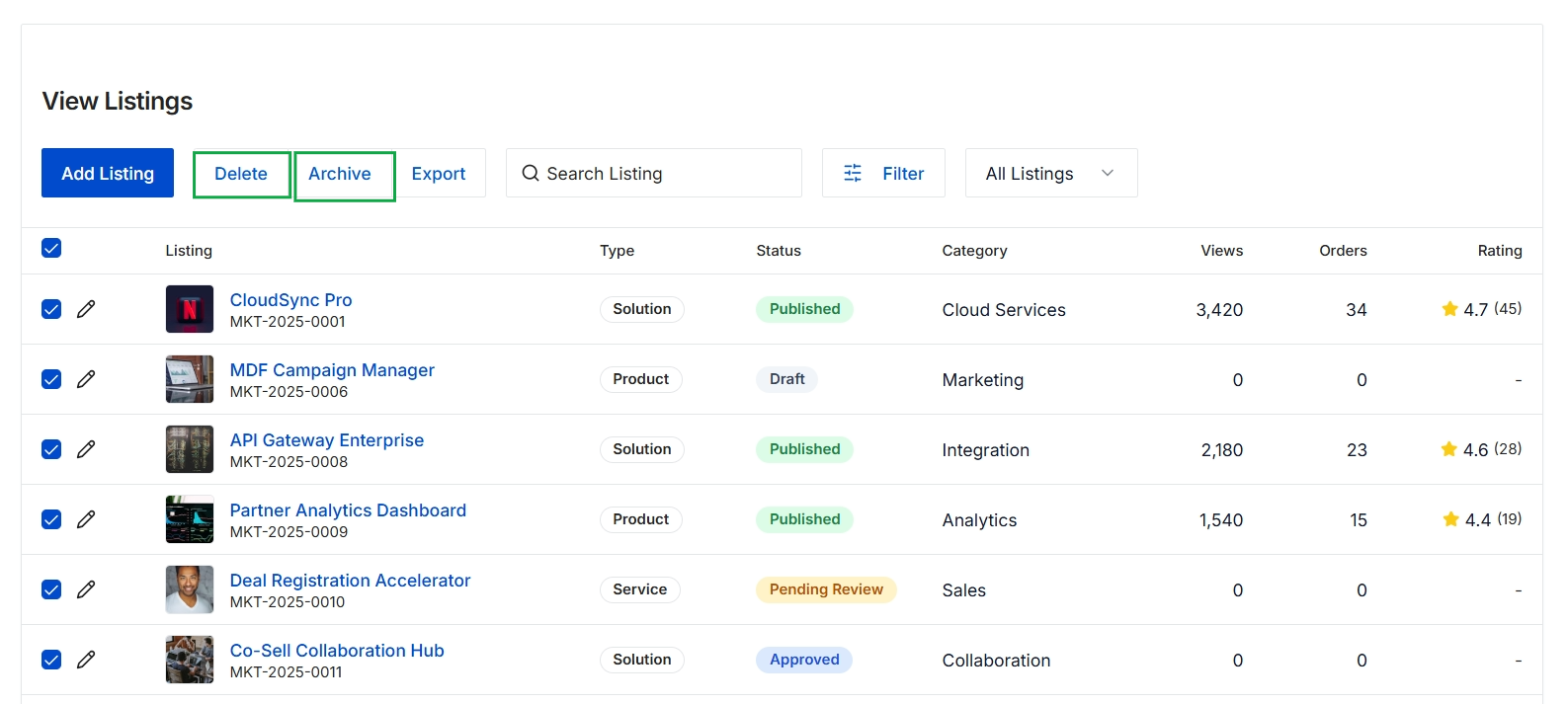
This screen displays a comprehensive list of co-sell marketplace listings, providing administrators with an overview of all partner-submitted solutions, products, and services available for partner-to-partner collaboration. Each listing includes details such as its type, current status (e.g., Published, Draft, Pending Review, Approved), category, and performance metrics like views, orders, and ratings. Administrators utilize this view to manage the marketplace content, allowing them to add new listings, search existing ones, apply filters, and perform bulk actions such as deleting or archiving selected listings to maintain an organized and relevant co-sell environment.
Frequently asked questions
- What is the purpose of the View Listings feature?
This feature provides UPM administrators with a centralized repository to manage co-sell marketplace listings. It facilitates the creation, review, and publication of solutions, products, and services that partners can offer or discover for joint initiatives.
- Who creates co-sell marketplace listings?
Partners create these listings to showcase their company, solutions, target verticals, and integration capabilities. The vendor's role is to review and approve these listings to ensure quality and alignment.
- What information is displayed on the co-sell marketplace listings overview screen?
This screen displays a comprehensive list of all marketplace listings, including their type, current status (e.g., Published, Draft, Pending Review, Approved), category, and performance metrics such as views, orders, and ratings.
- How do administrators manage listings?
Administrators utilize this view to add new listings, search existing ones, apply filters, and perform bulk actions such as deleting or archiving selected listings. This maintains an organized and relevant co-sell environment.
- What are the key features of the listing management functionality?
Key features include listing management, search and filter capabilities, status tracking, performance metrics (views, orders), bulk actions (delete, archive), and the ability to export listing data.