

Overview
The Marketplace Management module is a core component of the Accelerate zone, designed to facilitate partner-to-partner discovery and joint go-to-market initiatives. It enables partners to create detailed listings of their solutions, products, or services within a co-sell marketplace. Administrators use this module to oversee these listings, ensuring they align with program standards and effectively showcase partner offerings. By providing a comprehensive view of each listing, including its features, target markets, pricing, and performance data, administrators can approve, monitor, and optimize the marketplace to drive successful co-sell opportunities among ecosystem partners.
Viewing All Marketplace Listings
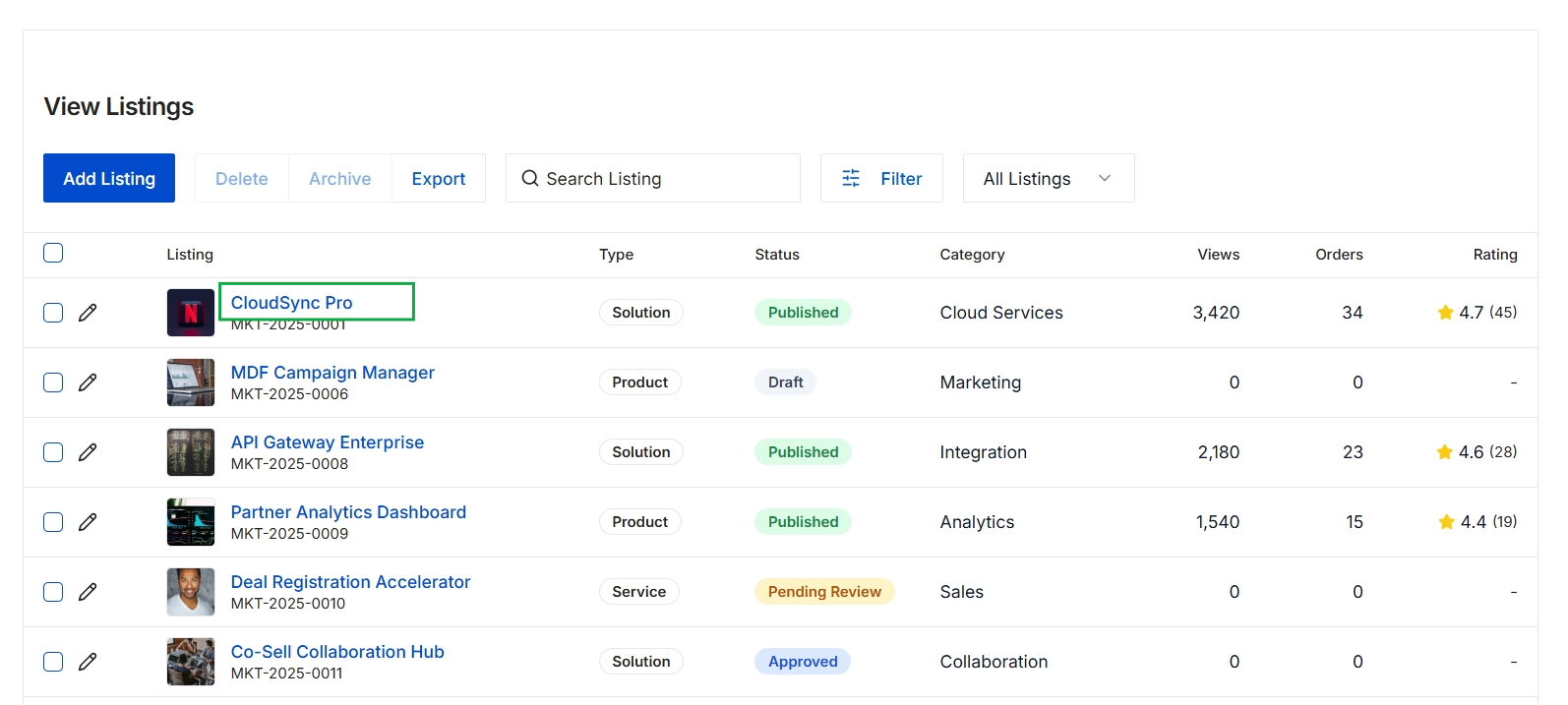
Click the CloudSync Pro listing name.
Reviewing a Specific Listing's Details
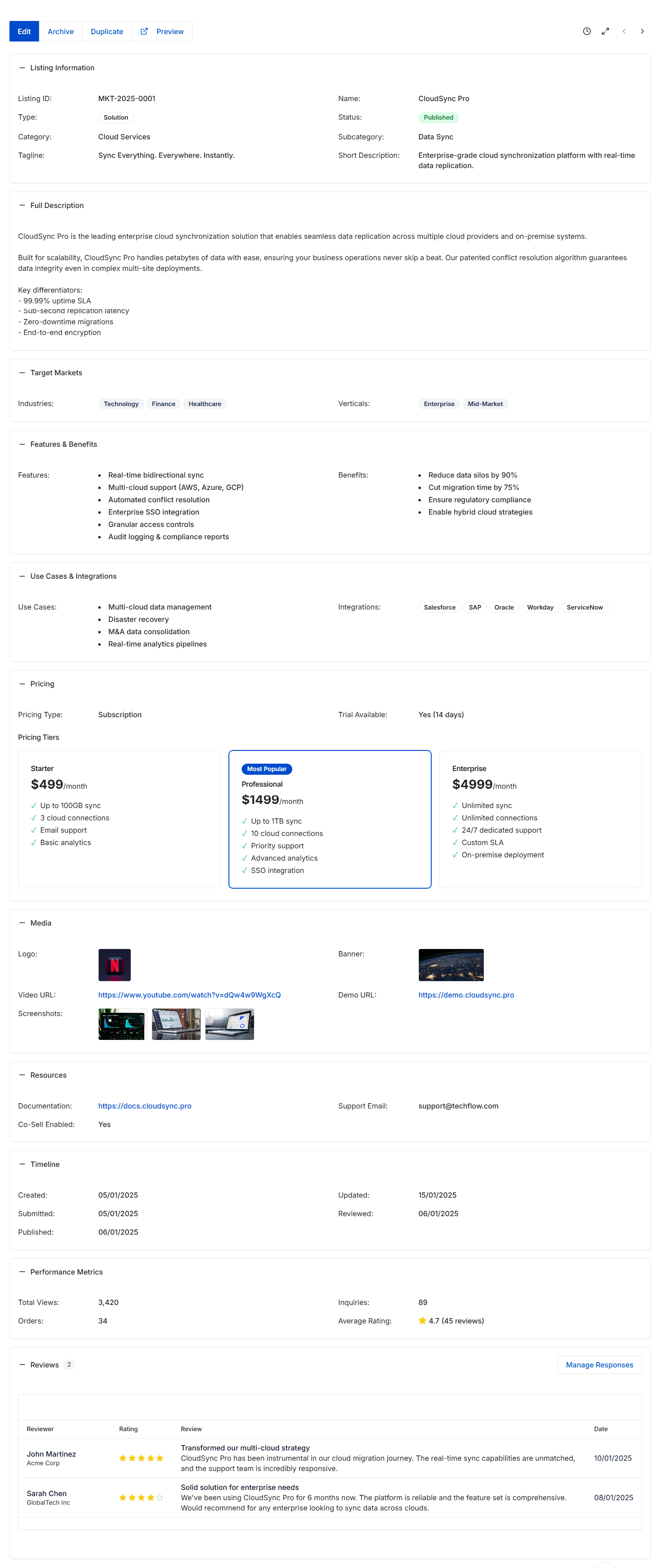
This screen displays the comprehensive details of a specific Co-sell Listing within the Accelerate module's marketplace. Partners create these listings to showcase their solutions, target markets, and capabilities, facilitating partner-to-partner discovery and joint go-to-market initiatives. The listing includes various sections covering product information, features, pricing, media, and resources, providing a complete overview for potential collaborators. Vendor administrators review and approve these listings, and once published, they become discoverable by other partners in the marketplace. This view also tracks performance metrics and displays partner reviews, offering insights into the listing's engagement and effectiveness.
Review the detailed information for the selected Co-sell Listing.
Buttons
| Button | Description |
|---|---|
| Edit | Allows editing the details of the current listing. |
| Duplicate | Creates a copy of the current listing, which can then be modified. |
| Preview | Displays how the listing will appear to partners in the marketplace. |
| Manage Responses | Allows managing and responding to reviews for the listing. |
Listing Information
| Field | Description |
|---|---|
| Listing ID | A unique identifier for the listing. |
| Type | The general classification of the listing, such as 'Solution'. |
| Category | The primary category under which the listing is classified, e.g., 'Cloud Services'. |
| Tagline | A concise, descriptive phrase summarizing the listing's offering. |
| Name | The name of the product or solution being listed. |
| Status | The current publication status of the listing, indicating if it is 'Published'. |
| Subcategory | A more specific classification within the primary category, e.g., 'Data Sync'. |
| Short Description | A brief overview of the listing's product or solution. |
Full Description
| Field | Description |
|---|---|
| Full Description | A detailed explanation of the product or solution, including key differentiators. |
Target Markets
| Field | Description |
|---|---|
| Industries | The industries that the listed solution targets, displayed as tags. |
| Verticals | The specific vertical markets the listed solution targets, displayed as tags. |
Features & Benefits
| Field | Description |
|---|---|
| Features | A bulleted list of the key functionalities and capabilities of the product or solution. |
| Benefits | A bulleted list of the advantages and value propositions offered by the product or solution. |
Use Cases & Integrations
| Field | Description |
|---|---|
| Use Cases | A bulleted list of practical scenarios where the product or solution can be applied. |
| Integrations | A list of other platforms or systems with which the product or solution integrates, displayed as tags. |
Pricing
| Field | Description |
|---|---|
| Pricing Type | Indicates the general pricing model, such as 'Subscription'. |
| Trial Available | Indicates if a trial period is offered and its duration, e.g., 'Yes (14 days)'. |
Pricing Tiers
| Field | Description |
|---|---|
| Starter | Details of the 'Starter' pricing tier, including price and included features. |
| Professional | Details of the 'Professional' pricing tier, including price and included features, marked as 'Most Popular'. |
| Enterprise | Details of the 'Enterprise' pricing tier, including price and included features. |
Media
| Field | Description |
|---|---|
| Logo | The visual brand identifier for the listed product or solution. |
| Video URL | A link to a promotional or informational video about the product or solution. |
| Screenshots | Thumbnail images showcasing the product or solution's interface or features. |
| Banner | A larger image used for visual representation of the listing. |
| Demo URL | A link to a live demonstration or interactive tour of the product or solution. |
Resources
| Field | Description |
|---|---|
| Documentation | A link to product documentation or guides. |
| Support Email | An email address for support inquiries related to the listing. |
| Co-Sell Enabled | Indicates whether the listing is enabled for co-selling activities. |
Timeline
| Field | Description |
|---|---|
| Created | The date when the listing was initially created. |
| Submitted | The date when the listing was submitted for review. |
| Published | The date when the listing was made live in the marketplace. |
| Updated | The date of the last modification to the listing. |
| Reviewed | The date when the listing was last reviewed by an administrator. |
Performance Metrics
| Field | Description |
|---|---|
| Total Views | The total number of times the listing has been viewed. |
| Orders | The number of orders or conversions generated from this listing. |
| Inquiries | The number of inquiries or contact requests received for this listing. |
| Average Rating | The average star rating based on partner reviews, along with the total number of reviews. |
Reviews
| Column | Description |
|---|---|
| Reviewer | The name of the partner or individual who submitted the review. |
| Rating | The star rating given by the reviewer. |
| Review | The textual feedback or commentary provided by the reviewer. |
| Date | The date when the review was submitted. |