

Overview
Market Development Funds (MDF) are crucial for fostering partner marketing efforts and driving co-selling initiatives. This module enables vendors to manage the entire lifecycle of MDF applications, from submission to approval and tracking. By providing a clear overview of all applications, administrators can efficiently allocate funds, ensure compliance with program guidelines, and monitor the effectiveness of partner marketing campaigns.
Key Features
- MDF Application List
- Search & Filter Applications
- Application Status Tracking
- Detailed Application View
- Fund Information Display
- Campaign Period Details
- Application Timeline
Viewing the MDF Applications List
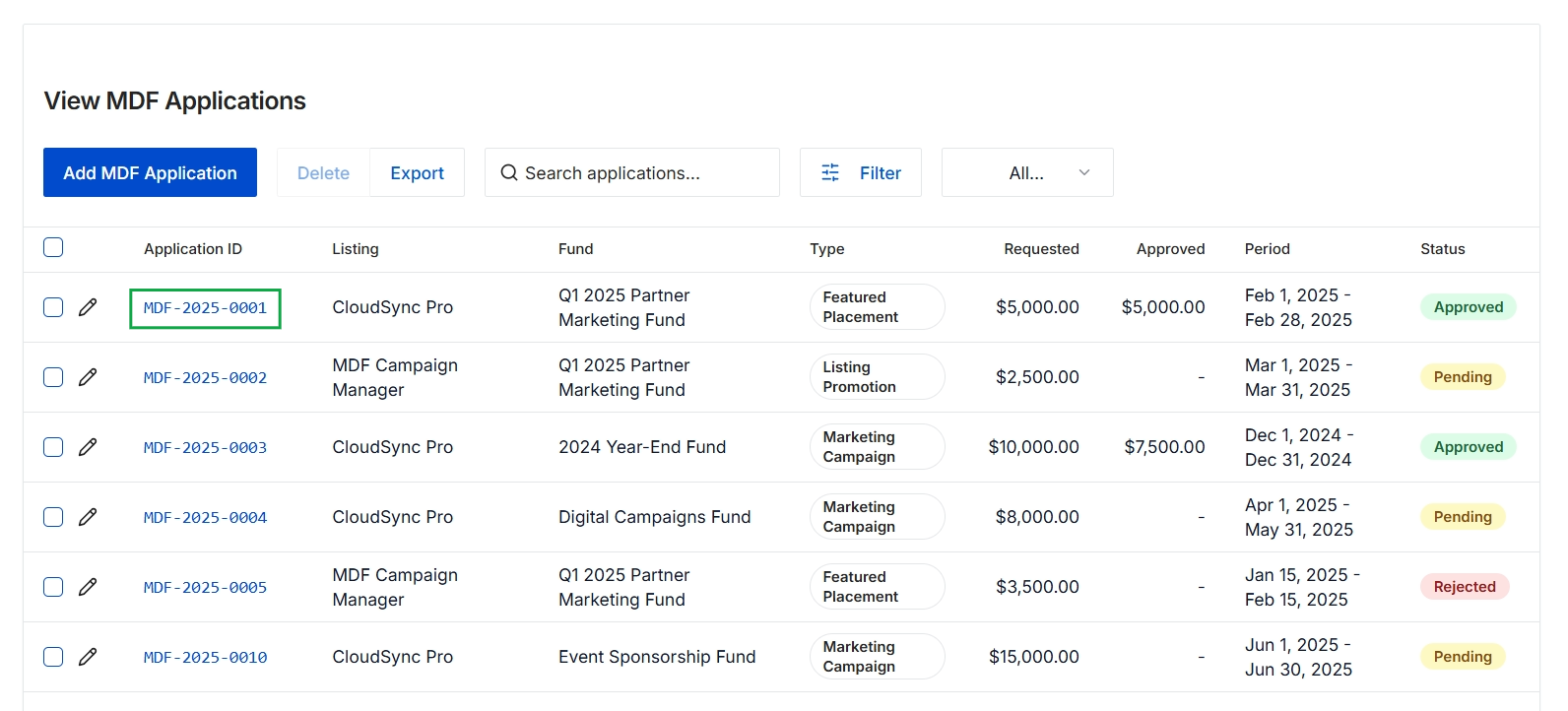
Click the MDF-2025-0001 link.
Reviewing a Specific MDF Application
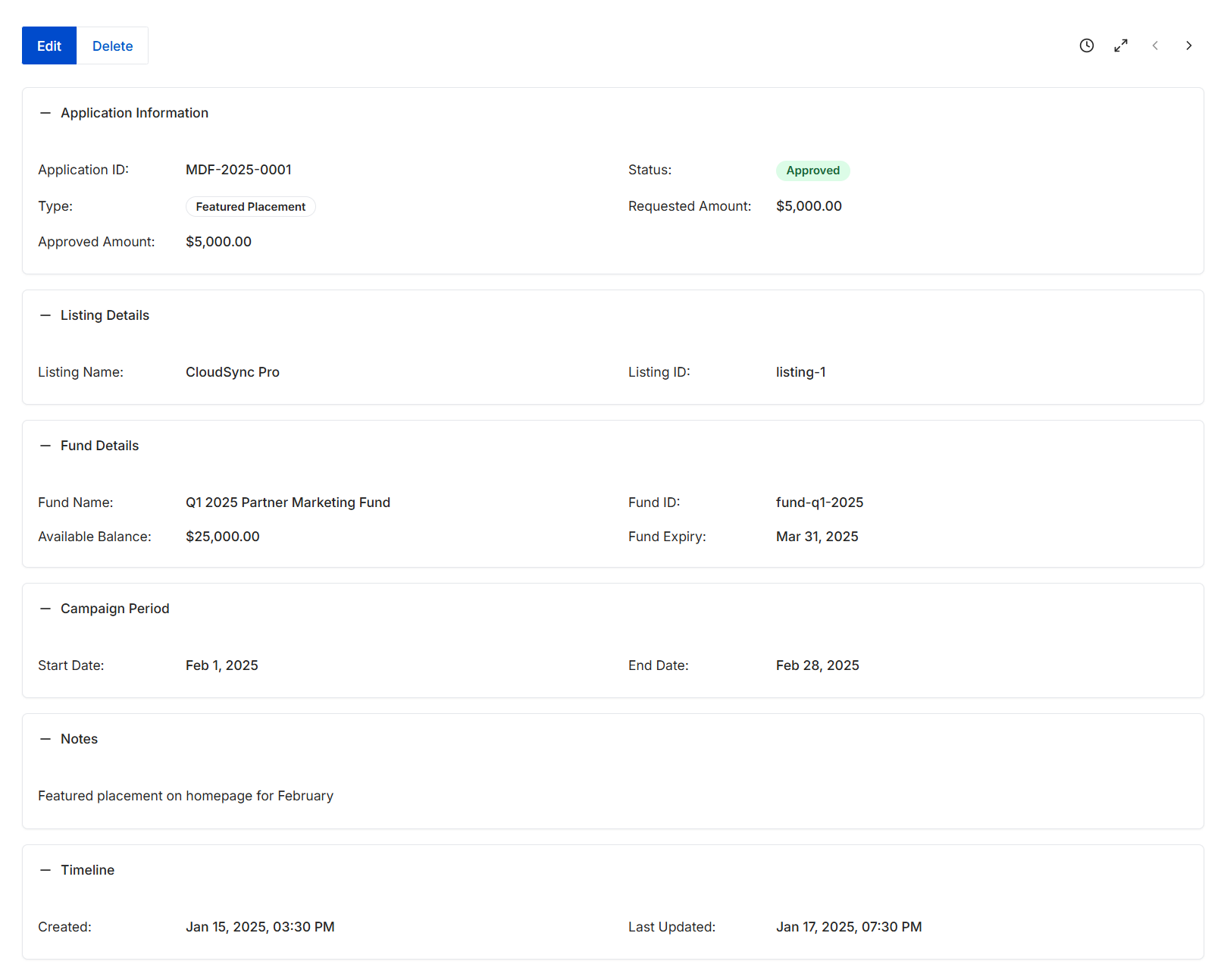
This screen displays the comprehensive details of a specific Market Development Fund (MDF) application, providing a centralized view of its status, financial aspects, and associated campaign information. MDF applications are submitted by partners to request funding for marketing activities, and this view allows administrators to review all pertinent data after an application has been processed. It includes information about the application itself, the listing it pertains to, the fund from which it draws, the campaign period, and any relevant notes or timeline events. This detailed record supports auditing, tracking, and understanding the lifecycle of each MDF request within the platform.
Review the detailed information for the selected MDF application after clicking its ID from the MDF applications list.
Buttons
| Button | Description |
|---|---|
| Edit | Allows modification of the MDF application details. |
| Delete | Removes the MDF application from the system. |
Application Information
| Field | Description |
|---|---|
| Application ID | A unique identifier for the MDF application. |
| Status | The current approval status of the MDF application, indicating whether it is Approved, Pending, or Rejected. |
| Type | The category or type of marketing activity for which the MDF is requested. |
| Requested Amount | The monetary amount initially requested by the partner for the marketing activity. |
| Approved Amount | The final monetary amount approved for the MDF application. |
Listing Details
| Field | Description |
|---|---|
| Listing Name | The name of the listing or product associated with the MDF application. |
| Listing ID | A unique identifier for the associated listing. |
Fund Details
| Field | Description |
|---|---|
| Fund Name | The name of the marketing fund from which the approved amount is drawn. |
| Fund ID | A unique identifier for the marketing fund. |
| Available Balance | The remaining balance in the marketing fund. |
| Fund Expiry | The expiration date of the marketing fund. |
Campaign Period
| Field | Description |
|---|---|
| Start Date | The beginning date of the campaign period for which the MDF is requested. |
| End Date | The end date of the campaign period for which the MDF is requested. |
Notes
| Field | Description |
|---|---|
| Notes | Additional comments or details provided for the MDF application. |
Timeline
| Field | Description |
|---|---|
| Created | The date and time when the MDF application was initially created. |
| Last Updated | The date and time when the MDF application was last modified. |
Frequently asked questions
- What is the purpose of viewing MDF applications?
This feature allows administrators to view, search, filter, and export all Market Development Fund (MDF) applications submitted by partners. It helps manage the entire lifecycle of MDF applications, ensuring efficient fund allocation and program compliance.
- What details are available when reviewing a specific MDF application?
The detailed view displays comprehensive information such as the application ID, status, requested and approved amounts, associated listing, fund details (name, ID, balance, expiry), campaign period, notes, and a timeline of creation and last update.
- Who can view MDF applications?
UPM administrators use this feature to oversee and manage MDF applications submitted by channel partners.
- Can I edit or delete an MDF application from this view?
Yes, specific buttons are available within the detailed view to allow modification of MDF application details or to remove an MDF application from the system.