

Overview
Effective partner sales and marketing rely on accurate contact data. The Contacts module provides administrators with the tools to manage individual contacts associated with accounts that partners are engaging with or have registered deals for. This ensures that all relevant stakeholders have access to up-to-date information for outreach, deal progression, and relationship management.
Accessing and Editing Contacts
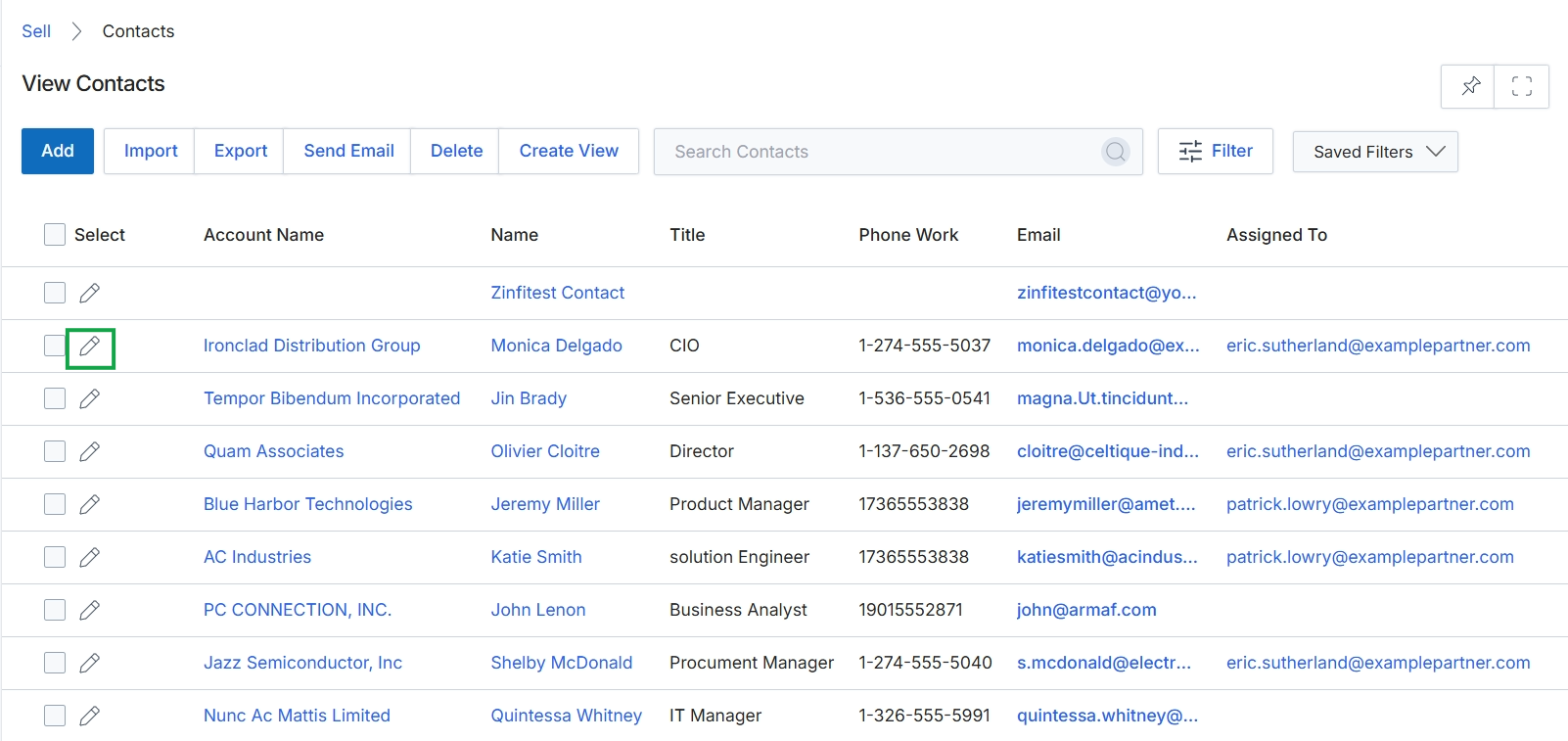
Click the edit icon next to the desired contact.
Contact Information Details
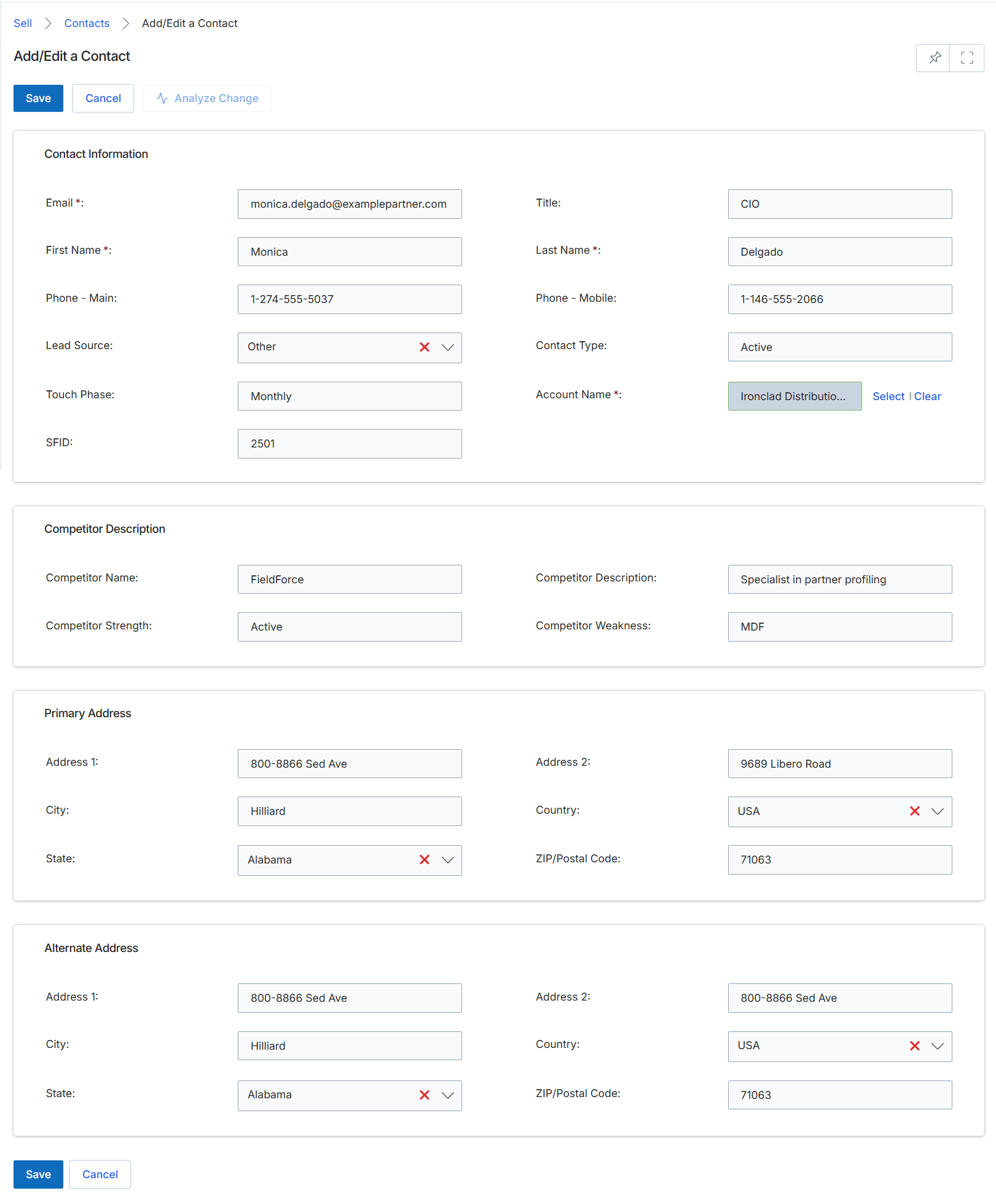
This screen displays the Add/Edit a Contact form, which is used by administrators to create new contact records or modify existing ones within the platform. Contacts are individual persons associated with accounts, prospects, leads, or deals, and their accurate information is critical for effective communication and sales process management. This form allows for the capture of essential contact details, including personal information, communication methods, associated account, and address details. The data entered here supports various workflows within the Sell module, such as lead submission and deal registration, ensuring that all sales-related activities are linked to specific individuals.
Fill in or update the contact details in the Add/Edit a Contact form.
Buttons
| Button | Description |
|---|---|
| Save | Saves the current contact information. |
| Cancel | Discards any changes and returns to the previous view. |
| Analyze Change | Initiates an analysis of changes made to the contact record. |
| Select | Opens a dialog to select an existing account to associate with the contact. |
| Clear | Removes the currently associated account from the contact. |
Contact Information
| Field | Description |
|---|---|
| Email * | The primary email address of the contact. This is a required field. |
| Title | The professional title of the contact. |
| First Name * | The first name of the contact. This is a required field. |
| Last Name * | The last name of the contact. This is a required field. |
| Phone - Main | The primary phone number for the contact. |
| Phone - Mobile | The mobile phone number for the contact. |
| Lead Source | The origin or channel through which the lead was acquired. |
| Contact Type | The classification of the contact's role or status. |
| Touch Phase | The current stage or frequency of interaction with the contact. |
| Account Name * | The name of the company or organization associated with this contact. This is a required field. |
| SFID | The Salesforce ID for the contact, if integrated. |
Competitor Description
| Field | Description |
|---|---|
| Competitor Name | The name of a competitor relevant to this contact or their associated account. |
| Competitor Description | A description of the competitor's profile or activities. |
| Competitor Strength | A description of the competitor's strengths. |
| Competitor Weakness | A description of the competitor's weaknesses. |
Primary Address
| Field | Description |
|---|---|
| Address 1 | The first line of the primary street address. |
| Address 2 | The second line of the primary street address. |
| City | The city for the primary address. |
| Country | The country for the primary address, selected from a dropdown list. |
| State | The state or province for the primary address, selected from a dropdown list. |
| ZIP/Postal Code | The ZIP or postal code for the primary address. |
Alternate Address
| Field | Description |
|---|---|
| Address 1 | The first line of the alternate street address. |
| Address 2 | The second line of the alternate street address. |
| City | The city for the alternate address. |
| Country | The country for the alternate address, selected from a dropdown list. |
| State | The state or province for the alternate address, selected from a dropdown list. |
| ZIP/Postal Code | The ZIP or postal code for the alternate address. |