

Overview
The Prospects module is a critical component of the Sell zone, specifically designed for managing potential partners or pre-lead contacts. Before a company becomes a formal lead or a registered partner, it often goes through a prospecting phase where initial contact is made, and basic information is gathered. This module provides the tools to track these early-stage interactions, store relevant company and contact details, and note any competitive landscape or associated campaigns.
Viewing the Prospect List
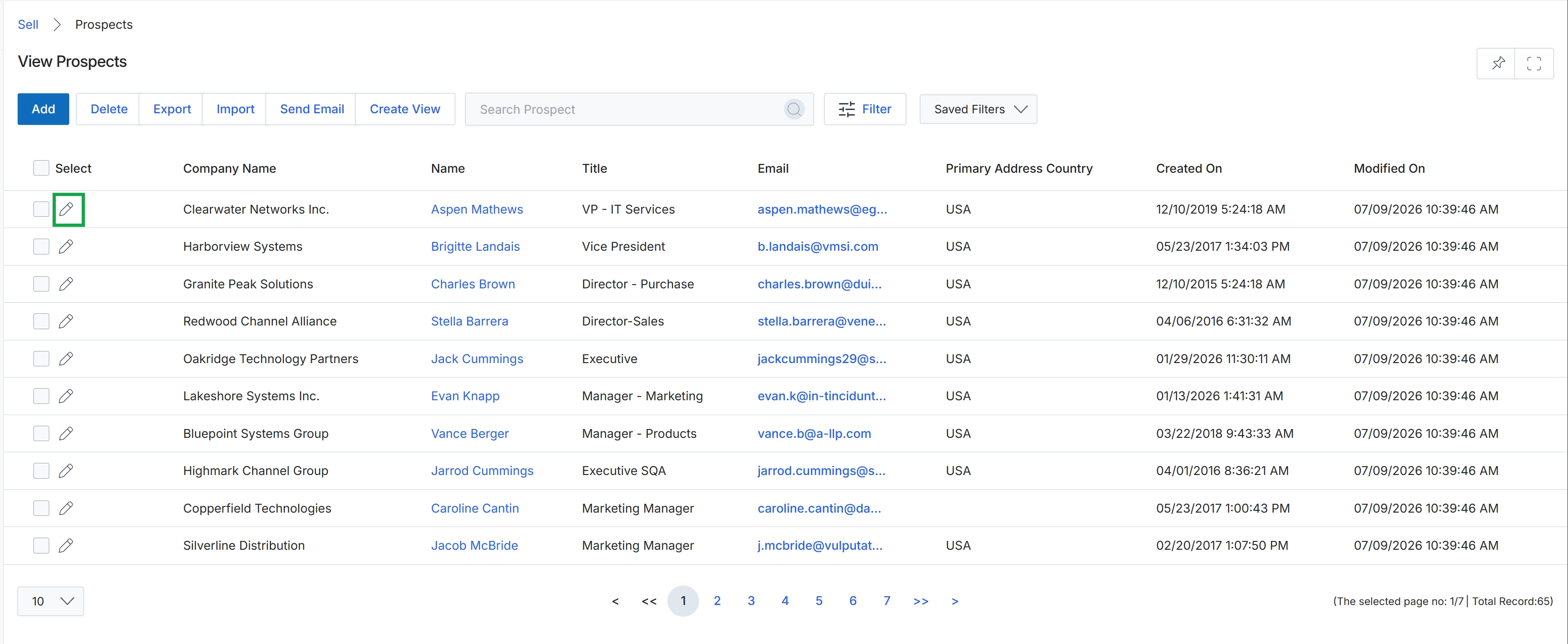
Click the edit icon next to a prospect.
Editing Prospect Details
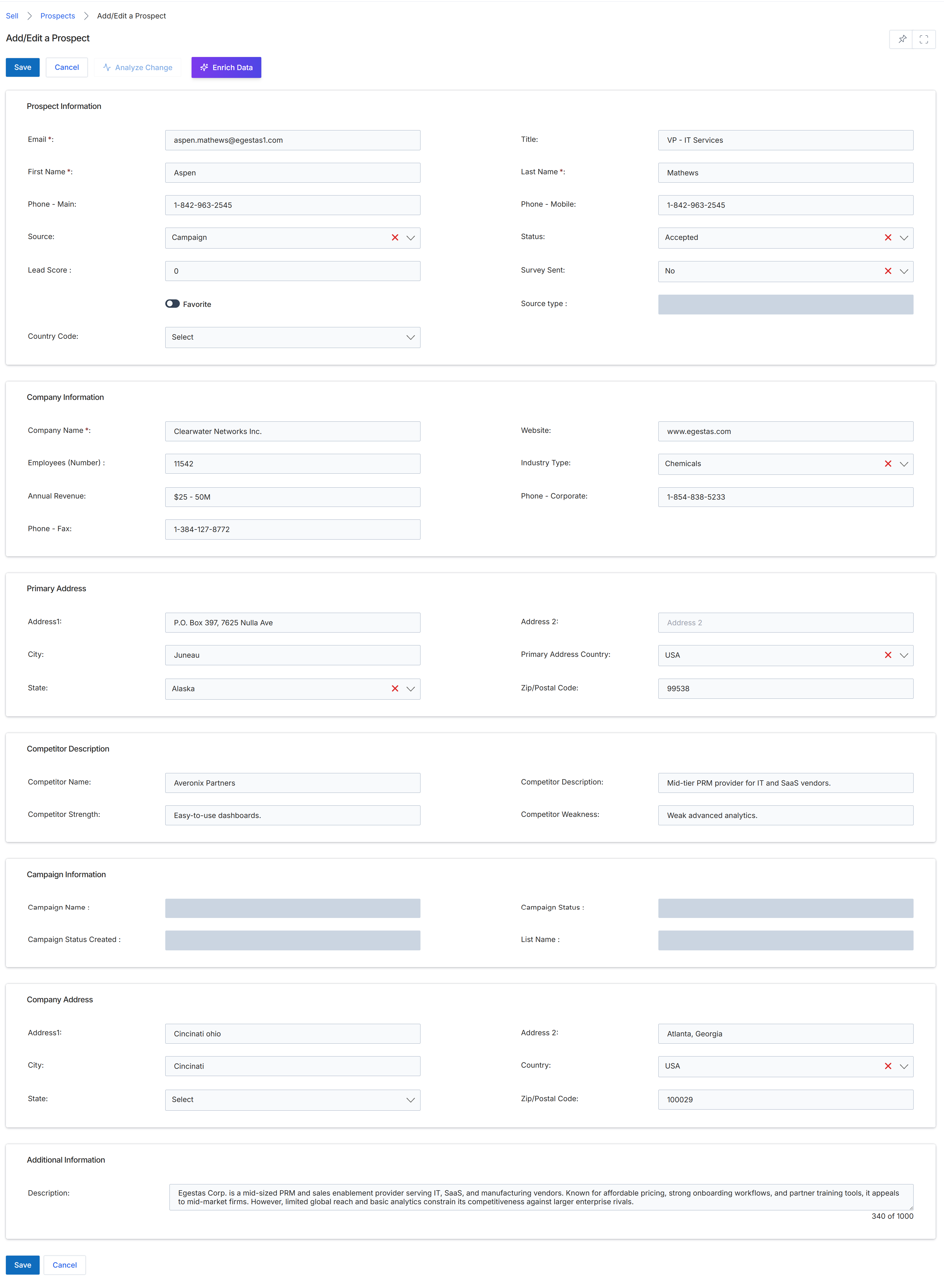
The Add/Edit a Prospect screen serves as the interface for UPM administrators to create new prospect records or modify existing ones. Prospects represent early-stage sales contacts that have not yet been qualified as leads or registered as deals within the channel sales funnel. This form allows for the capture of essential contact, company, and address details, along with competitive and campaign information, which is crucial for tracking potential sales opportunities. The data entered here helps in evaluating and nurturing prospects before they progress to later stages of the sales pipeline, potentially through lead assignment rules or deal registration processes.
Review or update the prospect's details across the various sections of the form.
Buttons
| Button | Description |
|---|---|
| Save | Saves the current prospect information. |
| Cancel | Discards any changes and returns to the previous screen. |
| Analyze Change | Initiates an analysis of changes made to the prospect record. |
| Enrich Data | Triggers a data enrichment process for the prospect's information. |
Prospect Information
| Field | Description |
|---|---|
| Email * | The prospect's email address, a required field for contact. |
| First Name * | The prospect's first name, a required field. |
| Phone - Main | The prospect's primary phone number. |
| Source | The origin or channel through which the prospect was identified. |
| Lead Score | A numerical score indicating the prospect's qualification level or potential. |
| Favorite | A toggle to mark the prospect as a favorite for quick access or prioritization. |
| Country Code | The country code associated with the prospect's contact information. |
| Title | The prospect's job title or role. |
| Last Name * | The prospect's last name, a required field. |
| Phone - Mobile | The prospect's mobile phone number. |
| Status | The current status of the prospect in the sales pipeline. |
| Survey Sent | Indicates whether a survey has been sent to the prospect. |
| Source type | The specific type of source from which the prospect originated. |
Company Information
| Field | Description |
|---|---|
| Company Name * | The name of the company the prospect is associated with, a required field. |
| Employees (Number) | The number of employees at the prospect's company. |
| Annual Revenue | The estimated annual revenue of the prospect's company. |
| Phone - Fax | The fax number for the prospect's company. |
| Website | The website URL of the prospect's company. |
| Industry Type | The industry sector of the prospect's company. |
| Phone - Corporate | The main corporate phone number for the prospect's company. |
Primary Address
| Field | Description |
|---|---|
| Address1 | The first line of the primary address for the prospect's company. |
| City | The city component of the primary address. |
| State | The state or province component of the primary address. |
| Address 2 | The second line of the primary address for the prospect's company. |
| Primary Address Country | The country of the primary address. |
| Zip/Postal Code | The zip or postal code for the primary address. |
Competitor Description
| Field | Description |
|---|---|
| Competitor Name | The name of a competitor relevant to this prospect. |
| Competitor Strength | A description of the competitor's strengths. |
| Competitor Description | A general description of the competitor. |
| Competitor Weakness | A description of the competitor's weaknesses. |
Campaign Information
| Field | Description |
|---|---|
| Campaign Name | The name of the marketing campaign associated with this prospect. |
| Campaign Status Created | The status of the campaign at the time the prospect was created. |
| Campaign Status | The current status of the associated campaign. |
| List Name | The name of the list from which the prospect was sourced. |
Company Address
| Field | Description |
|---|---|
| Address1 | The first line of an alternative company address. |
| City | The city component of the alternative company address. |
| State | The state or province component of the alternative company address. |
| Address 2 | The second line of an alternative company address. |
| Country | The country of the alternative company address. |
| Zip/Postal Code | The zip or postal code for the alternative company address. |
Additional Information
| Field | Description |
|---|---|
| Description | Additional descriptive information about the prospect or their company. |