

Overview
The Accounts module within the Sell zone serves as the foundational database for all customer and prospect organizations that partners engage with. Accurate and comprehensive account data is critical for effective lead and deal management, ensuring that partners are working with up-to-date information and that deal registrations are free from conflicts. This module supports the entire sales cycle by providing a single source of truth for account details, which can be linked to leads, registered deals, co-sell requests, and opportunities.
Accessing and Searching Accounts
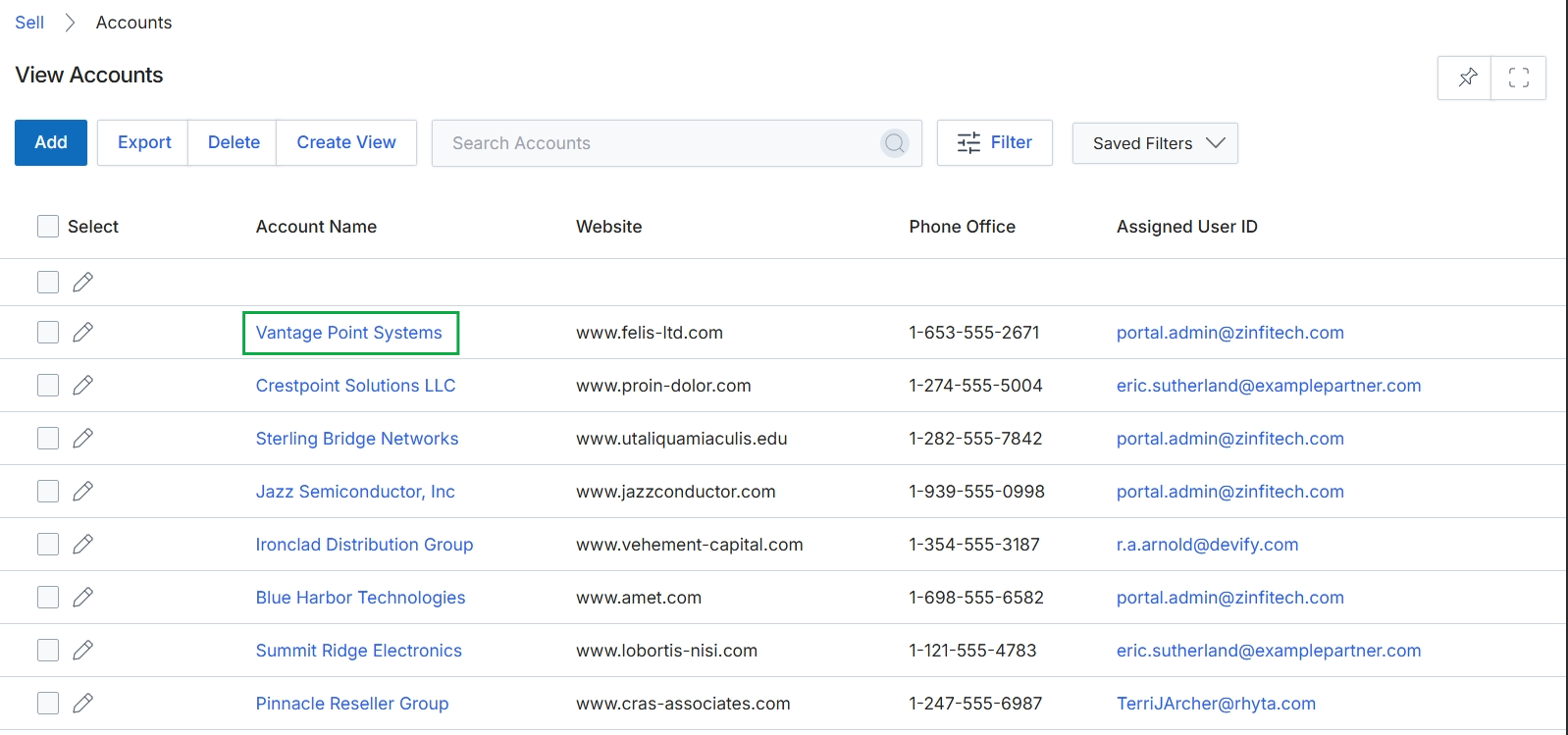
Click the account name Vantage Point Systems.
Viewing Account Details
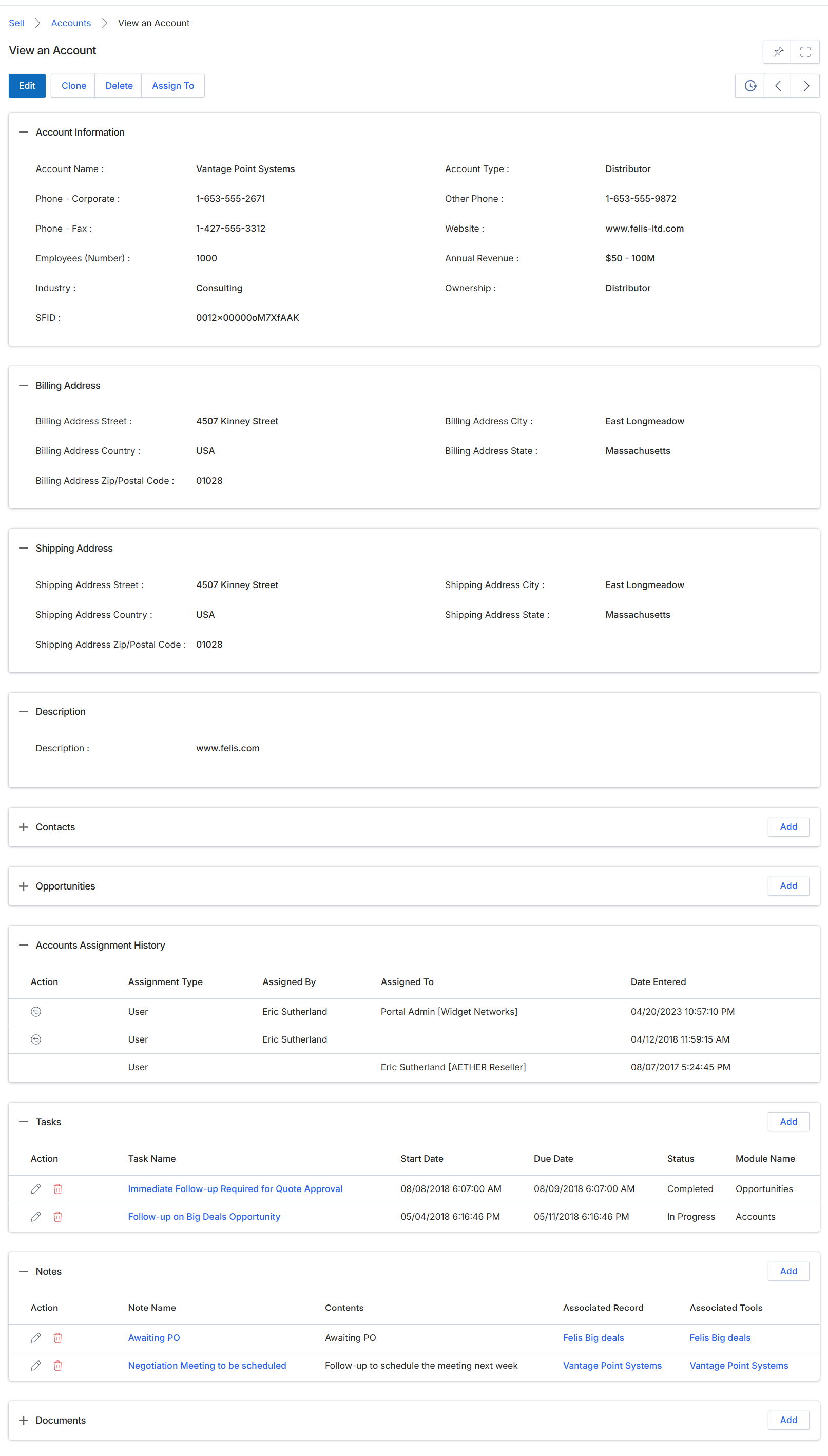
This screen presents a comprehensive view of a specific account record, which represents a target company that can be either a prospect or an existing customer within the UPM platform. It consolidates all relevant information about the account, including its core profile, billing and shipping addresses, and a historical log of assignments to various users or partners. Additionally, it provides related lists for associated contacts, opportunities, tasks, notes, and documents, offering a centralized hub for managing all interactions and data points pertaining to this account. This detail view is crucial for administrators and channel managers to understand the full context of an account's engagement within the partner ecosystem, track its progress through the sales funnel, and manage collaborative activities.
Review the detailed information and related activities for the selected account.
Buttons
| Button | Description |
|---|---|
| Edit | Allows editing the details of the current account. |
| Clone | Creates a duplicate of the current account record. |
| Delete | Removes the current account record from the system. |
| Assign To | Assigns the account to a specific user or partner. |
| Add | Adds a new contact associated with this account. |
| Add | Adds a new opportunity associated with this account. |
| Add | Adds a new task related to this account. |
| Add | Adds a new note for this account. |
| Add | Adds a new document to this account. |
Account Information
| Field | Description |
|---|---|
| Account Name | The official name of the account. |
| Account Type | The classification of the account, such as 'Distributor'. |
| Phone - Corporate | The primary corporate phone number for the account. |
| Other Phone | An alternative phone number for the account. |
| Phone - Fax | The fax number for the account. |
| Website | The official website URL for the account. |
| Employees (Number) | The number of employees at the account's organization. |
| Annual Revenue | The estimated annual revenue of the account's organization. |
| Industry | The industry sector to which the account belongs. |
| Ownership | Indicates who owns the account record, such as 'Distributor'. |
| SFID | A unique identifier for the account, potentially from an integrated CRM like Salesforce. |
Billing Address
| Field | Description |
|---|---|
| Billing Address Street | The street address for the account's billing location. |
| Billing Address City | The city for the account's billing location. |
| Billing Address Country | The country for the account's billing location. |
| Billing Address State | The state or province for the account's billing location. |
| Billing Address Zip/Postal Code | The zip or postal code for the account's billing location. |
Shipping Address
| Field | Description |
|---|---|
| Shipping Address Street | The street address for the account's shipping location. |
| Shipping Address City | The city for the account's shipping location. |
| Shipping Address Country | The country for the account's shipping location. |
| Shipping Address State | The state or province for the account's shipping location. |
| Shipping Address Zip/Postal Code | The zip or postal code for the account's shipping location. |
Description
| Field | Description |
|---|---|
| Description | A general description or notes about the account. |
Accounts Assignment History
| Column | Description |
|---|---|
| Action | Actions available for the assignment entry, such as viewing details. |
| Assignment Type | The type of assignment, such as 'User'. |
| Assigned By | The user who made the assignment. |
| Assigned To | The user or partner to whom the account was assigned. |
| Date Entered | The date and time when the assignment was recorded. |
Tasks
| Column | Description |
|---|---|
| Action | Actions available for the task entry, such as editing or deleting. |
| Task Name | The name or title of the task. |
| Start Date | The date and time when the task began. |
| Due Date | The date and time by which the task is expected to be completed. |
| Status | The current status of the task, such as 'Completed' or 'In Progress'. |
| Module Name | The module associated with the task, such as 'Opportunities' or 'Accounts'. |
Notes
| Column | Description |
|---|---|
| Action | Actions available for the note entry, such as editing or deleting. |
| Note Name | The title of the note. |
| Contents | The body text of the note. |
| Associated Record | The record to which the note is linked, if any. |