

Overview
Opportunities represent potential sales deals that partners or the vendor are pursuing. Managing these opportunities is crucial for pipeline visibility, forecasting, and ultimately, for triggering commission calculations when a deal closes. This module provides administrators with the tools to oversee the entire lifecycle of an opportunity, from initial identification to closure.
Administrators can create new opportunities, link them to existing accounts and contacts, and update key details such as the sales stage, estimated value, and expected close date. This ensures that all relevant information about a potential deal is captured and maintained, supporting effective sales management and enabling accurate reporting on partner pipeline contributions.
Accessing and Viewing Opportunities
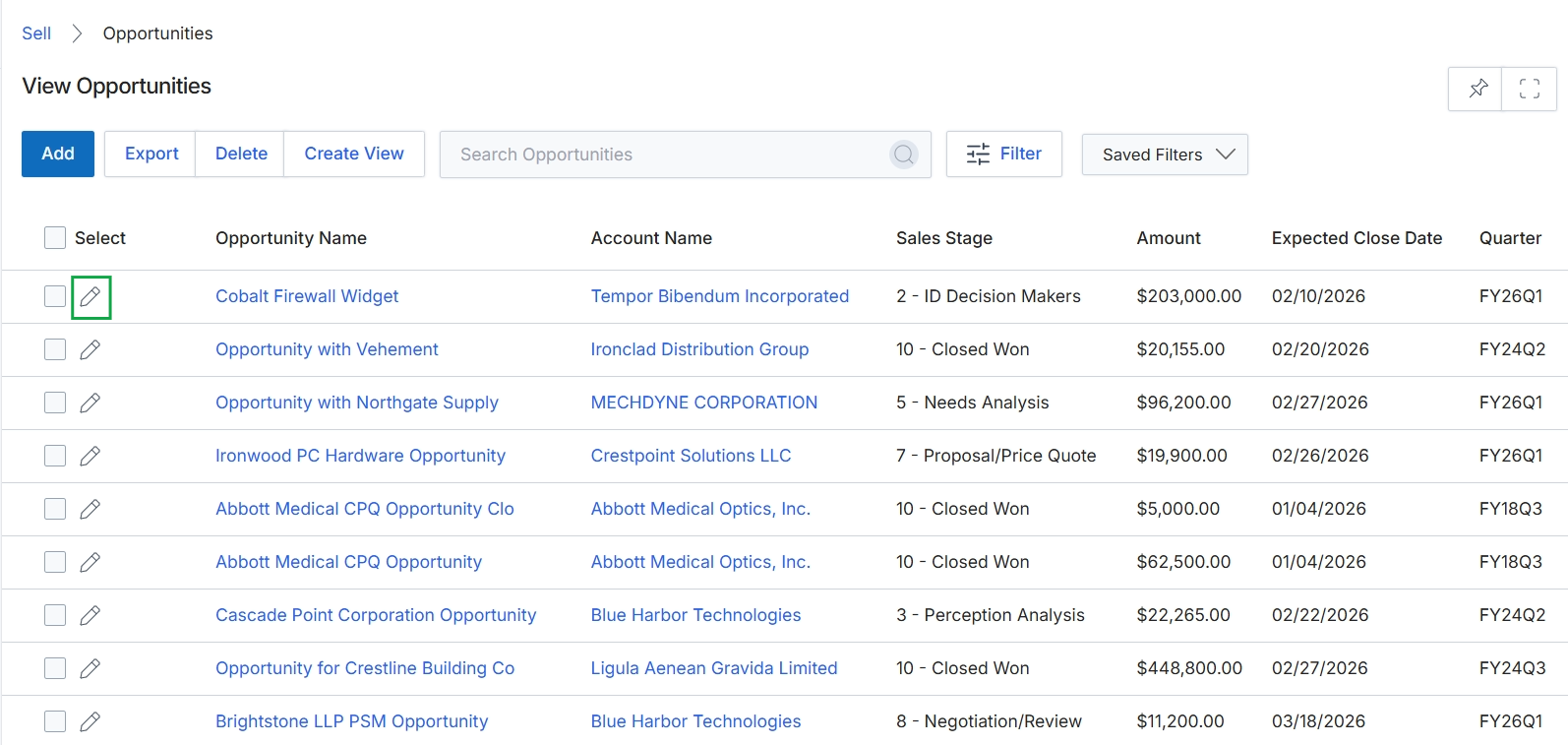
Click the pencil icon next to the desired opportunity.
Adding or Editing an Opportunity
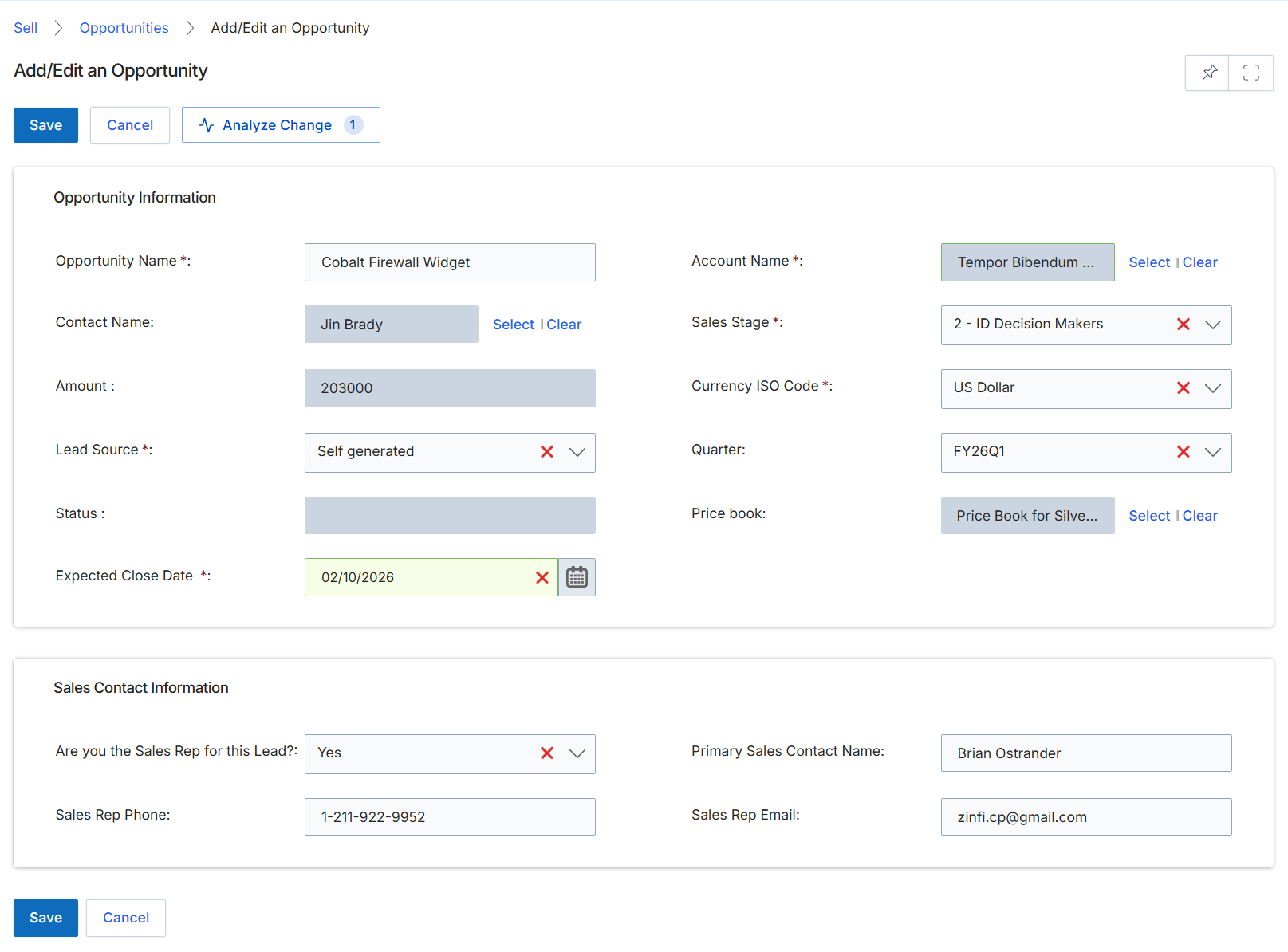
This screen provides a form for administrators to add new sales opportunities or modify existing ones within the Sell module. Opportunities represent vendor-side sales engagements that are typically linked to a registered deal or a qualified lead. This form captures essential details about the potential sale, including the associated account, contact, financial value, sales stage, and expected close date. It also allows for the specification of sales contact information. The data entered here contributes to pipeline visibility and can be integrated with CRM systems, playing a crucial role in tracking the progression of sales engagements and ultimately influencing commission calculations in the Incentivize module.
Fill in the required details in the 'Add/Edit an Opportunity' form to create or update an opportunity record.
Buttons
| Button | Description |
|---|---|
| Save | Saves the entered opportunity details. |
| Cancel | Discards any changes and returns to the previous screen. |
| Analyze Change | Initiates an analysis of changes made to the opportunity. |
Opportunity Information
| Field | Description |
|---|---|
| Opportunity Name * | The name or title of the sales opportunity. |
| Contact Name | The primary contact associated with this opportunity. |
| Amount | The estimated financial value of the opportunity. |
| Lead Source * | The origin or source from which this lead was generated. |
| Status | The current status of the opportunity. |
| Expected Close Date * | The anticipated date by which the opportunity is expected to close. |
| Account Name * | The name of the company or account associated with this opportunity. |
| Sales Stage * | The current stage of the sales process for this opportunity. |
| Currency ISO Code * | The ISO currency code for the opportunity's financial amount. |
| Quarter | The fiscal quarter in which the opportunity is expected to close. |
| Price book | The price book used for products and pricing related to this opportunity. |
Sales Contact Information
| Field | Description |
|---|---|
| Are you the Sales Rep for this Lead? | Indicates whether the current user is the sales representative for this lead. |
| Sales Rep Phone | The phone number of the assigned sales representative. |
| Primary Sales Contact Name | The name of the primary sales contact for this opportunity. |
| Sales Rep Email | The email address of the assigned sales representative. |