

Overview
Accurate and comprehensive account data is fundamental to effective partner sales and co-selling motions. The Accounts module within the Sell zone serves as the master record for all companies that partners engage with, whether they are prospects, customers, or other entities. Maintaining up-to-date account information ensures that lead assignments are accurate, deal registrations are conflict-free, and co-sell engagements are properly targeted. This module integrates with other Sell functionalities, providing the foundational company data necessary for tracking sales opportunities and managing partner-vendor collaborations.
Accessing the Accounts List
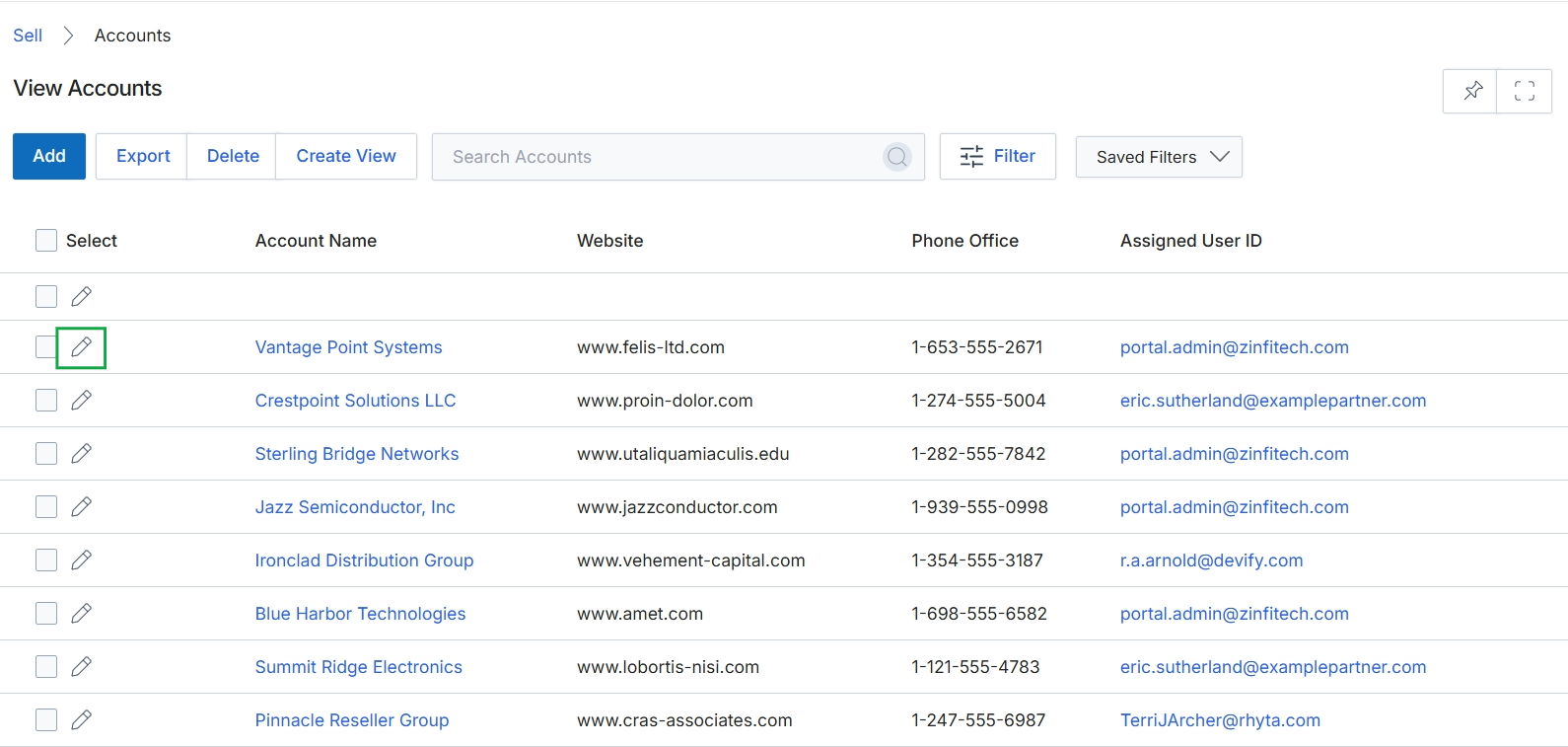
Click the pencil icon next to the desired account to edit it.
Editing Account Details
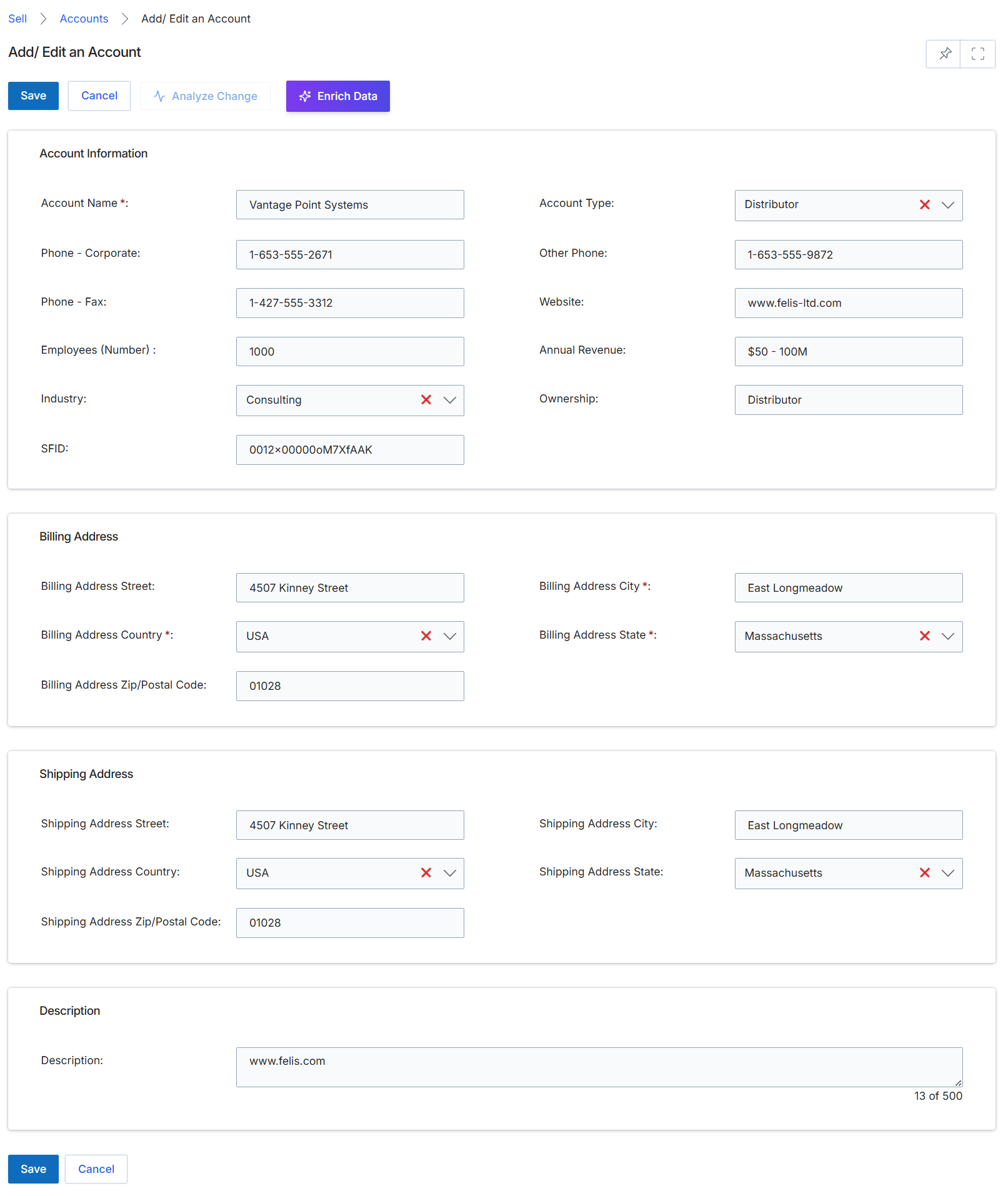
This screen displays the Add/Edit an Account form, which allows administrators to create new account records or modify existing ones within the platform. Accounts represent target companies, which can be either prospects or existing customers, and are fundamental entities in the Sell module. They serve as the foundation for tracking leads, deals, and opportunities, and are linked to contacts and other sales activities. The form is structured into several sections to capture comprehensive details about the account, including general information, billing address, shipping address, and a general description. This centralized management of account data supports various sales workflows, such as lead assignment and deal registration, ensuring that all partner-related sales activities are associated with accurate company information.
Review or update the account details in the Add/Edit an Account form.
Buttons
| Button | Description |
|---|---|
| Save | Saves the changes made to the account record. |
| Cancel | Discards any changes and returns to the previous screen. |
| Analyze Change | Analyzes the impact of proposed changes to the account. |
| Enrich Data | Automatically populates account information using external data sources. |
Account Information
| Field | Description |
|---|---|
| Account Name * | The official name of the account or company. |
| Account Type | The classification of the account, such as 'Distributor'. |
| Phone - Corporate | The primary corporate phone number for the account. |
| Other Phone | An alternative or secondary phone number for the account. |
| Phone - Fax | The fax number for the account. |
| Website | The official website URL for the account. |
| Employees (Number) | The approximate number of employees at the account. |
| Annual Revenue | The estimated annual revenue of the account. |
| Industry | The industry sector in which the account operates. |
| Ownership | The ownership type or structure of the account. |
| SFID | The Salesforce ID associated with this account, if integrated. |
Billing Address
| Field | Description |
|---|---|
| Billing Address Street | The street address for the account's billing location. |
| Billing Address City * | The city for the account's billing location. |
| Billing Address Country * | The country for the account's billing location. |
| Billing Address State * | The state or province for the account's billing location. |
| Billing Address Zip/Postal Code | The zip or postal code for the account's billing location. |
Shipping Address
| Field | Description |
|---|---|
| Shipping Address Street | The street address for the account's shipping location. |
| Shipping Address City | The city for the account's shipping location. |
| Shipping Address Country | The country for the account's shipping location. |
| Shipping Address State | The state or province for the account's shipping location. |
| Shipping Address Zip/Postal Code | The zip or postal code for the account's shipping location. |
Description
| Field | Description |
|---|---|
| Description | A free-text field for additional notes or a description of the account. |