

Overview
In a multi-sided platform, controlling data visibility is crucial for security and operational efficiency. The Record Visibility feature provides administrators with the tools to implement robust access management policies. This ensures that sensitive information, such as sales prospects or deal registrations, is only accessible to authorized personnel, whether they are vendor-side users or partner administrators. By configuring default access, enabling hierarchies, and defining explicit sharing rules, organizations can maintain compliance and streamline workflows by preventing unauthorized data exposure while facilitating necessary collaboration.
Viewing Record Visibility Information
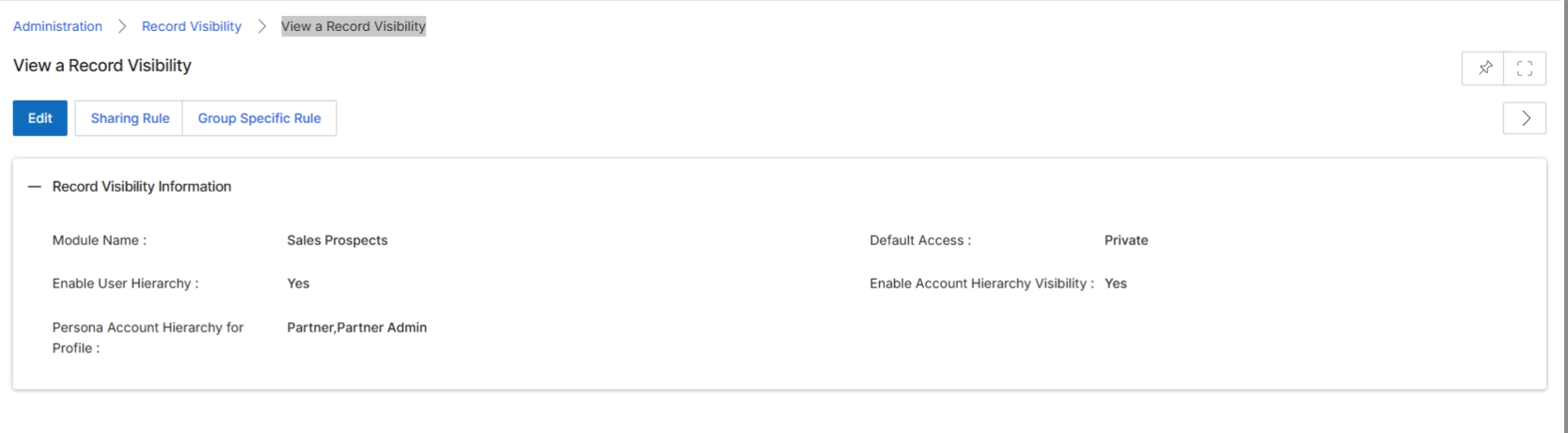
This screen displays the configured record visibility settings for a specific module within the platform. Record visibility rules determine which users can view which records, ensuring data privacy and appropriate access control across the system. These settings are crucial for managing how information, such as sales prospects, is shared or restricted among different user roles and within organizational hierarchies. Administrators use this view to understand the current access configurations, including default access levels and whether hierarchical visibility is enabled for users and accounts.
Review the record visibility settings for the selected module.
Buttons
| Button | Description |
|---|---|
| Edit | Click to modify the record visibility settings. |
| Sharing Rule | Click to view or configure specific rules for sharing records. |
| Group Specific Rule | Click to view or configure record visibility rules for specific user groups. |
Record Visibility Information
| Field | Description |
|---|---|
| Module Name | Indicates the name of the module for which these record visibility settings apply. |
| Default Access | Shows the default access level for records within this module, such as 'Private'. |
| Enable User Hierarchy | Indicates whether user hierarchy is enabled for record visibility, allowing users to see records owned by their subordinates. |
| Enable Account Hierarchy Visibility | Indicates whether account hierarchy visibility is enabled, allowing users to see records associated with accounts within their hierarchical structure. |
| Persona Account Hierarchy for Profile | Specifies the user profiles for which account hierarchy visibility is applied. |
Configuring Sharing Rules
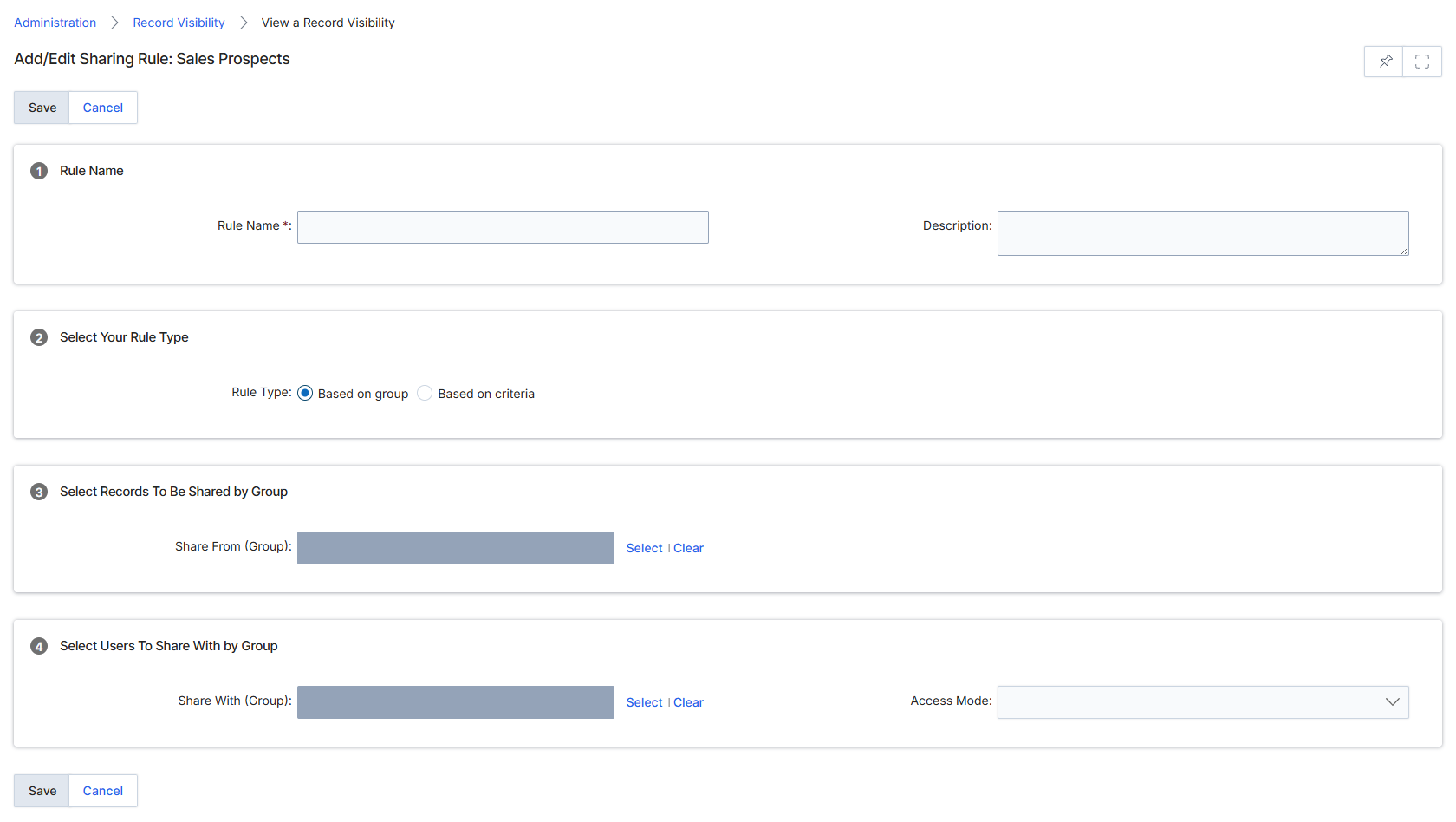
This screen, titled 'Add/Edit Sharing Rule', allows UPM administrators to define rules for record visibility, specifically for Sales Prospects in this instance. Record visibility rules determine which users or groups can access specific records based on predefined criteria or group assignments. This functionality is crucial for maintaining data security and ensuring that sensitive information is only accessible to authorized personnel, aligning with role-based access controls and compliance requirements. Administrators use this form to configure the scope of records to be shared, the groups with whom they are shared, and the level of access granted, thereby enabling granular control over data exposure within the platform.
Configure the sharing rule by providing a name, selecting the rule type, specifying the groups for sharing, and defining the access mode.
Buttons
| Button | Description |
|---|---|
| Select | A button to select the group for 'Share From (Group)'. |
| Clear | A button to clear the selected group for 'Share From (Group)'. |
| Select | A button to select the group for 'Share With (Group)'. |
| Clear | A button to clear the selected group for 'Share With (Group)'. |
| Save | A button to save the configured sharing rule. |
| Cancel | A button to discard changes and return to the previous screen. |
Rule Name
| Field | Description |
|---|---|
| Rule Name | A mandatory field for the name of the sharing rule. |
| Description | An optional field to provide a description for the sharing rule. |
Select Your Rule Type
| Field | Description |
|---|---|
| Based on group | A radio button option to define the sharing rule based on user groups. |
| Based on criteria | A radio button option to define the sharing rule based on specific record criteria. |
Select Records To Be Shared by Group
| Field | Description |
|---|---|
| Share From (Group) | A field to specify the group whose records will be shared. |
Select Users To Share With by Group
| Field | Description |
|---|---|
| Share With (Group) | A field to specify the group with whom the records will be shared. |
| Access Mode | A dropdown to select the level of access (e.g., Read, Read/Write) granted to the 'Share With' group. |
Managing Group-Specific Rules
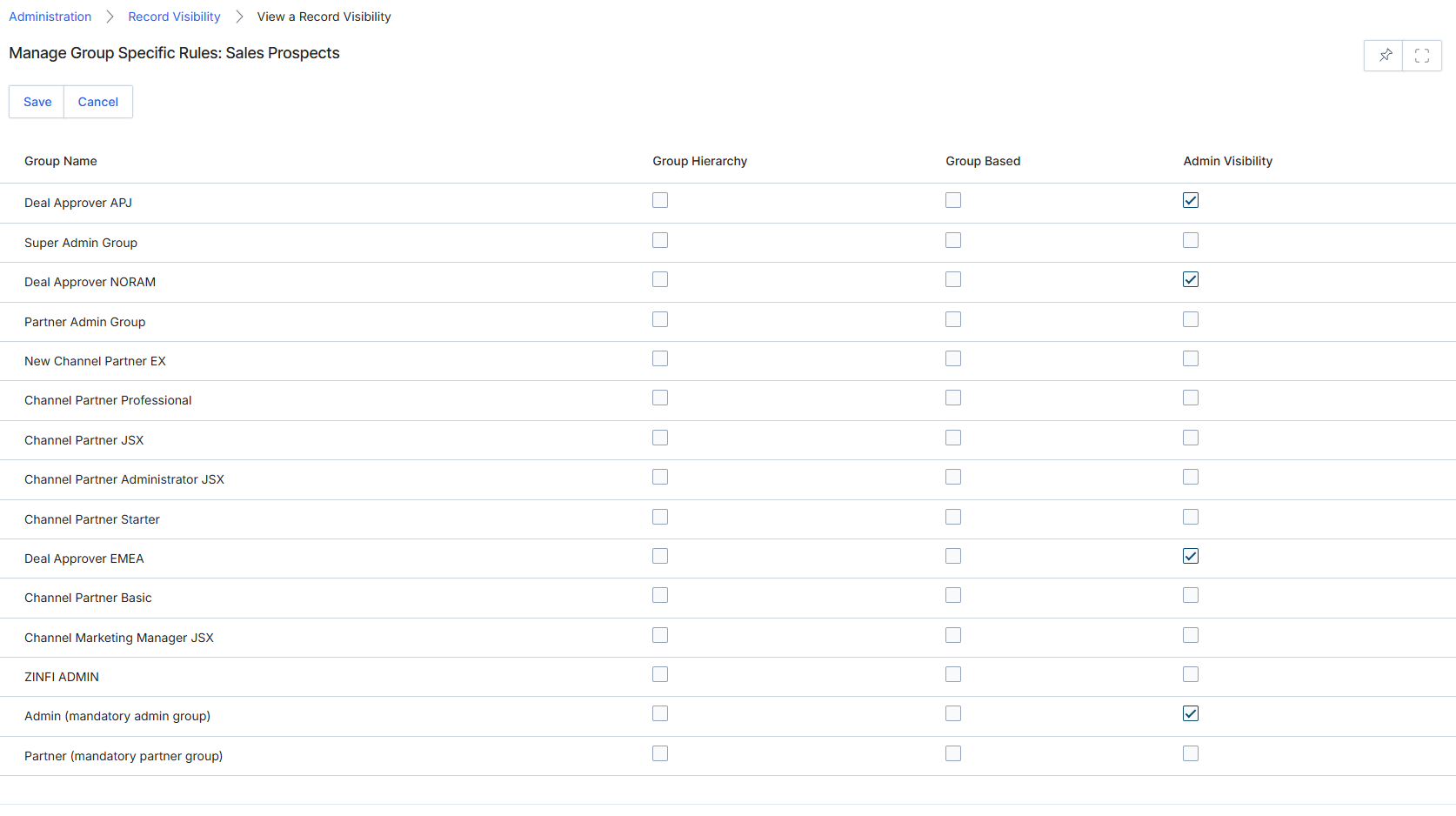
This screen allows administrators to define specific record visibility rules for different user groups within the platform, specifically for 'Sales Prospects'. Record visibility is a critical component of access management, ensuring that users only see the data relevant to their roles and responsibilities. By configuring these rules, the platform can enforce data segmentation, preventing unauthorized access to sensitive prospect information and streamlining the user experience by presenting only pertinent records. This granular control over data access is essential for maintaining data privacy, compliance, and operational efficiency across the partner ecosystem.
Configure the group-specific visibility rules for Sales Prospects by checking the appropriate boxes for each group.
Buttons
| Button | Description |
|---|---|
| Save | Saves the configured group-specific visibility rules. |
| Cancel | Discards any changes made and returns to the previous screen. |
Column Headings
| Column | Description |
|---|---|
| Group Name | Displays the name of the user group for which visibility rules can be set. |
| Group Hierarchy | A checkbox indicating whether the group's visibility is determined by its position in a hierarchical structure. |
| Group Based | A checkbox indicating whether visibility is based on the group's direct assignment. |
| Admin Visibility | A checkbox to enable or disable administrative visibility for Sales Prospects for the corresponding group. |