

Overview
The platform's Administration module provides a comprehensive suite of tools for configuring and customizing the entire partner management ecosystem. Among these, Application Settings serves as a critical component for managing global parameters that influence various aspects of the platform's functionality. These settings are typically key-value pairs, where a unique 'Key Name' identifies a specific configuration parameter, and its 'Value' dictates the behavior or content associated with it. This allows administrators to fine-tune the platform to meet specific program requirements without requiring code changes.
By centralizing these settings, administrators can efficiently manage system defaults, enable or disable features, and specify critical operational details that span across different modules like Users. This ensures that the platform operates according to the vendor's policies and preferences, providing a tailored experience for both administrators and partners. The ability to easily add, edit, and manage these settings is fundamental to maintaining a flexible and adaptable partner program.
Accessing and Viewing Application Settings
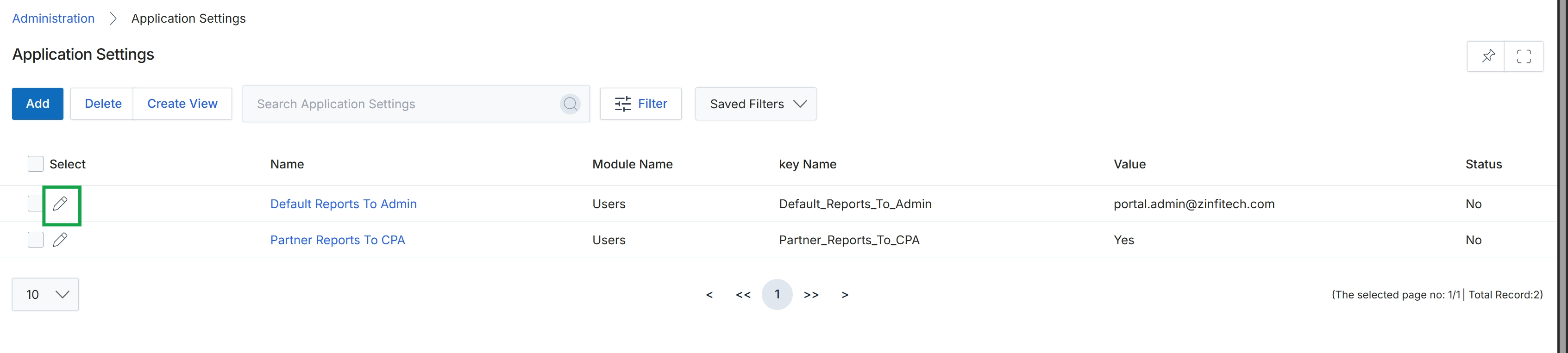
Click the pencil icon next to the application setting you want to edit.
Editing an Application Setting
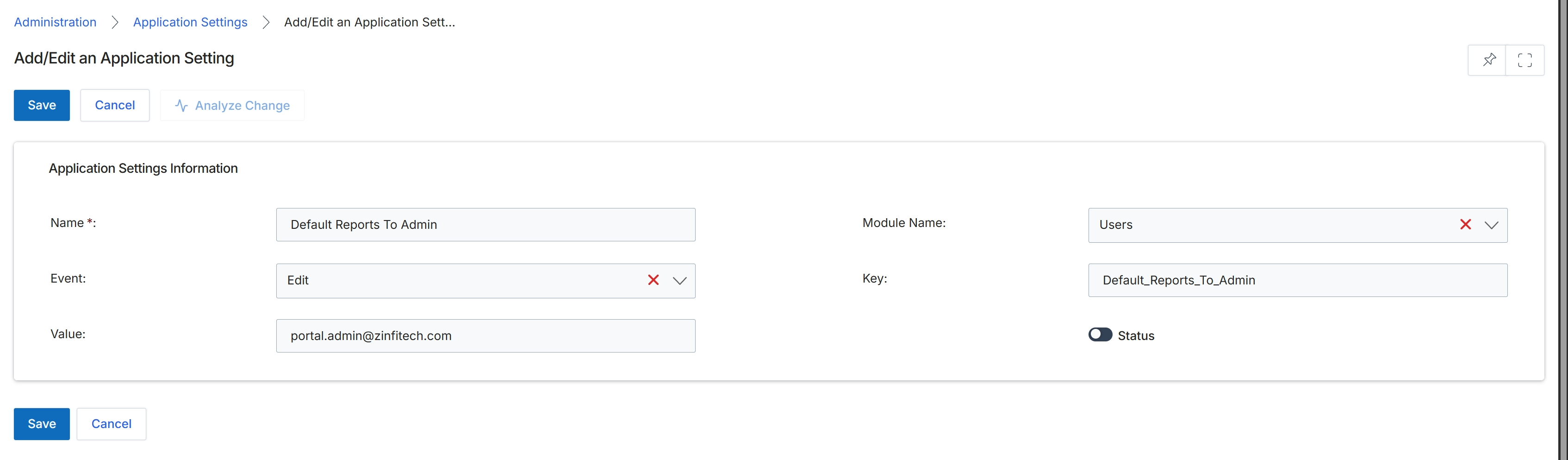
This screen, titled 'Add/Edit an Application Setting', is part of the Administration module where UPM administrators configure global platform behaviors. Application settings are granular configurations that control various aspects of the platform's functionality, often affecting how other modules operate or how specific events are handled. These settings can define default values, enable or disable features, or specify parameters for system processes. Administrators use this form to define or modify these critical operational parameters, ensuring the platform aligns with the vendor's specific program requirements and business rules. Each setting is identified by a unique name and key, associated with a particular module or event, and holds a specific value that dictates its behavior.
Modify the application setting details as needed on this form.
Buttons
| Button | Description |
|---|---|
| Save | Saves the changes made to the application setting. |
| Cancel | Discards any changes and returns to the previous screen. |
| Analyze Change | Analyzes the impact of the proposed changes before saving. |
Application Settings Information
| Field | Description |
|---|---|
| Name * | A user-friendly name for the application setting. |
| Module Name | The name of the module to which this application setting applies, selected from a dropdown list. |
| Event | The specific event or action that this application setting is associated with, selected from a dropdown list. |
| Key | A unique identifier or key for the application setting, often used for programmatic access or internal referencing. |
| Value | The configured value for the application setting, which dictates its behavior. |
| Status | A toggle to activate or deactivate the application setting. |