

Overview
In collaborative channel marketing programs, vendors co-fund partner-led demand generation activities through Market Development Funds (MDF). Contribution Rules codify these cost-sharing commitments by establishing the exact proportion of marketing expenses absorbed by the OEM versus the contribution required from the partner. This structure ensures financial governance and predictable budgeting across co-marketing campaigns.
Administrators configure these rules to offer differentiated co-investment terms across partner tiers or designated partner groups, aligning higher funding support with strategic commitments. Each rule is linked to a specific fiscal year, allowing organizations to periodically adjust subsidy rates, evaluate program policy changes, and maintain equitable funding structures across the partner ecosystem.
Key Features
- MDF Budget Sharing
- OEM Contribution Configuration
- Partner Cost Allocation
- Partner Group Assignment
- Fiscal Year Mapping
- Change Impact Analysis
Navigating to Contribution Rules
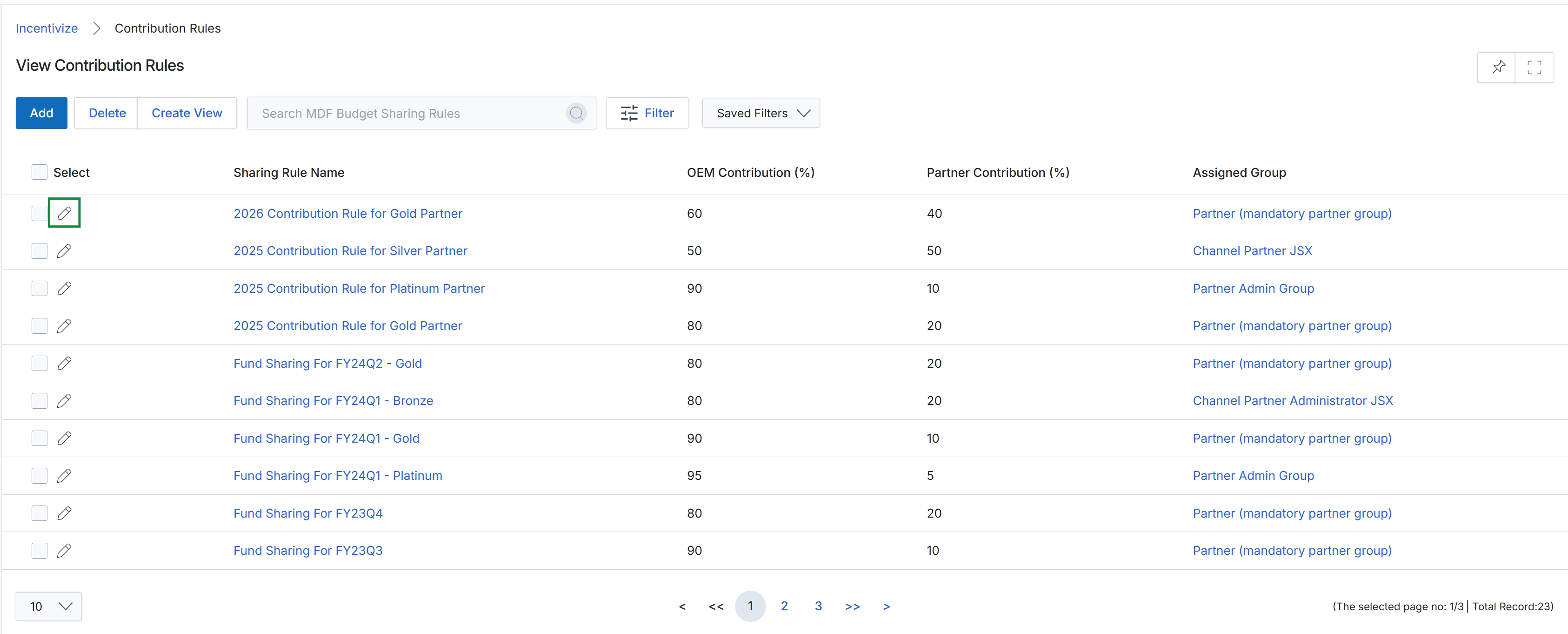
Click the Edit icon next to the contribution rule you want to modify.
Configuring Contribution Rule Information
Frequently asked questions
- What is a contribution rule in MDF?
A contribution rule defines the budget-sharing ratio between the vendor and channel partners for Market Development Funds. It codifies the exact proportion of marketing expenses absorbed by the vendor versus the co-investment required from the partner.
- Why are contribution rules linked to fiscal years?
Linking rules to a fiscal year allows organizations to periodically adjust subsidy rates, evaluate policy modifications, and maintain structured funding across the partner ecosystem.
- Can contribution rules differ across partner tiers?
Yes, administrators can establish differentiated co-investment terms across designated partner groups or tiers to provide higher funding support for strategic commitments.
- How do administrators edit an existing contribution rule?
Administrators locate the rule in the Contribution Rules list view and click the Edit icon to update its settings.