

Overview
Market Development Funds (MDF) empower channel partners to execute demand-generation campaigns and regional marketing initiatives co-funded by the vendor. Within the Incentivize zone, the MDF Plans repository provides program managers and finance teams with comprehensive oversight of all proposed and approved partner marketing investments across fiscal years.
Key Features
- MDF Plan List Filtering
- Co-Funding Contribution Breakdown
- Marketing Activity Tracking
- Linked Claims Monitoring
- Multi-Level Approval History
Navigating the MDF Plans List
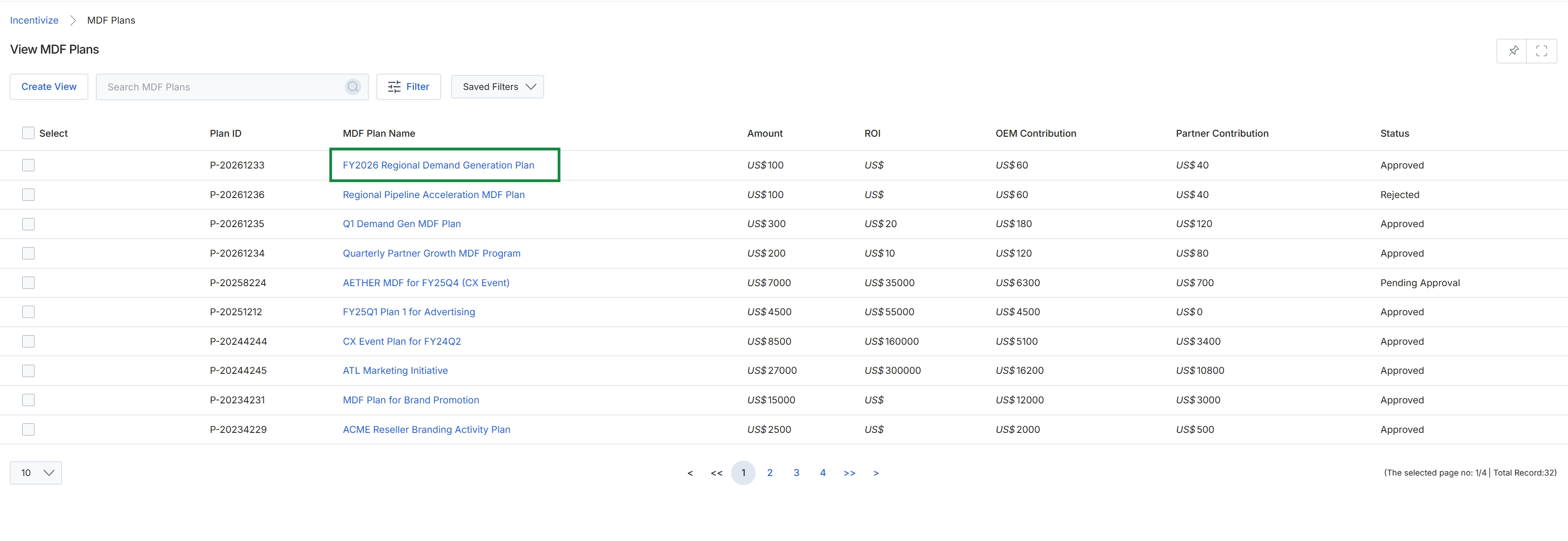
Click FY2026 Regional Demand Generation Plan under the MDF Plan Name column.
Reviewing Plan Details and Approvals
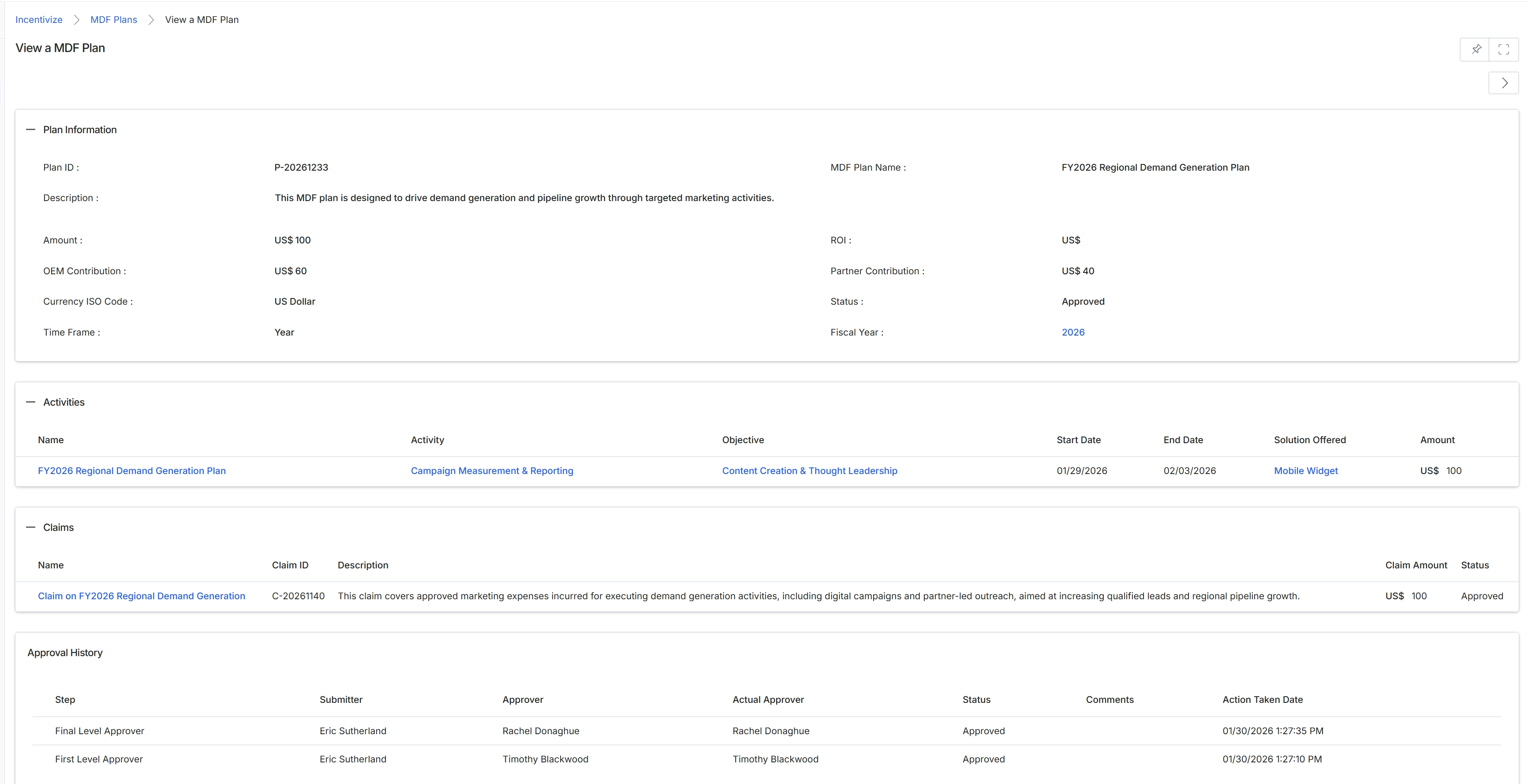
The View a MDF Plan screen displays the comprehensive configuration, execution metrics, and governance history for an approved Market Development Funds (MDF) plan. Within the platform, MDF allocations enable vendors to co-fund partner-led marketing initiatives aimed at driving demand generation, brand awareness, and pipeline growth. This record details the budgetary split between OEM and partner contributions, establishing precise co-investment commitments and total spend limits. Program managers and channel administrators use this view to monitor scheduled marketing activities, evaluate strategic objectives, and review downstream reimbursement claims submitted against approved funds. Additionally, the interface provides a full multi-stage approval history with timestamps and approver details to maintain corporate governance and fiscal compliance.
Review the MDF plan details, including the financial contribution breakdown, scheduled activities, related claims, and multi-tier approval audit trail.
Plan Information
| Field | Description |
|---|---|
| Plan ID | Displays the unique system-generated identification code assigned to the MDF plan. |
| MDF Plan Name | Displays the formal title of the marketing development fund plan. |
| Description | Displays the documented strategic purpose and campaign scope of the MDF plan. |
| Amount | Displays the total allocated monetary budget approved for the plan. |
| ROI | Displays the anticipated or calculated return on investment metric for the marketing plan. |
| OEM Contribution | Displays the specific funding amount provided by the vendor or OEM. |
| Partner Contribution | Displays the co-investment funding amount contributed by the partner. |
| Currency ISO Code | Displays the currency denomination applied across all plan figures. |
| Status | Displays the current lifecycle approval status of the plan. |
| Time Frame | Displays the duration period over which the plan operates. |
| Fiscal Year | Displays the fiscal year associated with the planned fund expenditure. |
Activities
| Column | Description |
|---|---|
| Name | Displays the title of the individual marketing activity planned under this budget. |
| Activity | Displays the categorization or operational type of the marketing activity. |
| Objective | Displays the strategic business goal linked to the activity. |
| Start Date | Displays the scheduled execution start date for the activity. |
| End Date | Displays the scheduled completion date for the activity. |
| Solution Offered | Displays the specific product or solution focus promoted by the activity. |
| Amount | Displays the dedicated fund allocation assigned to the specific activity. |
Claims
| Column | Description |
|---|---|
| Name | Displays the descriptive name of the reimbursement claim filed against the plan. |
| Claim ID | Displays the unique tracking identifier for the submitted claim. |
| Description | Displays the detailed justification and expense breakdown submitted with the claim. |
| Claim Amount | Displays the reimbursement amount requested by the partner. |
| Status | Displays the current review and approval status of the reimbursement claim. |
Approval History
| Column | Description |
|---|---|
| Step | Displays the sequential approval hierarchy level within the workflow. |
| Submitter | Displays the user who submitted the MDF plan for review. |
| Approver | Displays the designated authority assigned to evaluate this approval stage. |
| Actual Approver | Displays the specific user who executed the approval decision. |
| Status | Displays the decision status outcome recorded at this approval step. |
| Comments | Displays any notes or feedback submitted by the reviewer during evaluation. |
| Action Taken Date | Displays the precise date and timestamp when the approval action occurred. |
Frequently asked questions
- What information is displayed in the Plan Information section?
It displays key budgetary and administrative details, including the plan ID, name, description, total amount, ROI, OEM and partner contribution breakdown, currency code, lifecycle status, timeframe, and fiscal year.
- How do administrators track marketing initiatives linked to an MDF plan?
The Activities section lists each individual activity along with its category, business objective, schedule dates, promoted solution, and dedicated budget allocation.
- What details are available for claims filed against an approved plan?
The Claims section provides visibility into claim names, unique claim IDs, expense descriptions, requested reimbursement amounts, and current claim statuses.
- How does the platform maintain governance across the plan approval workflow?
The Approval History table records sequential review stages, showing submitters, designated approvers, actual decision-makers, approval outcomes, reviewer comments, and timestamps.