

Overview
Market Development Funds (MDF) serve as a foundational co-investment mechanism, enabling vendors to support partner-led demand generation, events, and co-marketing campaigns. Within the Incentivize zone, the MDF Funds management repository allows administrators to configure and oversee discrete budget pools designated for specific partner accounts across defined fiscal periods, ensuring financial visibility into allocated capital and available remaining balances.
From the individual MDF Fund record view, administrators gain granular insight into loaded funding rounds broken down by timeframe, administrative contributions, and incentive amounts. Furthermore, the fund view logs every deduction generated by approved MDF marketing plans, providing a complete audit trail alongside quick access to budget analytics and compliance checks before releasing further partner co-marketing funds.
Key Features
- MDF Fund Balance Tracking
- Quarterly Allocation Breakdown
- Fund Deduction History
- Partner Account Association
- Budget Analytics
- MDF Compliance Verification
Navigating the MDF Funds Repository
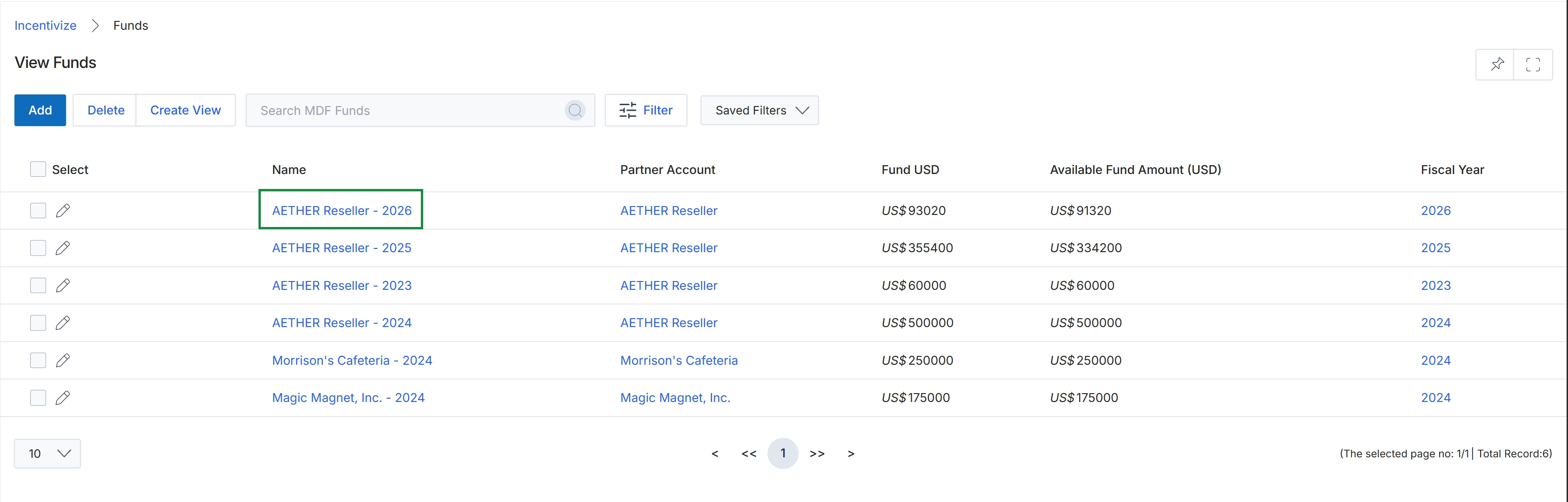
Click the fund name under the Name column (for example, AETHER Reseller - 2026) to view its details.
Reviewing MDF Fund Allocations and History
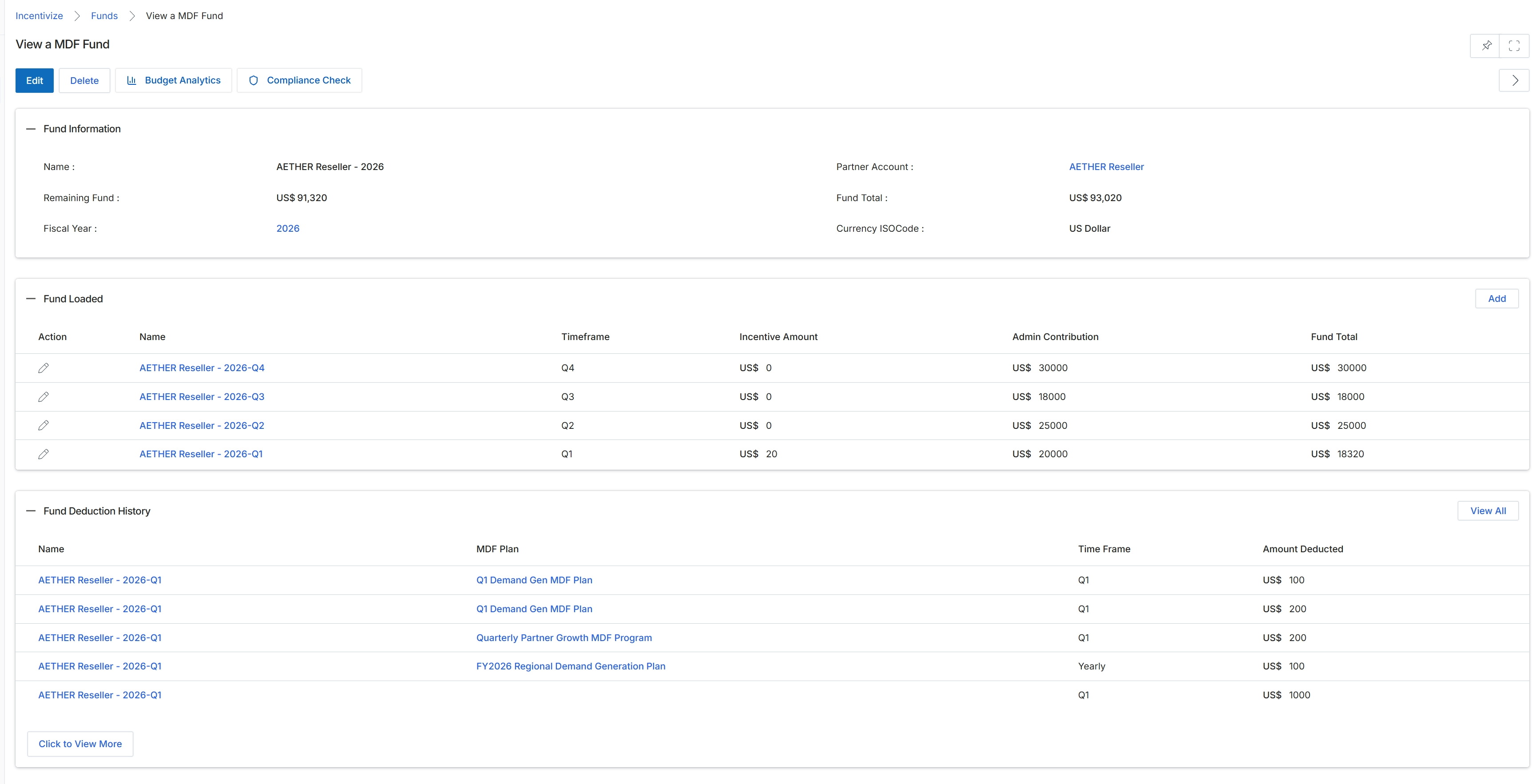
The View a MDF Fund screen displays the comprehensive financial and operational profile of a Market Development Fund allocated to a specific partner account. In the platform's Incentivize module, MDF budget pools are tracked across fiscal periods to ensure marketing investments align with co-marketing agreements and partner tier commitments. This view provides visibility into the overarching budget, showing the total loaded pool alongside remaining available funds. It breaks down allocations across fiscal timeframes such as quarters and itemizes deduction history tied to specific approved MDF plans. Administrators use this dashboard to monitor fund utilization, audit marketing spend deductions, run compliance checks, and access budget analytics.
Review the MDF fund details, loaded timeframe allocations, and deduction history for the partner account.
Buttons
| Button | Description |
|---|---|
| Edit | Opens the edit form to modify the MDF fund configuration and parameters. |
| Delete | Deletes the current MDF fund record from the platform. |
| Budget Analytics | Opens the budget analytics view to evaluate fund spending and allocation performance. |
| Compliance Check | Executes a compliance check on the fund and associated claims. |
| Add | Opens a form to add a new quarterly or periodic fund allocation to the loaded pool. |
| View All | Opens the complete listing of all deduction transactions recorded against the fund. |
| Click to View More | Expands the table to display additional fund deduction history records. |
Fund Information
| Field | Description |
|---|---|
| Name | Displays the designated name of the MDF fund. |
| Partner Account | Displays the partner account associated with this MDF fund allocation. |
| Remaining Fund | Displays the current unspent fund balance remaining for marketing activities. |
| Fund Total | Displays the total cumulative amount allocated to the fund. |
| Fiscal Year | Displays the fiscal year for which the fund is active. |
| Currency ISOCode | Displays the currency applied to all monetary values in the fund. |
Fund Loaded
| Column | Description |
|---|---|
| Action | Provides options to edit individual loaded fund period entries. |
| Name | Displays the specific timeframe identifier for the loaded fund entry. |
| Timeframe | Displays the quarterly period designated for the loaded fund entry. |
| Incentive Amount | Displays the incentive amount portion assigned to the timeframe. |
| Admin Contribution | Displays the contribution amount funded directly by program administrators. |
| Fund Total | Displays the total combined fund amount allocated for the period. |
Fund Deduction History
| Column | Description |
|---|---|
| Name | Displays the identifier of the loaded fund period from which the deduction occurred. |
| MDF Plan | Displays the specific marketing plan associated with the deducted amount. |
| Time Frame | Displays the timeframe associated with the deduction record. |
| Amount Deducted | Displays the monetary value deducted from the fund pool for the plan. |
Frequently asked questions
- What information is shown on the View a MDF Fund details page?
The page displays the partner account association, total cumulative budget, remaining unspent balance, active fiscal year, and currency ISO code.
- How are plan deductions tracked in an MDF fund record?
The Fund Deduction History table records each deduction by timeframe, associated MDF plan name, period identifier, and monetary amount deducted.
- What administrative actions are available from the MDF fund details view?
Administrators can edit fund parameters, delete the fund record, launch budget analytics, run compliance checks, or add new periodic allocations.
- What does the Fund Loaded section show?
It breaks down allocated budget rounds across quarterly timeframes, itemizing administrative contributions, incentive amounts, and total period funds.