

Overview
The MDF Rules engine serves as the policy backbone for vendor-partner marketing fund distribution within the Incentivize module. By establishing clear guidelines around eligibility scope, fund distribution cycles, and applicable business years, vendors ensure that co-marketing resources are distributed predictably and in alignment with partner engagement strategies. Rules can be targeted at specific partner accounts or broader programmatic tiers, maintaining strict control over available budgets.
Within this interface, administrators configure foundational parameters including the base currency ISO code, entitlement intervals, and application handling rules—such as mapping fund applications to specific deal records and defining whether calculations occur by total amount or itemized line items. Additionally, administrators can activate target-based incentives, bridging standard market development budgets with specific partner performance metrics.
Key Features
- MDF Rule Administration
- Partner Scope Configuration
- Allocation & Entitlement Frequency
- Currency Standardization
- Target-Based Incentive Activation
- Application Field Mapping
Navigating to MDF Rules
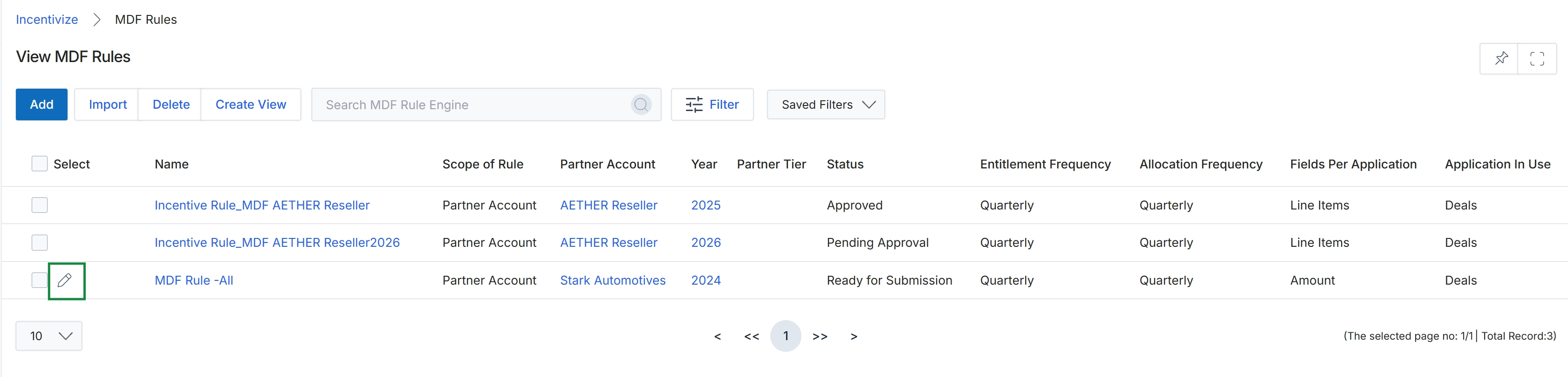
Click the Edit icon next to the rule you want to modify.
Configuring Rule Parameters
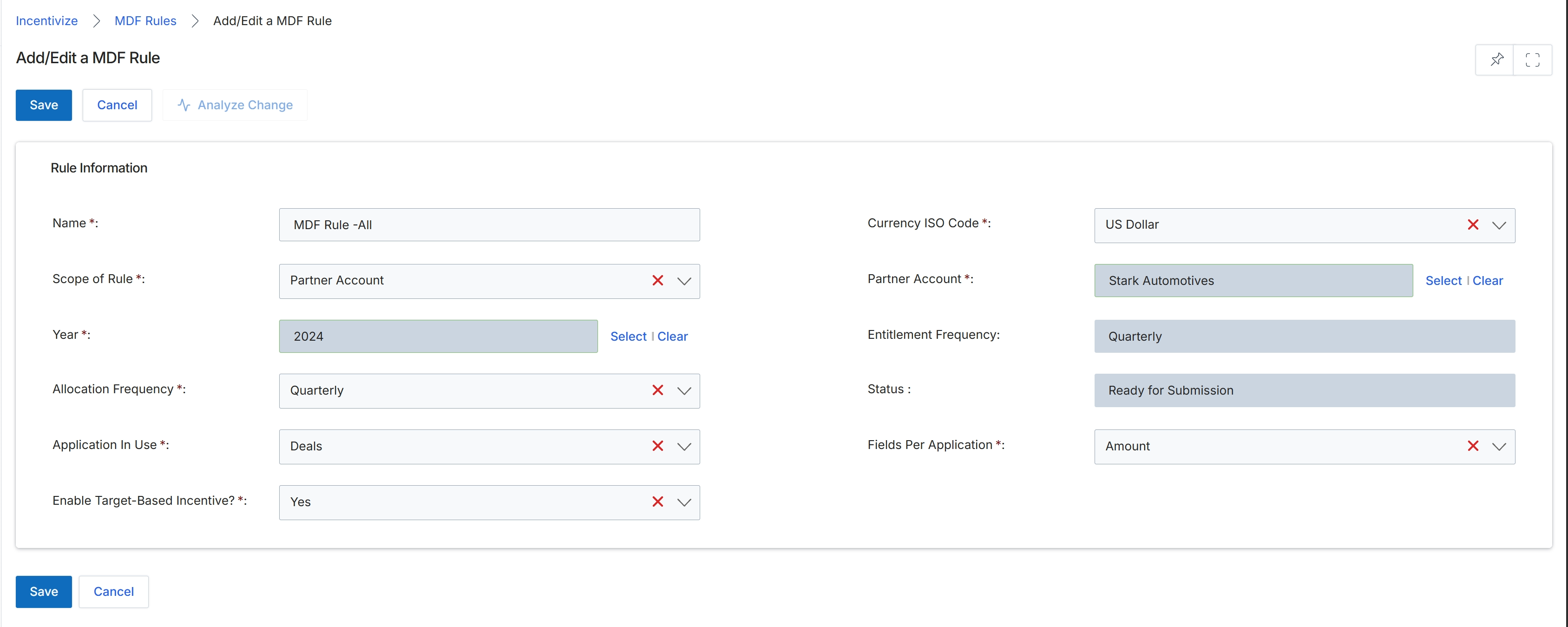
Configure the MDF rule details in the Rule Information section and click Save.
Buttons
| Button | Description |
|---|---|
| Save | Saves the configured MDF rule settings. |
| Cancel | Cancels the operation and discards any unsaved changes. |
| Analyze Change | Evaluates the potential impact of changes made to the rule configuration. |
Rule Information
| Field | Description |
|---|---|
| Name * | The name assigned to identify the MDF rule. |
| Currency ISO Code * | The currency standard applied to the rule allocations and calculations. |
| Scope of Rule * | Defines the target scope to which the MDF rule applies, such as a specific partner account. |
| Partner Account * | The partner account associated with the scope of this rule. |
| Year * | The calendar or fiscal year for which the MDF rule is effective. |
| Entitlement Frequency | Displays the frequency at which partner MDF entitlements are refreshed or evaluated. |
| Allocation Frequency * | Specifies how often fund allocations are distributed under this rule. |
| Status | Displays the current lifecycle state of the MDF rule. |
| Application In Use * | Specifies the module or activity type, such as Deals, linked to this MDF rule. |
| Fields Per Application * | Defines the specific metric or field used to calculate qualification or fund usage. |
| Enable Target-Based Incentive? * | Determines whether target-based incentive logic is enabled for the rule. |
Frequently asked questions
- What policies do MDF rules govern?
MDF rules define governance policies for market development fund distribution, including scoping criteria, currency standards, allocation frequencies, and performance incentive parameters.
- What does the Analyze Change button do?
The Analyze Change button evaluates the potential operational impact of modifications made to an MDF rule before saving the configuration.
- Can MDF rules link fund applications to specific deal records?
Yes. Administrators can link rules to applications like Deals and configure whether calculations evaluate total amounts or itemized line items.
- How do target-based incentives function within an MDF rule?
Enabling target-based incentives connects standard marketing fund distributions to specific partner performance metrics and targets.